

C++插入简介
我们已经知道,向量就像一个用于存储元素的动态数组,但它具有根据插入或删除的元素来调整大小的特殊能力。在C++中的插入函数是用来在向量中插入元素的。插入的元素可以是在一个特定的位置,也可以是将整个向量插入到另一个向量中。使用插入函数在向量中插入元素可以自动重新分配内存。如果元素的总数扩大了总容量,它就会增加/减少大小,使其达到正常容量。
语法
下面给出的是C++中插入函数的基本语法,用于正常插入元素。
iterator s_name.insert(element)
使用C++中的插入函数在所需位置插入元素的语法。
iterator s_name.insert(position, element)
在所需位置插入多个元素或一系列元素的语法。
iterator s_name.insert(position, iterator_first, iterator_last)
其中。
**s_name:**它是插入元素的集合名称。
**元素。**这是一个强制性的参数,包含了需要插入到给定集合中的元素或元素列表。
**位置。**它定义了元素在集合中需要插入的位置数。
返回值。在使用插入函数时,"迭代器 "被返回,指向插入值的第一个元素。
第一个,最后一个。 它定义了第一个和最后一个之间要插入的元素的范围,包括'第一个'元素,但不包括指向'最后一个'的元素。
插入函数在C++中是如何工作的?
正如我们上面已经说过的,C++中的insert()函数在向量中插入了元素。它的工作原理是根据参数中提供的参数值来决定如何插入,可以是正常插入,也可以是在某个特定的位置插入。让我们通过下面的例子来了解insert()函数的不同工作方式。
例子 #1
在C++中向量中插入一个单一的值
代码。
// insertion of a single value in the vector #include<iostream> #include<vector> using namespace std; int main() { vector<int> vec1 {100, 90, 80, 70}; cout<<" Vector values in the starting are: "; for(auto x=vec1.begin(); x<vec1.end(); x++) //for loop to traverse all the vector 'vec1' elements { cout<<" / "<<*x; //printing the values on console } vec1.insert(vec1.end(),60); //Inserting element '60' to the vector 'vec1' at the end cout<<"\nVector values after modification are: "; for(auto x=vec1.begin(); x<vec1.end(); x++) //for loop to traverse all the vector elements { cout<<" / "<<*x; } return 0; }
输出。

解释。
在上面的例子中,我们正在初始化向量'vec1'的元素。为了插入这些元素,我们使用了insert(vec1.end(), element)。在这个函数中,vec1.end()被用来在vec1的最后一个位置开始插入元素。第二个参数是要插入的元素。最后,插入了新值的最终向量被打印在控制台。
例子#2
在另一个向量中插入多个值或一个向量数组
代码。
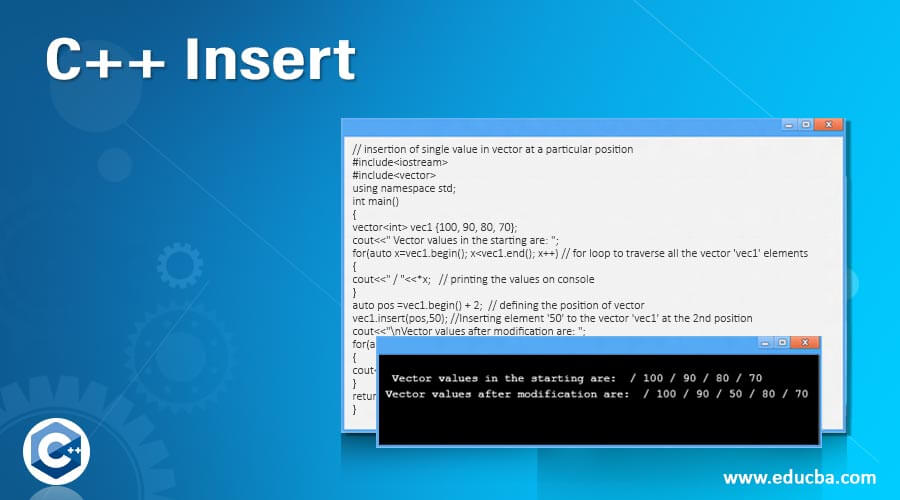
// insertion of single value in vector at a particular position #include<iostream> #include<vector> using namespace std; int main() { vector<int> vec1 {100, 90, 80, 70}; cout<<" Vector values in the starting are: "; for(auto x=vec1.begin(); x<vec1.end(); x++) // for loop to traverse all the vector 'vec1' elements { cout<<" / "<<*x; // printing the values on console } auto pos =vec1.begin() + 2; // defining the position of vector vec1.insert(pos,50); //Inserting element '50' to the vector 'vec1' at the 2nd position cout<<"\nVector values after modification are: "; for(auto x=vec1.begin(); x<vec1.end(); x++) // for loop to traverse all the vector elements { cout<<" / "<<*x; } return 0; }
输出。

解释:
在上面的例子中,我们正在初始化向量'vec1'的值。为了区分,我们首先打印vec1的原始元素。为了在一个特定的位置插入元素,使用变量'pos'来定义位置,然后使用插入函数在'pos'的位置插入。参数(pos, element)用来定义位置和要在该位置插入的元素。
例子#3
在一个矢量的特定位置上插入元素
代码:
// insertion of single value in vector #include<iostream> #include<vector> using namespace std; int main() { vector<int> vec1 {100, 90,80, 70}; vector<int> vec2 {10, 9, 8, 7}; cout<<" Vector values in the vec1 are: "; for(auto x=vec1.begin(); x<vec1.end(); x++) // for loop to traverse all the vector 'vec1' elements { cout<<" / "<<*x; // printing the values on console } cout<<" \nVector values in the vec2 are: "; for(auto x=vec2.begin(); x<vec2.end(); x++) // for loop to traverse all the vector 'vec2' elements { cout<<" / "<<*x; // printing the values on console } // Inserting the vec1 values in vec2 in the end vec2.insert(vec2.end(), vec1.begin(), vec1.end()); //Inserting elements of vector 'vec1' into the vector 'vec2' at the end cout<<"\nVector values after modification are: "; for(auto x=vec2.begin(); x<vec2.end(); x++) // for loop to traverse all the vector elements { cout<<" / "<<*x; } return 0; }
输出。

解释。
在上面的例子中,我们已经声明了两个向量,'vec1'和'vec2'。首先,我们打印了两个向量的元素的原始值。然后,insert()函数被用来将vec1的元素插入到vec2中。它的参数是(vec2.end(), vec1.begin(), vec1.end()),这意味着插入应该从向量'vec2'的结尾开始,并从vec1的起点到终点的范围。
总结
上面的描述清楚地解释了什么是C++中的插入函数,以及在C++编程中如何使用它。除了上面解释的函数外,字符串插入函数是用来在一个特定的位置上插入一个字符。它的语法是str.insert(position, str_to_insert)。 insert()是最重要的函数之一,程序员在使用它之前应该彻底了解。
推荐文章
这是一份关于C++ Insert的指南。在这里我们讨论了Insert函数在C++中的工作原理和例子,以及代码和输出。你也可以看看下面的文章来了解更多------。
