


Bootstrap标签简介
Bootstrap标签是经过设计的、灵活的组件,提供关于内容的额外信息。Bootstrap标签是为主要内容提供提示和额外小信息的布局组件。Bootstrap标签可以用最小的空间和信息来突出或标记内容。标签是一种可调整的组件,可以根据标签、元素和内容的大小进行修改。
语法
- Bootstrap标签类主要是通过标签来实现的。
- 基本的标签语法如下。
<span class =”label label-primary”> Extra Information </span>
- 类标签和上下文标签类总是在标签中一起工作。
- 类标签和主要类标签被放在span标签内。
- 标签总是随内容大小或文本大小而调整。
- 下面是带有标题大小的标签语法。
<h1> the labels in bootstrap <span class =”label label-primary”> Extra information </span> </h1>
- 标签被用在
标签内,
标签的文本和标签和标签主类被放在span标签内。
Bootstrap标签如何工作?
- 为了提供像标签这样的bootstrap组件,我们需要一个bootstrap3或bootstrap4支持文件。
- Bootstrap是针对手机、笔记本、桌面设备的响应性框架。
- 我们在HTML文件的head部分包含带有其属性的标签。语法如下。
<meta name = "viewport" content = "width=device-width, initial-scale = 1">
bootstrap3在HTML文件的头部部分包括三个支持文件。
<link rel= "stylesheet" href= "https://maxcdn.bootstrapcdn.com/bootstrap/3.4.1/css/bootstrap.min.css"> <script src= "https://ajax.googleapis.com/ajax/libs/jquery/3.5.1/jquery.min.js"> </script> <script src= "https://maxcdn.bootstrapcdn.com/bootstrap/3.4.1/js/bootstrap.min.js"> </script>
bootstrap4在HTML文件的头部部分包括四个支持文件。
<link rel = "stylesheet" href = "https://maxcdn.bootstrapcdn.com/bootstrap/4.5.0/css/bootstrap.min.css"> <script src = "https://ajax.googleapis.com/ajax/libs/jquery/3.5.1/jquery.min.js"> </script> <script src = "https://cdnjs.cloudflare.com/ajax/libs/popper.js/1.16.0/umd/popper.min.js"> </script> <script src = "https://maxcdn.bootstrapcdn.com/bootstrap/4.5.0/js/bootstrap.min.js"> </script>
bootstrap将语法与所需的标签放在HTML文件的body部分。
<h3> The Bootstrap New Style <span class = "label label-warning"> Add </span> </h3>
要知道如何在HTML文件中组装文件和标签语法。下面是基本标签的例子。
<!DOCTYPE html> <html> <head> <title> Bootstrap labels Example </title> <meta name = "viewport" content = "width=device-width, initial-scale=1"> <link rel= "stylesheet" href= "https://maxcdn.bootstrapcdn.com/bootstrap/3.4.1/css/bootstrap.min.css"> <script src = "https://ajax.googleapis.com/ajax/libs/jquery/3.5.1/jquery.min.js"> </script> <script src = "https://maxcdn.bootstrapcdn.com/bootstrap/3.4.1/js/bootstrap.min.js"> </script> </head> <body> <div class = "container-fluid"> <h3> The Bootstrap Labels </h3> <h3> The Bootstrap New Style file <span class="label label-warning"> Add </span> </h4> <h4> The website template new version <span class="label label-primary"> update </span> </h4> </div> </body> </html>
label-warning和label类被放置在
标题标签内。
label和label-primary类放在
标题标签内。
Bootstrap标签的例子
以下是不同的例子。
例子#1
基本标签与标题大小的例子及其输出如下。
代码。
<!DOCTYPE html> <html> <head> <title>Bootstrap Labels Example</title> <meta charset="utf-8"> <meta name ="viewport" content ="width=device-width, initial-scale=1"> <link rel ="stylesheet" href ="https://maxcdn.bootstrapcdn.com/bootstrap/3.4.1/css/bootstrap.min.css"> <script src ="https://ajax.googleapis.com/ajax/libs/jquery/3.5.1/jquery.min.js"> </script> <script src ="https://maxcdn.bootstrapcdn.com/bootstrap/3.4.1/js/bootstrap.min.js"> </script> </head> <body> <div class ="container-fluid"> <h2> Bootstrap Labels </h2> <h6> the Bootstrap Labels Example <span class ="label label-primary"> ADD </span> </h6> <h5> the Bootstrap Labels Example <span class ="label label-primary"> ADD </span> </h5> <h4> the Bootstrap Labels Example <span class ="label label-primary"> ADD </span> </h4> <h3> the Bootstrap Labels Example <span class ="label label-primary"> ADD </span> </h3> <h2> the Bootstrap Labels Example <span class ="label label-primary"> ADD </span> </h2> <h1> the Bootstrap Labels Example <span class ="label label-primary"> ADD </span> </h1> </div> </body> </html>
输出。
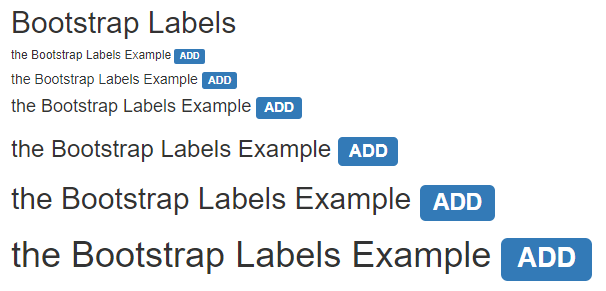
说明。
- label和label-primary类被用于span标签。
- span标签放在
到
的标题标签内。
- 标签可以根据标题文本的大小来调整。
例子#2
下面是带有不同上下文类的标签及其输出的例子。
代码。
<!DOCTYPE html> <html> <head> <title> Bootstrap label Example </title> <meta charset ="utf-8"> <meta name ="viewport" content ="width=device-width, initial-scale=1"> <link rel ="stylesheet" href ="https://maxcdn.bootstrapcdn.com/bootstrap/3.4.1/css/bootstrap.min.css"> <script src ="https://ajax.googleapis.com/ajax/libs/jquery/3.5.1/jquery.min.js"> </script> <script src ="https://maxcdn.bootstrapcdn.com/bootstrap/3.4.1/js/bootstrap.min.js"> </script> </head> <body> <div class ="container-fluid"> <h2> Bootstrap Contextual Label Classes </h2> <h4> The Bootstrap Labels Example <span class ="label label-default"> Default </span> </h4> <h4> The Bootstrap Labels Example <span class ="label label-primary"> Primary </span> </h4> <h4> The Bootstrap Labels Example <span class ="label label-info"> Information </span> </h4> <h4> The Bootstrap Labels Example <span class ="label label-warning"> Warning </span> </h4> <h4> The Bootstrap Labels Example <span class ="label label-success"> Success </span> </h4> <h4> The Bootstrap Labels Example <span class ="label label-danger"> Danger </span> </h4> </div> </body> </html>
输出。
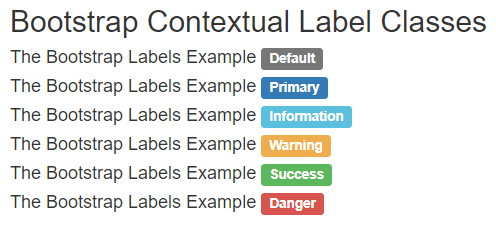
说明。
- 标签类和它们的上下文标签类都放在
标签里面。
- 有六个上下文标签:label-default, label-primary, label-info, label-warning, label-success, and label-danger。
- 上下文的标签有不同的颜色。我们可以用它来突出或标记使用标签的元素。
例子#3
下面是bootstrap标签的例子和它们的输出。
代码。
<!DOCTYPE html> <html> <head> <title> Bootstrap label Example </title> <meta charset ="utf-8"> <meta name ="viewport" content ="width=device-width, initial-scale=1"> <link rel ="stylesheet" href ="https://maxcdn.bootstrapcdn.com/bootstrap/3.4.1/css/bootstrap.min.css"> <script src ="https://ajax.googleapis.com/ajax/libs/jquery/3.5.1/jquery.min.js"> </script> <script src ="https://maxcdn.bootstrapcdn.com/bootstrap/3.4.1/js/bootstrap.min.js"> </script> </head> <body> <div class ="container-fluid"> <h2> Bootstrap Label </h2> <button type ="button" class ="btn btn-primary"> Register <span class ="label label-warning"> Now </span> </button> <br> <br> <button type ="button" class ="btn btn-success"> Next <span class ="label label-warning"> click here </span> </button> <br> <br> <a href="#"> News Link <span class ="label label-primary"> click </span> </a> <br> </div> </body> </html>
输出。
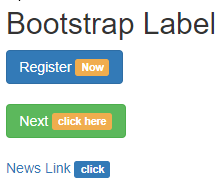
说明。
- 上面的例子中与按钮标签和href链接一起使用的标签。
- 标签和上下文标签类被放置在按钮标签内,以提供关于按钮的额外信息。
- label-warning和label类被放置在标签内,与它们的链接在一起。
例子 #4
下面是基本的bootstrap标签例子和它们的输出。
代码。
<!DOCTYPE html> <html> <head> <title> Bootstrap labels Example </title> <meta name = "viewport" content = "width=device-width, initial-scale=1"> <link rel= "stylesheet" href= "https://maxcdn.bootstrapcdn.com/bootstrap/3.4.1/css/bootstrap.min.css"> <script src = "https://ajax.googleapis.com/ajax/libs/jquery/3.5.1/jquery.min.js"> </script> <script src = "https://maxcdn.bootstrapcdn.com/bootstrap/3.4.1/js/bootstrap.min.js"> </script> </head> <body> <div class = "container-fluid"> <h3> The Bootstrap Labels </h3> <h3> The Bootstrap New Style file <span class="label label-warning"> Add </span> </h4> <h4> The website template new version <span class="label label-primary"> update </span> </h4> </div> </body> </html>
输出。
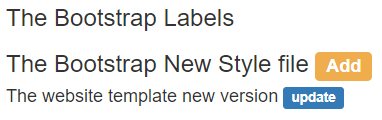
结论
Bootstrap标签是一个更可调整、更灵活、更方便用户的组件。它提供了少量的信息,帮助用户在网络应用中使用。此外,标签是一个轻量级的组件,可以使网络应用的额外内容变得有意义。
推荐文章
这是一份关于Bootstrap标签的指南。在这里,我们讨论了Bootstrap标签如何工作,以及与代码和输出有关的例子。
