

jQuery多选器简介
jQuery UI的多重选择器是用来选择所有指定选择器的综合结果。jQuery的多重选择器是一个很好的方法,允许在一个jQuery中选择多个元素,其中逗号分隔每个选择器或元素。这是一个有效的方法来结合多个表达式,并得到不同元素的组合结果。在多个选择器对象的返回结果中,DOM元素的顺序可能不一样,因为它们会按文档顺序排列。多重选择器选择多个html元素,可以基于它们的名称、id、class等,然后我们可以对它们应用共同的行为。要选择一个元素,那么将css选择器指定为("p")选择文档中的所有p元素,要选择匹配一个或多个选择器的多个元素,那么指定为("p, div, span")选择文档中所有p、div和span元素。这个方法的一个替代方法是jQuery的add()方法。
语法
jQuery UI多重选择器的语法------。
下面是使用多重选择器的简单语法是
$( “selector1, selector2, … selectorN ”)
它是用来选择文档中的多个html元素。
- 参数
Selector - 这个参数指定要选择的元素。
这个方法的返回值和其他jQuery选择器一样;它返回一个充满了找到的元素的数组。
jQuery UI多重选择器的例子
接下来,我们写html代码来更清楚地了解jQuery的多重选择器,下面的例子中,多重选择器是根据元素的名称来选择的,如下所示
例子 #1
代码。
<!doctype html>
<html lang ="en">
<head>
<meta charset="utf-8">
<title>This is an example for jQuery UI multiple selectors  </title>
<script src="https://ajax.googleapis.com/ajax/libs/jquery/3.5.1/jquery.min.js"></script>
<script>
$(document).ready(function(){
$("p, div").css("background-color", "red");
});
</script>
</head>
<body>
<p class = "p1">This is the first p element of the DOM.</p>
<p class = "p2">This is the second p element of the DOM.</p>
<span class = "span1">This is the first span element of the DOM.<p class = "p1">This is the third p element of the DOM.
</p> </span>
<div class = "div1">This is the first div element of the DOM.</div>
</body>
</html>
输出。
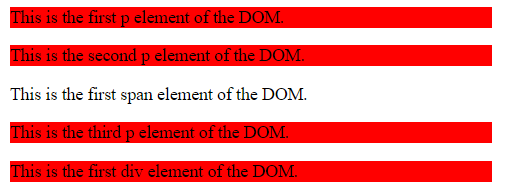
在上面的程序中,通过一行代码$("p, div").css("background-color", "red"),多个元素(p和div)被根据它们的名字选择;并对它们应用一些样式。
接下来,我们重写上面的html代码,通过下面的例子更清楚地了解jQuery的多重选择器,多重选择器将用于根据元素的类别来选择元素,如下图所示
例子#2
代码。
<!doctype html>
<html lang ="en">
<head>
<meta charset = "utf-8">
<title>This is an example for jQuery UI multiple selectors  </title>
<script src="https://ajax.googleapis.com/ajax/libs/jquery/3.5.1/jquery.min.js"></script>
<script>
$(document).ready(function(){
$(".p2, .div1, .span1").css( "background-color", "red" );
});
</script>
</head>
<body>
<p class = "p1">This is the first p element of the DOM.</p>
<p class = "p2">This is the second p element of the DOM.</p>
<span class = "span1">This is the first span element of the DOM. <p class = "p1">This is the third p element of the DOM. </p> </span>
<p class = "p1">This is the fourth p element of the DOM. <span class = "span2">This is the second span element of the DOM. </span> </p>
<div class = "div1">This is the first div element of the DOM. </div>
</body>
</html>
输出。
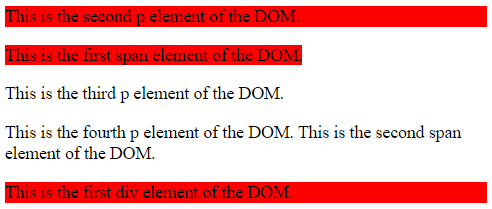
在上面的程序中,多个元素(p, div 和 span)通过一行代码"$(".p2, .div1, .span1").css("background-color", "red" ); "被根据它们的类别选择,并对它们应用一些样式。
例子 #3
代码。
<!doctype html>
<html lang ="en">
<head>
<meta charset = "utf-8">
<title>This is an example for jQuery UI multiple selectors  </title>
<script src="https://ajax.googleapis.com/ajax/libs/jquery/3.5.1/jquery.min.js"></script>
<script>
$(document).ready(function(){
$("#pid1, #divid1, #spanid1").css( "background-color", "red" );
});
</script>
</head>
<body>
<p class = "p1" id = "pid1">This is the first p element of the DOM.</p>
<p class = "p2" id = "pid2">This is the second p element of the DOM.</p>
<span class = "span1" id = "spanid1">This is the first span element of the DOM. <p class = "p1" id = "pid1">This is the third p element of the DOM. </p> </span>
<p class = "p2" id = "pid2">This is the fourth p element of the DOM. <span class = "span2" id = "spanid2">This is the second span element of the DOM. </span> </p>
<div class = "div1" id = "divid1">This is the first div element of the DOM. </div>
</body>
</html>
输出。
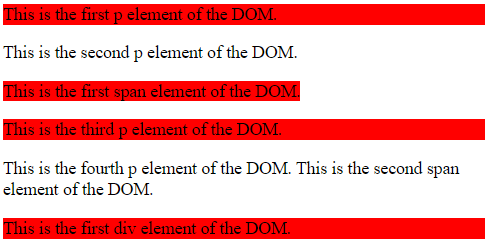
在上面的程序中,多个元素(p, div 和 span)通过这行代码$("#pid1, #divid1, #spanid1").css("background-color", "red" ); "根据它们的id被选择,并对它们应用一些样式。
接下来,我们重写上面的html代码,通过下面的例子更清楚地了解jQuery的多重选择器,多重选择器将被用来根据元素的名称、类别和id来选择元素,如下图。
例子 #4
代码。
<!doctype html>
<html lang ="en">
<head>
<meta charset = "utf-8">
<title>This is an example for jQuery UI multiple selectors  </title>
<script src="https://ajax.googleapis.com/ajax/libs/jquery/3.5.1/jquery.min.js"></script>
<script>
$(document).ready(function(){
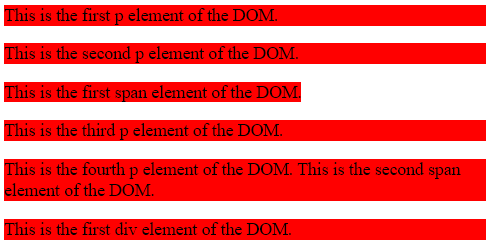
$("p, .div1, #spanid1").css( "background-color", "red" );
});
</script>
</head>
<body>
<p class = "p1" id = "pid1">This is the first p element of the DOM.</p>
<p class = "p2" id = "pid2">This is the second p element of the DOM.</p>
<span class = "span1" id = "spanid1">This is the first span element of the DOM. <p class = "p1" id = "pid1">This is the third p element of the DOM. </p> </span>
<p class = "p2" id = "pid2">This is the fourth p element of the DOM. <span class = "span2" id = "spanid2">This is the second span element of the DOM. </span> </p>
<div class = "div1" id = "divid1">This is the first div element of the DOM. </div>
</body>
</html>
输出。
结论
多重选择器在一个jQuery中选择多个html元素。逗号将每个选择器或元素分开,选择器可以根据它们的名称、id、class等进行选择,然后我们可以对所有选择器应用共同的行为。
