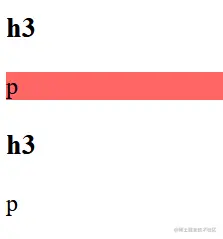
子集选择器
.box>p {
    background: #f66;
}
<div class="box">
    <h3>h3</h3>
    <p>p</p>
    <div>
        <h3>h3</h3>
        <p>p</p>
    </div>
</div>
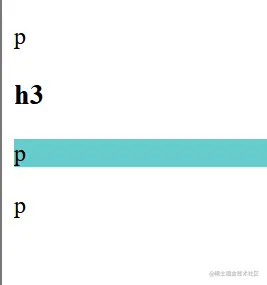
下个相邻兄弟选择器
h3+p {
    background: #6cc;
}
<div class="box">
        <p>p</p>
        <h3>h3</h3>
        <p>p</p>
        <p>p</p>
    </div>
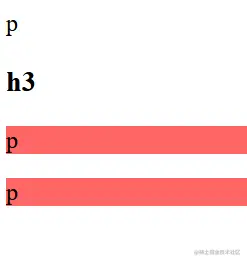
通用兄弟选择器
h3~p {
    background: #f66;
}
<div class="box">
    <p>p</p>
    <h3>h3</h3>
    <p>p</p>
    <p>p</p>
</div>
属性选择器
body {
    background: #2b2a33;
}
a[href] {
    color: #f00;
}
a[href="javascript:;"] {
    color: #0f0;
}
a[href^="http"] {
    color: #00f;
}
p[class$="list"] {
    color: #ff0;
}
p[class*="con"] {
    color: #f0f;
}
<a href="#">#</a>
<a href="javascript:;">javascript:;</a>
<a href="https://developer.mozilla.org/zh-CN/">MDN</a>
<p class="box_list">box_list</p>
<p class="ulist_list">ulist_list</p>
<p class="box_content">box_content</p>
<p class="ulist_content">box_content</p>

伪类选择器
div :first-child {
color: #f00;
}
div :last-child {
color: #0f0;
}
<div>
    <p>1</p>
    <a href="#">2</a>
    <p>3</p>
    <p>4</p>
    <p>5</p>
    <p>6</p>
    <p>7</p>
    <a href="#">8</a>
    <p>9</p>
</div>

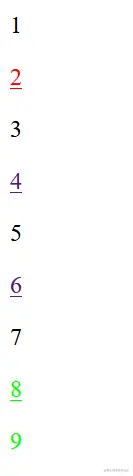
div a:first-of-type {
color: #f00;
}
div :last-of-type {
color: #0f0;
}
<div>
    <p>1</p>
    <a href="#">2</a>
    <p>3</p>
    <a href="#">4</a>
    <p>5</p>
    <a href="#">6</a>
    <p>7</p>
    <a href="#">8</a>
    <p>9</p>
</div>