

混合应用测试或微信小程序测试,都会涉及到 WebView 组件,这节内容将分析一下 WebView 的技术原理。首先通过日志分析查看 Appium 的运行过程。
WebView日志分析
要想查看 ChromeDriver 的日志,需要在 Capability 里开启 一个开关项 showChromedriverLog。让 Appium 运行测试用例时能够生成 ChromeDriver 相关的日志(默认是不打印 ChromeDriver 这部分日志的)。代码如下:
capabilities['showChromedriverLog'] = True
启动 AppiumServer 并将生成的所有日志存储到文件 /tmp/appium.log 中:
appium -g /tmp/appium.log
关键日志分析
下面我们对 /tmp/appium.log 文件中的关键日志进行详细的分析。首先找到 Context 切换的日志,发现 Context 切换到 WEBVIEW_io.appium.android.apis 上下文中:
[HTTP] <-- GET /wd/hub/session/xx/contexts 200 99 ms - 145
[HTTP] --> POST /wd/hub/session/xx/context \
{"name":"WEBVIEW_io.appium.android.apis"}
Appium 在本地开启了两个 WebView 进程,进程号分别是 1271 和 26060。
[debug] [AndroidDriver] WEBVIEW_1271 mapped to pid 1271
[debug] [AndroidDriver] Getting process name for webview
[debug] [ADB] Getting connected devices...
[debug] [AndroidDriver] WEBVIEW_26060 mapped to pid 26060
[debug] [AndroidDriver] Getting process name for webview
然后,Appium 通过使用 adb 命令来查看 1271 和 26060 的进程信息。
[debug] [ADB] Running '/Users/xxxx/profile/android-sdk_r2.4.1-\
macosx/android-sdk-macosx/platform-tools/adb' with args: ["-P",5037,\
"-s","192.168.56.101:5555","shell","ps"]
[debug] [AndroidDriver] Parsed pid: '1271' pkg: 'cn.goapk.market' from
[debug] [AndroidDriver] USER PID PPID VSIZE RSS \
WCHAN \ PC NAME
[debug] [AndroidDriver] u0_a58 1271 192 606848 53268 \
ffffffff b76c707b S cn.goapk.market
[debug] [AndroidDriver] Returning process name: 'cn.goapk.market'
[debug] [AndroidDriver] Parsed pid: '26060' pkg: 'io.appium.android.\
apis'\ from
[debug] [AndroidDriver] USER PID PPID VSIZE RSS \
WCHAN PC NAME
[debug] [AndroidDriver] u0_a139 26060 192 649076 68004\
ffffffff b76c6371 R io.appium.android.apis
[debug] [AndroidDriver] Returning process name:\
'io.appium.android.apis'
```
Appium Server 列出通过进程查找到的所有 WebView 和可用 Context,如下:
```
[debug] [AndroidDriver] Found webviews: ["WEBVIEW_cn.goapk.market",\
"WEBVIEW_io.appium.android.apis"]
[debug] [AndroidDriver] Available contexts: ["NATIVE_APP",\
"WEBVIEW_cn.goapk.market","WEBVIEW_io.appium.android.apis"]
```
然后 Appium Server 尝试连接 ChromeDriver,由于我们没有设置 ChromeDriver 的端口,所以 Appium Server 默认启用 8000 端口与 WebView 通讯。Appium Server 通过 ChromeDriver 与 app WebView 通讯。
```
[debug] [AndroidDriver] Connecting to chrome-backed webview context\
'WEBVIEW_io.appium.android.apis'
[debug] [AndroidDriver] A port was not given, using random port: 8000
```
然后,Appium 先杀掉 ChromeDriver 这个进程,清理 adb 映射端口数据,如下:
```
[debug] [Chromedriver] Killing any old chromedrivers, running: \
pkill -15 -f "/usr/local/lib/node_modules/appium/node_modules/\
_appium-chromedriver@3.1.3@appium-chromedriver/chromedriver/mac/\
chromedriver.*--port=8000"
[Chromedriver] No old chromedrivers seemed to exist
[debug] [Chromedriver] Cleaning any old adb forwarded port socket \
connections
[debug] [ADB] List forwarding ports
[debug] [ADB] Running '/Users/xxx/profile/android-sdk_r24.4.1-macosx\
/android-sdk-macosx/platform-tools/adb' with args: ["-P",5037,"-s","192.168.56.101:5555","forward","--list"]
```
到这步是真正开启 ChromeDriver 服务,建立起 Appium Server 与 ChromeDriver 之间的通讯。
```
[Chromedriver] Spawning chromedriver with: /usr/local/lib/\
node_modules/appium/node_modules/_appium-chromedriver@3.1.3@\
appium-chromedriver/chromedriver/mac/chromedriver --url-base=wd/hub \
--port=8000 --adb-port=5037 --verbose
```
建立连接之后,Appium Server 先查看 ChromeDriver 版本号。
```
[debug] [Chromedriver] Chromedriver version: '2.33.506106'
```
ChromeDriver 打印启动日志,开始传输参数。
```
[debug] [Chromedriver] [STDOUT] Starting ChromeDriver 2.33.506106 \
(8a06c39c4582fbfbab6966dbb1c38a9173bfb1a2) on port 8000
[debug] [Chromedriver] [STDOUT] Only local connections are allowed.
[debug] [JSONWP Proxy] Proxying [GET /status] to [GET\
http://127.0.0.1:8000/wd/hub/status] with no body
[debug] [JSONWP Proxy] Got response with status 200:\
"{\"sessionId\":\"\",\"status\":0,\"value\":{\"build\":{\"version
\":\"alpha\"},\"os\":{\"arch\":\"x86_64\",\"name\":\"Mac OS X\",
\"version\":\"10.12.6\"}}}"
[debug] [JSONWP Proxy] Proxying [POST /session] to [POST \
http://127.0.0.1:8000/wd/hub/session] with body: {"\
desiredCapabilities"\:{"chromeOptions":{"androidPackage":\
"io.appium.android.apis","androidUseRunningApp":true,"androidDeviceSerial":"192.168.56.101:5555"}}}
```
通过 ps 命令列出手机的进程列表,从中查找 WebView。
```
[Chromedriver] [STDERR] [0.349][DEBUG]: \
Sending adb command: \
host:transport:192.168.56.101:5555|shell:ps && ps -A
```
通过进程列表获取 WebView 的进程号,Appium 根据这些信息操作 WebView。
```
Chromedriver] [STDERR] [0.365][DEBUG]: \
Sending adb command: \
host-serial:192.168.56.101:5555:forward:tcp:12531;\
localabstract:webview_devtools_remote_26060
```
## 查看WebView
WebView 控件会被映射为原生控件,类型为 View,其中的文本内容会变成 content-desc(Android 6.0)或者 text(Android 9.0)。
打开雪球 APP,下面命令可以查看 Android 系统内的 WebView 进程:
```
Hogwarts $ adb shell cat /proc/net/unix | grep webview
0000000000000000: 00000002 00000000 00010000 0001 01 12863 /dev/socket/webview_zygote
0000000000000000: 00000002 00000000 00010000 0001 01 24703 @webview_devtools_remote_1758
0000000000000000: 00000003 00000000 00000000 0001 03 24672 /dev/socket/webview_zygote
```
上面的命令中,凡是名字前面有 @ 的都是套接字。套接字(Socket)是对网络中不同主机上的应用进程之间进行双向通信的端点的抽象。
下面命令查看这个进程对应的应用:
```
Hogwarts $ adb shell ps |grep 1758
u0_a67 1758 211 1600592 333680 futex_wait_queue_me f016fbb9 S com.xueqiu.android
```
查看到是雪球 APP 的 WebView 进程。测试时,Appium Server 就利用这个端口实现与 WebView 的通讯。
## Context切换
由于直接操作套接字很难,所以使用 adb forward 将它重定向到本地端口。
```
adb forward tcp:$port localabstract:webview_devtools_remote_$pid
```
例如:使用本地 7777 端口
```
Hogwarts $ adb forward tcp:7777 localabstract:webview_devtools_remote_1758
```
可以发送 http 请求实现相关操作,下面获取 WebView 组件版本(也可以直接在浏览器中访问 http://localhost:7777/json/version),命令如下:
```
Hogwarts $ curl http://localhost:7777/json/version
{
"Android-Package": "com.xueqiu.android",
"Browser": "Chrome/74.0.3729.186",
"Protocol-Version": "1.3",
"User-Agent": "Mozilla/5.0 (Linux; Android 8.1.0; Google Pixel_1 Build/OPM6.171019.030.E1; wv) AppleWebKit/537.36 (KHTML, like Gecko) Version/4.0 Chrome/74.0.3729.186 Mobile Safari/537.36",
"V8-Version": "7.4.288.28",
"WebKit-Version": "537.36 (@99fc61ba7ee9c511608e5ea11edc2622ba3b8e3f)",
"webSocketDebuggerUrl": "ws://localhost:7777/devtools/browser"
}
```
Chrome 的 devtools 协议是远程调试协议(https://chromedevtools.github.io/devtools-protocol/)
http://127.0.0.1:7777/json/list 可以直接获取 devtoolsFrontendUrl 查看调试的远程重定向的页面详细信息。
```
[
{
"description": "{\"attached\":true,\"empty\":false,\"height\":1605,\"screenX\":0,\"screenY\":189,\"visible\":true,\"width\":1080}",
"devtoolsFrontendUrl": "http://chrome-devtools-frontend.appspot.com/serve_rev/@99fc61ba7ee9c511608e5ea11edc2622ba3b8e3f/inspector.html?ws=127.0.0.1:7777/devtools/page/06840BED58C1415235EFC9817FFD472E",
"faviconUrl": "https://assets.imedao.com/broker/static/images/favicon.8d2e0522.png",
"id": "06840BED58C1415235EFC9817FFD472E",
"title": "平安证券 极速开户",
"type": "page",
"url": "https://broker.xueqiu.com/open/pingan?snb_from=tab",
"webSocketDebuggerUrl": "ws://127.0.0.1:7777/devtools/page/06840BED58C1415235EFC9817FFD472E"
},
...
```
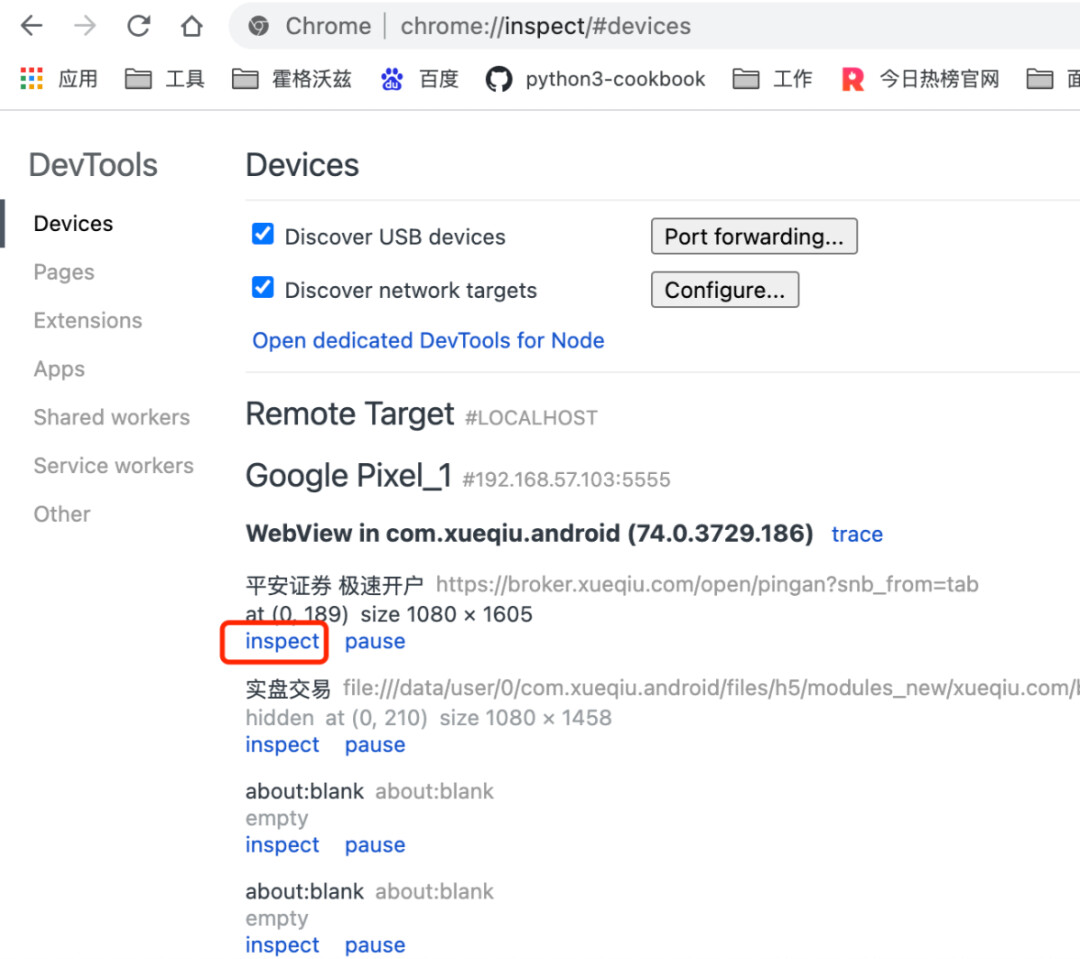
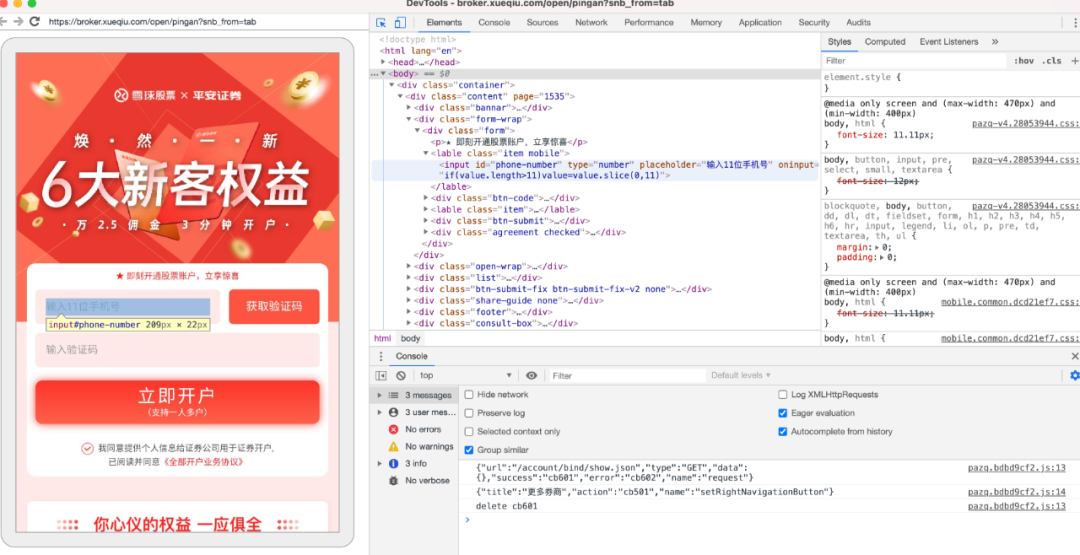
然后访问Chrome的调试页面 chrome://inspect/#devices,就可以获取到页面元素信息,从而完成对元素的定位。
内容全面升级,4 个月 20+ 项目实战强化训练,资深测试架构师、开源项目作者亲授 BAT 大厂前沿最佳实践,带你一站式掌握测试开发必备核心技能(对标阿里P6+,年薪50W+)!直推 BAT 名企测试经理,普遍涨薪 50%+!
###
⬇️ 点击“阅读原文”,提升测试核心竞争力!
[原文链接](https://mp.weixin.qq.com/s?__biz=MzU3NDM4ODEzMg==&mid=2247497152&idx=1&sn=966d46a8f069992985759feab8a78909&chksm=fd31970bca461e1d41574feddbc4611dacbae1b4a53b4acaa74cf6af2f22ad4b1915f38125cc#rd)
[更多技术文章](https://qrcode.ceba.ceshiren.com/link?name=article&project_id=qrcode&from=juejin×tamp=1654666698&author=QY)

