持续创作,加速成长!这是我参与「掘金日新计划 · 6 月更文挑战」的第15天,点击查看活动详情
目录
Viewpager介绍
1.Viewpager,视图翻页工具,提供了多页面切换的效果。Android 3.0后引入的一个UI控件,位于v4包中。低版本使用需要导入v4包,但是现在我们开发的APP一般不再兼容3.0及以下的系统版本,另外现在大多数使用Android studio进行开发,默认导入v7包,v7包含了v4,所以不用导包,越来越方便了。
2.Viewpager使用起来就是我们通过创建adapter给它填充多个view,左右滑动时,切换不同的view。Google官方是建议我们使用Fragment来填充ViewPager的,这样 可以更加方便的生成每个Page,以及管理每个Page的生命周期。
3.ViewPager 直接继承了** ViewGroup**,所有它是一个容器类,可以在其中添加其他的 view 类。
ViewPager 需要一个** PagerAdapter 适配器类给它提供数据**。
ViewPager 经常和 Fragment 一起使用,并且提供了专门的 FragmentPagerAdapter 和 FragmentStatePagerAdapter 类供 Fragment 中的 ViewPager 使用。
RecyclerView加载Fragment这里涉及到细节非常的多,因为Fragment本身有生命周期,所以我们如何通过Adapter来有效维护Fragment的生命周期,这本身就是一种挑战。\
2. ViewPager2的基本结构
ViewPager2的源码中我们知道,ViewPager2继承ViewGroup,其内部包含有一个RecyclerView控件,其他部分都是围绕着这个RecyclerView来实现的。总之,ViewPager2是以一个组合的方式来实现的。
这其中,ScrollEventAdapter的作用是将RecyclerView.OnScrollListener事件转变为ViewPager2.OnPageChangeCallback事件;FakeDrag的作用是用来实现模拟拖动的效果;PageTransformerAdapter的作用是将页面的滑动事件转变为比率变化,比如说,一个页面从左到右滑动,变化规则是从0~1,关于这个组件,我相信熟悉ViewPager2的同学都应该都知道。
最后就是最重要的东西--FragmentStateAdapter,这个Adapter在为了加载Fragment,花费了很多的功夫,为我们想要使用Adapter加载Fragment提供了非常权威的参考。
Android viewpage 设定上一页下一页按钮
编辑
编辑
接口回调回去当前viewpage 页码
package com.base.emergency_bureau.ui.module.question.fragment;

/**
 * @ProjectName: emergency_bureau
 * @Package: com.base.emergency_bureau.ui.module.question.fragment
 * @ClassName: getCurrentPage
 * @Description: java类作用描述
 * @Author: liys
 * @CreateDate: 2021/5/17 14:55
 * @UpdateUser: 更新者
 * @UpdateDate: 2021/5/17 14:55
 * @UpdateRemark: 更新说明
 * @Version: 1.0
 */
public interface getCurrentPage {
    int getPage( int page);
}
public class AnswerActivity extends FragmentActivity implements getCurrentPage {
 @Override
    public int getPage(int getPage) {
        currentPage = getPage;
        switch (getPage) {
            case 1:
                tvSubmit.setVisibility(View.GONE);
                btNext.setVisibility(View.VISIBLE);
                llQuestionNextLast.setVisibility(View.VISIBLE);
                btLast.setVisibility(View.GONE);
                break;
            case 2:
                tvSubmit.setVisibility(View.GONE);
                btNext.setVisibility(View.VISIBLE);
                btLast.setVisibility(View.VISIBLE);
                llQuestionNextLast.setVisibility(View.VISIBLE);
                break;
            case 3:
                tvSubmit.setVisibility(View.GONE);
                btNext.setVisibility(View.VISIBLE);
                btLast.setVisibility(View.VISIBLE);
                llQuestionNextLast.setVisibility(View.VISIBLE);
                break;
            case 4:
                tvSubmit.setVisibility(View.GONE);
                btNext.setVisibility(View.VISIBLE);
                btLast.setVisibility(View.VISIBLE);
                llQuestionNextLast.setVisibility(View.VISIBLE);
                break;
            case 5:
                btNext.setVisibility(View.GONE);
                btLast.setVisibility(View.GONE);
                llQuestionNextLast.setVisibility(View.GONE);
                tvSubmit.setVisibility(View.VISIBLE);
                break;
            default:
                break;
        }
        return 0;
    }
在Fragment 中设定事件触发(重写方法:setUserVisibleHint 在当前页面可见情况下)
    @Override
    public void setUserVisibleHint(boolean isVisibleToUser) {
        super.setUserVisibleHint(isVisibleToUser);
        if(isVisibleToUser){
            getCurrentPage.getPage(5);
        } else {
        }
    }
\
android 简单实现 recycleview,adapter 展示item
Intent传递参数,需要进行本地的实例化;
public static class ListDTO implements Serializable {
 adapter.setOnItemClickListener(new BaseQuickAdapter.OnItemClickListener() {
            @Override
            public void onItemClick(BaseQuickAdapter adapter, View view, int position) {

                    Intent intent = new Intent(mcontext,DangerAcceptanceActivity.class);
                    intent.putExtra("data",list.get(position));
                    startActivity(intent);


            }
        });
activity 展示list
package com.base.emergency_bureau.ui.module.hidden_trouble;

import android.content.Intent;
import android.view.LayoutInflater;
import android.view.View;
import android.widget.RelativeLayout;

import androidx.annotation.NonNull;
import androidx.recyclerview.widget.LinearLayoutManager;
import androidx.recyclerview.widget.RecyclerView;

import com.base.emergency_bureau.R;
import com.base.emergency_bureau.base.BaseActivity;
import com.base.emergency_bureau.base.BaseRequestCallBack;
import com.base.emergency_bureau.base.BaseRequestParams;
import com.base.emergency_bureau.base.Config;
import com.base.emergency_bureau.base.UserInfoSP;
import com.base.emergency_bureau.base.XHttpUtils;
import com.base.emergency_bureau.ui.bean.DangerCountBean;
import com.base.emergency_bureau.ui.bean.LurkingPerilCheckList;
import com.base.emergency_bureau.ui.module.adpter.DangerAccountListAdapter;
import com.blankj.utilcode.util.GsonUtils;
import com.blankj.utilcode.util.ToastUtils;
import com.chad.library.adapter.base.BaseQuickAdapter;
import com.scwang.smartrefresh.layout.SmartRefreshLayout;
import com.scwang.smartrefresh.layout.api.RefreshLayout;
import com.scwang.smartrefresh.layout.listener.OnLoadMoreListener;
import com.scwang.smartrefresh.layout.listener.OnRefreshListener;

import org.json.JSONException;
import org.json.JSONObject;

import java.util.ArrayList;
import java.util.HashMap;
import java.util.List;
import java.util.Map;

import butterknife.BindView;

//隐患核实列表
public class DangeAccountListActivity extends BaseActivity {

    @BindView(R.id.back)
    RelativeLayout back;
    @BindView(R.id.list_item_recycler)
    RecyclerView list_item_recycler;
    @BindView(R.id.refreshLayout)
    SmartRefreshLayout mRefreshlayout;


    private int pageNum = 1,pageSize = 20;
    private List<DangerCountBean.DataDTO.ListDTO> list = new ArrayList<>();
    private DangerAccountListAdapter adapter;
    private int status;//0 待核实列表 1 待整改列表 2 待验收列表
    @Override
    protected void initWindow() {

    }

    @Override
    protected int getLayoutId() {
        return R.layout.activity_danger_account;
    }

    @Override
    protected void initView() {
        status = getIntent().getIntExtra("status",0);
        back.setOnClickListener(v -> finish());

        mRefreshlayout.setOnRefreshListener(new OnRefreshListener() {
            @Override
            public void onRefresh(RefreshLayout refreshlayout) {
                pageNum = 1;
                getData();
            }
        });
        mRefreshlayout.setOnLoadMoreListener(new OnLoadMoreListener() {
            @Override
            public void onLoadMore(@NonNull RefreshLayout refreshLayout) {
                pageNum++;
                getDataRf();
            }
        });
        getData();
    }

    private void getDataRf() {

        Map<String, Object> map = new HashMap<>();
        map.put("pageNum", pageNum);
        map.put("pageSize", pageSize);
        map.put("userId", UserInfoSP.getId(mcontext));
        map.put("status", status);
        BaseRequestParams requestParams = new BaseRequestParams(Config.LurkingPerilCheckList,  map);
        XHttpUtils.getInstance().doHttpPost(requestParams, new BaseRequestCallBack() {
            @Override
            public void successEnd(String result) {
                mRefreshlayout.finishRefresh();
                mRefreshlayout.finishLoadMore();
                try {
                    JSONObject jsonObject = new JSONObject(result);
                    int status = jsonObject.getInt("status");
                    if (status == 0){
                        list.addAll(GsonUtils.fromJson(result, DangerCountBean.class).getData().getList());
                        adapter.notifyDataSetChanged();
                    }else {
                        ToastUtils.showShort(jsonObject.getString("msg"));
                    }
                } catch (JSONException e) {
                    e.printStackTrace();
                }
            }

            @Override
            public void onError(Throwable ex, boolean isOnCallback) {
                super.onError(ex, isOnCallback);
                mRefreshlayout.finishRefresh();
                mRefreshlayout.finishLoadMore();
            }

        });


    }

    private void getData() {

        Map<String, Object> map = new HashMap<>();
        map.put("pageNum", pageNum);
        map.put("pageSize", pageSize);
        map.put("userId", UserInfoSP.getId(mcontext));
        map.put("status", status);
        BaseRequestParams requestParams = new BaseRequestParams(Config.LurkingPerilCheckList,  map);
        XHttpUtils.getInstance().doHttpPost(requestParams, new BaseRequestCallBack() {
            @Override
            public void successEnd(String result) {
                mRefreshlayout.finishRefresh();
                mRefreshlayout.finishLoadMore();
                try {
                    JSONObject jsonObject = new JSONObject(result);
                    int status = jsonObject.getInt("status");
                    if (status == 0){
                        list = GsonUtils.fromJson(result, DangerCountBean.class).getData().getList();
                        bindData();
                    }else {
                        ToastUtils.showShort(jsonObject.getString("msg"));
                    }
                } catch (JSONException e) {
                    e.printStackTrace();
                }
            }

            @Override
            public void onError(Throwable ex, boolean isOnCallback) {
                super.onError(ex, isOnCallback);
                mRefreshlayout.finishRefresh();
                mRefreshlayout.finishLoadMore();
            }

        });


    }

    private void bindData(){
        LinearLayoutManager gridLayoutManager = new LinearLayoutManager(mcontext);
        list_item_recycler.setLayoutManager(gridLayoutManager);
        adapter = new DangerAccountListAdapter(R.layout.item_danger_verification,list);
        list_item_recycler.setAdapter(adapter);

        View emptyView = LayoutInflater.from(mcontext).inflate(R.layout.common_nodata_layout, null);
        adapter.setEmptyView(emptyView);

        adapter.setOnItemClickListener(new BaseQuickAdapter.OnItemClickListener() {
            @Override
            public void onItemClick(BaseQuickAdapter adapter, View view, int position) {

                    Intent intent = new Intent(mcontext,DangerAcceptanceActivity.class);
                    intent.putExtra("data",list.get(position));
                    startActivity(intent);


            }
        });
    }
    @Override
    protected void onResumeAction() {
        pageNum=1;
        getData();
    }
}
Bean 类不写了,太大
layout
```xml
<?xml version="1.0" encoding="utf-8"?>
<LinearLayout xmlns:android="http://schemas.android.com/apk/res/android"
    xmlns:app="http://schemas.android.com/apk/res-auto"
    xmlns:tools="http://schemas.android.com/tools"
    android:layout_width="match_parent"
    android:layout_height="match_parent"
    android:orientation="vertical"
    tools:context=".ui.module.hidden_trouble.DangerVerificationListActivity">

    <FrameLayout
        android:id="@+id/f_title"
        android:background="@color/white"
        android:layout_width="match_parent"
        android:layout_height="@dimen/size_big_40">

        <TextView
            android:id="@+id/tv_title"
            android:layout_width="match_parent"
            android:layout_height="match_parent"
            android:gravity="center"
            android:text="隐患列表"
            android:textColor="@color/black"
            android:textSize="18sp" />

        <RelativeLayout
            android:id="@+id/back"
            android:layout_width="@dimen/size_big_40"
            android:layout_height="@dimen/size_big_40"

            >

            <ImageView
                android:layout_width="@dimen/size_big"
                android:layout_height="@dimen/size_big"
                android:layout_centerInParent="true"
                android:src="@mipmap/back_lift" />
        </RelativeLayout>

    </FrameLayout>

    <com.scwang.smartrefresh.layout.SmartRefreshLayout
        android:id="@+id/refreshLayout"
        android:layout_width="match_parent"
        android:layout_height="match_parent">

        <com.scwang.smartrefresh.layout.header.ClassicsHeader
            android:layout_width="match_parent"
            android:layout_height="wrap_content">

        </com.scwang.smartrefresh.layout.header.ClassicsHeader>

        <androidx.recyclerview.widget.RecyclerView
            android:padding="@dimen/dp_10"
            android:id="@+id/list_item_recycler"
            android:layout_width="match_parent"
            android:layout_height="wrap_content"
            android:overScrollMode="never" />

        <com.scwang.smartrefresh.layout.footer.ClassicsFooter
            android:layout_width="match_parent"
            android:layout_height="wrap_content">

        </com.scwang.smartrefresh.layout.footer.ClassicsFooter>

    </com.scwang.smartrefresh.layout.SmartRefreshLayout>


</LinearLayout>
item layout
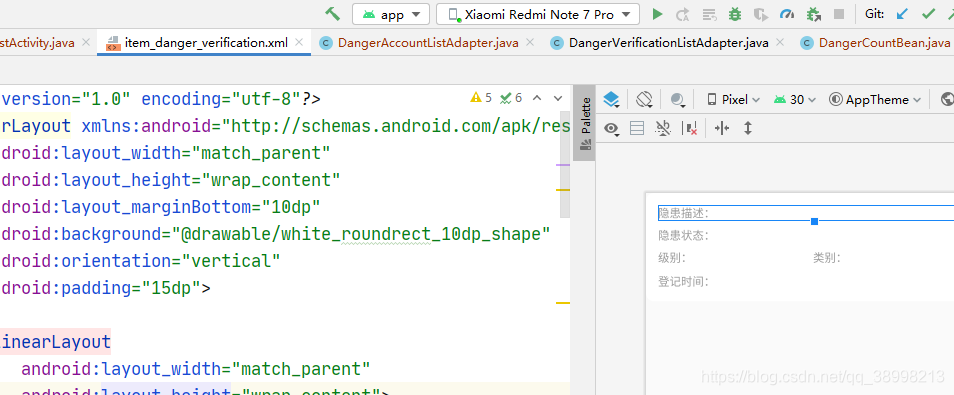
```xml
<?xml version="1.0" encoding="utf-8"?>
<LinearLayout xmlns:android="http://schemas.android.com/apk/res/android"
android:layout_width="match_parent"
android:layout_height="wrap_content"
android:layout_marginBottom="10dp"
android:background="@drawable/white_roundrect_10dp_shape"
android:orientation="vertical"
android:padding="15dp">
<LinearLayout
android:layout_width="match_parent"
android:layout_height="wrap_content">
<TextView
android:layout_width="wrap_content"
android:layout_height="wrap_content"
android:text="隐患描述:"
android:textColor="@color/tc_gray_999"
/>
<TextView
android:id="@+id/tv_des"
android:layout_width="0dp"
android:layout_height="wrap_content"
android:layout_weight="1"
android:text=""
android:textColor="@color/text_balck" />
</LinearLayout>
<LinearLayout
android:layout_width="match_parent"
android:layout_height="wrap_content"
android:layout_marginTop="8dp">
<TextView
android:layout_width="wrap_content"
android:layout_height="wrap_content"
android:text="隐患状态:"
android:textColor="@color/tc_gray_999" />
<TextView
android:id="@+id/tv_status"
android:layout_width="0dp"
android:layout_height="wrap_content"
android:layout_weight="1"
android:text=""
android:textColor="@color/text_balck" />
</LinearLayout>
<LinearLayout
android:layout_width="match_parent"
android:layout_height="wrap_content"
android:layout_marginTop="8dp">
<TextView
android:layout_width="wrap_content"
android:layout_height="wrap_content"
android:text="级别:"
android:textColor="@color/tc_gray_999" />
<TextView
android:id="@+id/tv_level"
android:layout_width="0dp"
android:layout_height="wrap_content"
android:layout_weight="1"
android:text=""
android:textColor="@color/text_balck" />
<TextView
android:layout_width="wrap_content"
android:layout_height="wrap_content"
android:text="类别:"
android:textColor="@color/tc_gray_999"
/>
<TextView
android:id="@+id/tv_type"
android:layout_width="0dp"
android:layout_height="wrap_content"
android:layout_weight="1"
android:text=""
android:textColor="@color/text_balck" />
</LinearLayout>
<LinearLayout
android:layout_width="match_parent"
android:layout_height="wrap_content"
android:layout_marginTop="10dp">
<TextView
android:layout_width="wrap_content"
android:layout_height="wrap_content"
android:text="登记时间:"
android:textColor="@color/tc_gray_999" />
<TextView
android:id="@+id/tv_time"
android:layout_width="0dp"
android:layout_height="wrap_content"
android:layout_weight="1"
android:text=""
android:textColor="@color/text_balck" />
</LinearLayout>
</LinearLayout>
adapter
package com.base.emergency_bureau.ui.module.adpter;

import androidx.annotation.Nullable;

import com.base.emergency_bureau.R;
import com.base.emergency_bureau.ui.bean.DangerCountBean;
import com.base.emergency_bureau.ui.bean.LurkingPerilCheckList;
import com.base.emergency_bureau.utils.Utils;
import com.chad.library.adapter.base.BaseQuickAdapter;
import com.chad.library.adapter.base.BaseViewHolder;

import java.util.List;

public class DangerAccountListAdapter extends BaseQuickAdapter<DangerCountBean.DataDTO.ListDTO, BaseViewHolder> {
    public DangerAccountListAdapter(int layoutResId, @Nullable List<DangerCountBean.DataDTO.ListDTO> data) {
        super(layoutResId, data);
    }

    @Override
    protected void convert(BaseViewHolder helper, DangerCountBean.DataDTO.ListDTO item) {

        helper.setText(R.id.tv_des,item.getDescription())
                .setText(R.id.tv_type,item.getTypeName())
                .setText(R.id.tv_time,item.getCheckDate())
        .setText(R.id.tv_status, Utils.rtStatusSt(item.getStatus()));
    }
}
item activity
```java
package com.base.emergency_bureau.ui.module.hidden_trouble;

import android.content.Intent;
import android.os.Bundle;
import android.view.View;
import android.widget.Button;
import android.widget.EditText;
import android.widget.ImageView;
import android.widget.TextView;

import com.base.emergency_bureau.R;
import com.base.emergency_bureau.base.BaseActivity;
import com.base.emergency_bureau.base.BaseRequestCallBack;
import com.base.emergency_bureau.base.BaseRequestParams;
import com.base.emergency_bureau.base.Config;
import com.base.emergency_bureau.base.UserInfoSP;
import com.base.emergency_bureau.base.XHttpUtils;
import com.base.emergency_bureau.ui.bean.DangerCountBean;
import com.base.emergency_bureau.ui.bean.LurkingPerilCheckList;
import com.base.emergency_bureau.ui.module.web.PdfActivity;
import com.base.emergency_bureau.utils.Utils;
import com.bigkoo.pickerview.builder.TimePickerBuilder;
import com.bigkoo.pickerview.listener.OnTimeSelectListener;
import com.bigkoo.pickerview.view.TimePickerView;
import com.blankj.utilcode.util.ClickUtils;
import com.blankj.utilcode.util.StringUtils;
import com.blankj.utilcode.util.ToastUtils;
import com.bumptech.glide.Glide;

import org.angmarch.views.NiceSpinner;
import org.angmarch.views.OnSpinnerItemSelectedListener;
import org.json.JSONException;
import org.json.JSONObject;

import java.text.SimpleDateFormat;
import java.util.Arrays;
import java.util.Date;
import java.util.HashMap;
import java.util.LinkedList;
import java.util.List;
import java.util.Map;

import butterknife.BindView;
import butterknife.ButterKnife;
import butterknife.OnClick;

//隐患验收
public class DangerAcceptanceActivity extends BaseActivity {

    @BindView(R.id.tv_des)
    TextView tv_des;
    @BindView(R.id.iv_pic)
    ImageView iv_pic;
    @BindView(R.id.iv_pic_change)
    ImageView iv_pic_change;
    @BindView(R.id.sp_is_pass)
    NiceSpinner sp_is_pass;
    @BindView(R.id.ed_result)
    EditText ed_result;
    @BindView(R.id.tv_time_yanshou)
    TextView tv_time_yanshou;
    @BindView(R.id.tv_submit)
    Button tv_submit;
    @BindView(R.id.tv_zhenggai)
    TextView tv_zhenggai;
    @BindView(R.id.ed_standard)
    EditText ed_standard;
    @BindView(R.id.tv_organization)
    TextView tv_organization;
    @BindView(R.id.iv_pic_1)
    ImageView ivPic1;
    @BindView(R.id.iv_pic_2)
    ImageView ivPic2;
    @BindView(R.id.iv_pic_1_1)
    ImageView ivPic11;
    @BindView(R.id.iv_pic_2_2)
    ImageView ivPic22;

    @BindView(R.id.tv_standard)
    TextView tvStandard;
    @BindView(R.id.tv_name)
    TextView tvName;
    @BindView(R.id.tv_time)
    TextView tvTime;
    @BindView(R.id.tv_jibie)
    TextView tvJibie;
    @BindView(R.id.tv_leibie)
    TextView tvLeibie;
    @BindView(R.id.tv_paicha)
    TextView tvPaicha;
    @BindView(R.id.tv_change_type)
    TextView tvChangeType;
    @BindView(R.id.tv_time_limit)
    TextView tvTimeLimit;
    @BindView(R.id.tv_time_change)
    TextView tvTimeChange;

    private DangerCountBean.DataDTO.ListDTO data;

    private List<String> list2 = new LinkedList<>(Arrays.asList("通过", "不通过"));
    private int status = 3;

    @Override
    protected void initWindow() {

    }

    @Override
    protected int getLayoutId() {
        return R.layout.activity_danger_acceptance;
    }

    @Override
    protected void initView() {

        data = (DangerCountBean.DataDTO.ListDTO) getIntent().getSerializableExtra("data");

        tvName.setText(data.getCheckUser());
        tvTime.setText(data.getCheckDate());
        if (data.getLurkingPerilLevel().equals("0")){
            tvJibie.setText(R.string.Generate);
        }else {
            tvJibie.setText(R.string.significant);
        }
        tvLeibie.setText(data.getTypeName());

        if (data.getSort().equals("0")){
            tvPaicha.setText("自查自纠");
        }else if(data.getSort().equals("1")){
            tvPaicha.setText("政法下发隐患");
        }else {
            tvPaicha.setText("政法三方机构下发隐患");
        }

        if (data.getCorrectType().equals("0")){
            tvChangeType.setText("立即整改");
        }else {
            tvChangeType.setText("期限整改");
        }
        tvTimeLimit.setText((String)data.getCorrectLimitDate());
        tvTimeChange.setText((String)data.getCorrectDate());


        if (data != null) {
            tv_des.setText(data.getDescription());

            //以逗号分割,得出的数据存到 result 里面
            String[] result = data.getLurkingPerilUrl().split(",");
            if (result.length == 1) {
                iv_pic.setVisibility(View.VISIBLE);
                ivPic1.setVisibility(View.GONE);
                ivPic2.setVisibility(View.GONE);
                Glide.with(mcontext).load(result[0]).override(240, 240).into(iv_pic);
            } else if (result.length == 2) {
                iv_pic.setVisibility(View.VISIBLE);
                ivPic1.setVisibility(View.VISIBLE);
                ivPic2.setVisibility(View.GONE);
                Glide.with(mcontext).load(result[0]).override(240, 240).into(iv_pic);
                Glide.with(mcontext).load(result[1]).override(240, 240).into(ivPic1);
            } else {
                iv_pic.setVisibility(View.VISIBLE);
                ivPic1.setVisibility(View.VISIBLE);
                ivPic2.setVisibility(View.VISIBLE);
                Glide.with(mcontext).load(result[0]).override(240, 240).into(iv_pic);
                Glide.with(mcontext).load(result[1]).override(240, 240).into(ivPic1);
                Glide.with(mcontext).load(result[2]).override(240, 240).into(ivPic2);
            }


            //以逗号分割,得出的数据存到 result 里面
            String[] resultChange = data.getCorrectUrl().toString().split(",");
            if (resultChange.length == 1) {
                iv_pic_change.setVisibility(View.VISIBLE);
                ivPic11.setVisibility(View.GONE);
                ivPic22.setVisibility(View.GONE);
                Glide.with(mcontext).load(resultChange[0]).override(240, 240).into(iv_pic_change);
            } else if (resultChange.length == 2) {
                iv_pic_change.setVisibility(View.VISIBLE);
                ivPic11.setVisibility(View.VISIBLE);
                ivPic22.setVisibility(View.GONE);
                Glide.with(mcontext).load(resultChange[0]).override(240, 240).into(iv_pic_change);
                Glide.with(mcontext).load(resultChange[1]).override(240, 240).into(ivPic11);
            } else {
                iv_pic_change.setVisibility(View.VISIBLE);
                ivPic11.setVisibility(View.VISIBLE);
                ivPic22.setVisibility(View.VISIBLE);
                Glide.with(mcontext).load(resultChange[0]).override(240, 240).into(iv_pic_change);
                Glide.with(mcontext).load(resultChange[1]).override(240, 240).into(ivPic11);
                Glide.with(mcontext).load(resultChange[2]).override(240, 240).into(ivPic22);
            }


            tv_zhenggai.setText(data.getCorrectStep()+"");
            ed_standard.setText(data.getLurkingPerilStandard());
            tv_organization.setText(Utils.rtOrganizationSt(data.getOrganizationType()));

            int type = getIntent().getIntExtra("type",-1);
            if (type == 1){
                tv_submit.setVisibility(View.GONE);
                ed_result.setEnabled(false);
                ed_result.setText(data.getCorrectOpinion()+"");
                sp_is_pass.setEnabled(false);
                tv_time_yanshou.setEnabled(false);
                tv_time_yanshou.setText(data.getReceptionDate()+"");

            }
        }

        sp_is_pass.attachDataSource(list2);
        sp_is_pass.setOnSpinnerItemSelectedListener(new OnSpinnerItemSelectedListener() {
            @Override
            public void onItemSelected(NiceSpinner parent, View view, int position, long id) {
                if (position == 0) {
                    status = 3;
                } else if (position == 1) {
                    status = 4;
                }
            }
        });


        ClickUtils.applySingleDebouncing(tv_submit, v -> {
            submit();
        });

    }

    @OnClick(R.id.tv_standard)
    public void intentStandardPdf() {
        Intent intent = new Intent(mcontext, PdfActivity.class);
        intent.putExtra("url", UserInfoSP.getSetListingStandardUrl(mcontext));
        startActivity(intent);
    }

    @OnClick(R.id.back)
    public void onBack() {
        finish();
    }

    @Override
    protected void onResumeAction() {

    }

    private void submit() {

        if (StringUtils.isEmpty(ed_result.getText().toString())) {
            ToastUtils.showShort("请上传验收结果");
            return;
        }
        if ("选择时间".equals(tv_time_yanshou.getText().toString())) {
            ToastUtils.showShort("请选择验收时间");
            return;
        }

        Map<String, Object> map = new HashMap<>();
        map.put("id", data.getId());

        map.put("correctOpinion", Utils.replaceBlank(ed_result.getText().toString().trim()));
        map.put("receptionDate", tv_time_yanshou.getText().toString());

        map.put("status", status);


        BaseRequestParams requestParams = new BaseRequestParams(Config.UpdateReceptionLurkingPerilCheck, map);
        XHttpUtils.getInstance().doHttpPost(requestParams, new BaseRequestCallBack() {
            @Override
            public void successEnd(String result) {
                try {
                    JSONObject jsonObject = new JSONObject(result);
                    int status = jsonObject.getInt("status");
                    if (status == 0) {
                        finish();
                    }
                    ToastUtils.showShort(jsonObject.getString("msg"));
                } catch (JSONException e) {
                    e.printStackTrace();
                }

            }

            @Override
            public void onError(Throwable ex, boolean isOnCallback) {
                super.onError(ex, isOnCallback);
            }

        });

    }

    @OnClick(R.id.tv_time_yanshou)
    public void showTimePick() {
        //时间选择器
        TimePickerView pvTime = new TimePickerBuilder(this, new OnTimeSelectListener() {
            @Override
            public void onTimeSelect(Date date, View v) {//选中事件回调
                SimpleDateFormat simpleDateFormat = new SimpleDateFormat("yyyy-MM-dd");
                tv_time_yanshou.setText(simpleDateFormat.format(date));
                data.setCorrectDate(simpleDateFormat.format(date));
            }
        }).build();
        // pvTime.setDate(Calendar.getInstance());//注:根据需求来决定是否使用该方法(一般是精确到秒的情况),此项可以在弹出选择器的时候重新设置当前时间,避免在初始化之后由于时间已经设定,导致选中时间与当前时间不匹配的问题。
        pvTime.show();
    }


    @Override
    protected void onCreate(Bundle savedInstanceState) {
        super.onCreate(savedInstanceState);
        // TODO: add setContentView(...) invocation
        ButterKnife.bind(this);
    }
}