指令收集
当前仓库下,添加一个新的远程地址:
git remote add neworigin <另一个仓库地址>
比如:
git remote add neworigin git@github.com:xxx/another-repo.git
推送到新的仓库:
git push neworigin other:main

👉 这会把当前仓库的 `other` 分支代码,推送到新仓库的 `main` 分支。
如果你希望保持分支名字不变:

git push neworigin other:other
简洁查看远程名和对应地址
git remote
git remote -v

详细查看某个远程信息
git remote show origin
问题汇总
问题一: Permission Denied (publickey)
问题描述:
生成GIT SSH:
- git config --global user.name "用户名"
- git config --global user.email "邮箱"
- 通过
ssh-keygen -t rsa -C "邮箱"生成ssh key,配置到Gerrit后,拉取代码,出现Permission Denied (publickey)问题。
PS:git的版本为 2.36.1.windows.1
解决方法:
ssh-keygen -t ed25519 -C "邮箱"
问题二:client_loop: send disconnect: Connection reset by peeriB/s...
问题描述:
拉取代码,出现如下问题:
$ git clone "ssh://xxxx"
Cloning into 'xxx'...
remote: Counting objects: 1234, done
remote: Finding sources: 100% (1234/1234)
client_loop: send disconnect: Connection reset by peeriB/s
fetch-pack: unexpected disconnect while reading sideband packet
fatal: early EOF
fatal: fetch-pack: invalid index-pack output
解决方法:
git config --global http.postBuffer 1048576000
问题三:missing Change-Id in message footer
问题描述:
提交代码到gerrit上,这里使用命令行执行git push origin HEAD:refs/for/分支名,出现如下问题:
$ git push origin HEAD:refs/for/分支名
Enumerating objects: 118, done.
Counting objects: 100% (118/118), done.
Delta compression using up to 8 threads
Compressing objects: 100% (83/83), done.
Writing objects: 100% (89/89), 60.99 KiB | 7.62 MiB/s, done.
Total 89 (delta 40), reused 0 (delta 0), pack-reused 0
remote: Resolving deltas: 100% (40/40)
remote: Processing changes: refs: 1, done
remote: ERROR: commit e75939d: missing Change-Id in message footer
remote:
remote: Hint: to automatically insert a Change-Id, install the hook:
remote:   gitdir=$(git rev-parse --git-dir); scp -p -P 29418 curry@123.123.123.123:hooks/commit-msg ${gitdir}/hooks/
remote: and then amend the commit:
remote:   git commit --amend --no-edit
remote: Finally, push your changes again
remote:
To ssh://123.123.123.123:1234/XXX
 ! [remote rejected] HEAD -> refs/for/分支名 (commit e75939d: missing Change-Id in message footer)
error: failed to push some refs to 'ssh://123.123.123.123:1234/XXX'
解决方法:
方式一: 这种情况适用于最后一笔提交没有Change-Id
按照提示执行,但需要注意将-p 改为 -O
- 执行
gitdir=$(git rev-parse --git-dir); scp -O -P 29418 curry@123.123.123.123:hooks/commit-msg ${gitdir}/hooks/ - 执行
git commit --amend --no-edit
方式二
确认项目目录下.git/hooks/中是否有commit-msg文件;
若不存在: 可以从其他项目中拷贝了一份commit-msg粘过来
问题四:直接在文件资源管理器中修改文件夹名称为小写,git不提示提交,提交没内容
问题描述:
原本文件夹名称为大写Test,后需要改成小写test;在文件资源管理器中修改后,git不提示需要commit,通过命令git add/git status也没有需要提交的内容。
解决方法:
方法一【亲测有用】
通过AndroidStudio,在文件夹上右键Refactor->Rename ; rename后可以顺利修改提交;
方法二
网上一些blog说执行git config core.ignorecase false;
验证如下:
项目中,默认git忽略了大小写敏感,配置在.git文件夹中config里:
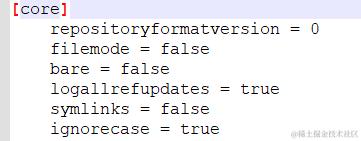
可以在项目下执行git config core.ignorecase false,或者直接修改config文件;
执行命令后,执行commit就有了需要提交的内容,但这种方式实际是新增一份以test命名的文件夹,而不是修改,原有的Test文件夹仍存在于git服务器中。因此还需要执行删除Test文件夹的步骤。
较为麻烦,不推荐!
问题五:将现有 git 仓库的某一个分支的多个子目录分离到一个独立仓库中并保留其提交历史
解决方法:
方法一 git subtree
git subtree split -P 子目录的路径 -b 创建的新分支的名字

git push 新的远程仓库 创建的新分支的名字:master
这种方式,不会带有子目录的文件夹,仅是子目录的内容。
方法二 git filter-repo
从 Git 2.25 开始,推荐使用 git filter-repo 工具代替 git filter-branch,因为它更快且功能更强大。首先需要安装
//【已经安装了 Python 和 pip】
pip install git-filter-repo
需要添加环境变量,默认下载的位置C:\Users<YourUsername>\AppData\Roaming\Python\Python3x\Scripts\
git clone --no-checkout 本地路径

git filter-repo --path 子目录1 --path 子目录2 --path 子目录3

Aborting: Refusing to destructively overwrite repo history since
this does not look like a fresh clone.
  (expected freshly packed repo)
Note: when cloning local repositories, you need to pass
      --no-local to git clone to avoid this issue.
Please operate on a fresh clone instead.  If you want to proceed
anyway, use --force.

git filter-repo --path 子目录1 --path 子目录2 --path 子目录3 --force

git init
git add .
git commit -m "first commit"
git remote add origin 远程仓库地址
git push -u origin master
// 【查看当前仓库】
git remote show origin
// 【设置远程仓库】
git remote set-url origin <远程仓库地址>
// 【允许不相关历史提交,并强制合并】
git pull origin master --allow-unrelated-histories
我的实际环境是gerrit,而不是直接可以推到git仓库,因此不能直接push。 做法是:分离出的分支,merge到新仓库的分支上,这样也能保留相关日志,但是gerrit上merge时会有很多提交记录,比较麻烦。
问题六:开了翻墙,Git拉取、升级等等依然卡住;
命令行执行flutter upgrade
一直返回超时;但浏览器能够正常访问github.com/flutter/flu…
ProcessException: Process exited abnormally with exit code 128:

致命错误:无法访问 'https://github.com/flutter/flutter.git/':Failed to connect to github.com port 443 after 75002 ms: Couldn't connect to server

  Command: git fetch --tags
解决方法:
原因:git没有走代理;
验证:运行 git ls-remote https://github.com/flutter/flutter.git 看看是不是超时,如果是的话就说明 git 没有走代理。
解决
根据自己翻墙的本机监听端口和地址:
单命令执行,不污染全局:
    MAC:
    https_proxy=http://127.0.0.1:1087 flutter upgrade

    Windows:
    set https_proxy=http://127.0.0.1:1087