在ActivityThread main流程,我们知道,ActivityThread main中调用attatch,然后通过Binder ipc调用AMS的attachApplication,然后调用ASS(ActivityStackSupervisor)的realStartActivtyLocked,然后通过Binder IPC又回调ApplicationThread的scheduleLaunchActivity,最总通过消息通信调用ActivityThread的handleLaunchActivity方法
ActivityThread.handleLaunchActivity
private void handleLaunchActivity(ActivityClientRecord r, Intent customIntent) {
        // If we are getting ready to gc after going to the background, well
        // we are back active so skip it.
        unscheduleGcIdler();
        mSomeActivitiesChanged = true;

        if (r.profilerInfo != null) {
            mProfiler.setProfiler(r.profilerInfo);
            mProfiler.startProfiling();
        }

        // Make sure we are running with the most recent config.
        handleConfigurationChanged(null, null);

        // Initialize before creating the activity
        WindowManagerGlobal.initialize();
        //1. 调用performLaunchActivity
        Activity a = performLaunchActivity(r, customIntent);

        if (a != null) {
            r.createdConfig = new Configuration(mConfiguration);
            Bundle oldState = r.state;
            //2. 调用handleResumeActivity
            handleResumeActivity(r.token, false, r.isForward,
                    !r.activity.mFinished && !r.startsNotResumed);

            if (!r.activity.mFinished && r.startsNotResumed) {

                try {
                    r.activity.mCalled = false;
                    mInstrumentation.callActivityOnPause(r.activity);

                    if (r.isPreHoneycomb()) {
                        r.state = oldState;
                    }
                    if (!r.activity.mCalled) {
                        throw new SuperNotCalledException(
                            "Activity " + r.intent.getComponent().toShortString() +
                            " did not call through to super.onPause()");
                    }

                } catch (SuperNotCalledException e) {
                    throw e;

                } catch (Exception e) {

                }
                r.paused = true;
            }
        } else {
            // If there was an error, for any reason, tell the activity
            // manager to stop us.
            try {
                ActivityManagerNative.getDefault()
                    .finishActivity(r.token, Activity.RESULT_CANCELED, null, false);
            } catch (RemoteException ex) {
                // Ignore
            }
        }
    }
\
handleLaunchActivity中主要流程如下:
- performLaunchActivity完成Activity初始化(创建,attatch,onCreate,onStart等),application的初始化(创建,onCreate调用)
- handleResumeActivity完成Activity的onResume和界面的设置
AcivityThread.perfromLaunchActivity
private Activity performLaunchActivity(ActivityClientRecord r, Intent customIntent) {
        ActivityInfo aInfo = r.activityInfo;
        if (r.packageInfo == null) {
            r.packageInfo = getPackageInfo(aInfo.applicationInfo, r.compatInfo,
                    Context.CONTEXT_INCLUDE_CODE);
        }

        ComponentName component = r.intent.getComponent();
        if (component == null) {
            component = r.intent.resolveActivity(
                mInitialApplication.getPackageManager());
            r.intent.setComponent(component);
        }

        if (r.activityInfo.targetActivity != null) {
            component = new ComponentName(r.activityInfo.packageName,
                    r.activityInfo.targetActivity);
        }
        //1. 通过反射初始化Actvity
        Activity activity = null;
        try {
            java.lang.ClassLoader cl = r.packageInfo.getClassLoader();
            activity = mInstrumentation.newActivity(
                    cl, component.getClassName(), r.intent);
            StrictMode.incrementExpectedActivityCount(activity.getClass());
            r.intent.setExtrasClassLoader(cl);
            r.intent.prepareToEnterProcess();
            if (r.state != null) {
                r.state.setClassLoader(cl);
            }
        } catch (Exception e) {

        }

        try {
            //2. 通过反射初始化Application,调用onCreate生命周期函数
            Application app = r.packageInfo.makeApplication(false, mInstrumentation);

            if (activity != null) {
                Context appContext = createBaseContextForActivity(r, activity);
                CharSequence title = r.activityInfo.loadLabel(appContext.getPackageManager());
                Configuration config = new Configuration(mCompatConfiguration);
                if (DEBUG_CONFIGURATION) Slog.v(TAG, "Launching activity "
                        + r.activityInfo.name + " with config " + config);
                //3. 将AMS activity信息绑定到Activity中
                activity.attach(appContext, this, getInstrumentation(), r.token,
                        r.ident, app, r.intent, r.activityInfo, title, r.parent,
                        r.embeddedID, r.lastNonConfigurationInstances, config,
                        r.referrer, r.voiceInteractor);

                ...
                //4. 调用Activty的onCreate,onStart,OnRestoreInstanceState, OnPostCreate生命周期
                //函数
                activity.mCalled = false;
                if (r.isPersistable()) {
                    mInstrumentation.callActivityOnCreate(activity, r.state, r.persistentState);
                } else {
                    mInstrumentation.callActivityOnCreate(activity, r.state);
                }
                if (!activity.mCalled) {

                }
                r.activity = activity;
                r.stopped = true;
                if (!r.activity.mFinished) {
                    activity.performStart();
                    r.stopped = false;
                }
                if (!r.activity.mFinished) {
                    if (r.isPersistable()) {
                        if (r.state != null || r.persistentState != null) {
                            mInstrumentation.callActivityOnRestoreInstanceState(activity, r.state,
                                    r.persistentState);
                        }
                    } else if (r.state != null) {
                        mInstrumentation.callActivityOnRestoreInstanceState(activity, r.state);
                    }
                }
                if (!r.activity.mFinished) {
                    activity.mCalled = false;
                    if (r.isPersistable()) {
                        mInstrumentation.callActivityOnPostCreate(activity, r.state,
                                r.persistentState);
                    } else {
                        mInstrumentation.callActivityOnPostCreate(activity, r.state);
                    }
                    if (!activity.mCalled) {
						...
                    }
                }

            }
            r.paused = true;

            mActivities.put(r.token, r);

        } catch (SuperNotCalledException e) {
            throw e;

        } catch (Exception e) {
.			..
        }

        return activity;
    }
主要完成Activity,Application的初始化和生命周期函数的调用
本章节我们只关注Activity的相关函数调用,主要是attatch,和onCreate
Activity.attatch
final void attach(Context context, ActivityThread aThread,
                  Instrumentation instr, IBinder token, int ident,
                  Application application, Intent intent, ActivityInfo info,
                  CharSequence title, Activity parent, String id,
                  NonConfigurationInstances lastNonConfigurationInstances,
                  Configuration config, String referrer, IVoiceInteractor voiceInteractor) {
    attachBaseContext(context);

    mFragments.attachHost(null /*parent*/);
    //1. 创建PhoneWindow
    mWindow = new PhoneWindow(this);
    mWindow.setCallback(this);
    mWindow.setOnWindowDismissedCallback(this);
    mWindow.getLayoutInflater().setPrivateFactory(this);
    if (info.softInputMode != WindowManager.LayoutParams.SOFT_INPUT_STATE_UNSPECIFIED) {
        mWindow.setSoftInputMode(info.softInputMode);
    }
    if (info.uiOptions != 0) {
        mWindow.setUiOptions(info.uiOptions);
    }
    mUiThread = Thread.currentThread();

    mMainThread = aThread;
    mInstrumentation = instr;
    //2. 获取wms的token
    mToken = token;
    mIdent = ident;
    mApplication = application;
    mIntent = intent;
    mReferrer = referrer;
    mComponent = intent.getComponent();
    mActivityInfo = info;
    mTitle = title;
    mParent = parent;
    mEmbeddedID = id;
    mLastNonConfigurationInstances = lastNonConfigurationInstances;
    if (voiceInteractor != null) {
        if (lastNonConfigurationInstances != null) {
            mVoiceInteractor = lastNonConfigurationInstances.voiceInteractor;
        } else {
            mVoiceInteractor = new VoiceInteractor(voiceInteractor, this, this,
                                                   Looper.myLooper());
        }
    }
    //3. 为phonewindow设置WindowManagerImpl
    mWindow.setWindowManager(
        (WindowManager)context.getSystemService(Context.WINDOW_SERVICE),
        mToken, mComponent.flattenToString(),
        (info.flags & ActivityInfo.FLAG_HARDWARE_ACCELERATED) != 0);
    if (mParent != null) {
        mWindow.setContainer(mParent.getWindow());
    }
    mWindowManager = mWindow.getWindowManager();
    mCurrentConfig = config;
    }
其中Activty中的mToken是从ams传递过来的Binder对象,对象的定义如下
    ActivityRecord(ActivityManagerService _service, ProcessRecord _caller,
            int _launchedFromUid, String _launchedFromPackage, Intent _intent, String _resolvedType,
            ActivityInfo aInfo, Configuration _configuration,
            ActivityRecord _resultTo, String _resultWho, int _reqCode,
            boolean _componentSpecified, boolean _rootVoiceInteraction,
            ActivityStackSupervisor supervisor,
            ActivityContainer container, Bundle options) {
        service = _service;
        appToken = new Token(this, service);
        ....
        }
static class Token extends IApplicationToken.Stub {
private final WeakReference<ActivityRecord> weakActivity;
private final ActivityManagerService mService;
Token(ActivityRecord activity, ActivityManagerService service) {
weakActivity = new WeakReference<>(activity);
mService = service;
}
@Override
public void windowsDrawn() {
synchronized (mService) {
ActivityRecord r = tokenToActivityRecordLocked(this);
if (r != null) {
r.windowsDrawnLocked();
}
}
}
@Override
public void windowsVisible() {
synchronized (mService) {
ActivityRecord r = tokenToActivityRecordLocked(this);
if (r != null) {
r.windowsVisibleLocked();
}
}
}
@Override
public void windowsGone() {
synchronized (mService) {
ActivityRecord r = tokenToActivityRecordLocked(this);
if (r != null) {
if (DEBUG_SWITCH) Log.v(TAG_SWITCH, "windowsGone(): " + r);
r.nowVisible = false;
return;
}
}
}
}
```java
### Activity.onCreate
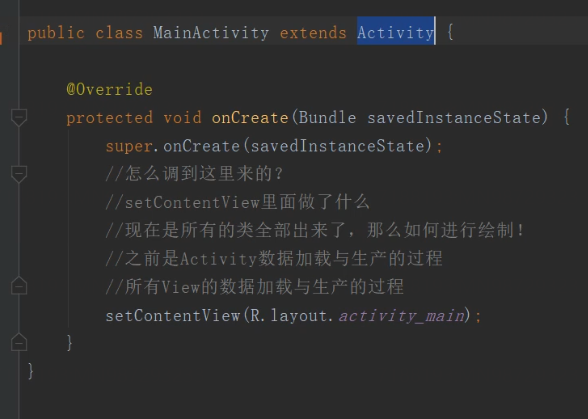
在onCreate中,通过调用setContentView,设置窗口的布局view, 完成了数据准备工作
为PhoneWindow设置view
```java
public void setContentView(@LayoutRes int layoutResID) {
getWindow().setContentView(layoutResID);
initWindowDecorActionBar();
}
PhoneWindow.setContentView
   @Override
    public void setContentView(int layoutResID) {
        // Note: FEATURE_CONTENT_TRANSITIONS may be set in the process of installing the window
        // decor, when theme attributes and the like are crystalized. Do not check the feature
        // before this happens.
        if (mContentParent == null) {
            installDecor();
        } else if (!hasFeature(FEATURE_CONTENT_TRANSITIONS)) {
            mContentParent.removeAllViews();
        }

        if (hasFeature(FEATURE_CONTENT_TRANSITIONS)) {
            final Scene newScene = Scene.getSceneForLayout(mContentParent, layoutResID,
                    getContext());
            transitionTo(newScene);
        } else {
            mLayoutInflater.inflate(layoutResID, mContentParent);
        }
        mContentParent.requestApplyInsets();
        final Callback cb = getCallback();
        if (cb != null && !isDestroyed()) {
            cb.onContentChanged();
        }
    }
主要流程:
- 调用installDecor,完成DectorView的创建和mContentParent的创建
- 通过inflate加载传递的资源id对一个的xml布局文件,并添加到布局文件mContentParent中
PhoneWindow.installDecor
private void installDecor() {
        if (mDecor == null) {
			//new DecorView, is a FrameLayout.
            mDecor = generateDecor();
            mDecor.setDescendantFocusability(ViewGroup.FOCUS_AFTER_DESCENDANTS);
            mDecor.setIsRootNamespace(true);
            if (!mInvalidatePanelMenuPosted && mInvalidatePanelMenuFeatures != 0) {
                mDecor.postOnAnimation(mInvalidatePanelMenuRunnable);
            }
        }
        if (mContentParent == null) {
            mContentParent = generateLayout(mDecor);

            // Set up decor part of UI to ignore fitsSystemWindows if appropriate.
            mDecor.makeOptionalFitsSystemWindows();

            final DecorContentParent decorContentParent = (DecorContentParent) mDecor.findViewById(
                    R.id.decor_content_parent);

            if (decorContentParent != null) {
                mDecorContentParent = decorContentParent;
                mDecorContentParent.setWindowCallback(getCallback());
                if (mDecorContentParent.getTitle() == null) {
                    mDecorContentParent.setWindowTitle(mTitle);
                }

                final int localFeatures = getLocalFeatures();
                for (int i = 0; i < FEATURE_MAX; i++) {
                    if ((localFeatures & (1 << i)) != 0) {
                        mDecorContentParent.initFeature(i);
                    }
                }

                mDecorContentParent.setUiOptions(mUiOptions);

                if ((mResourcesSetFlags & FLAG_RESOURCE_SET_ICON) != 0 ||
                        (mIconRes != 0 && !mDecorContentParent.hasIcon())) {
                    mDecorContentParent.setIcon(mIconRes);
                } else if ((mResourcesSetFlags & FLAG_RESOURCE_SET_ICON) == 0 &&
                        mIconRes == 0 && !mDecorContentParent.hasIcon()) {
                    mDecorContentParent.setIcon(
                            getContext().getPackageManager().getDefaultActivityIcon());
                    mResourcesSetFlags |= FLAG_RESOURCE_SET_ICON_FALLBACK;
                }
                if ((mResourcesSetFlags & FLAG_RESOURCE_SET_LOGO) != 0 ||
                        (mLogoRes != 0 && !mDecorContentParent.hasLogo())) {
                    mDecorContentParent.setLogo(mLogoRes);
                }

                // Invalidate if the panel menu hasn't been created before this.
                // Panel menu invalidation is deferred avoiding application onCreateOptionsMenu
                // being called in the middle of onCreate or similar.
                // A pending invalidation will typically be resolved before the posted message
                // would run normally in order to satisfy instance state restoration.
                PanelFeatureState st = getPanelState(FEATURE_OPTIONS_PANEL, false);
                if (!isDestroyed() && (st == null || st.menu == null) && !mIsStartingWindow) {
                    invalidatePanelMenu(FEATURE_ACTION_BAR);
                }
            } else {
                mTitleView = (TextView)findViewById(R.id.title);
                if (mTitleView != null) {
                    mTitleView.setLayoutDirection(mDecor.getLayoutDirection());
                    if ((getLocalFeatures() & (1 << FEATURE_NO_TITLE)) != 0) {
                        View titleContainer = findViewById(
                                R.id.title_container);
                        if (titleContainer != null) {
                            titleContainer.setVisibility(View.GONE);
                        } else {
                            mTitleView.setVisibility(View.GONE);
                        }
                        if (mContentParent instanceof FrameLayout) {
                            ((FrameLayout)mContentParent).setForeground(null);
                        }
                    } else {
                        mTitleView.setText(mTitle);
                    }
                }
            }

            if (mDecor.getBackground() == null && mBackgroundFallbackResource != 0) {
                mDecor.setBackgroundFallback(mBackgroundFallbackResource);
            }

            // Only inflate or create a new TransitionManager if the caller hasn't
            // already set a custom one.
            if (hasFeature(FEATURE_ACTIVITY_TRANSITIONS)) {
                if (mTransitionManager == null) {
                    final int transitionRes = getWindowStyle().getResourceId(
                            R.styleable.Window_windowContentTransitionManager,
                            0);
                    if (transitionRes != 0) {
                        final TransitionInflater inflater = TransitionInflater.from(getContext());
                        mTransitionManager = inflater.inflateTransitionManager(transitionRes,
                                mContentParent);
                    } else {
                        mTransitionManager = new TransitionManager();
                    }
                }

                mEnterTransition = getTransition(mEnterTransition, null,
                        R.styleable.Window_windowEnterTransition);
                mReturnTransition = getTransition(mReturnTransition, USE_DEFAULT_TRANSITION,
                        R.styleable.Window_windowReturnTransition);
                mExitTransition = getTransition(mExitTransition, null,
                        R.styleable.Window_windowExitTransition);
                mReenterTransition = getTransition(mReenterTransition, USE_DEFAULT_TRANSITION,
                        R.styleable.Window_windowReenterTransition);
                mSharedElementEnterTransition = getTransition(mSharedElementEnterTransition, null,
                        R.styleable.Window_windowSharedElementEnterTransition);
                mSharedElementReturnTransition = getTransition(mSharedElementReturnTransition,
                        USE_DEFAULT_TRANSITION,
                        R.styleable.Window_windowSharedElementReturnTransition);
                mSharedElementExitTransition = getTransition(mSharedElementExitTransition, null,
                        R.styleable.Window_windowSharedElementExitTransition);
                mSharedElementReenterTransition = getTransition(mSharedElementReenterTransition,
                        USE_DEFAULT_TRANSITION,
                        R.styleable.Window_windowSharedElementReenterTransition);
                if (mAllowEnterTransitionOverlap == null) {
                    mAllowEnterTransitionOverlap = getWindowStyle().getBoolean(
                            R.styleable.Window_windowAllowEnterTransitionOverlap, true);
                }
                if (mAllowReturnTransitionOverlap == null) {
                    mAllowReturnTransitionOverlap = getWindowStyle().getBoolean(
                            R.styleable.Window_windowAllowReturnTransitionOverlap, true);
                }
                if (mBackgroundFadeDurationMillis < 0) {
                    mBackgroundFadeDurationMillis = getWindowStyle().getInteger(
                            R.styleable.Window_windowTransitionBackgroundFadeDuration,
                            DEFAULT_BACKGROUND_FADE_DURATION_MS);
                }
                if (mSharedElementsUseOverlay == null) {
                    mSharedElementsUseOverlay = getWindowStyle().getBoolean(
                            R.styleable.Window_windowSharedElementsUseOverlay, true);
                }
            }
        }
    }
主要流程如下:
- generateDecor生成DectorView
protected DecorView generateDecor() {
    return new DecorView(getContext(), -1);
}
- generateLayout生成mContentParent布局,设置当前窗口相关窗口属性,例如是否全屏,设置窗口动画,设置虚拟按键颜色值等
protected ViewGroup generateLayout(DecorView decor) {
        // Apply data from current theme.

        //1. jdf-得到当前窗口设置的主题,根据主题设置窗口属性
        TypedArray a = getWindowStyle();

        mIsFloating = a.getBoolean(R.styleable.Window_windowIsFloating, false);
        int flagsToUpdate = (FLAG_LAYOUT_IN_SCREEN|FLAG_LAYOUT_INSET_DECOR)
                & (~getForcedWindowFlags());
        /// M: BMW.
        boolean isMultiWindow = MultiWindowProxy.getInstance().isFloatingByAppToken(getAppToken());
        if (mIsFloating) {
            setLayout(WRAP_CONTENT, WRAP_CONTENT);
            setFlags(0, flagsToUpdate);
        } else {
            setFlags(FLAG_LAYOUT_IN_SCREEN|FLAG_LAYOUT_INSET_DECOR, flagsToUpdate);
        }

        if (a.getBoolean(R.styleable.Window_windowNoTitle, false)) {
            requestFeature(FEATURE_NO_TITLE);
        } else if (a.getBoolean(R.styleable.Window_windowActionBar, false)) {
            // Don't allow an action bar if there is no title.
            requestFeature(FEATURE_ACTION_BAR);
        }

        ...
        if (a.getBoolean(R.styleable.Window_windowShowWallpaper, false)) {
            setFlags(FLAG_SHOW_WALLPAPER, FLAG_SHOW_WALLPAPER&(~getForcedWindowFlags()));
        }

       ...

        if (a.getBoolean(R.styleable.Window_windowContentTransitions, false)) {
            requestFeature(FEATURE_CONTENT_TRANSITIONS);
        }
        if (a.getBoolean(R.styleable.Window_windowActivityTransitions, false)) {
            requestFeature(FEATURE_ACTIVITY_TRANSITIONS);
        }
        //2. window适配不同的android版本
        final Context context = getContext();
        final int targetSdk = context.getApplicationInfo().targetSdkVersion;
        final boolean targetPreHoneycomb = targetSdk < android.os.Build.VERSION_CODES.HONEYCOMB;
        final boolean targetPreIcs = targetSdk < android.os.Build.VERSION_CODES.ICE_CREAM_SANDWICH;
        final boolean targetPreL = targetSdk < android.os.Build.VERSION_CODES.LOLLIPOP;
        final boolean targetHcNeedsOptions = context.getResources().getBoolean(
                R.bool.target_honeycomb_needs_options_menu);
        final boolean noActionBar = !hasFeature(FEATURE_ACTION_BAR) || hasFeature(FEATURE_NO_TITLE);

        if (targetPreHoneycomb || (targetPreIcs && targetHcNeedsOptions && noActionBar)) {
            setNeedsMenuKey(WindowManager.LayoutParams.NEEDS_MENU_SET_TRUE);
        } else {
            setNeedsMenuKey(WindowManager.LayoutParams.NEEDS_MENU_SET_FALSE);
        }

        // Non-floating windows on high end devices must put up decor beneath the system bars and
        // therefore must know about visibility changes of those.
            if (!targetPreL && a.getBoolean(
                    R.styleable.Window_windowDrawsSystemBarBackgrounds,
                    false)) {
                setFlags(FLAG_DRAWS_SYSTEM_BAR_BACKGROUNDS,
                        FLAG_DRAWS_SYSTEM_BAR_BACKGROUNDS & ~getForcedWindowFlags());
            }

        if (!mForcedStatusBarColor) {
            mStatusBarColor = a.getColor(R.styleable.Window_statusBarColor, 0xFF000000);
        }
        if (!mForcedNavigationBarColor) {
            mNavigationBarColor = a.getColor(R.styleable.Window_navigationBarColor, 0xFF000000);
        }
        if (a.getBoolean(R.styleable.Window_windowLightStatusBar, false)) {
            decor.setSystemUiVisibility(
                    decor.getSystemUiVisibility() | View.SYSTEM_UI_FLAG_LIGHT_STATUS_BAR);
        }

        if (mAlwaysReadCloseOnTouchAttr || getContext().getApplicationInfo().targetSdkVersion
                >= android.os.Build.VERSION_CODES.HONEYCOMB) {
            if (a.getBoolean(
                    R.styleable.Window_windowCloseOnTouchOutside,
                    false)) {
                setCloseOnTouchOutsideIfNotSet(true);
            }
        }
        //4. 创建窗口属性对象,并根据不同模式进行测试
        WindowManager.LayoutParams params = getAttributes();

        if (!hasSoftInputMode()) {
            params.softInputMode = a.getInt(
                    R.styleable.Window_windowSoftInputMode,
                    params.softInputMode);
        }

        if (a.getBoolean(R.styleable.Window_backgroundDimEnabled,
                mIsFloating)) {
            /* All dialogs should have the window dimmed */
            if ((getForcedWindowFlags()&WindowManager.LayoutParams.FLAG_DIM_BEHIND) == 0) {
                params.flags |= WindowManager.LayoutParams.FLAG_DIM_BEHIND;
            }
            if (!haveDimAmount()) {
                params.dimAmount = a.getFloat(
                        android.R.styleable.Window_backgroundDimAmount, 0.5f);
            }
        }

        //设置窗口动画
        if (params.windowAnimations == 0) {
            params.windowAnimations = a.getResourceId(
                    R.styleable.Window_windowAnimationStyle, 0);
        }

        // The rest are only done if this window is not embedded; otherwise,
        // the values are inherited from our container.
...

        // Inflate the window decor.

        int layoutResource;
        int features = getLocalFeatures();
        // System.out.println("Features: 0x" + Integer.toHexString(features));
        //5. 设置应用启动窗口starting页面
        /// M: [APP launch time enhancenment feature] Simplified starting window.
        final boolean mIsStartingWindow = DBG_APP_LAUNCH_ENHANCE
            && (getAttributes().type == WindowManager.LayoutParams.TYPE_APPLICATION_STARTING);
        if (mIsStartingWindow) {
            layoutResource = R.layout.screen_simple;
        } else if ((features & (1 << FEATURE_SWIPE_TO_DISMISS)) != 0) {
            layoutResource = R.layout.screen_swipe_dismiss;
        } else if ((features & ((1 << FEATURE_LEFT_ICON) | (1 << FEATURE_RIGHT_ICON))) != 0) {
            if (mIsFloating) {
                TypedValue res = new TypedValue();
                getContext().getTheme().resolveAttribute(
                        R.attr.dialogTitleIconsDecorLayout, res, true);
                layoutResource = res.resourceId;
            } else {
                layoutResource = R.layout.screen_title_icons;
            }
            // XXX Remove this once action bar supports these features.
            removeFeature(FEATURE_ACTION_BAR);
            // System.out.println("Title Icons!");
        } else if ((features & ((1 << FEATURE_PROGRESS) | (1 << FEATURE_INDETERMINATE_PROGRESS))) != 0
                && (features & (1 << FEATURE_ACTION_BAR)) == 0) {
            // Special case for a window with only a progress bar (and title).
            // XXX Need to have a no-title version of embedded windows.
            layoutResource = R.layout.screen_progress;
            // System.out.println("Progress!");
        } else if ((features & (1 << FEATURE_CUSTOM_TITLE)) != 0) {
            // Special case for a window with a custom title.
            // If the window is floating, we need a dialog layout
            if (mIsFloating) {
                TypedValue res = new TypedValue();
                getContext().getTheme().resolveAttribute(
                        R.attr.dialogCustomTitleDecorLayout, res, true);
                layoutResource = res.resourceId;
            } else {
                layoutResource = R.layout.screen_custom_title;
            }
            // XXX Remove this once action bar supports these features.
            removeFeature(FEATURE_ACTION_BAR);
        } else if ((features & (1 << FEATURE_NO_TITLE)) == 0) {
            // If no other features and not embedded, only need a title.
            // If the window is floating, we need a dialog layout
            if (mIsFloating) {
                TypedValue res = new TypedValue();
                getContext().getTheme().resolveAttribute(
                        R.attr.dialogTitleDecorLayout, res, true);
                layoutResource = res.resourceId;
            } else if ((features & (1 << FEATURE_ACTION_BAR)) != 0) {
                layoutResource = a.getResourceId(
                        R.styleable.Window_windowActionBarFullscreenDecorLayout,
                        R.layout.screen_action_bar);
            } else {
                layoutResource = R.layout.screen_title;
            }
            // System.out.println("Title!");
        } else if ((features & (1 << FEATURE_ACTION_MODE_OVERLAY)) != 0) {
            layoutResource = R.layout.screen_simple_overlay_action_mode;
        } else {
            // Embedded, so no decoration is needed.
            layoutResource = R.layout.screen_simple;
            // System.out.println("Simple!");
        }

        mDecor.startChanging();

        View in = mLayoutInflater.inflate(layoutResource, null);
...
        //7. jdf decor添加starting页面
        decor.addView(in, new ViewGroup.LayoutParams(MATCH_PARENT, MATCH_PARENT));
        mContentRoot = (ViewGroup) in;
        //创建contentparent 布局
        ViewGroup contentParent = (ViewGroup)findViewById(ID_ANDROID_CONTENT);
        if (contentParent == null) {
            throw new RuntimeException("Window couldn't find content container view");
        }

        if ((features & (1 << FEATURE_INDETERMINATE_PROGRESS)) != 0) {
            ProgressBar progress = getCircularProgressBar(false);
            if (progress != null) {
                progress.setIndeterminate(true);
            }
        }

        if ((features & (1 << FEATURE_SWIPE_TO_DISMISS)) != 0) {
            registerSwipeCallbacks();
        }

        // Remaining setup -- of background and title -- that only applies
        // to top-level windows.
        if (getContainer() == null) {
            final Drawable background;
            if (mBackgroundResource != 0) {
                background = getContext().getDrawable(mBackgroundResource);
            } else {
                background = mBackgroundDrawable;
            }
            mDecor.setWindowBackground(background);

            final Drawable frame;
            if (mFrameResource != 0) {
                frame = getContext().getDrawable(mFrameResource);
            } else {
                frame = null;
            }
            mDecor.setWindowFrame(frame);

            mDecor.setElevation(mElevation);
            mDecor.setClipToOutline(mClipToOutline);

            if (mTitle != null) {
                setTitle(mTitle);
            }

            if (mTitleColor == 0) {
                mTitleColor = mTextColor;
            }
            setTitleColor(mTitleColor);
        }

        mDecor.finishChanging();

        return contentParent;
    }
总结
- attatch中完成窗口的创建和其他属性的初始化,初始化来源主要是AMS传递的ActivityRecord信息
- onCreate中调用setContentView设置当前窗口的布局
- installDector中完成DectorView,contentparent的创建,和窗口属性的设置
ActivithThread.handleResumeActivity
在Rresume中,将DectorView传递给WMS
mContentParentfinal void handleResumeActivity(IBinder token,
            boolean clearHide, boolean isForward, boolean reallyResume) {
        // If we are getting ready to gc after going to the background, well
        // we are back active so skip it.
        unscheduleGcIdler();
        mSomeActivitiesChanged = true;

        // TODO Push resumeArgs into the activity for consideration
        //1. 调用onResume
        ActivityClientRecord r = performResumeActivity(token, clearHide);

        if (r != null) {
            final Activity a = r.activity;


             ...
            if (r.window == null && !a.mFinished && willBeVisible) {
                r.window = r.activity.getWindow();
                View decor = r.window.getDecorView();
                decor.setVisibility(View.INVISIBLE);
                ViewManager wm = a.getWindowManager();
                WindowManager.LayoutParams l = r.window.getAttributes();
                a.mDecor = decor;
                l.type = WindowManager.LayoutParams.TYPE_BASE_APPLICATION;
                l.softInputMode |= forwardBit;
                if (a.mVisibleFromClient) {
                    a.mWindowAdded = true;
                    //2. 将Decor传递给wms
                    wm.addView(decor, l);
                }

            // If the window has already been added, but during resume
            // we started another activity, then don't yet make the
            // window visible.
            } else if (!willBeVisible) {
                r.hideForNow = true;
            }

            // Get rid of anything left hanging around.
            cleanUpPendingRemoveWindows(r);

            // The window is now visible if it has been added, we are not
            // simply finishing, and we are not starting another activity.
		    ...
            r.onlyLocalRequest = false;

            // Tell the activity manager we have resumed.
            if (reallyResume) {
                try {
                    //3. 通知ams,token是从ams传递过来的对象,里面包含了ActivityRecord信息
                    ActivityManagerNative.getDefault().activityResumed(token);
                } catch (RemoteException ex) {
                }
            }

        } else {
            // If an exception was thrown when trying to resume, then
            // just end this activity.
            try {
                ActivityManagerNative.getDefault()
                    .finishActivity(token, Activity.RESULT_CANCELED, null, false);
            } catch (RemoteException ex) {
            }
        }
    }
主要流程:
-
调用onResume
-
将Decor传递给wms,通过WindowManagerGlobal.addView方法传递
-
通知ams,token是从ams传递过来的对象,里面包含了ActivityRecord信息
ActivityThread.performResumeActivity
public final ActivityClientRecord performResumeActivity(IBinder token,
            boolean clearHide) {
        ActivityClientRecord r = mActivities.get(token);
        if (localLOGV || !mIsUserBuild) Slog.v(TAG, "Performing resume of " + r);
        if (r != null && !r.activity.mFinished) {
            if (!r.paused && !r.stopped) {
                Slog.w(TAG, "Skipping resume of activity that is already resumed");
                return r;
            }
            if (clearHide) {
                r.hideForNow = false;
                r.activity.mStartedActivity = false;
            }
            try {
                r.activity.onStateNotSaved();
                r.activity.mFragments.noteStateNotSaved();
                if (r.pendingIntents != null) {
                    deliverNewIntents(r, r.pendingIntents);
                    r.pendingIntents = null;
                }
                if (r.pendingResults != null) {
                    deliverResults(r, r.pendingResults);
                    r.pendingResults = null;
                }
                //调用Activity的onResume方法
                r.activity.performResume();

                r.paused = false;
                r.stopped = false;
                r.state = null;
                r.persistentState = null;
            } catch (Exception e) {

            }
        }
        return r;
    }
r.activity.performResume();里面会以此调用Activity的onRestart(如果需要),和onResume方法
WMImple.addView
@Override
    public void addView(@NonNull View view, @NonNull ViewGroup.LayoutParams params) {
        applyDefaultToken(params);
        mGlobal.addView(view, params, mDisplay, mParentWindow);
    }
WMGloabal.addView
  public void addView(View view, ViewGroup.LayoutParams params,
            Display display, Window parentWindow) {

        final WindowManager.LayoutParams wparams = (WindowManager.LayoutParams) params;
        if (parentWindow != null) {
            parentWindow.adjustLayoutParamsForSubWindow(wparams);
        } else {

            final Context context = view.getContext();
            if (context != null
                    && (context.getApplicationInfo().flags
                            & ApplicationInfo.FLAG_HARDWARE_ACCELERATED) != 0) {
                wparams.flags |= WindowManager.LayoutParams.FLAG_HARDWARE_ACCELERATED;
            }
        }

        ViewRootImpl root;
        View panelParentView = null;

        synchronized (mLock) {
            // Start watching for system property changes.
            if (mSystemPropertyUpdater == null) {
                mSystemPropertyUpdater = new Runnable() {
                    @Override public void run() {
                        synchronized (mLock) {
                            for (int i = mRoots.size() - 1; i >= 0; --i) {
                                mRoots.get(i).loadSystemProperties();
                            }
                        }
                    }
                };
                SystemProperties.addChangeCallback(mSystemPropertyUpdater);
            }

            int index = findViewLocked(view, false);
            if (index >= 0) {
                if (mDyingViews.contains(view)) {
                    // Don't wait for MSG_DIE to make it's way through root's queue.
                    mRoots.get(index).doDie();
                } else {
                    throw new IllegalStateException("View " + view
                            + " has already been added to the window manager.");
                }
                // The previous removeView() had not completed executing. Now it has.
            }

            // If this is a panel window, then find the window it is being
            // attached to for future reference.
            if (wparams.type >= WindowManager.LayoutParams.FIRST_SUB_WINDOW &&
                    wparams.type <= WindowManager.LayoutParams.LAST_SUB_WINDOW) {
                final int count = mViews.size();
                for (int i = 0; i < count; i++) {
                    if (mRoots.get(i).mWindow.asBinder() == wparams.token) {
                        panelParentView = mViews.get(i);
                    }
                }
            }

            root = new ViewRootImpl(view.getContext(), display);

            view.setLayoutParams(wparams);

            mViews.add(view);
            mRoots.add(root);
        }
        // do this last because it fires off messages to start doing things
        try {
            root.setView(view, wparams, panelParentView);
        } catch (RuntimeException e) {
            // BadTokenException or InvalidDisplayException, clean up.
            synchronized (mLock) {
                final int index = findViewLocked(view, false);
                if (index >= 0) {
                    removeViewLocked(index, true);
                }
            }
            throw e;
        }
    }
ViewRootImpl:管理所有view的绘制策略
这个方法的主要作用,是将前期创建的DectorView添加到mView中,供后续使用
private final ArrayList<View> mViews = new ArrayList<View>();
private final ArrayList<ViewRootImpl> mRoots = new ArrayList<ViewRootImpl>();
private final ArrayList<WindowManager.LayoutParams> mParams =
    new ArrayList<WindowManager.LayoutParams>();
ViewRootImpl.setView
 public void setView(View view, WindowManager.LayoutParams attrs, View panelParentView) {
        synchronized (this) {
            if (mView == null) {
                mView = view;

                mAttachInfo.mDisplayState = mDisplay.getState();
                ...
				//ViewRootImpl持有DectorView
                mAttachInfo.mRootView = view;
                mAttachInfo.mScalingRequired = mTranslator != null;
                mAttachInfo.mApplicationScale =
                        mTranslator == null ? 1.0f : mTranslator.applicationScale;
                if (panelParentView != null) {
                    mAttachInfo.mPanelParentWindowToken
                            = panelParentView.getApplicationWindowToken();
                }
                mAdded = true;
                int res; /* = WindowManagerImpl.ADD_OKAY; */

                // Schedule the first layout -before- adding to the window
                // manager, to make sure we do the relayout before receiving
                // any other events from the system.
				//2. requestLayout刷新布局
                requestLayout();
                ...

                if (view instanceof RootViewSurfaceTaker) {
                    mInputQueueCallback =
                        ((RootViewSurfaceTaker)view).willYouTakeTheInputQueue();
                }
                if (mInputChannel != null) {
                    if (mInputQueueCallback != null) {
                        mInputQueue = new InputQueue();
                        mInputQueueCallback.onInputQueueCreated(mInputQueue);
                    }
                    mInputEventReceiver = new WindowInputEventReceiver(mInputChannel,
                            Looper.myLooper());
                }
                //3. DectorView持有ViewRootImpl
                view.assignParent(this);
                ...
            }
        }
    }
-
ViewRootImpl持有DectorView
-
requestLayout刷新布局
-
DectorView通过assignParent持有ViewRootImpl
    void assignParent(ViewParent parent) {
        if (mParent == null) {
            mParent = parent;
        } else if (parent == null) {
            mParent = null;
        } else {
            throw new RuntimeException("view " + this + " being added, but"
                    + " it already has a parent");
        }
    }
总结
- 调用Activity的声明周期onRestart,onResume
- 调用requeslayou刷新布局,进行绘制操作,这个后续详细讲解
- 将DectorView和ViewRootImpl进行绑定,会后续的绘制做准备
总结
根据以上章节内容,可知handleLaunchActivity主要完成以下工作
PerfomLaunchActivity:
-
通过反射初始化Actvity
-
通过反射初始化Application,调用onCreate生命周期函数
-
通过Activity.attach将AMS activity信息绑定到Activity中
-
调用Activty的onCreate,onStart,OnRestoreInstanceState, OnPostCreate生命周期函数
-
在onCreate中,通过调用setContentView,设置窗口的布局view, 完成了数据准备工作
-
在setContentView中调用installDecor,完成DectorView的创建和mContentParent的创建,窗口属性的设置,通过inflate加载传递的资源id对一个的xml布局文件,并添加到布局文件mContentParent中
handlerResumeActivity
- 调用Activity的声明周期onRestart,onResume
- 调用requeslayou刷新布局,进行绘制操作,这个后续详细讲解
- 将DectorView和ViewRootImpl进行绑定,会后续的绘制做准备