效果图
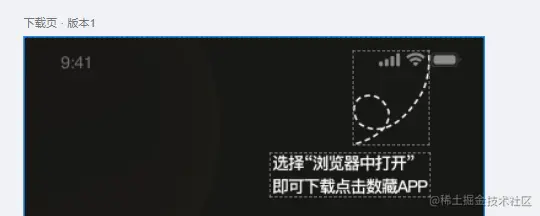
原理:点击下载 使遮罩显示或者隐藏 判断是否在微信内打开 如果是 弹出遮罩层
遮罩层css
.mask {
	position: fixed;
	top:0;
	left:0;
	z-index:999;
	width:100%;
	height:100vh;
	background:rgba(0,0,0,0.4);
	}
判断微信
btnAdd(){
const ua = window.navigator.userAgent.toLowerCase();
if (ua.match(/MicroMessenger/i) == 'micromessenger') {
this.maskbtn = true;
} else {
return false;
}
}
}
完整代码-uniapp
<view class="container" style="max-width:1800rpx; margin:0 auto;">
<my-nav-title title="下载APP" ></my-nav-title>
<u--image :src="downbj" bgColor="#000" radius="20" height="100vh" width="100%" mode="scaleToFill"></u--image>
<view class="btnbox" >
<button class="btn" throttleTime="3000" :show="show" @click="btnAdd" >立即下载</button>
</view>
<view v-show="maskbtn">
<view class="mask">
<view class="mask-right">
<img class="right1" :src="right1" alt="">
<img class="right2" :src="right2" alt="">
</view>
</view>
</view>
</view>
</template>
<script>
import right1 from '@/static/right1.png'
import right2 from '@/static/right2.png'
import downbj from '@/static/downbj.png'
export default {
data() {
return {
downbj:downbj,
right1:right1,
right2:right2,
show: true,
maskbtn:false
}
},
methods: {
 btnAdd(){
  // this.maskbtn = true
     const ua = window.navigator.userAgent.toLowerCase();
     if (ua.match(/MicroMessenger/i) == 'micromessenger') {
      this.maskbtn = true; // 微信中打开
      } else {
        return false; // 普通浏览器中打开
       }
	}
	}
}
</script>
<style>
.container {
position: relative;
}
.btnbox{
position: absolute;
width: 660rpx;
height: 200rpx;
bottom: 90rpx;
left: 50rpx;
}
.btn{
width: 650rpx;
height: 100rpx;
border-radius: 50rpx;
font-size: 35rpx;
line-height: 100rpx;
font-weight: bold;
background: linear-gradient(42deg, #F6DEA4, #EFC77A);
}
.mask {
position: fixed;
top:0;
left:0;
z-index:999;
width:100%;
height:100vh;
background:rgba(0,0,0,0.4);
}
.right1{
position: absolute;
right: 80rpx;
top: 50rpx;
}
.right2{
position: absolute;
right: 80rpx;
top: 200rpx;
}
</style>
完整代码-html
<!DOCTYPE html>
<html lang="en">
<head>
<meta charset="UTF-8">
<meta http-equiv="X-UA-Compatible" content="IE=edge">
<meta name="viewport" content="width=device-width, initial-scale=1.0">
<title>Document</title>
<div class="container" >
<div class="box">
<img src="./downbj.png" alt="" width="100%" height="100%">
<div class="btnbox">
<button class="btn" onclick="bthAdd()">下载</button>
</div>
<div class="maskbtn" id="maskbtn" style="visibility:hidden">
<div class="mask">
<div class="mask-right">
<img class="right1" src="./right1.png" alt="">
<img class="right2" src="./right2.png" alt="">
</div>
</div>
</div>
</div>
</head>
<style>
*{
margin: 0px;
padding: 0px;
}
.container {
position: relative;
}
.box{
position: relative;
width: 100%;
height: 100%;
margin: auto;
}
.btnbox{
position: absolute;
bottom:10%;
display:flex;
left: 50%;
transform: translate(-50%,-50%);
justify-content: center;
align-items: center;
}
.btn{
border-style:none;
width: 150px;
height: 50px;
border-radius: 50px;
padding: 10px 50px;
font-size: 35rpx;
line-height: 100rpx;
font-weight: bold;
text-align: center;
background: linear-gradient(42deg, #F6DEA4, #EFC77A);
}
.mask {
position: fixed;
top:0;
left:0;
z-index:999;
width:100%;
height:100vh;
background:rgba(0,0,0,0.4);
}
.right1{
position: absolute;
right: 80px;
top: 50px;
}
.right2{
position: absolute;
right: 80px;
top: 140px;
}
</style>
<body>
<script>
var bth = document.getElementsByClassName("btn");
function bthAdd () {
const ua = window.navigator.userAgent.toLowerCase();
if (ua.match(/MicroMessenger/i) == 'micromessenger') {
document.getElementById( "maskbtn" ).style.visibility = "visible";
} else {
alert('我是大帅逼')
}}
</script>
</body>
</html>