第一次用、直接上代码吧
成品
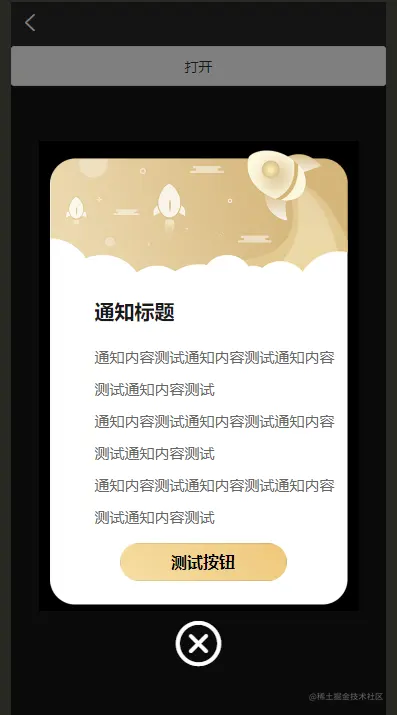
代码
<template>
<view>
<u-popup :show="show" :round="10" @close="close" @open="open" mode="center">
// 弹出层
<view class="box" >
<u--image :src="tct" height="946rpx" width="100%" mode="scaleToFill"></u--image>
</view>
<view class="tzbt" >
<text>{{tzbt}}</text>
</view>
<view class="nrbox">
<view class="nrtxt">
<text>{{tznr}}</text>
</view>
<view class="nrtxt">
<text>{{tznr}}</text>
</view>
<view class="nrtxt">
<text>{{tznr}}</text>
</view>
<view class="btn-box">
<button
class="btn"
@click="show = false"
shape="circle"
throttleTime="3000"
>测试按钮</button>
</view>
</view>
<view class="iconboxmax" style="background-color:rgb(10, 10, 10)">
<view class="icon-box" @click="show = false">
<uni-icons type="close" size="60" color="white"></uni-icons>
</view>
</view>
</u-popup>
<u-button @click="show = true">打开</u-button>
</view>
</template>
<script>
import tct from '@/static/tct.png'
export default {
data() {
return {
show: false,
tct:tct,
tzbt:'通知标题',
tznr:'通知内容测试通知内容测试通知内容测试通知内容测试'
}
},
methods: {
open() {
},
close() {
this.show = false
}
}
}
</script>
<style>
.box{
width: 640rpx;
height: 940rpx;
background-color: black;
}
.tzbt{
color: #1A1A1A;
position: absolute;
top: 325rpx;
left: 113rpx;
padding-right: 50rpx;
display: flex;
margin: auto;
font-weight: bold;
font-size: 40rpx;
line-height: 32rpx;
}
.nrbox{
width: 500rpx;
height: 350rpx;
margin: auto;
position: absolute;
top: 400rpx;
left: 113rpx;
color: #1A1A1A;
}
.nrtxt{
display: flex;
flex-wrap: wrap;
line-height: 32px;
font-weight: 400;
color: #666666;
font-size: 30rpx;
}
.nrbox{
width: 500rpx;
height: 350rpx;
margin: auto;
position: absolute;
top: 400rpx;
left: 113rpx;
color: #1A1A1A;
}
.nrtxt{
display: flex;
flex-wrap: wrap;
line-height: 32px;
font-weight: 400;
color: #666666;
font-size: 30rpx;
}
.icon-box{
display: flex;
justify-content: center;
align-items: center;
margin: 5rpx auto;
}
.btn-box{
position: absolute;
bottom: -130rpx;
left: 50rpx;
display: flex;
}
.btn{
width: 335rpx;
height: 77rpx;
line-height: 77rpx;
border-radius: 50rpx;
font-size: 33rpx;
font-weight: bold;
background: linear-gradient(42deg, #F6DEA4, #EFC77A);
}
</style>