本文已参与「新人创作礼」活动,一起开启掘金创作之路。
需求描述:
我们需要使用 Flume 采集端口为 26001 的 socket 数据,将数据注入 Kafka 的同时,将数据备份到 HDFS 的 /user/test/flumebackup 目录下。
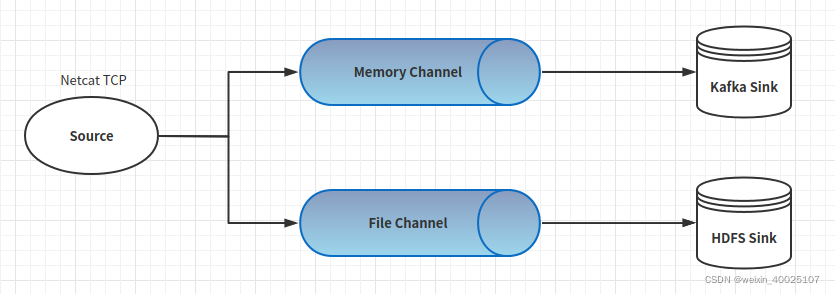
Flume配置文件:
# Name the components on this agent
agent.sources = s1
agent.sinks = k1 k2
agent.channels = c1 c2
# Describe/configure the source
agent.sources.s1.type = netcat
agent.sources.s1.bind = localhost
agent.sources.s1.port = 26001
# Describe the sink1
agent.sinks.k1.type = org.apache.flume.sink.kafka.KafkaSink
agent.sinks.k1.kafka.topic = order
agent.sinks.k1.kafka.bootstrap.servers = master:9092
# Describe the sink2
agent.sinks.k2.type = hdfs
agent.sinks.k2.hdfs.path = /user/test/flumebackup/
# channel1
agent.channels.c1.type = memory
agent.channels.c1.capacity = 1000
agent.channels.c1.transactionCapacity = 100
# channel2
agent.channels.c2.type = file
agent.channels.c2.checkpointDir = /opt/apache-flume-1.7.0-bin/flumeCheckpoint
agent.channels.c2.capacity = 1000
agent.channels.c2.transactionCapacity = 100
# Bind the source and sink to the channel
agent.sources.s1.channels = c1 c2
agent.sinks.k1.channel = c1
agent.sinks.k2.channel = c2
启动Flume
./bin/flume-ng agent -n agent -c conf/ -f conf/conf-file2
查看HDFS 和 Kafka 中的数据
# HDFS
$ hdfs dfs -ls /user/test/flumebackup
# Kafka
$ ./bin/kafka-console-consumer.sh --topic order --bootstrap-server master:9092