虚拟列表 + 瀑布流解决方案
效果
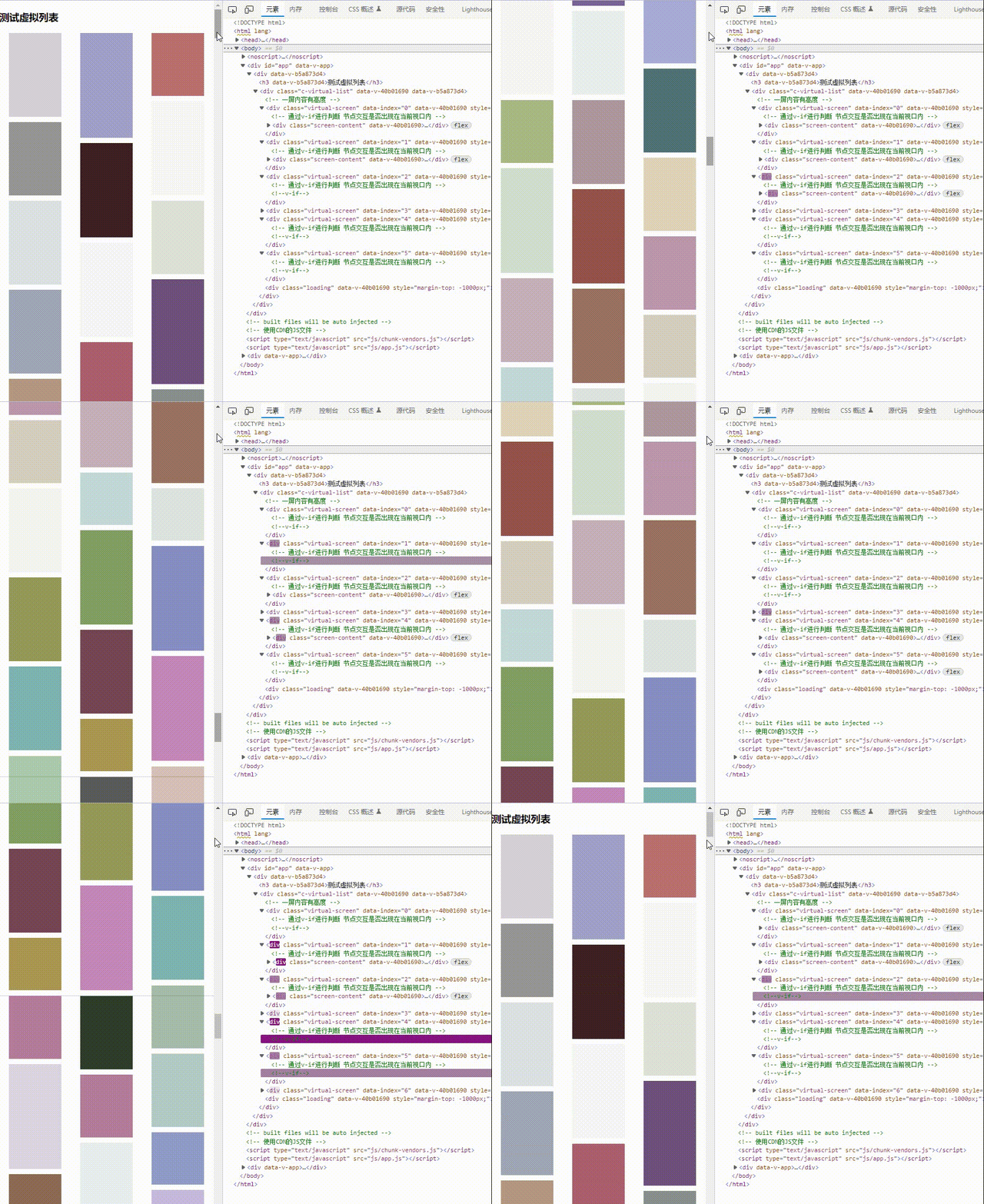
属性
| 参数 | 说明 | 类型 | 可选值 | 默认值 |
|---|
| size | 一次性添加的数据 | number | - | 50 |
| column | 列数 | number | - | 1 |
| marginBottom | 每项底边距 | number | - | 0 |
| loading | 数据加载状态 | boolean | - | false |
| marginTop | 距离底部多少开始拉取数据 | number | - | 1000 |
| data | 需要进行分裂的数据,{height:300},一定要含有高度字段,防止加载图片文件缓慢计算不准确 | array | - | {height:300} |
方法
| 事件名称 | 说明 | 回调参数 |
|---|
| fetchData | 滚动到指定位置通知加载数据 | - |
组件内容
<template>
<div class="c-virtual-list">
<div
class="virtual-screen"
v-for="(screen, index) in list"
:key="index"
:data-index="index"
:style="{ height: screen.height + 'px' }"
>
<div class="screen-content" v-if="computeShow(index)">
<div
class="column"
v-for="(column, cIndex) in screen.columns"
:key="cIndex"
:style="{
marginTop:
index > 0 ? `-${list[index - 1].heightOffset[cIndex]}px` : '0',
}"
>
<slot :data="column" :index="index"></slot>
</div>
</div>
</div>
<div class="loading" :style="{ top: -marginTop + 'px' }">loading</div>
</div>
</template>
<script setup>
import {
defineProps,
defineEmits,
nextTick,
onBeforeUnmount,
onMounted,
reactive,
watch,
} from "vue";
const props = defineProps({
size: {
type: Number,
require: true,
default: 50,
},
column: {
type: Number,
default: 1,
},
marginBottom: {
type: Number,
default: 0,
},
loading: {
type: Boolean,
default: false,
},
marginTop: {
type: Number,
default: 1000,
},
data: {
type: Array,
default: () => [],
},
});
const list = reactive([
]);
const item = {
height: 300,
color: "",
};
const showList = reactive([-1, 0, 1]);
const emits = defineEmits(["update:loading", "fetchData"]);
onMounted(() => {
createNodeObserve(".loading", () => {
console.log("去加载数据");
emits("fetchData");
});
});
watch(props.data, (newData, preDate) => {
divisionData(newData);
nextTick(() => {
createNodeObserve(".virtual-screen", (index) => {
Object.assign(showList, [index - 1, index, index + 1]);
});
});
});
let ob;
const createNodeObserve = (element, callback) => {
ob = new IntersectionObserver((entries) => {
if (!entries[0].isIntersecting) return;
let showIndex = ~~entries[0].target.dataset.index;
callback(showIndex);
});
document.body.querySelectorAll(element).forEach((item) => {
ob.observe(item);
});
};
onBeforeUnmount(() => {
ob && ob.disconnect();
});
const computeShow = (index) => {
return showList.findIndex((item) => item === index) > -1 ? true : false;
};
const divisionData = (data) => {
let columns = [];
let columnsHeight = [];
let tempHeights = [];
for (let i = 0; i < props.column; i++) {
columns.push([]);
columnsHeight.push(0);
tempHeights.push(0);
}
let input = 0;
let maxOffset = 0;
let maxHeight = 0;
let heightOffset = [];
let nextSortInput = [];
if (list.length > 0) {
let sortInput = list[list.length - 1].nextSortInput;
if (props.column > 1) {
input = sortInput.length - 1;
list[list.length - 1].heightOffset.forEach((offsetH, index) => {
tempHeights[index] = -offsetH;
});
sortInput.forEach((sort, index) => {
columns[sort].push(data[index]);
columnsHeight[index] += data[index].height + props.marginBottom;
});
}
}
for (let dIndex = input; dIndex < data.length; dIndex++) {
const position = computeInput(columnsHeight);
columns[position].push(data[dIndex]);
columnsHeight = computeHeight(columns, columnsHeight, tempHeights);
}
maxHeight = Math.max(...columnsHeight);
nextSortInput = computeNextSortPosition(columnsHeight);
heightOffset = computeOffset(columnsHeight);
function computeInput(heights) {
let min = Math.min(...heights);
return heights.findIndex((item) => item === min) === -1
? 0
: heights.findIndex((item) => item === min);
}
function computeHeight(cols, heights, tHeights) {
let hs = JSON.parse(JSON.stringify(heights));
cols.forEach((col, index) => {
hs[index] = tHeights[index];
col.forEach((item) => {
hs[index] += item.height + props.marginBottom;
});
});
return hs;
}
function computeNextSortPosition(heights) {
let hs = JSON.parse(JSON.stringify(heights));
hs = hs.sort((a, b) => a - b);
let result = [];
heights.forEach((item, index) => {
result.push(hs.findIndex((h) => h === item));
});
result = arrayAddOne(result);
return result;
}
function computeOffset(heights) {
const max = Math.max(...heights);
const result = [];
heights.forEach((item, index) => {
result[index] = max - item;
});
return result;
}
let screen = {
show: false,
height: maxHeight,
heights: columnsHeight,
heightOffset,
nextSortInput,
columns,
};
list.push(screen);
};
function arrayAddOne(arr) {
const result = [...arr];
result.forEach((item, index) => {
for (let i = index + 1; i < result.length; i++) {
if (item === arr[i]) {
result[i]++;
}
}
});
return result;
}
const sleep = (timer = 10) => {
return new Promise((resolve) => {
setTimeout(() => resolve(), timer);
});
};
const randomColor = (min = 0, max = 150) => {
const r = Math.round(Math.random() * (max - min)) + min;
const g = Math.round(Math.random() * (max - min)) + min;
const b = Math.round(Math.random() * (max - min)) + min;
const a = Math.floor(Math.random() * 100) / 100;
return `rgba(${r},${g},${b},${a})`;
};
const randomHeight = (rang = [100, 120, 140, 160, 180, 200]) => {
return rang[parseInt(Math.random() * rang.length)];
};
</script>
<style scoped>
.btn {
position: fixed;
top: 0;
left: 0;
}
.c-virtual-list {
width: 100%;
height: 100%;
}
.virtual-screen {
border-bottom: 1px solid #ccc;
}
.screen-content {
display: flex;
justify-content: space-around;
}
.column {
display: flex;
flex-direction: column;
}
.column .item {
flex-shrink: 0;
width: 300px;
}
.loading {
position: relative;
z-index: -1;
opacity: 0;
text-align: center;
}
</style>
组件使用
<template>
<div>
<h3>测试虚拟列表</h3>
<VirtualList
:data="listData"
:size="50"
:column="3"
:marginBottom="10"
@fetchData="generateData(50)"
>
<template v-slot="column">
<div
v-for="(item, iIndex) in column.data"
class="item"
:key="iIndex"
:style="{
height: item.height + 'px',
background: item.color,
marginBottom: 10 + 'px',
}"
></div>
</template>
</VirtualList>
</div>
</template>
<script setup>
import { onBeforeMount, reactive, ref } from "vue";
import VirtualList from "@/components/VirtualList";
let loading = ref(false);
const item = {
height: 300,
color: "",
};
const listData = reactive([]);
const generateData = async (num) => {
const data = [];
if (!loading.value) {
loading.value = true;
await sleep(500);
for (let i = 0; i < num; i++) {
item.color = randomColor();
item.height = randomHeight();
data.push(JSON.parse(JSON.stringify(item)));
}
Object.assign(listData, data);
loading.value = false;
}
};
onBeforeMount(() => {
generateData(50);
});
const sleep = (timer = 10) => {
return new Promise((resolve) => {
setTimeout(() => resolve(), timer);
});
};
const randomColor = (min = 0, max = 150) => {
const r = Math.round(Math.random() * (max - min)) + min;
const g = Math.round(Math.random() * (max - min)) + min;
const b = Math.round(Math.random() * (max - min)) + min;
const a = Math.floor(Math.random() * 100) / 100;
return `rgba(${r},${g},${b},${a})`;
};
const randomHeight = (rang = [100, 120, 140, 160, 180, 200]) => {
return rang[parseInt(Math.random() * rang.length)];
};
</script>
<style scoped>
.item {
flex-shrink: 0;
width: 300px;
}
</style>
分析
IntersectionObserver判断元素节点是否在可视区域之内
let ob;
const createNodeObserve = (element, callback) => {
ob = new IntersectionObserver((entries) => {
if (!entries[0].isIntersecting) return;
let showIndex = ~~entries[0].target.dataset.index;
callback(showIndex);
});
document.body.querySelectorAll(element).forEach((item) => {
ob.observe(item);
});
};
onBeforeUnmount(() => {
ob && ob.disconnect();
});
{
show: false,
height: "",
heights: [],
heightOffset: [],
columns:[[],[],[]],
}
function computeHeight(cols, heights, tHeights) {
let hs = JSON.parse(JSON.stringify(heights));
cols.forEach((col, index) => {
hs[index] = tHeights[index];
col.forEach((item) => {
hs[index] += item.height + props.marginBottom;
});
});
return hs;
}
function computeOffset(heights) {
const max = Math.max(...heights);
const result = [];
heights.forEach((item, index) => {
result[index] = max - item;
});
return result;
}
function computeNextSortPosition(heights) {
let hs = JSON.parse(JSON.stringify(heights));
hs = hs.sort((a, b) => a - b);
let result = [];
heights.forEach((item, index) => {
result.push(hs.findIndex((h) => h === item));
});
result = arrayAddOne(result);
return result;
}
function computeInput(heights) {
let min = Math.min(...heights);
return heights.findIndex((item) => item === min) === -1
? 0
: heights.findIndex((item) => item === min);
}
未解决问题
- 兼容性问题
IntersectionObserver
- 依赖height,当动态加载图片时高度无法计算准确