

本文已参与「新人创作礼」活动,一起开启掘金创作之路。
准备工作:
- 一个facebook账号
- 一个有域名服务器,配置了https 拥有以上条件后就可以开始啦~。
首先注册facebook开发者。 facebook开发文档,可以对照文档获取api,然后创建应用。
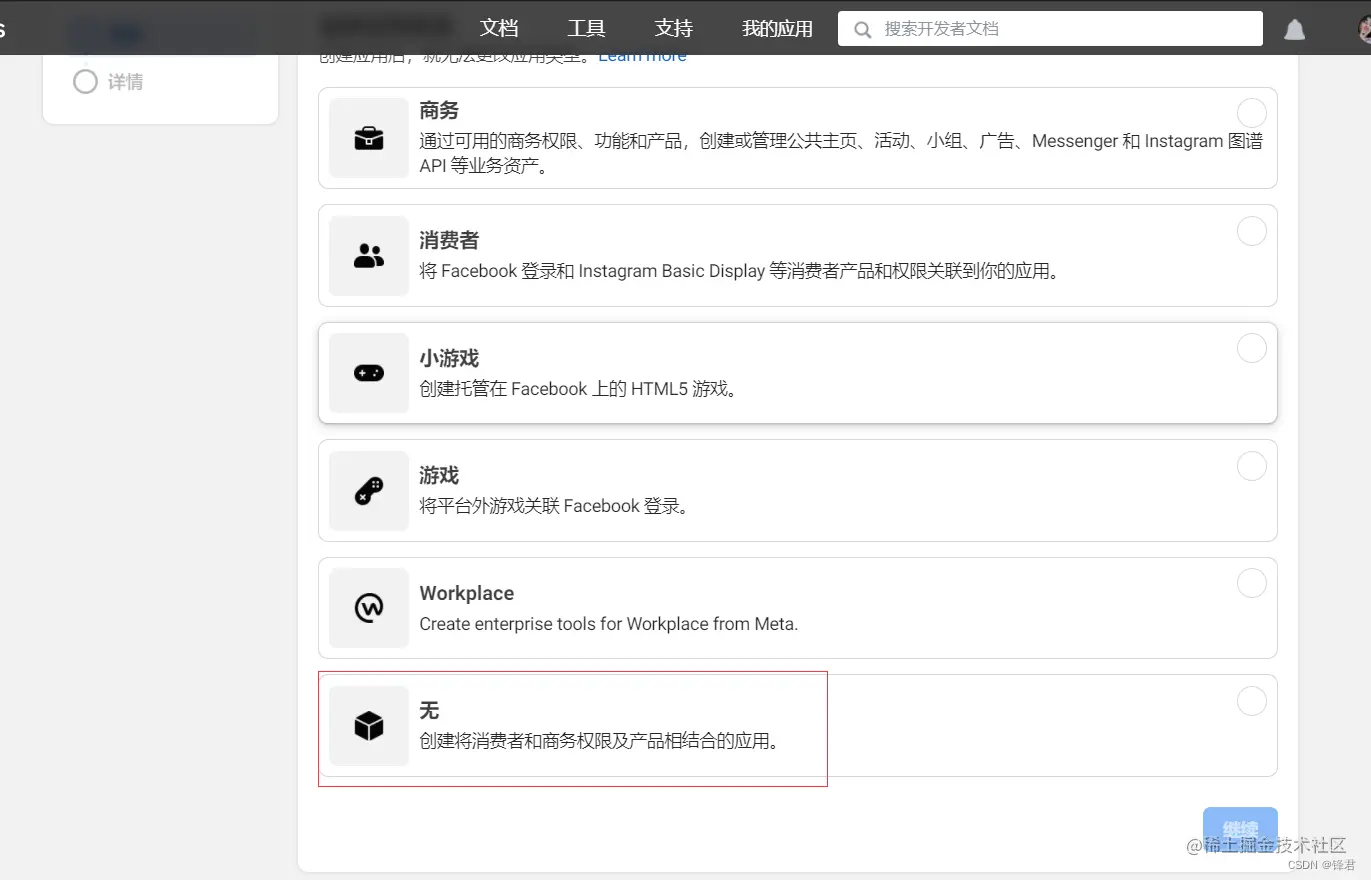
添加facebook登录,并且配置它。
PS:回调地址需要是https的。
demo
这个demo比较简单,通过登录返回用户的accToken以及userId等信息。具体api可参见官网开发文档。注意Facebook已取消了手机端嵌入式web端登录。
<!DOCTYPE html>
<html lang="en">

<head>
    <meta charset="UTF-8">
    <meta http-equiv="X-UA-Compatible" content="IE=edge">
    <meta name="viewport" content="width=device-width, initial-scale=1.0">
    <title>faceebook 登录</title>
</head>

<body>
    <script>
        window.fbAsyncInit = function () {
            FB.init({
            	// 替换成自己的appId
                appId: '359xxxxxx8162',
                cookie: true,
                xfbml: true,
                version: 'v13.0'
            });
            FB.AppEvents.logPageView();
            // 初始化检查是否已经登录
            FB.getLoginStatus(function (response) {   // Called after the JS SDK has been initialized.
                statusChangeCallback(response);        // Returns the login status.
            });
        };
        (function (d, s, id) {
            var js, fjs = d.getElementsByTagName(s)[0];
            if (d.getElementById(id)) { return; }
            js = d.createElement(s); js.id = id;
            js.src = "https://connect.facebook.net/en_US/sdk.js";
            fjs.parentNode.insertBefore(js, fjs);
        }(document, 'script', 'facebook-jssdk'));

        function statusChangeCallback(response) {  // Called with the results from FB.getLoginStatus().
            console.log('statusChangeCallback');
            console.log(response);                   // The current login status of the person.
            if (response.status === 'connected') {   // Logged into your webpage and Facebook.
                testAPI();
                alert("登录成功")
            } else {                                 // Not logged into your webpage or we are unable to tell.
                document.getElementById('status').innerHTML = '请登录'
            }
        }


        function checkLoginState() {               // Called when a person is finished with the Login Button.

            // 跳出登录页面
            // FB.getLoginStatus(function (response) {   // See the onlogin handler
            //     statusChangeCallback(response);
            // });
            FB.login(function (response) {

                statusChangeCallback(response);
            })
        }


        //FB.getLoginStatus(function (response) {   // Called after the JS SDK has been initialized.
            //statusChangeCallback(response);        // Returns the login status.
        //});

		//测试一个接口, 使用FB.api请求的话,他会自带userID和accessToken
		// 我们也可以自己去 请求接口 但是要带上以上参数,详情看文档
        function testAPI() {                      // Testing Graph API after login.  See statusChangeCallback() for when this call is made.
            console.log('Welcome!  Fetching your information.... ');
            FB.api('/me', function (response) {
                console.log(response)
                console.log('Successful login for: ' + response.name);
                document.getElementById('status').innerHTML =
                    '感谢登录, ' + response.name + '!';
                document.querySelector("#logout").style.display = 'inline-block'
            });
        }
		// 退出登录
        function logout() {
            FB.logout(function (response) {
                console.log(response) // response.status =  unknown
                if (response.status == 'unknown') {
                    alert("退出成功")
                    document.querySelector("#logout").style.display = 'none'
                }

            })
        }
    </script>
    <!-- <script async defer crossorigin="anonymous" src="https://connect.facebook.net/en_US/sdk.js"></script> -->
    <!-- The JS SDK Login Button -->

    <fb:login-button scope="public_profile,email" onlogin="checkLoginState();">
    </fb:login-button>

    <div id="status"></div>

    <button id="logout" onclick="logout()" style="display: none;">退出</button>
</body>

</html>
效果

