一、分库分表的方式
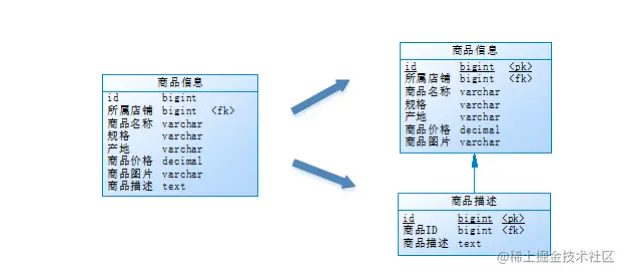
1.垂直分表
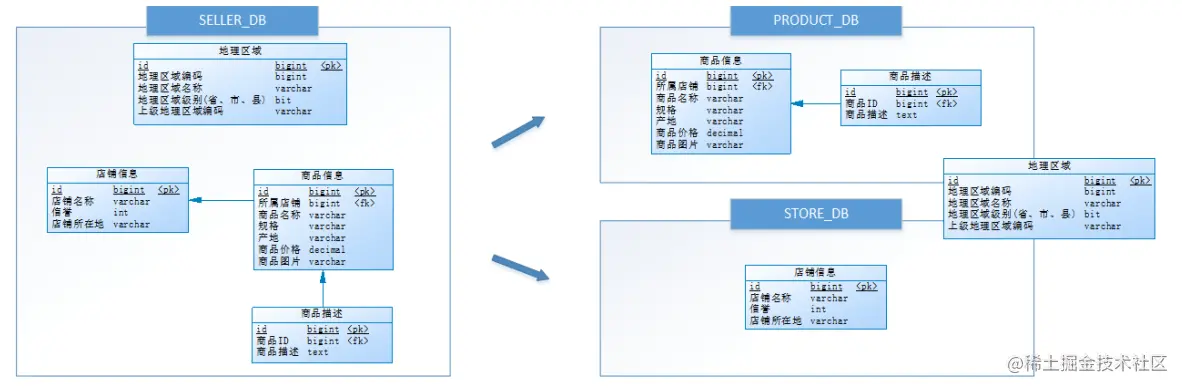
2.垂直分库
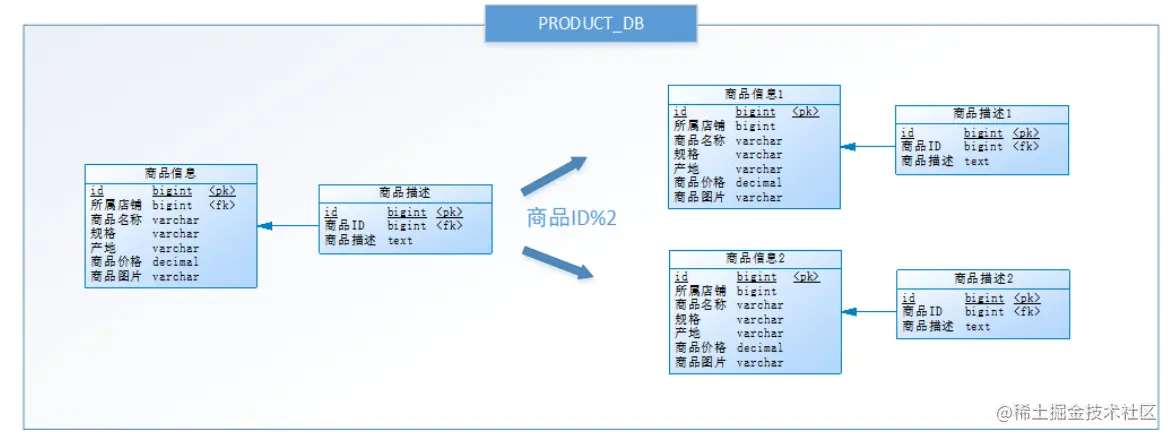
3.水平分表
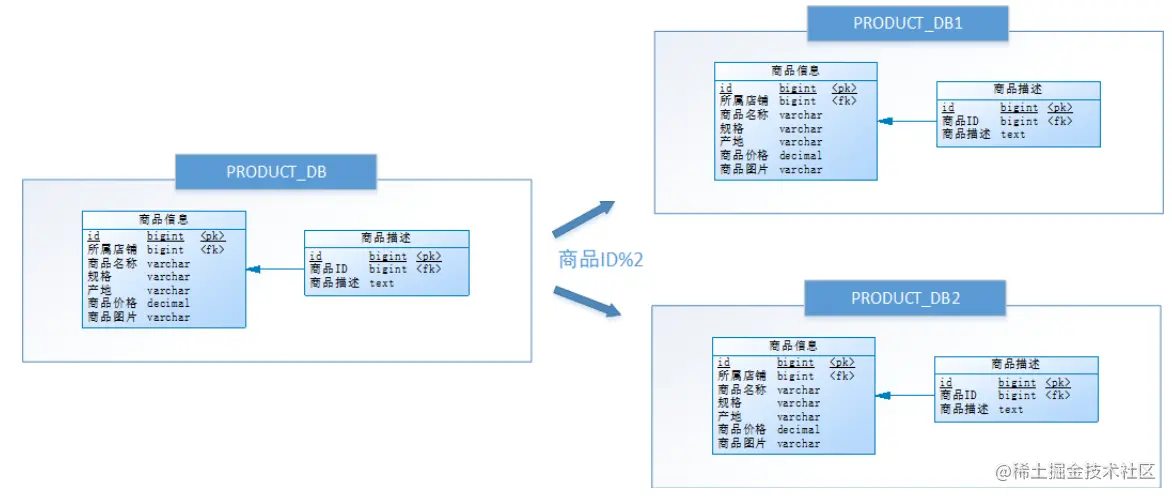
4.水平分库
二、Sharding-JDBC水平分表
spring.main.allow‐bean‐definition‐overriding=true
# 以下是分片规则配置
# 定义数据源
spring.shardingsphere.datasource.names=m1
spring.shardingsphere.datasource.m1.type=com.zaxxer.hikari.HikariDataSource
spring.shardingsphere.datasource.m1.driver-class-name=com.mysql.cj.jdbc.Driver
spring.shardingsphere.datasource.m1.jdbcUrl=jdbc:mysql://192.168.0.158:3306/order_db
spring.shardingsphere.datasource.m1.username=root
spring.shardingsphere.datasource.m1.password=123456

# 指定t_order表的数据分布情况,配置数据节点
spring.shardingsphere.sharding.tables.t_order.actual‐data‐nodes=m1.t_order_$‐>{1..2}

# 指定t_order表的主键生成策略为SNOWFLAKE
spring.shardingsphere.sharding.tables.t_order.key‐generator.column=order_id
spring.shardingsphere.sharding.tables.t_order.key‐generator.type=SNOWFLAKE

# 指定t_order表的分片策略,分片策略包括分片键和分片算法
spring.shardingsphere.sharding.tables.t_order.table‐strategy.inline.sharding‐column=order_id
spring.shardingsphere.sharding.tables.t_order.table‐strategy.inline.algorithm‐expression=t_order_$‐>{order_id % 2 + 1}
三、Sharding-JDBC水平分库
# 定义多个数据源
spring.shardingsphere.datasource.names=m1,m2
#数据源1
spring.shardingsphere.datasource.m1.type=com.zaxxer.hikari.HikariDataSource
spring.shardingsphere.datasource.m1.driver-class-name=com.mysql.cj.jdbc.Driver
spring.shardingsphere.datasource.m1.jdbcUrl=jdbc:mysql://192.168.0.158:3306/order_db_1
spring.shardingsphere.datasource.m1.username=root
spring.shardingsphere.datasource.m1.password=123456
#数据源2
spring.shardingsphere.datasource.m2.type=com.zaxxer.hikari.HikariDataSource
spring.shardingsphere.datasource.m2.driver-class-name=com.mysql.cj.jdbc.Driver
spring.shardingsphere.datasource.m2.jdbcUrl=jdbc:mysql://192.168.0.158:3306/order_db_2
spring.shardingsphere.datasource.m2.username=root
spring.shardingsphere.datasource.m2.password=123456

# 分库策略,以user_id为分片键,分片策略为user_id % 2 + 1,user_id为偶数操作m1数据源,否则操作m2。
spring.shardingsphere.sharding.tables.t_order.database‐strategy.inline.sharding‐column=user_id
spring.shardingsphere.sharding.tables.t_order.database‐strategy.inline.algorithm‐expression=m$‐>{user_id % 2 + 1}
四、Sharding-JDBC垂直分库
# 定义多个数据源
spring.shardingsphere.datasource.names=m0,m1,m2
#数据源1
spring.shardingsphere.datasource.m1.type=com.zaxxer.hikari.HikariDataSource
spring.shardingsphere.datasource.m1.driver-class-name=com.mysql.cj.jdbc.Driver
spring.shardingsphere.datasource.m1.jdbcUrl=jdbc:mysql://192.168.0.158:3306/order_db_1
spring.shardingsphere.datasource.m1.username=root
spring.shardingsphere.datasource.m1.password=123456
#数据源2
spring.shardingsphere.datasource.m2.type=com.zaxxer.hikari.HikariDataSource
spring.shardingsphere.datasource.m2.driver-class-name=com.mysql.cj.jdbc.Driver
spring.shardingsphere.datasource.m2.jdbcUrl=jdbc:mysql://192.168.0.158:3306/order_db_2
spring.shardingsphere.datasource.m2.username=root
spring.shardingsphere.datasource.m2.password=123456
#数据源3
spring.shardingsphere.datasource.m0.type=com.zaxxer.hikari.HikariDataSource
spring.shardingsphere.datasource.m0.driver-class-name=com.mysql.cj.jdbc.Driver
spring.shardingsphere.datasource.m0.jdbcUrl=jdbc:mysql://192.168.0.158:3306/user_db
spring.shardingsphere.datasource.m0.username=root
spring.shardingsphere.datasource.m0.password=123456

# t_user分表策略,固定分配至m0的t_user真实表
spring.shardingsphere.sharding.tables.t_user.actual‐data‐nodes=m$‐>{0}.t_user
spring.shardingsphere.sharding.tables.t_user.table‐strategy.inline.sharding‐column=user_id
spring.shardingsphere.sharding.tables.t_user.table‐strategy.inline.algorithm‐expression=t_user
五、Sharding-JDBC公共表
指定t_dict为公共表
spring.shardingsphere.sharding.broadcast‐tables=t_dict
六、Sharding-JDBC读写分离
增加数据源s0,使用上面主从同步配置的从库。
# 定义多个数据源
spring.shardingsphere.datasource.names=m0,m1,m2,s0
#数据源1
spring.shardingsphere.datasource.m1.type=com.zaxxer.hikari.HikariDataSource
spring.shardingsphere.datasource.m1.driver-class-name=com.mysql.cj.jdbc.Driver
spring.shardingsphere.datasource.m1.jdbcUrl=jdbc:mysql://192.168.0.158:3306/order_db_1
spring.shardingsphere.datasource.m1.username=root
spring.shardingsphere.datasource.m1.password=123456
#数据源2
spring.shardingsphere.datasource.m2.type=com.zaxxer.hikari.HikariDataSource
spring.shardingsphere.datasource.m2.driver-class-name=com.mysql.cj.jdbc.Driver
spring.shardingsphere.datasource.m2.jdbcUrl=jdbc:mysql://192.168.0.158:3306/order_db_2
spring.shardingsphere.datasource.m2.username=root
spring.shardingsphere.datasource.m2.password=123456
#数据源3
spring.shardingsphere.datasource.m0.type=com.zaxxer.hikari.HikariDataSource
spring.shardingsphere.datasource.m0.driver-class-name=com.mysql.cj.jdbc.Driver
spring.shardingsphere.datasource.m0.jdbcUrl=jdbc:mysql://192.168.0.158:3306/user_db
spring.shardingsphere.datasource.m0.username=root
spring.shardingsphere.datasource.m0.password=123456
#数据源4
spring.shardingsphere.datasource.s0.type=com.zaxxer.hikari.HikariDataSource
spring.shardingsphere.datasource.s0.driver-class-name=com.mysql.cj.jdbc.Driver
spring.shardingsphere.datasource.s0.jdbcUrl=jdbc:mysql://192.168.0.158:3307/user_db
spring.shardingsphere.datasource.s0.username=root
spring.shardingsphere.datasource.s0.password=123456

# 主库从库逻辑数据源定义 ms0为user_db
spring.shardingsphere.sharding.master‐slave‐rules.ms0.master‐data‐source‐name=m0
spring.shardingsphere.sharding.master‐slave‐rules.ms0.slave‐data‐source‐names=s0

# t_user分表策略,固定分配至ms0的t_user真实表
spring.shardingsphere.sharding.tables.t_user.actual‐data‐nodes=ms0.t_user
七、案例
spring.main.allow-bean-definition-overriding=true

spring.shardingsphere.datasource.names = m0,m1,m2,s0,s1,s2
#数据源的配置
spring.shardingsphere.datasource.m0.type=com.zaxxer.hikari.HikariDataSource
spring.shardingsphere.datasource.m0.driver-class-name=com.mysql.cj.jdbc.Driver
spring.shardingsphere.datasource.m0.jdbcUrl=jdbc:mysql://192.168.0.158:3306/store_db
spring.shardingsphere.datasource.m0.username=root
spring.shardingsphere.datasource.m0.password=123456

spring.shardingsphere.datasource.m1.type=com.zaxxer.hikari.HikariDataSource
spring.shardingsphere.datasource.m1.driver-class-name=com.mysql.cj.jdbc.Driver
spring.shardingsphere.datasource.m1.jdbcUrl=jdbc:mysql://192.168.0.158:3306/product_db_1
spring.shardingsphere.datasource.m1.username=root
spring.shardingsphere.datasource.m1.password=123456

spring.shardingsphere.datasource.m2.type=com.zaxxer.hikari.HikariDataSource
spring.shardingsphere.datasource.m2.driver-class-name=com.mysql.cj.jdbc.Driver
spring.shardingsphere.datasource.m2.jdbcUrl=jdbc:mysql://192.168.0.158:3306/product_db_2
spring.shardingsphere.datasource.m2.username=root
spring.shardingsphere.datasource.m2.password=123456

spring.shardingsphere.datasource.s0.type=com.zaxxer.hikari.HikariDataSource
spring.shardingsphere.datasource.s0.driver-class-name=com.mysql.cj.jdbc.Driver
spring.shardingsphere.datasource.s0.jdbcUrl=jdbc:mysql://192.168.0.158:3307/store_db
spring.shardingsphere.datasource.s0.username=root
spring.shardingsphere.datasource.s0.password=123456

spring.shardingsphere.datasource.s1.type=com.zaxxer.hikari.HikariDataSource
spring.shardingsphere.datasource.s1.driver-class-name=com.mysql.cj.jdbc.Driver
spring.shardingsphere.datasource.s1.jdbcUrl=jdbc:mysql://192.168.0.158:3307/product_db_1
spring.shardingsphere.datasource.s1.username=root
spring.shardingsphere.datasource.s1.password=123456

spring.shardingsphere.datasource.s2.type=com.zaxxer.hikari.HikariDataSource
spring.shardingsphere.datasource.s2.driver-class-name=com.mysql.cj.jdbc.Driver
spring.shardingsphere.datasource.s2.jdbcUrl=jdbc:mysql://192.168.0.158:3307/product_db_2
spring.shardingsphere.datasource.s2.username=root
spring.shardingsphere.datasource.s2.password=123456

#主从数据库的配置
spring.shardingsphere.sharding.master-slave-rules.ms0.master-data-source-name=m0
spring.shardingsphere.sharding.master-slave-rules.ms0.slave-data-source-names=s0

spring.shardingsphere.sharding.master-slave-rules.ms1.master-data-source-name=m1
spring.shardingsphere.sharding.master-slave-rules.ms1.slave-data-source-names=s1

spring.shardingsphere.sharding.master-slave-rules.ms2.master-data-source-name=m2
spring.shardingsphere.sharding.master-slave-rules.ms2.slave-data-source-names=s2

# 默认分库策略,以store_info_id为分片键,分片策略为store_info_id % 2 + 1,也就是store_info_id为双数的 数据进入ms1,为单数的进入ms2
spring.shardingsphere.sharding.default-database-strategy.inline.sharding-column=store_info_id
spring.shardingsphere.sharding.default-database-strategy.inline.algorithm-expression=ms$->{store_info_id % 2 + 1}

# store_info分表策略,固定分配至ms0的store_info真实表
spring.shardingsphere.sharding.tables.store_info.actual-data-nodes=ms$->{0}.store_info
spring.shardingsphere.sharding.tables.store_info.table-strategy.inline.sharding-column=id
spring.shardingsphere.sharding.tables.store_info.table-strategy.inline.algorithm-expression=store_info

# product_info分表策略,分布在ms1,ms2的product_info_1 product_info_2表 ,分片策略为product_info_id % 2 + 1,
# product_info_id生成为雪花算法,为双数的数据进入product_info_1表,为单数的进入product_info_2 表spri
spring.shardingsphere.sharding.tables.product_info.key-generator.column=product_info_id
spring.shardingsphere.sharding.tables.product_info.key-generator.type=SNOWFLAKE
spring.shardingsphere.sharding.tables.product_info.actual-data-nodes=ms$->{1..2}.product_info_$->{1..2}
spring.shardingsphere.sharding.tables.product_info.table-strategy.inline.sharding-column=product_info_id
spring.shardingsphere.sharding.tables.product_info.table-strategy.inline.algorithm-expression=product_info_$->{product_info_id % 2 + 1}

# product_descript分表策略,分布在ms1,ms2的product_descript_1 product_descript_2表 ,
# 分片策略为 product_info_id % 2 + 1,id生成为雪花算法,product_info_id为双数的数据进入product_descript_1表,为单 数的进入product_descript_2表
spring.shardingsphere.sharding.tables.product_descript.key-generator.column=id
spring.shardingsphere.sharding.tables.product_descript.key-generator.type=SNOWFLAKE
spring.shardingsphere.sharding.tables.product_descript.actual-data-nodes=ms$->{1..2}.product_descript_$->{1..2}
spring.shardingsphere.sharding.tables.product_descript.table-strategy.inline.sharding-column=product_info_id
spring.shardingsphere.sharding.tables.product_descript.table-strategy.inline.algorithm-expression=product_descript_$->{product_info_id % 2 + 1}

# 设置product_info,product_descript为绑定表
spring.shardingsphere.sharding.binding-tables=product_info,product_descript
# 设置region为广播表(公共表),每次更新操作会发送至所有数据源
spring.shardingsphere.sharding.broadcast-tables=region