1、事件函数
    void Awake()
    {
        Debug.Log("Awake");
    }
    void OnEnable()
    {
        Debug.Log("Enable");
    }
    void Start ()
    {
        Debug.Log("Start");
    }
    void FixedUpdate()
    {
        Debug.Log("FixedUpdate");
    }

    void Update()
    {
        Debug.Log("Update");
    }
    void LateUpdate()
    {
        Debug.Log("LateUpdate");
    }
    void OnApplicationPause()
    {
        Debug.Log("OnApplicationPause");
    }
    void OnDisable()
    {
        Debug.Log("Disable");
    }
    void OnApplicatoinQuit()
    {
        Debug.Log("OnApplicationQuit");
    }
    void Reset()
    {
        Debug.Log("Reset");
    }
    void OnDestroy()
    {
        Debug.Log("OnDestroy");
    }
2、Time类
public Transform cube
public int runCount = 10000
void Start()
{
//Debug.Log("Time.deltaTime:" + Time.deltaTime)
//Debug.Log("Time.fixedDeltaTime:" + Time.fixedDeltaTime)
//Debug.Log("Time.fixedTime:" + Time.fixedTime)
//Debug.Log("Time.frameCount:" + Time.frameCount)
//Debug.Log("Time.realtimeSinceStartup:" + Time.realtimeSinceStartup)
//Debug.Log("Time.smoothDeltaTime:" + Time.smoothDeltaTime)
//Debug.Log("Time.time:" + Time.time)
//Debug.Log("Time.timeScale:" + Time.timeScale)
//Debug.Log("Time.timeSinceLevelLoad:" + Time.timeSinceLevelLoad)
//Debug.Log("Time.unscaledTime:" + Time.unscaledTime)
for (int i = 0
{
Method0()
}
float time1 = Time.realtimeSinceStartup
for (int i = 0
{
Method1()
}
float time2 = Time.realtimeSinceStartup
Debug.Log(time2 - time1)
float time3 = Time.realtimeSinceStartup
for (int i = 0
{
Method2()
}
float time4 = Time.realtimeSinceStartup
Debug.Log(time4 - time3)
}
void Update ()
{
//Debug.Log("Time.deltaTime:" + Time.deltaTime)
//Debug.Log("Time.fixedDeltaTime:" + Time.fixedDeltaTime)
//Debug.Log("Time.fixedTime:" + Time.fixedTime)
//Debug.Log("Time.frameCount:" + Time.frameCount)
//Debug.Log("Time.realtimeSinceStartup:" + Time.realtimeSinceStartup)
//Debug.Log("Time.smoothDeltaTime:" + Time.smoothDeltaTime)
//Debug.Log("Time.time:" + Time.time)
//Debug.Log("Time.timeScale:" + Time.timeScale)
//Debug.Log("Time.timeSinceLevelLoad:" + Time.timeSinceLevelLoad)
//Debug.Log("Time.unscaledTime:" + Time.unscaledTime)
//cube.Translate(Vector3.forward *Time.deltaTime*3 )
//Time.timeScale = 3f
}
void Method0()
{
}
void Method1()
{
int i = 2
i += 2
i += 2
}
void Method2()
{
int i = 2
i *= 2
i *= 2
}
3、GameObject
public GameObject go
void Start()
{
//1,第一种创建方法
//GameObject go = new GameObject("Cube")
//2,第二种
//根据prefab
//根据另外一个游戏物体
//GameObject.Instantiate(prefab)
//3,第三种 创建原始的几何体
//GameObject.CreatePrimitive(PrimitiveType.Plane)
//GameObject go = GameObject.CreatePrimitive(PrimitiveType.Cube)
//go.AddComponent<Rigidbody>()
//// go.AddComponent<API01EventFunction>()
//Debug.Log(go.activeInHierarchy)
//go.SetActive(false)
//Debug.Log(go.activeInHierarchy)
//Debug.Log(go.tag)
//Debug.Log(go.name)
//Debug.Log(go.GetComponent<Transform>().name)
//Light light = FindObjectOfType<Light>()
//light.enabled = false
//Transform[] ts= FindObjectsOfType<Transform>()
//foreach (Transform t in ts)
//{
// Debug.Log(t)
//}
//GameObject go = GameObject.Find("Main Camera")
//GameObject[] gos= GameObject.FindGameObjectsWithTag("MainCamera")
GameObject go = GameObject.FindGameObjectWithTag("Finish")
go.SetActive(false)
}
4、Massage
public GameObject target;
void Start()
{
target.SendMessageUpwards("Attack", null, SendMessageOptions.DontRequireReceiver);
}
    void Attack()
    {
        Debug.Log(this.gameObject + "正在进行攻击");
    }
5、GetComponent
    public GameObject target;
    void Start()
    {
        Transform cube = target.GetComponent<Transform>();
        Transform t = target.GetComponent<Transform>();
        Debug.Log(cube);
        Debug.Log(t);
        Debug.Log("---------------------------------");
        Transform[] cubes = target.GetComponents<Transform>();
        Debug.Log(cubes.Length);
        Debug.Log("---------------------------------");
        cubes = target.GetComponentsInChildren<Transform>();
        foreach (Transform c in cubes)
        {
            Debug.Log(c);
        }
        Debug.Log("---------------------------------");
        cubes = target.GetComponentsInParent<Transform>();
        foreach (Transform c in cubes)
        {
            Debug.Log(c);
        }
    }
6、MonoBehaviour
void Start()
{
Debug.Log(this.isActiveAndEnabled)
Debug.Log(this.enabled)
enabled = false
Debug.Log(name)
Debug.Log(tag)
Debug.Log(gameObject)
Debug.Log(transform)
}
7、Invoke
void Start()
{
InvokeRepeating("Attack", 4, 2);
CancelInvoke("Attack");
}
void Update()
{
bool res = IsInvoking("Attack");
print(res);
}
void Attack()
{
print("攻击目标");
}
8、Coroutine
public GameObject cube;
void Start()
{
}
private IEnumerator ie;
void Update()
{
if (Input.GetKeyDown(KeyCode.Space))
{
StartCoroutine("Fade");
}
if (Input.GetKeyDown(KeyCode.S))
{
StopCoroutine("Fade");
}
}
IEnumerator Fade()
{
for (; ; )
{
Color color = cube.GetComponent<MeshRenderer>().material.color;
Color newColor = Color.Lerp(color, Color.red, 0.02f);
cube.GetComponent<MeshRenderer>().material.color = newColor;
yield return new WaitForSeconds(0.02f);
if (Mathf.Abs(Color.red.g - newColor.g) <= 0.01f)
{
break;
}
}
}
IEnumerator ChangeColor()
{
print("hahaColor");
yield return new WaitForSeconds(3);
cube.GetComponent<MeshRenderer>().material.color = Color.blue;
print("hahaColor");
yield return null;
}
9、OnMouseEventFunction
    void OnMouseDown()
    {
        print("Down"+gameObject);
    }
    void OnMouseUp()
    {
        print("up" + gameObject);
    }
    void OnMouseDrag()
    {
        print("Drag" + gameObject);
    }
    void OnMouseEnter()
    {
        print("Enter");
    }
    void OnMouseExit()
    {
        print("Exit");
    }
    void OnMouseOver()
    {
        print("Over");
    }
    void OnMouseUpAsButton()
    {
        print("Button" + gameObject);
    }
10、Mathf
public Transform cube
public int a = 8
public int b = 20
public float t = 0
public float speed = 3
// Use this for initialization
void Start()
{
//print(Mathf.Deg2Rad)
//print(Mathf.Rad2Deg)
//print(Mathf.Infinity)
//print(Mathf.NegativeInfinity)
//print(Mathf.PI)
//print(Mathf.Epsilon)
//Debug.Log(Mathf.Floor(10.0F))
//Debug.Log(Mathf.Floor(10.2F))
//Debug.Log(Mathf.Floor(10.7F))
//Debug.Log(Mathf.Floor(-10.0F))
//Debug.Log(Mathf.Floor(-10.2F))
//Debug.Log(Mathf.Floor(-10.7F))
// 2 4 8 16 32
//print(Mathf.ClosestPowerOfTwo(2))
//print(Mathf.ClosestPowerOfTwo(3))
//print(Mathf.ClosestPowerOfTwo(4))
//print(Mathf.ClosestPowerOfTwo(5))
//print(Mathf.ClosestPowerOfTwo(6))
//print(Mathf.ClosestPowerOfTwo(30))
//print(Mathf.Max(1, 2))
//print(Mathf.Max(1, 2, 5, 3, 10))
//print(Mathf.Min(1, 2))
//print(Mathf.Min(1, 2, 5, 3, 10))
//print(Mathf.Pow(4, 3))
//print(Mathf.Sqrt(3))
cube.position = new Vector3(0, 0, 0)
}
void Update()
{
//cube.position = new Vector3(Mathf.Clamp(Time.time, 1.0F, 3.0F), 0, 0)
//Debug.Log(Mathf.Clamp(Time.time, 1.0F, 3.0F))
//print(Mathf.Lerp(a, b, t))
//float x = cube.position.x
////float newX = Mathf.Lerp(x, 10, Time.deltaTime)
//float newX = Mathf.MoveTowards(x, 10, Time.deltaTime*speed)
//cube.position = new Vector3(newX, 0, 0)
//print(Mathf.MoveTowards(a, b, t))
//print(Mathf.PingPong(t, 20))
cube.position = new Vector3(5+Mathf.PingPong(Time.time*speed, 5), 0, 0)
}
private int hp = 100
void TakeDamage()
{
hp -= 9
//if (hp < 0)
// hp = 0
hp = Mathf.Clamp(hp,0, 100)
}
11、Input
    public Transform cube;
    void Update()
    {
        //if (Input.GetKeyDown("left shift"))//在用户开始按下 name 标识的键的帧期间返回 true
        //{
        //    print("left shift");
        //}
        //if (Input.GetKeyDown(KeyCode.Space))
        //{
        //    print("KeyDOwn");
        //}
        //if (Input.GetKeyUp(KeyCode.Space))//在用户释放 name 标识的键的帧期间返回 true
        //{
        //    print("KeyUp");
        //}
        //if (Input.GetKey(KeyCode.Space))
        //{
        //    print("Key");
        //}

        //if (Input.GetMouseButton(0))//返回是否按下了给定的鼠标按钮
        //    Debug.Log("Pressed left click.");

        //if (Input.GetMouseButton(1))
        //    Debug.Log("Pressed right click.");

        //if (Input.GetMouseButton(2))
        //    Debug.Log("Pressed middle click.");

        //if (Input.GetMouseButtonDown(0))//在用户按下给定鼠标按钮的帧期间返回 true
        //    Debug.Log("Pressed left click.");

        //if (Input.GetMouseButtonDown(1))
        //    Debug.Log("Pressed right click.");

        //if (Input.GetMouseButtonDown(2))
        //    Debug.Log("Pressed middle click.");

        //if (Input.GetButtonDown("Fire1"))//在用户按下由 buttonName 标识的虚拟按钮的帧期间返回 true
        //{
        //    print("Fire1 Down");
        //}

        //if (Input.GetButtonDown("Horizontal"))
        //{
        //    print("Horizontal Down");
        //}
        //print( );

        //cube.Translate(Vector3.right * Time.deltaTime * Input.GetAxis("Horizontal")*10);
        //cube.Translate(Vector3.right * Time.deltaTime * Input.GetAxisRaw("Horizontal")*10);

        //if (Input.anyKeyDown)//在用户按任意键或鼠标按钮后的第一帧返回 true
        //{
        //    print("any key down");
        //}
        print(Input.mousePosition);
  }
12、Vector2
void Start()
{
//print(Vector2.down)
//print(Vector2.up)
//print(Vector2.left)
//print(Vector2.right)
//print(Vector2.one)
//print(Vector2.zero)
//Vector2 a = new Vector2(2, 2)
//Vector2 b = new Vector2(3, 4)
//print(a.magnitude)
//print(a.sqrMagnitude)
//print(b.magnitude)
//print(b.sqrMagnitude)
//print(a.normalized)
//print(b.normalized)
//print(a.x + "," + a.y)
//a.Normalize()
//print(a[0] + "," + a[1])
//向量是结构体,是值类型,要整体赋值
//transform.position = new Vector3(3, 3, 3)
//Vector3 pos = transform.position
//pos.x = 10
//transform.position = pos
Vector2 a = new Vector2(2, 2)
Vector2 b = new Vector2(3, 4)
Vector2 c = new Vector2(3, 0)
//print(Vector2.Angle(a, b))
//print(Vector2.Angle(a, c))
//print(Vector2.ClampMagnitude(c, 2))
//print(Vector2.Distance(b, c))
//print(Vector2.Lerp(a, b, 0.5f))
//print(Vector2.LerpUnclamped(a, b, 0.5f))
//print(Vector2.Lerp(a, b, 2f))
//print(Vector2.LerpUnclamped(a, b, 2f))
//print(Vector2.Max(a, b))
//print(Vector2.Min(a, b))
Vector2 res = b - a
print(res)
print(res * 10)
print(res / 5)
print(a + b)
print(a == b)
}
public Vector2 a = new Vector2(2, 2)
public Vector2 target = new Vector2(10, 3)
// Update is called once per frame
void Update () {
a = Vector2.MoveTowards(a, target, Time.deltaTime)
}
13、Random
public Transform cube;
void Start()
{
}
void Update()
{
if (Input.GetKeyDown(KeyCode.Space))
{
print(UnityEngine.Random.Range(4, 100));
print((int)System.DateTime.Now.Ticks);
}
cube.position = UnityEngine.Random.insideUnitSphere * 5;
}
14、Quaternion
public Transform cube
public Transform player
public Transform enemy
void Start()
{
//cube.rotation = new Vector3(10, 0, 0)
//cube.eulerAngles = new Vector3(10, 0, 0)
//print(cube.eulerAngles)
//print(cube.rotation)
//cube.eulerAngles = new Vector3(45, 45, 45)
//cube.rotation = Quaternion.Euler(new Vector3(45, 45, 45))
//print(cube.rotation.eulerAngles)
}
void Update()
{
if (Input.GetKey(KeyCode.Space))
{
Vector3 dir = enemy.position - player.position
dir.y = 0
Quaternion target = Quaternion.LookRotation(dir)
player.rotation = Quaternion.Lerp(player.rotation, target, Time.deltaTime)
}
}
15、RigidbodyPosition
public Rigidbody playerRgd
public Transform enemy
public int force
void Update()
{
//playerRgd.position = playerRgd.transform.position + Vector3.forward * Time.deltaTime*10
//playerRgd.MovePosition(playerRgd.transform.position + Vector3.forward * Time.deltaTime*10)
//if (Input.GetKey(KeyCode.Space))
//{
// Vector3 dir = enemy.position - playerRgd.position
// dir.y = 0
// Quaternion target = Quaternion.LookRotation(dir)
// playerRgd.MoveRotation(Quaternion.Lerp(playerRgd.rotation, target, Time.deltaTime))
//}
playerRgd.AddForce(Vector3.forward * force)
}
16、Camera
private Camera mainCamera
void Start()
{
//mainCamera= GameObject.Find("MainCamera").GetComponent<Camera>()
mainCamera = Camera.main
}
void Update()
{
//Ray ray = mainCamera.ScreenPointToRay(Input.mousePosition)
//RaycastHit hit
//bool isCollider = Physics.Raycast(ray, out hit)
//if (isCollider)
//{
// Debug.Log(hit.collider)
//}
Ray ray = mainCamera.ScreenPointToRay(new Vector3(200, 200, 0))
Debug.DrawRay(ray.origin, ray.direction * 10, Color.yellow)
}
void RayHit()
{
if (Input.GetMouseButtonDown(0))
{
Ray ray
RaycastHit hit
GameObject go
ray = Camera.main.ScreenPointToRay(Input.mousePosition)
if (Physics.Raycast(ray, out hit))
{
go = hit.collider.gameObject
if (go.name.Equals("电源btn"))
{
}
}
}
}
17、Application_xxxPath
void Start()
{
print(Application.dataPath);
print(Application.streamingAssetsPath);
print(Application.persistentDataPath);
print(Application.temporaryCachePath);
}
18、Application
void Start()
{
print(Application.identifier);
print(Application.companyName);
print(Application.productName);
print(Application.installerName);
print(Application.installMode);
print(Application.isEditor);
print(Application.isFocused);
print(Application.isMobilePlatform);
print(Application.isPlaying);
print(Application.platform);
print(Application.unityVersion);
print(Application.version);
print(Application.runInBackground);
Application.Quit();
Application.OpenURL("www.sikiedu.com");
}
void Update()
{
if (Input.GetKeyDown(KeyCode.Space))
{
SceneManager.LoadScene(1);
}
}
19、SceneManager
void Start()
{
print(SceneManager.sceneCount);
print(SceneManager.sceneCountInBuildSettings);
print(SceneManager.GetActiveScene().name);
print(SceneManager.GetSceneAt(0).name);
SceneManager.activeSceneChanged += OnActiveSceneChanged;
SceneManager.sceneLoaded += OnSceneLoaded;
}
void OnActiveSceneChanged(Scene a, Scene b)
{
print(a.name);
print(b.name);
}
void OnSceneLoaded(Scene a, LoadSceneMode mode)
{
print(a.name + "" + mode);
}
void Update()
{
if (Input.GetKeyDown(KeyCode.Space))
{
print(SceneManager.GetSceneByName("02 - MenuScene").buildIndex);
SceneManager.LoadScene(1);
}
}
20、Audio Source UnityEngine
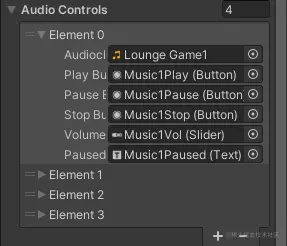
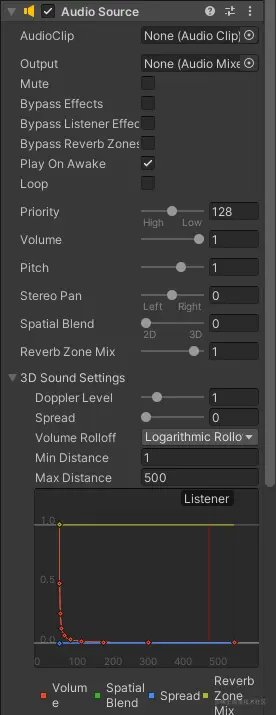
public EazySoundDemoAudioControls[] AudioControls
public Slider globalVolSlider
public Slider globalMusicVolSlider
public Slider globalSoundVolSlider
EazySoundDemoAudioControls audioControl = AudioControls[0]
//定义类
[System.Serializable]
public struct EazySoundDemoAudioControls
{
public AudioClip audioclip
public Button playButton
public Button pauseButton
public Button stopButton
public Slider volumeSlider
public Text pausedStatusTxt
}
public AudioSource audioSource
public AudioClip audioclip
void AudioTest()
{
audioclip = audioSource.clip
bool isMute = audioSource.mute
float time = audioSource.time
float value = audioSource.volume
audioSource.Play()
audioSource.Pause()
audioSource.UnPause()
audioSource.Stop()
}
21、Video Player UnityEngine.Video;
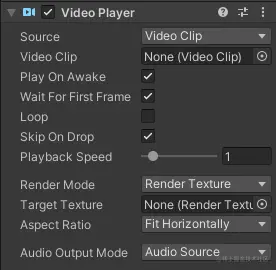
public VideoPlayer videoPlayer
public VideoClip videoClip
void VideoTest()
{
videoClip = videoPlayer.clip
videoPlayer.source = VideoSource.VideoClip
string path = videoPlayer.url
double time = videoPlayer.time
videoPlayer.Play()
videoPlayer.Pause()
videoPlayer.Stop()
}