java封装一个ADB
1.首先项目结构
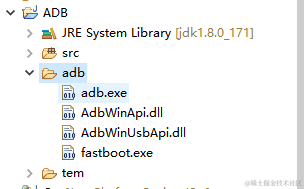
2.其次,核心代码
public static Process exec(String value) throws IOException {
String path = System.getProperty("user.dir");
return java.lang.Runtime.getRuntime().exec(path+"/adb/adb.exe " + value);
}
2.1下载ADB程序到PC,并放入项目目录下 的adb文件夹内
2.2创建指向adb目标的指令类方便开发
2.3创建一个临时文件夹tem,用于保存从android中pull出的文件
2.3.1 工具类代码
public class Runtime {
	public static Process exec(String value) throws IOException {
		String path = System.getProperty("user.dir");
		return java.lang.Runtime.getRuntime().exec(path+"/adb/adb.exe " + value);
	}
}
2.3.2 导入文件代码
public static void pull(String device) {
try {
Runtime.exec("-s "+device+" pull /usrapp/num.txt " +System.getProperty("user.dir")+"/tem/num.txt");
Runtime.exec("-s "+device+" pull /usrapp/ipconfig " +System.getProperty("user.dir")+"/tem/ipconfig.properties");
} catch (IOException e) {
e.printStackTrace();
}
}
2.3.3 导入文件代码
public static void push(String device) {
try {
Runtime.exec("-s "+device+" push " +System.getProperty("user.dir")+"/tem/ipconfig.properties "+"/usrapp/ipconfig");
Runtime.exec("-s "+device+" push " +System.getProperty("user.dir")+"/tem/num.txt "+"/usrapp/");
} catch (IOException e) {
e.printStackTrace();
}
}