具体应用场景
判断上拉(触底)
可视高度 + 滚动距离 >= 实际高度
let offsetHeight = e.target.getBoundingClientRect().height;
let scrollTop = e.target.scrollTop;
let scrollHeight = e.target.scrollHeight;

if(offsetHeight + scrollTop >= scrollHeight){ xxx }
判断下拉(触顶)
滑动中Y坐标 - 初碰Y坐标 >= 50
function isTop(){
  return document.documentElement.scrollTop >= 0 || document.body.scrollTop === 0
}
拖动y距离
var starty;
document.addEventListener("touchstart",(e)=>{
  starty = e.touches[0].pageY;
})
document.addEventlistener('touchmove',(e)=>{
   console.log('拖动距离',e.touch[0].pageY - starty)
})
判断元素在可视范围
1、 使用getBoundingClientRect()方法:
满足以下两个条件
- top <= clientHeight
- bottom >= 0
2、 **使用IntersectionObserver API**:
// 创建IntersectionObserver实例
const options = { root: null, rootMargin: '0px', threshold: 0.5 };
const observer = new IntersectionObserver(callback, options);
//**指定观察目标**
const target = document.querySelector('.target-element');
observer.observe(target);
//**编写回调函数**:
function callback(entries, observer) {
entries.forEach(entry => {
if (entry.isIntersecting) {
// 目标元素进入视窗时的处理逻辑
} else {
// 目标元素离开视窗时的处理逻辑
}
});
}
//**停止观察**
observer.unobserve(target);
浏览器几个尺寸
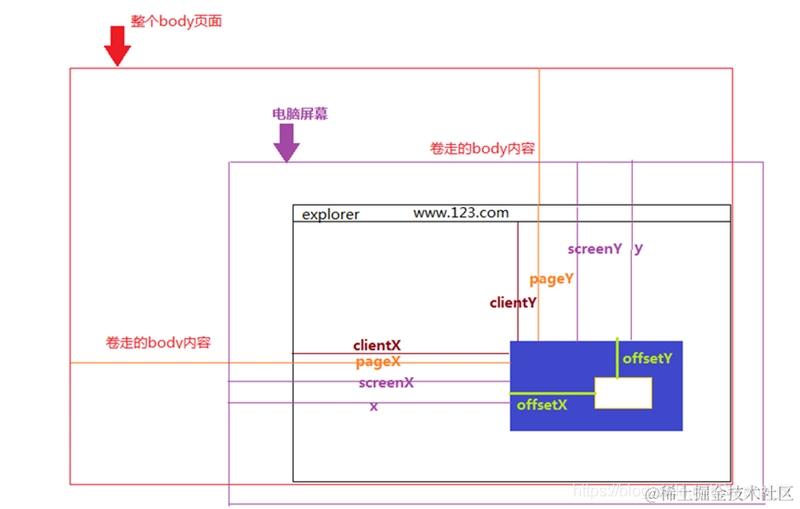
点击事件MouseEvent相关
- target.clientX 可视区域X坐标
- target.offsetX 鼠标相对于事件源元素的X坐标
- target.pageX 加上被卷区域X坐标
- target.screenX 鼠标相对于显示器屏幕左上角的X坐标
dom HTMLElement相关
-
getBoundingClientRect()是DOM元素到浏览器可视范围的距离
-
offsetLeft 相对于
offsetParent左边的偏移量 -
clientLeft 当前dom border-left的值
-
scrollLeft 横向滚动条的距离
<html>
  <head>
    <style>
      #myDiv {
        border: 1px solid red;
        margin: 100px;
        height: 300px;
        overflow-y: auto;

        /* position: relative; */
      }
      li {
        background: yellow;
        border: 1px solid green;
        height: 50px;
        box-sizing: border-box;
      }
      li:first-child {
        top: 0;
        position: sticky;
        background: rgb(255, 0, 0);
      }
      li:last-child {
        bottom: 0;
        position: sticky;
        background: rgb(255, 0, 0);
      }
    </style>
  </head>
  <body>
    <ul id="myDiv"></ul>

    <script>
      window.onload = function () {
        document.getElementById("myDiv").innerHTML = Array.from(
          { length: 40 },
          (_, i) => i + 1
        ).reduce((sum, i) => sum + `<li>这是段落${i}</li>`, "");

        const dom = document.querySelector("#myDiv");
        const child1 = document.querySelectorAll("li")[1];
        dom.addEventListener("scroll", function (e) {
          var scrollHeight = dom.scrollHeight;
          var clientHeight = dom.clientHeight;
          var scrollTop = dom.scrollTop;

          console.log(scrollHeight, clientHeight, scrollTop);

          if (scrollHeight - clientHeight - scrollTop <= 100) {
            // 阈值设为100
            // 执行加载操作
            console.log("触底了", scrollHeight, clientHeight, scrollTop);
          }

          if (scrollTop < 100) {
            console.log("触顶了", scrollHeight, clientHeight, scrollTop);
          }

          console.log("e", e);
          console.log("client", child1.clientTop, child1.clientHeight);
          console.log("offsetTop", child1.offsetTop, child1.offsetWidth);
        });

        dom.addEventListener("click", function (e) {
          console.log("e", e);
          console.log("clientX", e.clientX);
          console.log("offsetX", e.offsetX);
        });
      };
    </script>
  </body>
</html>
欢迎关注我的前端自检清单,我和你一起成长