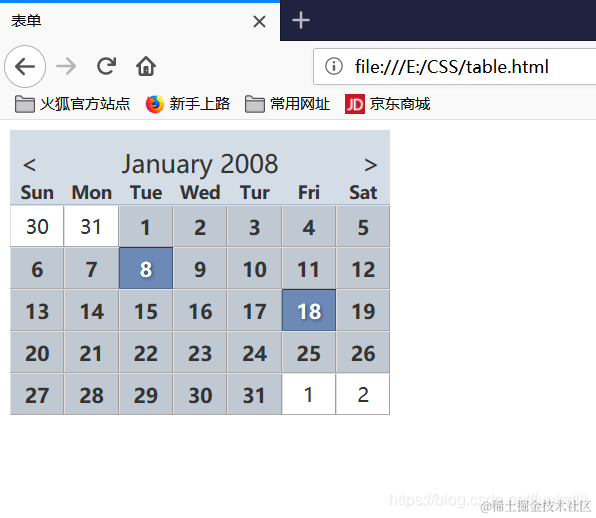
数据表格
<!DOCTYPE html>
<html>
<head>
<meta charset="utf-8">
<title>表单</title>
<style>
table.cal {
border-collapse: separate;
border-spacing: 0;
text-align: center;
color: #333;
}
.cal th,.cal td {
margin: 0;
padding: 0;
}
.cal caption {
font-size: 1.25em;
padding-top: 0.692em;
background-color: #d4dde6;
}
.cal caption [rel="prev"]{
float: left;
margin-left: 0.2em;
}
.cal caption [rel="next"]{
float:right;
margin-right: 0.2em;
}
.cal caption a:link,
.cal caption a:visited{
text-decoration: none;
color: #333;
padding: 0 0.2em;
}
.cal caption a:hover,
.cal caption a:active,
.cal caption a:focus{
background-color: #6d8ab7;
}
.cal thead th {
background-color: #d4dde6;
border-bottom: 1px solid #a9bacb;
font-size: 0.875em;
}
.cal tbody td {
border-top: 1px solid #e0e0e1;
border-right: 1px solid #9f9fa1;
border-bottom: 1px solid #acacad;
border-left: 1px solid #dfdfe0;
}
.cal tbody a{
display: block;
text-decoration: none;
color: #333;
background-color: #c0c8d2;
font-weight: bold;
padding: 0.385em 0.692em 0.308em 0.692em;
}
.cal tbody a:hover,
.cal tbody a:focus,
.cal tbody a:active,
.cal tbody .selected a:link,
.cal tbody .selected a:visited,
.cal tbody .selected a:hover,
.cal tbody .selected a:focus,
.cal tbody .selected a:active{
background-color: #6d8ab7;
color: white;
text-shadow: 1px 1px 2px #22456b;
}
.cal tbody td:hover,
.cal tbody td.selected{
border-top: 1px solid #2a3647;
border-right: 1px solid #465977;
border-bottom: 1px solid #576e92;
border-left: 1px solid #466080;
}
</style>
</head>
<body>
<table class="cal" summary="A calender style data picker">
<caption>
<a href="cal.php?mounth=dec08" rel="prev"><</a>January 2008
<a href="cal.php?month=feb09" rel="next">></a>
</caption>
<colgroup>
<col id="sun" />
<col id="mon" />
<col id="tue" />
<col id="wed" />
<col id="thur" />
<col id="fri" />
<col id="sat" />
</colgroup>
<thead>
<tr>
<th scope="col">Sun</th>
<th scope="col">Mon</th>
<th scope="col">Tue</th>
<th scope="col">Wed</th>
<th scope="col">Thu</th>
<th scope="col">Fri</th>
<th scope="col">Sat</th>
</tr>
</thead>
<tbody>
<tr>
<td class="null">30</td>
<td class="null">31</td>
<td><a href="#">1</a></td>
<td><a href="#">2</a></td>
<td><a href="#">3</a></td>
<td><a href="#">4</a></td>
<td><a href="#">5</a></td>
</tr>
<tr>
<td><a href="#">6</a></td>
<td><a href="#">7</a></td>
<td class="selected"><a href="#">8</a></td>
<td><a href="#">9</a></td>
<td><a href="#">10</a></td>
<td><a href="#">11</a></td>
<td><a href="#">12</a></td>
</tr>
<tr>
<td><a href="#">13</a></td>
<td><a href="#">14</a></td>
<td><a href="#">15</a></td>
<td><a href="#">16</a></td>
<td><a href="#">17</a></td>
<td><a href="#">18</a></td>
<td><a href="#">19</a></td>
</tr>
<tr>
<td><a href="#">20</a></td>
<td><a href="#">21</a></td>
<td><a href="#">22</a></td>
<td><a href="#">23</a></td>
<td><a href="#">24</a></td>
<td><a href="#">25</a></td>
<td><a href="#">26</a></td>
</tr>
<tr>
<td><a href="#">27</a></td>
<td><a href="#">28</a></td>
<td><a href="#">29</a></td>
<td><a href="#">30</a></td>
<td><a href="#">31</a></td>
<td class="null">1</td>
<td class="null">2</td>
</tr>
</tbody>
</table>
</body>
</html>
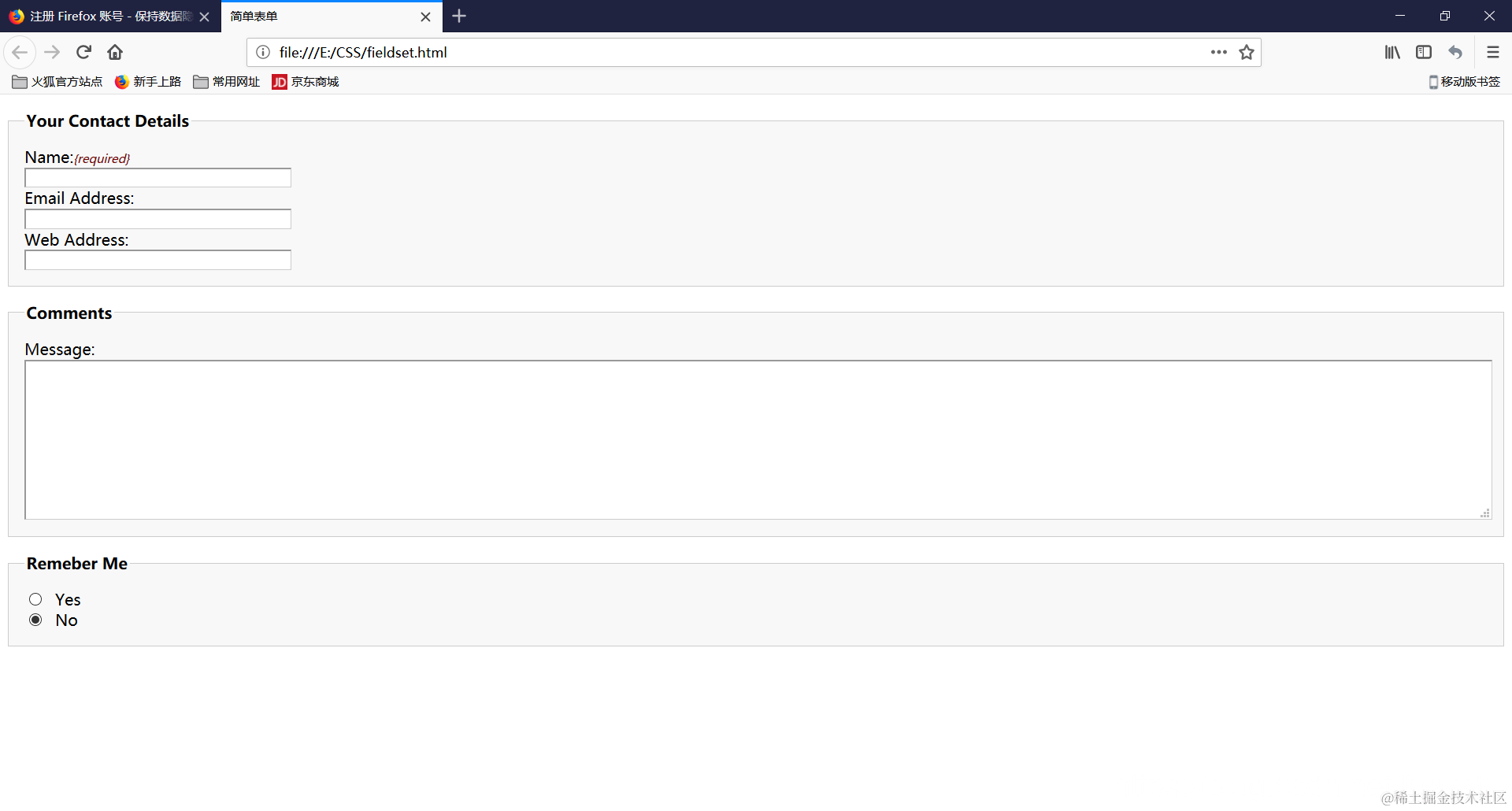
表单布局
<!DOCTYPE html>
<html>
    <head>
        <meta charset="utf-8">
        <title>简单表单</title>
        <style>
            fieldset {
                margin: 1em 0;
                padding: 1em;
                border: 1px solid #ccc;
                background: #f8f8f8;
            }
            legend {
                font-weight: bold;
            }
            label {
                display: block;
                cursor: pointer;
            }
            input[type="text"]{
                width: 20em;
            }
            input[type="text"],textarea{
                border-top: 2px solid #999;
                border-left: 2px solid #999;
                border-bottom: 1px solid #ccc;
                border-right: 1px solid #ccc;
            }
            input[type="text"]:focus,textarea:focus{
                background: #ffc;
            }
            textarea {
                width: 100%;
                height: 10em;
            }
            input.radio,input.checkbox,input.submit{
                width: auto;
            }
            #remeber-me .radio{
                margin-right: 1em;
            }
            .required {
                font-size: 0.75em;
                color: #760000;
            }
        </style>
    </head>
    <body>
        <fieldset>
            <legend>Your Contact Details</legend>
            <div>
                <label for="author">Name:<em class="required">{required}</em></label>
                <input name="author" id="author" type="text">
            </div>
            <div>
                <label for="email">Email Address:</label>
                <input name="email" id="email" type="text">
            </div>
            <div>
                <label for="url">Web Address:</label>
                <input name="url" id="url" type="text">
            </div>
        </fieldset>
        <fieldset>
            <legend>Comments</legend>
            <div>
                <label for="text">Message:</label>
                <textarea name="text" id="text"></textarea>
            </div>
        </fieldset>
        <fieldset>
            <legend>Remeber Me</legend>
            <div id="remeber-me">
                <label for="remember-yes">
                    <input id="remeber-yes" class="radio" name="remeber" type="radio" value="yes">Yes
                </label>
                <label for="remeber-no">
                    <input id="remeber-no" class="radio" name="remeber" type="radio" value="no" checked="checked">No
                </label>
            </div>
        </fieldset>
    </body>
</html>