在 Node 的世界里流行两种响应逻辑管理方式:回调和事件监听。
用回调处理一次性事件
回调是一个函数,它被当作参数传给异步函数,用来描述异步操作完成之后要做什么。
这里用一个简单的 HTTP 服务器演示回调的用法,让它实现如下功能:
异步获取存放在 JSON 文件中的文章的标题;
异步获取简单的 HTML 模板;
把那些标题组装到 HTML 页面里;
把 HTML 页面发送给用户。
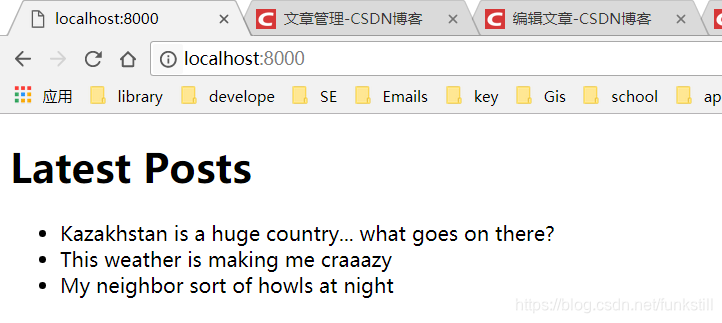
最终结果
JSON 文件(titles.json)
[ "Kazakhstan is a huge country... what goes on there?", "This weather is making me craaazy", "My neighbor sort of howls at night"]
HTML 模板文件(template.html)
<!doctype html>
<html>
	<head></head>
	<body>
		<h1>Latest Posts</h1>
		<ul><li>%</li><ul>
		<!--%会被替换-->
	</body>
</html>
JS文件(blog_recent.js)
const http = require('http');
const fs = require('fs');
//创建HTTP服务器并用回调定义响应逻辑
http.createServer((req,res)=>{
  if(req.url=='/'){
	//读取JSON文件并用回调定义如何处理其中的内容
    fs.readFile('./titles.json',(err,data)=>{
	  //如果出错,输出错误日志,并给客户端返回“Server Error”
      if(err){
        console.error(err);
        res.end('Server Error');
      }else{
		//从JSON文本中解析数据
        const titles = JSON.parse(data.toString());
		//读取HTML模板,并在加载完成后使用回调
        fs.readFile('./template.html',(err,data)=>{
          if(err){
            console.error(err);
            res.end('Server Erroor');
          }else{
            const tmpl = data.toString();
			//组装HTML页面以显示博客
            const html = tmpl.replace('%',titles.join('</li><li>'));
            res.writeHead(200,{'Content-Type':'text/html'});
			//将HTML页面发送给用户
            res.end(html);
          }
        });
      }
    });
  }
}).listen(8000,'127.0.0.1');