ESModules基本特性
- ESM自动采用严格模式,忽略'use strict'
- 每个ES Module 都是运行在单独的私有作用域中
- ESM是通过CORS的方式请求外部JS模块的
- ESM的script标签会延迟执行脚本
  <!-- 通过给 script 添加 type = module 的属性,就可以以 ES Module 的标准执行其中的 JS 代码了 -->
  <script type="module">
    console.log('this is es module')
  </script>

  <!-- 1. ESM 自动采用严格模式,忽略 'use strict' -->
  <script type="module">
    console.log(this)
  </script>

  <!-- 2. 每个 ES Module 都是运行在单独的私有作用域中 -->
  <script type="module">
    var foo = 100
    console.log(foo)
  </script>
  <script type="module">
    console.log(foo)
  </script>

  <!-- 3. ESM 是通过 CORS 的方式请求外部 JS 模块的 -->
  <!-- <script type="module" src="https://unpkg.com/jquery@3.4.1/dist/jquery.min.js"></script> -->

  <!-- 4. ESM 的 script 标签会延迟执行脚本 -->
  <!-- 相当于用了defer -->
  <script defer src="demo.js"></script>
  <p>需要显示的内容</p>
ESModules导入导出
export var name = 'foo module'
export function hello () {
console.log('hello')
}
export class Person {}
var name = 'foo module'
function hello () {
console.log('hello')
}
class Person {}
export { name, hello, Person }
import { name, hello, Person } from './module.js'
*****************
export {
hello as fooHello,
name as default
}
import { default as fooName } from './module.js'
*****************
export default name
import fooName from './module.js'
导入导出注意事项
export { name, age }
import { name, age } from './module.js'
*********************
export default { name, age }
*********************
var name = 'jack'
var age = 18
export { name, age }
setTimeout(function () {
name = 'ben'
}, 1000)
import { name, age } from './module.js'
console.log(name, age)
setTimeout(function () {
console.log(name, age)
}, 1500)
导入的用法
import { name } from './module.js'
import { lowercase } from './utils/index.js'
import { name } from './module.js'
import { name } from '/04-import/module.js'
import { name } from 'http://localhost:3000/04-import/module.js'
import {} from './module.js'
import './module.js'
import * as mod from './module.js'
import('./module.js').then(function (module) {
console.log(module)
})
*************************
var name = 'jack'
var age = 18
export { name, age }
console.log('module action')
export default 'default export'
import { name, age, default as title } from './module.js'
import abc, { name, age } from './module.js'
console.log(name, age, abc)
导出导入成员
export { foo, bar } from './module.js'
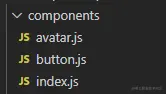
*************index.js********************
import { Button } from './button.js'
import { Avatar } from './avatar.js'
export { Button, Avatar }
*************app.js********************
import { Button, Avatar } from './components/index.js'
浏览器环境Polyfill



