本文已参与[新人创作礼]活动,一起开启掘金创作之路
1. Mybaits-plus 项目整合
1.1 修改案例讲解
@Test
public void updateUserById(){
User user = new User(354,"六耳猕猴",null,null);
int rows = userMapper.updateById(user);
System.out.println("响应了"+ rows +"行");
}
@Test
public void updateUserByName(){
User user = new User(null,"齐天大圣",null,null);
UpdateWrapper<User> updateWrapper = new UpdateWrapper<>();
updateWrapper.eq("name","猴子");
userMapper.update(user,updateWrapper);
System.out.println("修改操作成功!!!");
}
1.2 MP后台项目改造
1.2.1 导入jar包
<dependency>
<groupId>com.baomidou</groupId>
<artifactId>mybatis-plus-boot-starter</artifactId>
<version>3.4.3</version>
</dependency>
1.2.2 编辑POJO ItemCat
@Data
@Accessors(chain = true)
@TableName("item_cat")
public class ItemCat extends BasePojo{
@TableId(type = IdType.AUTO)
private Integer id;
private Integer parentId;
private String name;
private Boolean status;
private Integer level;
@TableField(exist = false)
private List<ItemCat> children;
}
1.2.3 编辑ItemCatMapper接口
public interface ItemCatMapper extends BaseMapper<ItemCat> {

}
1.2.4 修改YML文件
server:
port: 8091
spring:
datasource:
driver-class-name: com.mysql.cj.jdbc.Driver
url: jdbc:mysql://127.0.0.1:3306/jt?serverTimezone=GMT%2B8&useUnicode=true&characterEncoding=utf8&autoReconnect=true&allowMultiQueries=true
username: root
password: root
mybatis-plus:
type-aliases-package: com.jt.pojo
mapper-locations: classpath:/mybatis/mappers/*.xml
configuration:
map-underscore-to-camel-case: true
logging:
level:
com.jt.mapper: debug
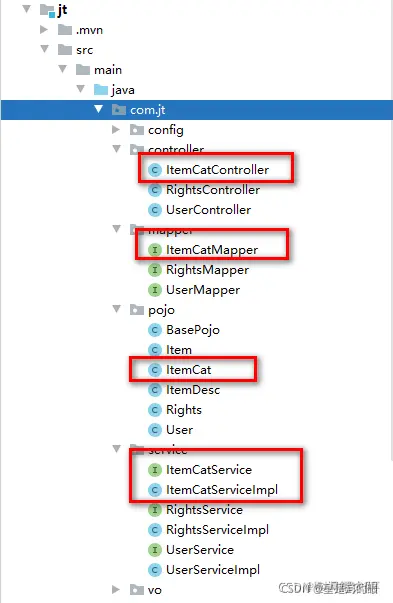
1.2.5 层级代码结构
1.3 商品分类页面跳转
说明: 编辑路由 index.js
import Vue from 'vue'
import VueRouter from 'vue-router'
import Login from '../components/Login.vue'
import ElementUI from '../components/ElementUI.vue'
import Home from '../components/Home.vue'
import User from '../components/user/user.vue'
import ItemCat from '../components/items/ItemCat.vue'
Vue.use(VueRouter)
const routes = [
{path: '/', redirect: '/login'},
{path: '/login', component: Login},
{path: '/elementUI', component: ElementUI},
{path: '/home', component: Home, children: [
{path: '/user', component: User},
{path: '/itemCat', component: ItemCat}
]}
]
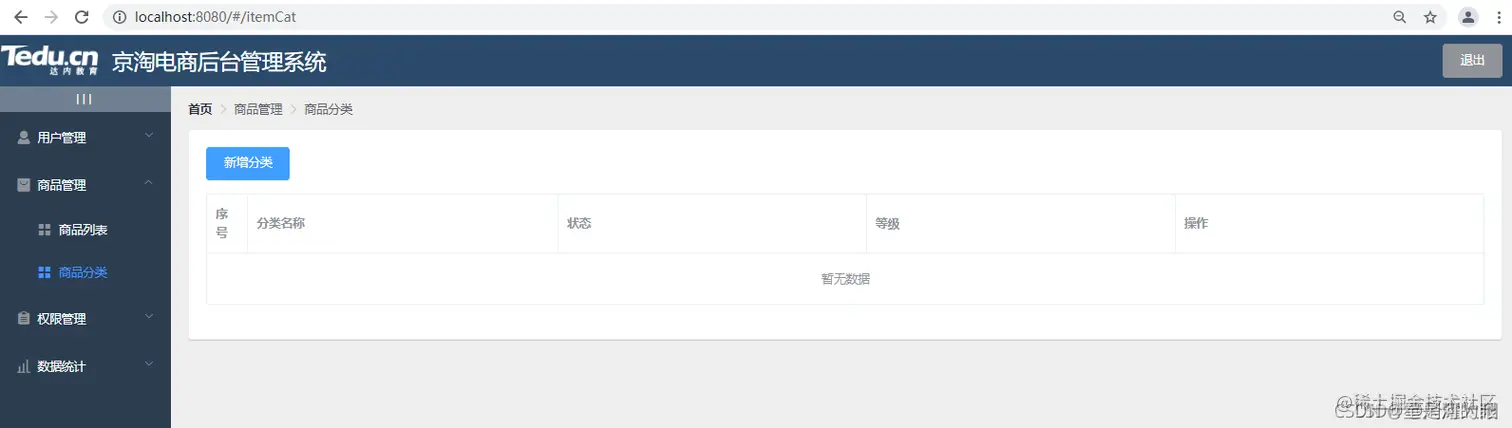
页面效果展现
2 完成商品分类业务
2.1 页面JS分析
- 生命周期函数
created() {
this.findItemCatList()
},
- 获取数据函数说明
async findItemCatList() {
        const {
          data: result
        } = await this.$http.get("/itemCat/findItemCatList/3")
        if (result.status !== 200) return this.$message.error("获取商品分类列表失败!!")
        this.itemCatList = result.data
      },
2.2 业务接口文档
- 请求路径: /itemCat/findItemCatList/{level}
- 请求类型: get
- 请求参数: level
| 参数名称 | 参数说明 | 备注 |
|---|
| level | 查询级别 | 1查询一级分类 2查询1-2 级商品分类 3查询1-2-3级商品分类 |
- 业务说明: 查询3级分类菜单数据 要求三层结构嵌套
- 返回值: SysResult对象
| 参数名称 | 参数说明 | 备注 |
|---|
| status | 状态信息 | 200表示服务器请求成功 | 201表示服务器异常 |
| msg | 服务器返回的提示信息 | 可以为null |
| data | 服务器返回的业务数据 | 3级商品分类信息 |
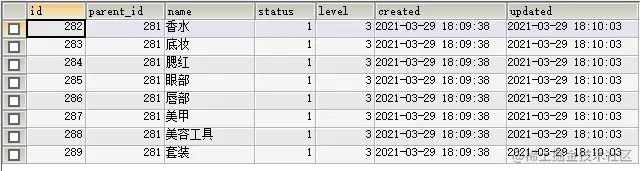
2.3 商品分类表结构说明
- 表结构
- sql案例练习
SELECT * FROM item_cat WHERE parent_id = 0
SELECT * FROM item_cat WHERE parent_id = 249
SELECT * FROM item_cat WHERE parent_id = 281
小结: 商品分类表,通过parent_id 来指定父子级关系.
2.4 编辑ItemCatController
@RestController
@CrossOrigin
@RequestMapping("/itemCat")
public class ItemCatController {
@Autowired
private ItemCatService itemCatService;
@GetMapping("findItemCatList/{level}")
public SysResult findItemCatList(@PathVariable Integer level){
List<ItemCat> itemCatList = itemCatService.findItemCatList(level);
return SysResult.success(itemCatList);
}
}
2.5 编辑ItemCatService
package com.jt.service;
import com.baomidou.mybatisplus.core.conditions.query.QueryWrapper;
import com.jt.mapper.ItemCatMapper;
import com.jt.pojo.ItemCat;
import org.springframework.beans.factory.annotation.Autowired;
import org.springframework.stereotype.Service;
import java.util.List;
@Service
public class ItemCatServiceImpl implements ItemCatService{
@Autowired
private ItemCatMapper itemCatMapper;
@Override
public List<ItemCat> findItemCatList(Integer level) {
QueryWrapper queryWrapper = new QueryWrapper();
queryWrapper.eq("parent_id",0);
List<ItemCat> oneList = itemCatMapper.selectList(queryWrapper);
for(ItemCat oneItemCat : oneList){
int oneId = oneItemCat.getId();
queryWrapper.clear();
queryWrapper.eq("parent_id",oneId);
List<ItemCat> twoList = itemCatMapper.selectList(queryWrapper);
for(ItemCat twoItemCat : twoList){
int twoId = twoItemCat.getId();
queryWrapper.clear();
queryWrapper.eq("parent_id",twoId);
List<ItemCat> threeList = itemCatMapper.selectList(queryWrapper);
twoItemCat.setChildren(threeList);
}
oneItemCat.setChildren(twoList);
}
return oneList;
}
}
2.6 上述案例分析
- 上述的案例 采用多级循环的方式. 将来会耗费服务器资源 100次 内层100次 总循环1万次. 暂时可以接受
- 上述的代码 频繁访问数据库.导致数据库压力增大.严重时可能导致数据库服务器宕机. 不能接受的
优化策略: 降低数据库访问的次数
2.7 采用数据结构优化代码
思路:
- 用户查询所有的数据库信息. (1-2-3所有数据)
- 数据结构 Map<k,v> key唯一的, value可以任意类型.
思路: Map<parentId,List>
例子:
- Map<0,List<一级ItemCat对象>>
- Map<249,List<二级ItemCat对象>>
- Map<281,List<三级ItemCat对象>>
利用map 封装父子关系.
2.8 代码具体实现
@Service
public class ItemCatServiceImpl implements ItemCatService{
@Autowired
private ItemCatMapper itemCatMapper;
public Map<Integer,List<ItemCat>> getMap(){
Map<Integer,List<ItemCat>> map = new HashMap<>();
List<ItemCat> itemCatList = itemCatMapper.selectList(null);
for (ItemCat itemCat : itemCatList){
Integer key = itemCat.getParentId();
if(map.containsKey(key)){
map.get(key).add(itemCat);
}else{
List<ItemCat> list = new ArrayList<>();
list.add(itemCat);
map.put(key,list);
}
}
return map;
}
@Override
public List<ItemCat> findItemCatList(Integer level) {
long startTime = System.currentTimeMillis();
Map<Integer,List<ItemCat>> map = getMap();
if(level == 1){
return map.get(0);
}
if(level == 2){
return getTwoList(map);
}
List<ItemCat> oneList = getThreeList(map);
long endTime = System.currentTimeMillis();
System.out.println("优化前的耗时: 500ms,优化后耗时:"+(endTime - startTime)+"ms");
return oneList;
}
private List<ItemCat> getThreeList(Map<Integer, List<ItemCat>> map) {
List<ItemCat> oneList = getTwoList(map);
for(ItemCat oneItemCat : oneList){
List<ItemCat> twoList = oneItemCat.getChildren();
if(twoList == null || twoList.size()==0){
continue;
}
for (ItemCat twoItemCat : twoList){
int twoId = twoItemCat.getId();
List<ItemCat> threeList = map.get(twoId);
twoItemCat.setChildren(threeList);
}
}
return oneList;
}
private List<ItemCat> getTwoList(Map<Integer, List<ItemCat>> map) {
List<ItemCat> oneList = map.get(0);
for (ItemCat oneItemCat : oneList){
int oneId = oneItemCat.getId();
List<ItemCat> twoList = map.get(oneId);
oneItemCat.setChildren(twoList);
}
return oneList;
}
}
3 商品分类新增实现
3.1 页面JS分析
- 页面JS分析
itemCatForm: {
name: '',
parentId: 0,
level: 1
},
async addItemCatForm() {
this.$refs.itemCatFormRef.validate(async validate => {
if (!validate) return
const {
data: result
} = await this.$http.post("/itemCat/saveItemCat", this.itemCatForm)
if (result.status !== 200) return this.$message.error("新增商品分类失败")
this.$message.success("新增商品分类成功!!!")
this.findItemCatList();
this.addItemCatDialogVisible = false
})
},
3.2 商品分类新增接口文档
- 请求路径: /itemCat/saveItemCat
- 请求类型: post
- 请求参数: 表单数据
| 参数名称 | 参数说明 | 备注 |
|---|
| name | 商品分类名称 | 不能为null |
| parentId | 用户父级ID | 不能为null |
| level | 分类级别 | 1 2 3 商品分类级别 |
| 参数名称 | 参数说明 | 备注 |
|---|
| status | 状态信息 | 200表示服务器请求成功 201表示服务器异常 |
| msg | 服务器返回的提示信息 | 可以为null |
| data | 服务器返回的业务数据 | 可以为null |
3.3 编辑ItemCatController
@PostMapping("/saveItemCat")
public SysResult saveItem(@RequestBody ItemCat itemCat){
itemCatService.saveItem(itemCat);
return SysResult.success();
}
3.4 编辑ItemCatService
@Override
@Transactional
public void saveItem(ItemCat itemCat) {
Date date = new Date();
itemCat.setStatus(true).setCreated(date).setUpdated(date);
itemCatMapper.insert(itemCat);
}
4. 商品分类删除操作
4.1 删除业务接口
- 请求路径: /itemCat/deleteItemCat
- 请求类型: delete
- 业务描述: 当删除节点为父级时,应该删除自身和所有的子节点
- 请求参数:
| 参数名称 | 参数说明 | 备注 |
|---|
| id | 用户id号 | 不能为null |
| level | 商品分类级别 | 一级,二级,三级 |
| 参数名称 | 参数说明 | 备注 |
|---|
| status | 状态信息 | 200表示服务器请求成功 201表示服务器异常 |
| msg | 服务器返回的提示信息 | 可以为null |
| data | 服务器返回的业务数据 | 可以为null |
4.2 前端页面JS
1. 页面JS
<el-button type="danger" icon="el-icon-delete" @click="deleteItemCatBtn(scope.row)">删除</el-button>
2. 发起Ajax请求
const {data: result} = await this.$http.delete("/itemCat/deleteItemCat",{params:{id:itemCat.id,level:itemCat.level}})
if(result.status !== 200) return this.$message.error("删除商品分类失败")
this.$message.success("删除数据成功")
this.findItemCatList()
4.3 编辑ItemCatController
@DeleteMapping("/deleteItemCat")
public SysResult deleteItemCat(Integer id,Integer level){
itemCatService.deleteItemCat(id,level);
return SysResult.success();
}
4.4 编辑ItemCatService
@Override
public void deleteItemCat(Integer id, Integer level) {
if(level == 3){
itemCatMapper.deleteById(id);
}
if(level == 2){
QueryWrapper<ItemCat> queryWrapper = new QueryWrapper<>();
queryWrapper.eq("parent_id",id)
.or()
.eq("id",id);
itemCatMapper.delete(queryWrapper);
}
if(level == 1){
QueryWrapper<ItemCat> queryWrapper = new QueryWrapper();
queryWrapper.eq("parent_id",id);
List twoIds = itemCatMapper.selectObjs(queryWrapper);
queryWrapper.clear();
queryWrapper.in(twoIds.size()>0,"parent_id",twoIds)
.or()
.in(twoIds.size()>0,"id",twoIds)
.or()
.eq("id",id);
itemCatMapper.delete(queryWrapper);
}
}
5. 修改
5.1 状态修改操作
5.1.1 页面JS分析
1. 页面JS函数
updateStatus(scope.row)
2. 页面JS
async updateStatus(itemCat) {
const {
data: result
} = await this.$http.put(`/itemCat/status/${itemCat.id}/${itemCat.status}`)
if (result.status !== 200) return this.$message.error("修改状态失败")
this.$message.success("状态修改成功")
},
5.1.2 业务接口文档
- 请求路径: /itemCat/status/{id}/{status}
- 请求类型: put
- 请求参数:
| 参数名称 | 参数说明 | 备注 |
|---|
| id | 用户ID值 | 不能为null |
| status | 用户的状态信息 | 不能为null |
| 参数名称 | 参数说明 | 备注 |
|---|
| status | 状态信息 | 200表示服务器请求成功 | 201表示服务器异常 |
| msg | 服务器返回的提示信息 | 可以为null |
| data | 服务器返回的业务数据 | 可以为null |
5.1.3 编辑ItemCatController
@PutMapping("/status/{id}/{status}")
public SysResult updateStatus(ItemCat itemCat){
itemCatService.updateStatus(itemCat);
return SysResult.success();
}
5.1.4 编辑ItemCatService
@Override
@Transactional
public void updateStatus(ItemCat itemCat) {
itemCat.setUpdated(new Date());
itemCatMapper.updateById(itemCat);
}
5.2 商品分类修改操作
5.2.1 页面JS分析
1.指定修改的按钮
<el-button type="success" icon="el-icon-edit" @click="updateItemCatBtn(scope.row)">编辑</el-button>
2. 数据的回显
updateItemCatBtn(itemCat) {
this.updateItemCatForm = itemCat
this.updateItemCatDialogVisible = true
},
3. 修改页面的JS
<el-dialog title="修改商品分类" :visible.sync="updateItemCatDialogVisible" width="50%">
<!-- 定义分类表单 -->
<el-form :model="updateItemCatForm" :rules="rules" ref="upDateItemCatForm" label-width="100px">
<el-form-item label="分类名称:" prop="name">
<el-input v-model="updateItemCatForm.name"></el-input>
</el-form-item>
</el-form>
<span slot="footer" class="dialog-footer">
<el-button @click="updateItemCatDialogVisible = false">取 消</el-button>
<el-button type="primary" @click="updateItemCat">确 定</el-button>
</span>
</el-dialog>
4. 修改按钮的JS
async updateItemCat() {
const {data: result} =
await this.$http.put('/itemCat/updateItemCat', this.updateItemCatForm)
if (result.status !== 200) return this.$message.error("更新商品分类失败")
this.$message.success("更新商品分类成功")
this.findItemCatList();
this.updateItemCatDialogVisible = false;
},
5.2.2 页面接口文档
- 请求路径: /itemCat/updateItemCat
- 请求类型: put
- 请求参数: 表单数据 ItemCat对象
- 返回值: SysResult对象
| 参数名称 | 参数说明 | 备注 |
|---|
| status | 状态信息 | 200表示服务器请求成功 | 201表示服务器异常 |
| msg | 服务器返回的提示信息 | 可以为null |
| data | 服务器返回的业务数据 | 可以为null |
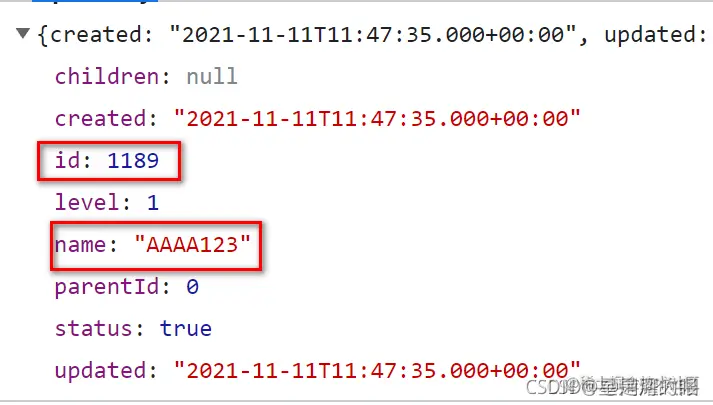
- 数据解析:
5.2.3 编辑ItemCatController
@PutMapping("/updateItemCat")
public SysResult updateItemCat(@RequestBody ItemCat itemCat){
itemCatService.updateItemCat(itemCat);
return SysResult.success();
}
5.2.4 编辑ItemCatService
@Override
@Transactional
public void updateItemCat(ItemCat itemCat) {
ItemCat temp = new ItemCat();
temp.setId(itemCat.getId())
.setName(itemCat.getName())
.setUpdated(new Date());
itemCatMapper.updateById(temp);
}
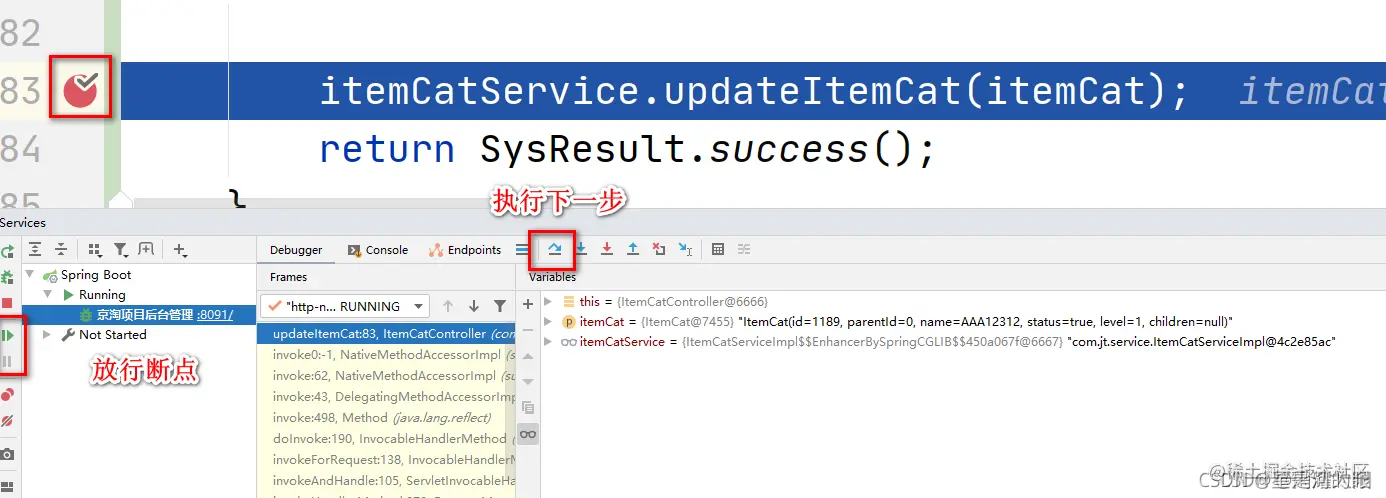
5.3 debug断点调试