


PowerShell打印简介
将输出写入控制台或文件是任何语言的一个重要要求。输出一般可以是单行、多行或一个表达式或表达式的结果。打印值也可用于调试或作为错误处理机制的一部分。在PowerShell中,有多种打印输出的方式。PowerShell中的一些打印方式是Write-Output、Write-Host、Write-Verbose、Write-Warning和Write-Error。
在PowerShell中打印输出的不同方法
下面是在PowerShell中打印输出的不同方式。
1.写入-输出
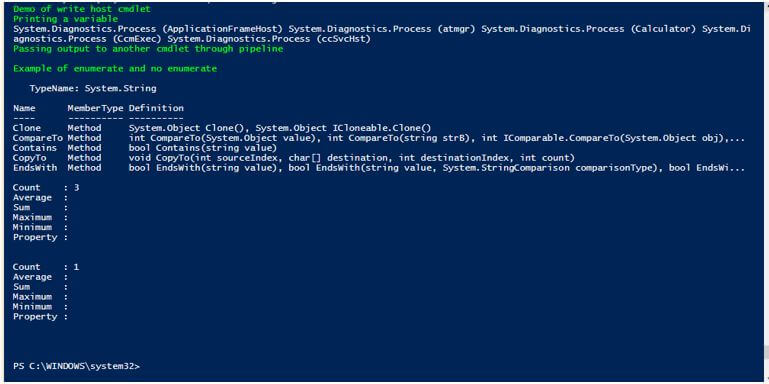
第一种打印输出的方法是使用Write-Output cmdlet。这个cmdlet被用来将管道中的对象传递给连续的命令。在命令是最后一个的情况下,最后的对象被写到控制台。要传递错误对象,可以使用Write-Error cmdlet。
语法。
Write-Output [-InputObject] <PSObject[]> [-NoEnumerate] [<CommonParameters>]
参数。
- **-InputObject。**这表示应该通过管道传递的对象。它可以是一个表达式、一个对象的变量或一个表达式。这个参数的数据类型是PSObject[]。它的默认值是无。它接受管道输入,但不接受通配符。
- -NoEnumerate。 默认情况下,写输出的cmdlet会列举输出。为了避免这一点,使用了这个参数。这个参数的数据类型是Switch。无是默认值。它不接受管道输入,以及通配符,这也是不允许的。
例子。
代码。
Write-Host "Demo of write host cmdlet" -ForegroundColor Green $test= Get-Process Write-Host "Printing a variable" -ForegroundColor Green Write-Output $test Write-Host "Passing output to another cmdlet through pipeline" -ForegroundColor Green Write-Output "sample output" | Get-Member Write-Host "Example of enumerate and no enumerate" -ForegroundColor Green Write-Output 10,20,30 | Measure-Object Write-Output 10,20,30 -NoEnumerate | Measure-Object
输出。
2.写入-主机
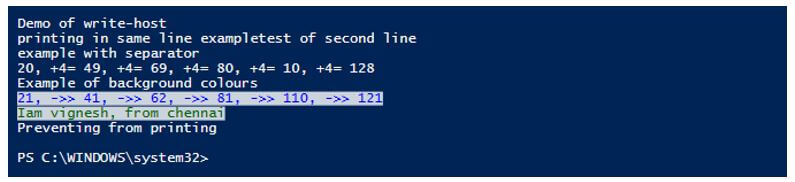
这个cmdlet的主要用途是用不同的颜色来显示输出。它与read-host cmdlet一起工作,后者从用户那里获取输入。这个cmdlet使用ToString()方法来生成和写入输出到控制台。我们可以使用前景和背景参数分别指定输出的文本颜色和背景颜色。为了分离输出中的各种对象,作为cmdlert的一部分,有一个分离器参数。有两个变量;Informationaction参数与这个参数有关,但它们不影响输出。
参数。
- -BackgroundColor: 这表示背景的颜色。没有默认的颜色。一些值是灰色、绿色、蓝色、红色、白色、深绿色、深蓝色和磁铁色。这个参数的数据类型是控制台颜色。它不接受管道输入,也不允许使用通配符。
- -前景色: 这表示文本的颜色。没有默认的颜色。一些值是灰色、绿色、蓝色、红色、白色、深绿色、深蓝色和磁铁色。这个参数的数据类型是控制台颜色。它不接受管道输入,也不允许使用通配符。
- -NoNewLine。 这表示所有的输出都写在同一行,输出之间不插入换行。该参数的数据类型是一个开关。默认值是无。它不接受流水线输入,也不允许使用通配符。
- -对象。 这表示要被写入输出的对象。这个参数的数据类型是一个对象。这个参数的别名是Msg和message。这是一个强制性参数。默认值是无。它接受管道输入,而通配符是不允许的。
- -分离器。 这表示对象之间要插入的分隔符。这个参数的数据类型是一个对象。默认值是无。它不接受管道输入,也不允许使用通配符。
例子。
代码。
Write-Host "Demo of write-host" Write-Host "printing in same line example" -NoNewline Write-Host "test of second line" Write-Host "example with separator" Write-Host (20,49,69,80,10,128) -Separator ", +4= " Write-Host "Example of background colours" Write-Host (21,41,62,81,110,121) -Separator ", ->> " -ForegroundColor Blue -BackgroundColor White Write-Host "Iam vignesh, from chennai" -ForegroundColor DarkGreen -BackgroundColor white Write-Host "Preventing from printing" Write-Host "this wont be displayed" -InformationAction Ignore Write-Host "it wont be available on screen" 6>$null
输出。
3.写入-调试
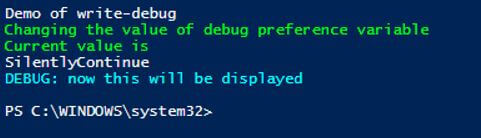
这是用来在脚本或命令的控制台中打印调试信息。默认情况下,这些信息是不显示的,但可以使用$debugPreference变量在需要时显示。
语法。
Write-Debug [-Message] <String> [<CommonParameters>]
参数。
- **-消息。**这表示需要显示的调试信息。这个参数的数据类型是一个字符串。这是一个强制性参数。这个参数的别名是msg。无是其默认值。它接受管道输入,但不允许使用通配符。
例子。
代码。
Write-Host "Demo of write-debug" Write-Debug "This wont be printed" Write-Debug "my name is vignesh" Write-Host "Changing the value of debug preference variable" -ForegroundColor Green Write-Host "Current value is" -ForegroundColor Green $DebugPreference Write-Debug "wont print this on console" $DebugPreference = "Continue" Write-Debug "now this will be displayed"
输出。
4.写入-核查
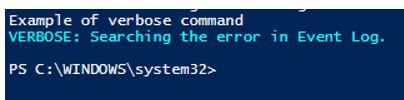
Write-Verbose cmdlet将文本写入PowerShell的verbose消息流。通常情况下,使用verbose消息流是为了提供关于命令处理的更全面的信息。默认情况下,verbose消息流是不显示的,但可以通过改变$VerbosePreference变量的价值或在任何命令中使用Verbose常用参数来显示。
语法。
Write-Verbose [-Message] <String> [<CommonParameters>]
参数。
- **-消息。**这表示需要显示的信息。这是一个强制性参数。该参数的数据类型是字符串。别名是msg。默认值是无。它接受管道输入,但不允许使用通配符。
例子。
代码。
Write-Host "Example of verbose command" Write-Verbose -Message "Searching the error in Event viewer." Write-Verbose -Message "Searching the error in Event viewer." -Verbose
输出。
结论 - PowerShell打印
因此,这篇文章详细介绍了PowerShell中的打印。它详细解释了可以打印输出的各种方式,并附有适当的例子。
推荐文章
这是一篇关于PowerShell打印的指南。这里我们讨论了PowerShell中打印输出的介绍和不同的方式。你也可以看看下面的文章来了解更多---
The postPowerShell printappeared first onEDUCBA.
