面试前喵一眼
原型、原型链、构造函数、继承
- 所有函数都有一个特别的属性:
- 所有实例对象都有一个特别的属性:
- 显式原型与隐式原型的关系
- 函数的prototype: 定义函数时被自动赋值, 值默认为{}, 即用为原型对象
- 实例对象的__proto__: 在创建实例对象时被自动添加, 并赋值为构造函数的prototype值
- 原型对象即为当前实例对象的父对象
- 原型链
- 所有的实例对象都有__proto__属性, 它指向的就是原型对象
- 这样通过__proto__属性就形成了一个链的结构---->原型链
- 当查找对象内部的属性/方法时, js引擎自动沿着这个原型链查找
- 当给对象属性赋值时不会使用原型链, 而只是在当前对象中进行操作
执行上下文与执行上下文栈
- 变量提升与函数提升
- 变量提升: 在变量定义语句之前, 就可以访问到这个变量(undefined)
- 函数提升: 在函数定义语句之前, 就执行该函数
- 先有变量提升, 再有函数提升
- 理解
- 执行上下文: 由js引擎自动创建的对象, 包含对应作用域中的所有变量属性
- 执行上下文栈: 用来管理产生的多个执行上下文
- 分类:
- 全局: window
- 函数: 对程序员来说是透明的
- 生命周期
- 全局 : 准备执行全局代码前产生, 当页面刷新/关闭页面时死亡
- 函数 : 调用函数时产生, 函数执行完时死亡
- 包含哪些属性:
- 全局 :
- 用var定义的全局变量 ==>undefined
- 使用function声明的函数 ===>function
- this ===>window
- 函数
- 用var定义的局部变量 ==>undefined
- 使用function声明的函数 ===>function
- this ===> 调用函数的对象, 如果没有指定就是window
- 形参变量 ===>对应实参值
- arguments ===>实参列表的伪数组
- 执行上下文创建和初始化的过程
- 全局:
- 在全局代码执行前最先创建一个全局执行上下文(window)
- 收集一些全局变量, 并初始化
- 将这些变量设置为window的属性
- 函数:
- 在调用函数时, 在执行函数体之前先创建一个函数执行上下文
- 收集一些局部变量, 并初始化
- 将这些变量设置为执行上下文的属性
作用域与作用域链
- 理解:
- 作用域: 一块代码区域, 在编码时就确定了, 不会再变化
- 作用域链: 多个嵌套的作用域形成的由内向外的结构, 用于查找变量
- 分类:
- 作用
- 作用域: 隔离变量, 可以在不同作用域定义同名的变量不冲突
- 作用域链: 查找变量
- 区别作用域与执行上下文
- 作用域: 静态的, 编码时就确定了(不是在运行时), 一旦确定就不会变化了
- 执行上下文: 动态的, 执行代码时动态创建, 当执行结束消失
- 联系: 执行上下文环境是在对应的作用域中的
闭包
内存溢出与内存泄露
- 内存溢出
- 一种程序运行出现的错误
- 当程序运行需要的内存超过了剩余的内存时, 就出抛出内存溢出的错误
- 内存泄露
- 占用的内存没有及时释放
- 内存泄露积累多了就容易导致内存溢出
- 常见的内存泄露:
- 意外的全局变量
- 没有及时清理的计时器或回调函数
- 闭包
正式开始学习笔记
一、 原型、原型链、构造函数、继承
一图胜千言
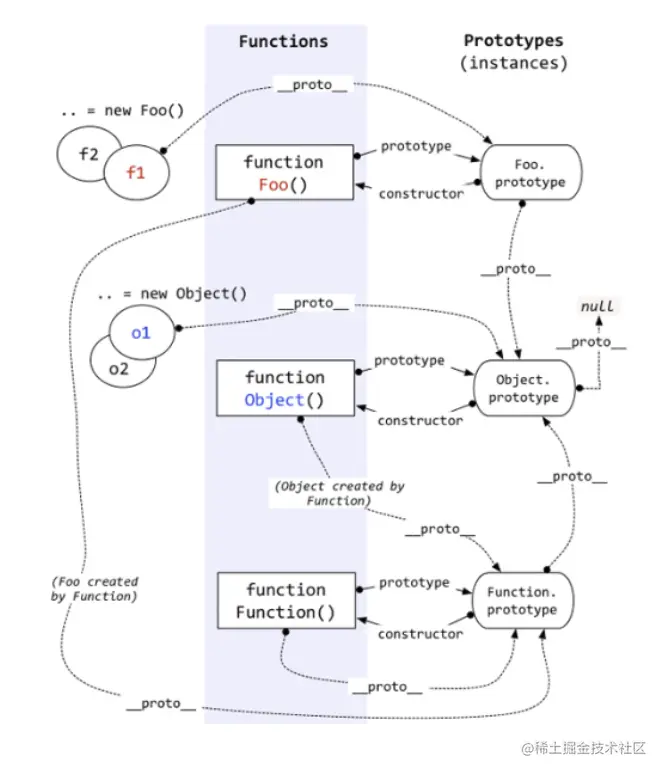
1、原型(prototype)
<!DOCTYPE html>
<html lang="en">
<head>
<meta charset="UTF-8">
<title>01_原型(prototype)</title>
</head>
<body>
<script type="text/javascript">
console.log(Date.prototype, typeof Date.prototype)
function Fun () {
}
console.log(Fun.prototype)
console.log(Date.prototype.constructor===Date)
console.log(Fun.prototype.constructor===Fun)
Fun.prototype.test = function () {
console.log('test()')
}
var fun = new Fun()
fun.test()
</script>
</body>
</html>
2、显式原型与隐式原型
<!DOCTYPE html>
<html lang="en">
<head>
<meta charset="UTF-8">
<title>02_显式原型与隐式原型</title>
</head>
<body>
<script type="text/javascript">
function Fn() {
}
console.log(Fn.prototype)
var fn = new Fn()
console.log(fn.__proto__)
console.log(Fn.prototype===fn.__proto__)
console.log(Fn.prototype.constructor===Fn)
console.log(fn.constructor===Fn)
Fn.prototype = {
aa: 11,
bb; function() {
console.log(666)
},
constructor: Fn
}
Fn.prototype.test = function () {
console.log('test()')
}
fn.test()
</script>
</body>
</html>
3、原型链
<!DOCTYPE html>
<html lang="en">
<head>
<meta charset="UTF-8">
<title>03_原型链</title>
</head>
<body>
<script type="text/javascript">
console.log(Object.prototype.__proto__)
function Fn() {
this.test1 = function () {
console.log('test1()')
}
}
console.log(Fn.prototype)
Fn.prototype.test2 = function () {
console.log('test2()')
}
var fn = new Fn()
fn.test1()
fn.test2()
console.log(fn.toString())
console.log(fn.test3)
console.log(Fn.prototype instanceof Object)
console.log(Object.prototype instanceof Object)
console.log(Function.prototype instanceof Object)
console.log(Function.__proto__===Function.prototype)
console.log(Object.prototype.__proto__)
</script>
</body>
</html>
4、原型链_属性问题
<!DOCTYPE html>
<html lang="en">
<head>
<meta charset="UTF-8">
<title>04_原型链_属性问题</title>
</head>
<body>
<script type="text/javascript">
function Fn() {
}
Fn.prototype.a = 'xxx'
var fn1 = new Fn()
console.log(fn1.a, fn1)
var fn2 = new Fn()
fn2.a = 'yyy'
console.log(fn1.a, fn2.a, fn2)
function Person(name, age) {
this.name = name
this.age = age
}
Person.prototype.setName = function (name) {
this.name = name
}
var p1 = new Person('Tom', 12)
p1.setName('Bob')
console.log(p1)
var p2 = new Person('Jack', 12)
p2.setName('Cat')
console.log(p2)
console.log(p1.__proto__===p2.__proto__)
</script>
</body>
</html>
5、探索instanceof
<!DOCTYPE html>
<html lang="en">
<head>
<meta charset="UTF-8">
<title>05_探索instanceof</title>
</head>
<body>
<script type="text/javascript">
function Foo() { }
var f1 = new Foo()
console.log(f1 instanceof Foo)
console.log(f1 instanceof Object)
console.log(f1.__proto__ === Foo.prototype)
console.log(Object.prototype === f1.__proto__.__proto__)
console.log(Object.getPrototypeOf(f1) === Foo.prototype)
console.log(Foo.__proto__ === Function.prototype)
console.log(Object.__proto__ === Function.prototype)
console.log(Function.__proto__ === Function.prototype)
console.log(Object instanceof Function)
console.log(Object instanceof Object)
console.log(Function instanceof Function)
console.log(Function instanceof Object)
function Foo() {}
console.log(Object instanceof Foo)
</script>
</body>
</html>
6、对象的继承
6.1 原型链继承
此继承有什么问题:引用值共享问题
function Super() { this.b = "呱呱呱"; this.temp = [1,2,3,4] };
Super.prototype.say = function() {
console.log(222)
};
function Sub() { this.a = "嘎嘎嘎"; };
Sub.prototype = new Super();
var sub1 = new Sub();
var sub2 = new Sub();
console.log(sub1.b);
sub1.b = "噢噢噢";
console.log(sub1.b);
console.log(sub2.b);
sub1.temp.push(5);
console.log(sub1.temp);
console.log(sub2.temp);
6.2 构造函数继承
此继承有什么问题:没办法拿到原型上的方法
function Super() { this.b = "呱呱呱"; this.temp = [1,2,3,4] };
Super.prototype.say = function() {
console.log(222)
};
function Sub() {
this.a = "嘎嘎嘎";
Super.call(this);
};
var sub1 = new Sub();
var sub2 = new Sub();
sub1.b = "噢噢噢";
console.log(sub1.b);
console.log(sub2.b);
sub1.temp.push(5);
console.log(sub1.temp);
console.log(sub2.temp);
6.3 组合继承(伪经典继承)
此继承有什么问题:构造函数复用问题,调用了两次Super,所以"伪"
function Super() { this.b = "呱呱呱"; this.temp = [1,2,3,4] };
Super.prototype.say = function() {
console.log(222)
};
function Sub() {
this.a = "嘎嘎嘎";
Super.call(this);
};
Sub.prototype = new Super();
Sub.prototype.constructor = Sub;
var sub1 = new Sub();
var sub2 = new Sub();
sub1.b = "噢噢噢";
console.log(sub1.b);
console.log(sub2.b);
sub1.temp.push(5);
console.log(sub1.temp);
console.log(sub2.temp);
sub1.say();
sub2.say();
6.4 寄生组合继承(经典继承)
此继承有什么问题:Sub原型上的方法被覆盖了,用【圣杯模式】来解决
扩展知识:js如何实现多重继承
function Super() { this.b = "呱呱呱"; this.temp = [1,2,3,4] };
Super.prototype.say = function() {
console.log(222)
};
function Lol() {
this.game = "Lol"
};
Lol.prototype.play = function() {
console.log(333)
};
function Sub() {
this.a = "嘎嘎嘎";
Super.call(this);
Lol.call(this);
};
Sub.prototype.subSay = function() {
console.log("subSay 666")
};
if(!Object.create) {
Object.create = function(proto) {
function() {};
F.prototype = proto;
return new F();
}
}
Sub.prototype = Object.create(Super.prototype);
Object.create(Super.prototype, Lol.prototype);
Sub.prototype.constructor = Sub;
var sub1 = new Sub();
var sub2 = new Sub();
sub1.b = "噢噢噢";
console.log(sub1.b);
console.log(sub2.b);
sub1.temp.push(5);
console.log(sub1.temp);
console.log(sub2.temp);
sub1.say();
sub2.say();
sub1.subSay();
6.5 圣杯模式(企业级方案)
function Teacher() {
this.name = "猫咪老师";
this.tSkill = "JAVA";
};
Teacher.prototype = {
this.pSkill = "JAVA";
};
var t = new Teacher();
function Student() {
this.name = "夏目";
};
function Buffer() {
this.name = "夏目";
};
Buffer.prototype = Teacher.prototype;
var buffer = new Buffer();
Student.prototype = buffer;
Student.prototype.age = 18;
var s = new Student();
console.log(s);
封装一下
function Teacher() {this.name = "猫咪老师"; this.tSkill = "JAVA"};
function Student() {this.name = "夏目"};
Teacher.prototype = {this.pSkill = "JAVA"};
Student.prototype = buffer;
Student.prototype.age = 18;
inherit(Student, Teacher);
var t = new Teacher();
var s = new Student();
console.log(t);
console.log(s);
function inherit(Target, Origin) {
function Buffer() {this.name = "夏目"};
Buffer.prototype = Origin.prototype;
Target.prototype = new Buffer();
Target.prototype.constructor = Target;
Target.prototype.super_class = Origin;
用来找到真正继承的那个构造函数对象
}
封装一下,用【闭包+自执行】的方式,企业级写法,也是模块化开发
var inherit = (function() {
var Buffer = function() {this.name = "夏目"}
return function(Target, Origin) {
Buffer.prototype = Origin.prototype;
Target.prototype = new Buffer();
Target.prototype.constructor = Target;
Target.prototype.super_class = Origin;
}
})()
function Teacher() {this.name = "猫咪老师"; this.tSkill = "JAVA"};
function Student() {this.name = "夏目"};
Teacher.prototype = {this.pSkill = "JAVA"};
Student.prototype = buffer;
Student.prototype.age = 18;
inherit(Student, Teacher);
var t = new Teacher();
var s = new Student();
console.log(t);
console.log(s);
var initProgrammer = (function() {
var Programmer = function() {};
Programmer.prototype = {
name: "程序员",
tool: "计算机",
work: "编写应用重新程序,
duration: "10个小时",
say: function() {
console.log(
"我是一名" + this.myName + this.name + ",我的工作是用" +
this.tool + this.work + ",我每天工作" + this.duration + "我
的工作需要用到" + this.lang.toString() + "。"
)
}
};
function FrontEnd() {};
function BackEnd() {};
inherit(FrontEnd, Programmer);
inherit(BackEnd, Programmer);
FrontEnd.prototype.lang = ["HTML", "CSS", "JavaScript"];
FrontEnd.prototype.myName = "前端";
BackEnd.prototype.lang = ["Node", "Java", "SQL"];
BackEnd.prototype.myName = "后端";
return {
FrontEnd: FrontEnd,
BackEnd: BackEnd
}
})();
var frontEnd = new initProgrammer.FrontEnd();
var backEnd = new initProgrammer.BackEnd();
frontEnd.say();
backEnd.say();
继续感受,什么是模块化开发
    window.onload = function() {
        init();
    };

    function init() {
        initCompute();
        initFunctions();
    };

    var initCompute = (function() {
        var a = 1, b = 2;

        function add() {
            console.log(a + b);
        };
        function minus() {
            console.log(a - b);
        };
        function mul() {
            console.log(a * b);
        };
        function div() {
            console.log(a / b);
        };

        return function() {
            add();
            minus();
            mul();
            div();
        }
    })()
模块化开发,Person借用Car的属性和方法
function Car(brand, color, displacement) {
this.brand = brand;
this.color = color;
this.displacement = displacement;
this.info = function() {
return "排量为" + this.displacement + ""的 + this.color + this.brand
};
};
function Person(opt) {
Car.apply(this, [opt.brand, opt.color, opt.displacement]);
this.name = opt.name;
this.age = opt.age;
this.say = function() {
console.log("年龄" + this.age + "岁姓名为" + this.name + "买了一辆"
+ this.info());
};
};
var p = new Person({
brand: "奔驰",
color: "红色",
displacement: "3.0",
color: "张三",
color: "25",
});
p.say();
模块化开发,链式调用,链式操作
    var sche = {
        wakeup: function() {
            console.log("wakeup");
            return this;
        },
        morning: function() {
            console.log("morning");
            return this;
        },
        noon: function() {
            console.log("noon");
            return this;
        },
        afternoon: function() {
            console.log("afternoon");
            return this;
        },
        evening: function() {
            console.log("evening");
            return this;
        },
        night: function() {
            console.log("night");
            return this;
        },
    };
    sche.wakeup().morning().noon().afternoon().evening().night();
6.5.1 CSS圣杯布局 双飞翼
这是一个插入的知识点
<!DOCTYPE html>
<html>
<head>
<meta charset="utf-8">
<script src="http://lib.sinaapp.com/js/jquery/2.0.2/jquery-
2.0.2.min.js"></script>
</head>
<style>
body {
min-width: 550px;
font-weight: bold;
font-size: 20px;
}
#header, #footer {
background: rgba(29, 27, 27, 0.726);
text-align: center;
height: 60px;
line-height: 60px;
}
#footer {
clear: both;
}
#container {
padding-left: 200px;
padding-right: 150px;
overflow: hidden;
}
#container .column {
position: relative;
float: left;
text-align: center;
height: 300px;
line-height: 300px;
}
#center {
width: 100%;
background: rgb(206, 201, 201);
}
#left {
width: 200px;
right: 200px;
margin-left: -100%;
background: rgba(95, 179, 235, 0.972);
}
#right {
width: 150px;
margin-left: -150px;
right: -150px;
background: rgb(231, 105, 2);
}
</style>
<body>
<div id="header">#header</div>
<div id="container">
<div id="center" class="column">#center</div>
<div id="left" class="column">#left</div>
<div id="right" class="column">#right</div>
</div>
<div id="footer">#footer</div>
</body>
</html>
6.6 class + extends
ES6当中,通过 class + extends 关键字的方式,直接实现继承
    class Person {
        constructor(name) {
            this.name = name;
        };
        drink() {
            console.log("喝水");
        }
    }
    class Student extends Person {
        constructor(name, score) {
            this.score = score;
        };
        introduce() {
            console.log(`我是${this.name},考了${this.score}分`);
        }
    }
    class Teacher extends Person {
        constructor(name, subject) {
            this.subject = subject;
        };
        teach() {
            console.log(`我是${this.name},教${this.subject}`);
        }
    }

    const student = new Student("葡葡", 100);
    student.introduce();
    student.drink();
    const teacher = new Teacher("猫咪老师", "计算机");
    teacher.teach();
    teacher.drink();
6.7 拷贝继承
function Person() { }
Person.prototype.head = 1;
Person.prototype.foot = 2;
Person.prototype.eat = function () {
    console.log('我会吃饭');
}
function Student() { }
for (let key in Person.prototype) {
    Student.prototype[key] = Person.prototype[key];
}
let stu1 = new Student();
stu1.eat();
7、利用自执行函数、构造函数、原型、window写一个插件,注意开头的;不可缺
    ;(function() {
        var Compute = function() {}

        Compute.prototype = {
            plus: function(a, b) {
                return a + b;
            },
             minus: function(a, b) {
                return a - b;
            },
             mul: function(a, b) {
                return a * b;
            },
             div: function(a, b) {
                return a / b;
            },
        }

        window.Compute = Compute;
    })();

    var compute = new Compute(1, 6);
8、函数预编译
前置知识---函数预编译会走的五步
- 产生AO对象:AO对象全称为:activation object (活跃对象/执行期上下文),
在函数执行前执行函数预编译,此时会产生一个AO对象,AO对象保存该函数的参数变量;
- 寻找var变量声明:将函数的参数以及函数里面声明的变量当做AO对象的属性名,
值全部为undefined;
- 形参和实参赋值:将实参的值赋值给形参 ;
- 寻找函数声明:在函数里面声明的函数,函数名作为AO对象的属性名,值赋值给函数
体(若参数名和函数名重叠,则函数体值会覆盖参数值);
- 执行。
有了前置知识才能开启面试题
9、原型面试题
function Foo() {
getName = function() {
console.log(1);
};
return this;
};
Foo.getName = function() {
console.log(2);
};
Foo.prototype.getName = function() {
console.log(2);
};
var getName = function() {
console.log(4);
};
function getName() {
console.log(5);
};
console.log(Foo());
Foo.getName();
getName();
Foo().getName();
getName();
new Foo.getName();
new Foo().getName();
new new Foo.getName();
#
<!DOCTYPE html>
<html lang="en">
<head>
<meta charset="UTF-8">
<title>面试题</title>
</head>
<body>
<script type="text/javascript">
function A () {
}
A.prototype.n = 1
var b = new A()
A.prototype = {
n: 2,
m: 3
}
var c = new A()
console.log(b.n, b.m, c.n, c.m)
function F (){}
Object.prototype.a = function(){
console.log('a()')
}
Function.prototype.b = function(){
console.log('b()')
}
var f = new F()
f.a()
F.a()
F.b()
console.log(f)
console.log(Object.prototype)
console.log(Function.prototype)
</script>
</body>
</html>
二、 执行上下文与执行上下文栈
1、变量提升与函数提升
<!DOCTYPE html>
<html lang="en">
<head>
<meta charset="UTF-8">
<title>01_变量提升与函数提升</title>
</head>
<body>
<script type="text/javascript">
console.log('-----')
var a = 3
function fn () {
console.log(a)
var a = 4
}
fn()
console.log(b)
fn2()
var b = 3
function fn2() {
console.log('fn2()')
}
var fn3 = function () {
console.log('fn3()')
}
</script>
</body>
</html>
2、执行上下文
<!DOCTYPE html>
<html lang="en">
<head>
<meta charset="UTF-8">
<title>02_执行上下文</title>
</head>
<body>
<script type="text/javascript">
console.log(a1, window.a1)
window.a2()
console.log(this)
var a1 = 3
function a2() {
console.log('a2()')
}
console.log(a1)
</script>
</body>
</html>
3、执行上下文栈1
<!DOCTYPE html>
<html lang="en">
<head>
<meta charset="UTF-8">
<title>03_执行上下文栈1/title>
</head>
<body>
<script type="text/javascript">
var a = 10
var bar = function (x) {
var b = 5
foo(x + b)
}
var foo = function (y) {
var c = 5
console.log(a + c + y)
}
bar(10)
</script>
</body>
</html>
4、执行上下文栈2
<!DOCTYPE html>
<html lang="en">
<head>
<meta charset="UTF-8">
<title>04_执行上下文栈2</title>
</head>
<body>
<script type="text/javascript">
console.log('gb: '+ i)
var i = 1
foo(1)
function foo(i) {
if (i == 4) {
return
}
console.log('fb:' + i)
foo(i + 1)
console.log('fe:' + i)
}
console.log('ge: ' + i)
</script>
</body>
</html>
5、面试题
<!DOCTYPE html>
<html lang="en">
<head>
<meta charset="UTF-8">
<title>05_面试题</title>
<link rel="stylesheet" href="xxx.css">
<style>
</style>
</head>
<body>
<div style=""></div>
<script type="text/javascript">
function a() {}
var a
console.log(typeof a)
if (!(b in window)) {
var b = 1
}
console.log(b)
var c = 1
function c(c) {
console.log(c)
var c = 3
}
c(2)
</script>
</body>
</html>
三、 作用域与作用域链
1、作用域
<!DOCTYPE html>
<html lang="en">
<head>
<meta charset="UTF-8">
<title>01_作用域</title>
</head>
<body>
<script type="text/javascript">
var a = 10,
b = 20
function fn(x) {
var a = 100,
c = 300;
console.log('fn()', a, b, c, x)
function bar(x) {
var a = 1000,
d = 400
console.log('bar()', a, b, c, d, x)
}
bar(100)
bar(200)
}
fn(10)
</script>
</body>
</html>
2、作用域与执行上下文
<!DOCTYPE html>
<html lang="en">
<head>
<meta charset="UTF-8">
<title>02_作用域与执行上下文</title>
</head>
<body>
<script type="text/javascript">
var a = 10,
b = 20
function fn(x) {
var a = 100,
c = 300;
console.log('fn()', a, b, c, x)
function bar(x) {
var a = 1000,
d = 400
console.log('bar()', a, b, c, d, x)
}
bar(100)
bar(200)
}
fn(10)
</script>
</body>
</html>
3、作用域链
<!DOCTYPE html>
<html lang="en">
<head>
<meta charset="UTF-8">
<title>03_作用域链</title>
</head>
<body>
<script type="text/javascript">
var a = 1
function fn1() {
var b = 2
function fn2() {
var c = 3
console.log(c)
console.log(b)
console.log(a)
console.log(d)
}
fn2()
}
fn1()
</script>
</body>
</html>
4、作用域_面试题1
<!DOCTYPE html>
<html lang="en">
<head>
<meta charset="UTF-8">
<title>04_作用域_面试题1/title>
</head>
<body>
<script type="text/javascript">
var x = 10;
function fn() {
console.log(x);
}
function show(f) {
var x = 20;
f();
}
show(fn);
</script>
</body>
</html>
4、作用域_面试题2
<!DOCTYPE html>
<html lang="en">
<head>
<meta charset="UTF-8">
<title>04_作用域_面试题2</title>
</head>
<body>
<script type="text/javascript">
var fn = function () {
console.log(fn)
}
fn()
var obj = {
fn2: function () {
console.log(fn2)
}
}
obj.fn2()
</script>
</body>
</html>
四、 闭包 Closure
0、引入
<!DOCTYPE html>
<html lang="en">
<head>
<meta charset="UTF-8">
<title>00_引入</title>
</head>
<body>
<button>测试1</button>
<button>测试2</button>
<button>测试3</button>
<script type="text/javascript">
var btns = document.getElementsByTagName('button')
for (var i = 0,length=btns.length; i < length; i++) {
(function (j) {
var btn = btns[j]
btn.onclick = function () {
alert('第'+(j+1)+'个')
}
})(i)
}
</script>
</body>
</html>
1、理解闭包
<!DOCTYPE html>
<html lang="en">
<head>
<meta charset="UTF-8">
<title>01_理解闭包</title>
</head>
<body>
<script type="text/javascript">
function fn1 () {
var a = 2
var b = 'abc'
function fn2 () {
console.log(a)
}
}
fn1()
function fun1() {
var a = 3
var fun2 = function () {
console.log(a)
}
}
fun1()
</script>
</body>
</html>
2、常见的闭包
<!DOCTYPE html>
<html lang="en">
<head>
<meta charset="UTF-8">
<title>02_常见的闭包</title>
</head>
<body>
<script type="text/javascript">
function fn1() {
var a = 2
function fn2() {
a++
console.log(a)
}
return fn2
}
var f = fn1()
f()
f()
看外部函数执行几次,就产生多少个闭包,本题调用了一次fn1,所以只有一个闭包,
调用f()相当于调用fn2
function showDelay(msg, time) {
setTimeout(function () {
alert(msg)
}, time)
}
showDelay('atguigu', 2000)
function test() {
var num = 0;
var compute = {
add: function fn2() {
num++
console.log(num)
};
minus: function fn2() {
num--
console.log(num)
};
},
return compute
}
var compute = test();
compute.add();
compute.add();
compute.add();
compute.minus();
function Compute() {
var num = 0;
this.add = function fn2() {
num++
console.log(num)
};
this.minus = function fn2() {
num--
console.log(num)
};
}
var compute = new Compute();
compute.add();
compute.add();
compute.add();
compute.minus();
</script>
</body>
</html>
3、闭包的作用
<!DOCTYPE html>
<html lang="en">
<head>
<meta charset="UTF-8">
<title>03_闭包的作用</title>
</head>
<body>
<script type="text/javascript">
function fn1() {
var a = 2
function fn2() {
a++
console.log(a)
}
function fn3() {
a--
console.log(a)
}
return fn3
}
var f = fn1()
f()
f()
</script>
</body>
</html>
4、闭包的生命周期
<!DOCTYPE html>
<html lang="en">
<head>
<meta charset="UTF-8">
<title>04_闭包的生命周期</title>
</head>
<body>
<script type="text/javascript">
function fn1() {
var a = 2
function fn2 () {
a++
console.log(a)
}
return fn2
}
var f = fn1()
f()
f()
f = null
</script>
</body>
</html>
5、闭包的应用_自定义JS模块1
<!DOCTYPE html>
<html lang="en">
<head>
<meta charset="UTF-8">
<title>05_闭包的应用_自定义JS模块</title>
</head>
<body>
<script type="text/javascript" src="myModule.js"></script>
<script type="text/javascript">
var module = myModule()
module.doSomething()
module.doOtherthing()
</script>
</body>
</html>
myModule.js
function myModule() {
var msg = 'My atguigu'
function doSomething() {
console.log('doSomething() '+msg.toUpperCase())
}
function doOtherthing () {
console.log('doOtherthing() '+msg.toLowerCase())
}
return {
doSomething: doSomething,
doOtherthing: doOtherthing
}
}
5、闭包的应用_自定义JS模块2
<!DOCTYPE html>
<html lang="en">
<head>
<meta charset="UTF-8">
<title>05_闭包的应用_自定义JS模块2</title>
</head>
<body>
<script type="text/javascript" src="myModule2.js"></script>
<script type="text/javascript">
myModule2.doSomething()
myModule2.doOtherthing()
</script>
</body>
</html>
myModule2.js
(function () {
var msg = 'My atguigu'
function doSomething() {
console.log('doSomething() '+msg.toUpperCase())
}
function doOtherthing () {
console.log('doOtherthing() '+msg.toLowerCase())
}
window.myModule2 = {
doSomething: doSomething,
doOtherthing: doOtherthing
}
})()
6、闭包的缺点及解决
<!DOCTYPE html>
<html lang="en">
<head>
<meta charset="UTF-8">
<title>06_闭包的缺点及解决</title>
</head>
<body>
<script type="text/javascript">
function fn1() {
var arr = new Array[100000]
function fn2() {
console.log(arr.length)
}
return fn2
}
var f = fn1()
f()
f = null
</script>
</body>
</html>
7、内存溢出与内存泄露
<!DOCTYPE html>
<html lang="en">
<head>
<meta charset="UTF-8">
<title>02_内存溢出与内存泄露</title>
</head>
<body>
<script type="text/javascript">
var obj = {}
for (var i = 0; i < 10000; i++) {
obj[i] = new Array(10000000)
console.log('-----')
}
function fn() {
a = new Array(10000000)
console.log(a)
}
fn()
var intervalId = setInterval(function () {
console.log('----')
}, 1000)
function fn1() {
var a = 4
function fn2() {
console.log(++a)
}
return fn2
}
var f = fn1()
f()
</script>
</body>
</html>
8、面试题1
<!DOCTYPE html>
<html lang="en">
<head>
<meta charset="UTF-8">
<title>07_面试题1</title>
</head>
<body>
<script type="text/javascript">
var name = "The Window";
var object = {
name : "My Object",
getNameFunc : function(){
return function(){
return this.name;
};
}
};
alert(object.getNameFunc()());
var name2 = "The Window";
var object2 = {
name2 : "My Object",
getNameFunc : function(){
var that = this;
return function(){
return that.name2;
};
}
};
alert(object2.getNameFunc()());
</script>
</body>
</html>
8、面试题2
<!DOCTYPE html>
<html lang="en">
<head>
<meta charset="UTF-8">
<title>07_面试题2</title>
</head>
<body>
<script type="text/javascript">
function fun(n,o) {
console.log(o)
return {
fun:function(m){
return fun(m,n)
}
}
}
var a = fun(0)
a.fun(1)
a.fun(2)
a.fun(3)
var b = fun(0).fun(1).fun(2).fun(3)
var c = fun(0).fun(1)
c.fun(2)
c.fun(3)
</script>
</body>
</html>