


Matlab Disp简介
Disp函数在MATLAB中用于显示任何代码的输出而不显示输入变量。这个函数可用于我们的代码不是很长或不容易理解的情况,而且没有必要显示输入变量。
例如,如果我们使用disp函数来显示存储在变量 "A "中的字符串 "MATLAB Disp function",我们的输出将是 "MATLAB Disp function"。但是,如果我们不使用disp函数,我们的输出将是A='MATLAB Disp函数'。
Disp函数的语法。
disp (A)
Disp函数的描述。
Disp (A)函数用于显示或打印存储在变量'A'中的值,而不打印该变量的名称。
Matlab disp的例子
现在让我们了解一下在MATLAB中使用disp函数的代码。
例子 #1
在这个例子中,我们将使用disp函数来显示一个矢量的元素。以下是需要遵循的步骤。
- 初始化输入向量
- 使用disp函数来显示矢量的元素
代码。
A = [3 7 1 8 10] [Initializing an input vector and storing it in a variable ‘A’] disp (A) [Using the disp function to display the value stored in the variable ‘A’]
这就是我们的输入和输出在MATLAB中的样子。
输入。
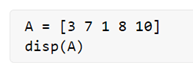
输出。

正如我们在输出中所看到的,我们通过使用disp函数获得了存储在变量'A'中的值(即我们案例中的元素)。

如果我们在不使用disp函数的情况下打印输出,它将是这样的。
请注意,在这种情况下,甚至变量的名字也会显示在输出中。
例子 #2
在这个例子中,我们将使用disp函数来显示一个矩阵的元素。以下是需要遵循的步骤。
- 初始化输入矩阵
- 使用disp函数来显示矩阵中的元素
代码。
A = [3 3 1; 8 0 4; 1 4 9] [Initializing a 3 x 3 input matrix and storing it in a variable ‘A’] disp (A) [Using the disp function to display the value stored in the variable ‘A’]
这就是我们的输入和输出在MATLAB中的样子。
输入。
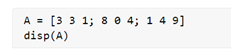
输出。
正如我们在输出中看到的,我们通过使用disp函数获得了存储在变量 "A "中的值(即本例中的矩阵元素)。
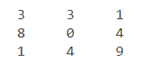
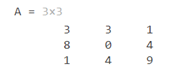
如果我们在不使用disp函数的情况下打印输出,会是这样的结果。
请注意,在这种情况下,甚至变量的名字也会显示在输出中。
例子 #3
在这个例子中,我们将使用disp函数来显示一个字符串。以下是需要遵循的步骤。
- 初始化输入字符串
- 使用disp函数来显示该字符串
代码。
A = "Let us learn MATLAB disp function" [Initializing a string and storing it in a variable ‘A’] disp (A) [Using the disp function to display the value stored in the variable ‘A’]
这就是我们的输入和输出在MATLAB中的样子。
输入。

输出。

正如我们在输出中看到的,我们通过使用disp函数获得了存储在变量'A'中的值(即本例中的一串字)。
如果我们在不使用disp函数的情况下打印输出,它将是这样的。

请注意,在这种情况下,即使是变量名称也会显示在输出中。
例子 #4
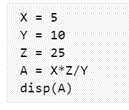
在这个例子中,我们将使用 disp 函数来显示一个数学表达式的输出。以下是需要遵循的步骤。
- 初始化表达式中涉及的变量
- 使用disp函数来显示输出
代码。
X = 5 [Initializing the 1st input variable] Y = 10 [Initializing the 2nd input variable] Z = 25 [Initializing the 3rd input variable] A = X * Z / Y [Mathematical expression to be solved] disp (A) [Using the disp function to display the value stored in the variable ‘A’]
这就是我们的输入和输出在MATLAB中的样子。
输入。
输出。

正如我们在输出中看到的,我们通过使用disp函数获得了存储在变量'A'中的输出值。
如果我们在不使用disp函数的情况下打印输出,它将是这样的。
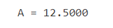
请注意,在这种情况下,即使是变量名称也会显示在输出中。
结论
- 我们使用disp函数来显示存储在一个变量中的值,而不打印该变量的名称。
- 如果我们希望我们的输出看起来很整齐,除了实际的输出外没有任何其他信息,就可以使用这个函数。
推荐文章
这是一份关于Matlab disp的指南。 这里我们讨论了Matlab disp的例子以及在MATLAB中使用disp函数的代码。你也可以看看下面的文章,以了解更多信息。
The postMatlab dispappeared first onEDUCBA.
