控制台花式打印
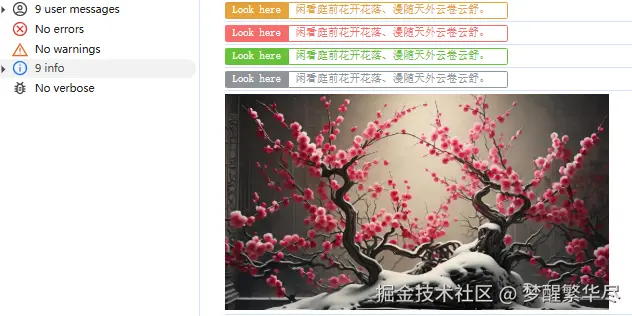
const prettyLog = () => {
const isEmpty = (value: any) => {
return value == null || value === undefined || value === '';
};
const prettyPrint = (title: string, text: string, color: string) => {
console.log(
`%c ${title} %c ${text} %c`,
`background:${color};border:1px solid ${color}; padding: 1px; border-radius: 2px 0 0 2px; color: #fff;`,
`border:1px solid ${color}; padding: 1px; border-radius: 0 2px 2px 0; color: ${color};`,
'background:transparent'
);
};
const info = (textOrTitle: string, content = '') => {
const title = isEmpty(content) ? 'Info' : textOrTitle;
const text = isEmpty(content) ? textOrTitle : content;
prettyPrint(title, text, '#909399');
};
const error = (textOrTitle: string, content = '') => {
const title = isEmpty(content) ? 'Error' : textOrTitle;
const text = isEmpty(content) ? textOrTitle : content;
prettyPrint(title, text, '#F56C6C');
};
const warning = (textOrTitle: string, content = '') => {
const title = isEmpty(content) ? 'Warning' : textOrTitle;
const text = isEmpty(content) ? textOrTitle : content;
prettyPrint(title, text, '#E6A23C');
};
const success = (textOrTitle: string, content = '') => {
const title = isEmpty(content) ? 'Success ' : textOrTitle;
const text = isEmpty(content) ? textOrTitle : content;
prettyPrint(title, text, '#67C23A');
};
const picture = (url: string, scale = 1) => {
const img = new Image();
img.crossOrigin = 'anonymous';
img.onload = () => {
const c = document.createElement('canvas');
const ctx = c.getContext('2d');
if (ctx) {
c.width = img.width;
c.height = img.height;
ctx.fillStyle = 'red';
ctx.fillRect(0, 0, c.width, c.height);
ctx.drawImage(img, 0, 0);
const dataUri = c.toDataURL('image/png');
console.log(
`%c sup?`,
`font-size: 1px;
padding: ${Math.floor((img.height * scale) / 2)}px ${Math.floor((img.width * scale) / 2)}px;
background-image: url(${dataUri});
background-repeat: no-repeat;
background-size: ${img.width * scale}px ${img.height * scale}px;
color: transparent;
`
);
}
};
img.src = url;
};
return {
info,
error,
warning,
success,
picture,
};
};
const log = prettyLog();
log.warning('Look here', '');
log.error('前方的路看似很危险,实际一点也不安全。');
log.success('奥德彪', '钱没了可以再赚,良心没了便可以赚的更多。 ');
log.info('Look here', 'loading...');
log.picture(
'https://nimg.ws.126.net/?url=http%3A%2F%2Fdingyue.ws.126.net%2F2024%2F0514%2Fd0ea93ebj00sdgx56001xd200u000gtg00hz00a2.jpg&thumbnail=660x2147483647&quality=80&type=jpg'
);
多维对象数组查找某一个符合条件的对象
const searchData = (id: string, list: any[], result = { search: undefined }) => {
  result.search = list.find((item) => item.id === id)
  let child
  if (result.search === undefined) {
    data.forEach((item: any) => {
      child = item.children || []
      if (child.length > 0 && result.search === undefined) {
        searchData(id, child, result)
      }
    })
  }
  return result.search
}
最大余额法解决百分比和不是100%的问题
function getPercentValue(arrList, index, precision) {
if (!arrList[index]) {
return 0;
}
if (!precision) precision = 2;
let sum = arrList.reduce(function(acc, val) {
return acc + (isNaN(val) ? 0 : val);
}, 0);
if (sum === 0) {
return 0;
}
let digits = Math.pow(10, precision);
let votesPerQuota = arrList.map(function(val) {
return (isNaN(val) ? 0 : val) / sum * digits * 100;
});
let targetSeats = digits * 100;
let seats = votesPerQuota.map(function(votes) {
return Math.floor(votes);
});
let currentSum = seats.reduce(function(acc, val) {
return acc + val;
}, 0);
let remainder = votesPerQuota.map(function(votes, index) {
return votes - seats[index];
});
while (currentSum < targetSeats) {
let max = Number.NEGATIVE_INFINITY;
let maxId = null;
for (let i = 0, len = remainder.length; i < len; ++i) {
if (remainder[i] > max) {
max = remainder[i];
maxId = i;
}
}
++seats[maxId];
remainder[maxId] = 0;
++currentSum;
}
return seats[index] / digits;
}
网页视频快进
document.querySelector('video').play();
document.querySelector('video').playbackRate = 3.0;
axios 终止已发请求
import axios from 'axios';
const CancelToken = axios.CancelToken;
export let cancel: any;
request({
url: `/gis/analyst/buffer-geometry`,
method: 'post',
data,
cancelToken: new CancelToken(function executor(c) {
cancel = c
})
})
cancel && cancel()
判断数据类型
1.typeof()
typeof(1)
typeof({user:'admin'})
typeof([1,2,3])
typeof('string')
typeof(null)
typeof(undefined)
typeof(Symbol(1))
数组、null和对象都是Object
2.Object.prototype.toString.call()
Object.prototype.toString.call(1)
Object.prototype.toString.call('hi')
Object.prototype.toString.call({a:'hi'})
Object.prototype.toString.call([1,'a'])
Object.prototype.toString.call(true)
Object.prototype.toString.call(() => {})
Object.prototype.toString.call(null)
Object.prototype.toString.call(undefined)
Object.prototype.toString.call(Symbol(1))
3.instanceof
'string' instanceof String
'string' instanceof Functin
4.constructor 注意:可以被更改原型所以有不却确定性
([]).constructor===Array
let a = 'NaN'
let b = '123'
let c = 'c'
Number.isFinite(Number(a))
Number.isFinite(Number(b))
Number.isFinite(Number(c))
根据节点获取元素在页面中的坐标
const getPosition = (node: any) => {
var left = node.offsetLeft;
var top = node.offsetTop;
let current = node.offsetParent;
while (current != null) {
left += current.offsetLeft;
top += current.offsetTop;
current = current.offsetParent;
}
return {
left: left,
top: top,
};
};
深拷贝
function clone(data){
if(typeof data === 'object' && data !== null){
const newData = Array.isArray(data) ? [] : {}
for(let key in data){
newData[key] = clone(data[key])
}
return newData
}else{
return data
}
}
取出数组中出现最多一项或者多项
  const aryObj = {}
  let ary = ['赵', '钱', '孙', '孙', '李', '周', '李', '周', '周', '李'];
  ary.forEach(k => !aryObj[k] ? aryObj[k] = 1 : aryObj[k]++)
  let result = Object.keys(aryObj).sort((a, b) => aryObj[b] - aryObj[a]).filter((k, i, l) => aryObj[k] === aryObj[l[0]])
    console.log(result)
数组对象排序
const arr = [
{
name: 'jp',
age: 18
},
{
name: 'mm',
age: 20
},
{
name: 'xm',
age: 17
}
]
function sortArr(a, b) {
let aa = a.age
let bb = b.age
if (aa > bb) {
return -1
} else if (aa === bb) {
return 0
} else {
return 1
}
}
arr.sort(sortArr)
console.log(arr)
防抖节流
function debounce(fun, time=1000) {
let timer
return function () {
clearTimeout(timer)
if(!timer){
fun.apply(this, arguments)
}
timer = setTimeout(() => {
timer=null
}, time)
}
}
function throttle(fn, delay = 2000) {
let begin = 0
return function () {
let currentTime = new Date().getTime()
if (currentTime - begin > delay) {
fn.apply(this, arguments)
begin = currentTime
}
}
}
页面回到顶部方法
 const BackToTop = () => {
    let marginTop =
      document.body.scrollTop || document.documentElement.scrollTop;
    let step = Math.floor(marginTop / 60);
    if (step === 0) {
      step = marginTop;
    }
    let timer: any = null;
    timer = setInterval(() => {
      marginTop -= step;
      document.body.scrollTop = marginTop <= 0 ? 0 : marginTop;
      document.documentElement.scrollTop = marginTop <= 0 ? 0 : marginTop;
      if (marginTop <= 0) {
        clearInterval(timer);
      }
    }, 10);
  };
- 打印js代码段执行耗时
console.time();
console.timeEnd();
- 判断数据类型
function toString(data) {
let temp = Object.prototype.toString.call(data).split(' ')[1];
return temp.slice(0, temp.length - 1)
}
js获取区间随机数的方法
function randomNum(min,max) {
    return Math.floor(Math.random() * (max - min + 1) + min);
}
js获取页面宽高方法记录
document.body.clientWidth
document.body.clientHeight
document.body.offsetWidth
document.body.offsetHeight
document.body.scrollWidth
document.body.scrollHeight
document.body.scrollTop
document.body.scrollLeft
window.screenTop
window.screenLeft
window.screen.height
window.screen.width
window.screen.availHeight
window.screen.availWidth
数字金额转换大写
export const number2text = (number, type = "upper") => {
const confs = {
lower: {
num: ["零", "一", "二", "三", "四", "五", "六", "七", "八", "九"],
unit: ["", "十", "百", "千", "万"],
level: ["", "万", "亿"]
},
upper: {
num: ["零", "壹", "贰", "叁", "肆", "伍", "陆", "柒", "捌", "玖"],
unit: ["", "拾", "佰", "仟"],
level: ["", "万", "亿"]
},
decimal: {
unit: ["分", "角"]
},
maxNumber: 999999999999.99
};
if (Number(number) > confs.maxNumber) {
console.error(
`The maxNumber is ${confs.maxNumber}. ${number} is bigger than it!`
);
return false;
}
const conf = confs[type];
const numbers = String(Number(number).toFixed(2)).split(".");
const integer = numbers[0].split("");
const decimal = Number(numbers[1]) === 0 ? [] : numbers[1].split("");
const levels = integer.reverse().reduce((pre, item, idx) => {
let level = pre[0] && pre[0].length < 4 ? pre[0] : [];
let value =
item === "0" ? conf.num[item] : conf.num[item] + conf.unit[idx % 4];
level.unshift(value);
if (level.length === 1) {
pre.unshift(level);
} else {
pre[0] = level;
}
return pre;
}, []);
const _integer = levels.reduce((pre, item, idx) => {
let _level = conf.level[levels.length - idx - 1];
let _item = item.join("").replace(/(零)\1+/g, "$1");
if (_item === "零") {
_item = "";
_level = "";
} else if (_item[_item.length - 1] === "零") {
_item = _item.slice(0, _item.length - 1);
}
return pre + _item + _level;
}, "");
let _decimal = decimal
.map((item, idx) => {
const unit = confs.decimal.unit;
const _unit = item !== "0" ? unit[unit.length - idx - 1] : "";
return `${conf.num[item]}${_unit}`;
})
.join("");
return `${_integer}元` + (_decimal || "整");
};
跳转外部链接
var url = 'https://juejin.cn'
window.location.href = url
window.history.pushState(url);
window.history.replaceState(url);
window.open(url,"_blank");
var a = document.createElement("a");
a.setAttribute("href", "www.baidu.com");
a.setAttribute("target", "_blank");
a.click();
js无限刷新当前页面方法
let timeout = prompt("设置刷新时间间隔[S]");
let current = location.href;
if(timeout > 0)
{
setTimeout('reload()', 1000 * timeout);
}
else
{
location.replace(current);
}
let num = 1
function reload()
{
setTimeout('reload()', 1000 * timeout);
let fr4me = '<frameset cols=\'*\'>\n<frame src=\'' + current + '\' />';
fr4me += '</frameset>';
with(document)
{
write(fr4me);
console.log("刷新第【"+ num +"】次")
void(close());
};
}
js抽奖
function lottery(total, winners, seed) {
if (typeof total !== 'number' || typeof winners !== 'number' || total < 1 || winners < 1 || winners > total) {
throw new Error('error parameter');
}
const randomSeed = seed !== undefined ? seed : Date.now();
function mulberry32(seed) {
return function() {
seed += 0x6D2B79F5;
let t = seed;
t = Math.imul(t ^ t >>> 15, t | 1);
t ^= t + Math.imul(t ^ t >>> 7, t | 61);
return ((t ^ t >>> 14) >>> 0) / 4294967296;
}
}
const random = mulberry32(randomSeed);
const participants = Array.from({length: total}, (_, i) => i + 1);
for (let i = participants.length - 1; i > 0; i--) {
const j = Math.floor(random() * (i + 1));
[participants[i], participants[j]] = [participants[j], participants[i]];
}
const result = participants.slice(0, winners);
result.sort((a, b) => a - b);
return result;
}
const seed = 20251015091158+5;
const result = lottery(100, 3, seed);
console.log(`(种子 ${seed})中奖号码:`, result);