

echarts柱状体改变颜色 同时对应legend
1.echarts改变柱状图的颜色,每个柱状图显示不同的颜色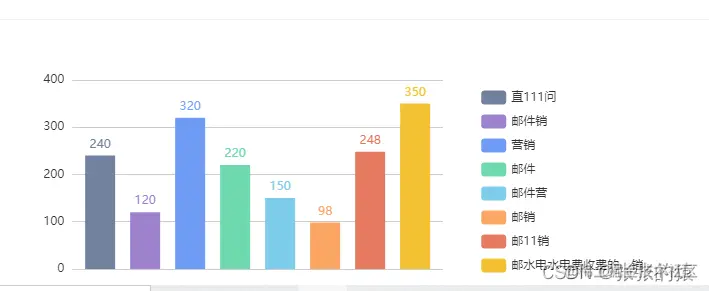
 endchartes() {
      let chart4 = this.$echarts.init(
        document.getElementById("end_zz_echartes"),
        "light"
      );
      let option4 = {
        tooltip: {
          trigger: "axis",
          axisPointer: {
            type: "shadow",
          },
        },
        legend: {
          orient: "vertical",
          top: "25%",
          x: "70%", //图例位置,设置right发现图例和文字位置反了,设置一个数值就好了
          y: "center", //延Y轴居中
        },
        grid: {
          left: "5%",
          right: "35%",
          bottom: "5%",
          containLabel: true,
        },

        xAxis: [
          {
            axisTick: {
              show: false,
            },
            axisLine: {
              show: false,
            },
            type: "category",
          },
        ],
        yAxis: [
          {
            axisTick: {
              show: false,
            },
            axisLine: {
              //y轴
              show: false,
            },
            type: "value",
          },
        ],
        color: [
          "#71819E",
          "#9E81CE",
          "#6F9BF6",
          "#6ED9AF",
          "#7ECCEA",
          "#FBA763",
          "#E67A61",
          "#F3C234",
        ],

        series: [
          {
            barWidth: 30,
            type: "bar",
            name: "直111问",
            barGap: 0.5,
            label: {
              show: true,
              position: "top",
            },
            data: [240],
          },
          {
            name: "邮件销",
            barWidth: 30,
            barGap: 0.5,
            type: "bar",
            label: {
              show: true,
              position: "top",
            },
            data: [120],
          },
          {
            name: "营销",
            barWidth: 30,
            barGap: 0.5,
            type: "bar",
            label: {
              show: true,
              position: "top",
            },
            data: [320],
          },
          {
            name: "邮件",
            barWidth: 30,
            barGap: 0.5,
            type: "bar",
            label: {
              show: true,
              position: "top",
            },
            data: [220],
          },
          {
            name: "邮件营",
            barWidth: 30,
            barGap: 0.5,
            type: "bar",
            label: {
              show: true,
              position: "top",
            },
            data: [150],
          },
          {
            name: "邮销",
            barWidth: 30,
            barGap: 0.5,
            type: "bar",
            label: {
              show: true,
              position: "top",
            },
            data: [98],
          },
          {
            name: "邮11销",
            barWidth: 30,
            barGap: 0.5,
            type: "bar",
            label: {
              show: true,
              position: "top",
            },
            data: [248],
          },
          {
            name: "邮水电水电费收费的,销",
            barWidth: 30,
            barGap: 0.5,
            type: "bar",
            label: {
              show: true,
              position: "top",
            },
            data: [350],
          },
        ],
      };
      chart4.setOption(option4);
      window.onresize = function () {
        chart4.resize();
      };
    },
  },

