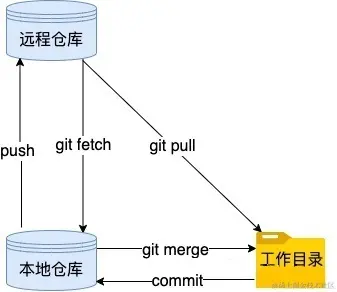
基本使用
git init

git remote add origin 远程仓库url

git pull origin master

git add .

git commit -m  "注释"

git push origin "master"
git remote -v
git push -u origin master
git remote remove origin
git remote add origin https://gitee.com/zm5/demo01.git
分支命令
git branch
git branch 分支名
git checkout 分支名
git checkout -b 分支名
git merge 被合并分支名
git branch -d 被删除分支名 //删除分支时要先退出被删除分支
git branch -m oldBranch newBranch
其他命令
# 生成ssh秘钥
ssh-keygen -t rsa

# 撤销对该文件的所有更改
git checkout -- filename

# 将某个文件移出缓存区
git rm -r --cached "文件路径"

# 查看当前存在的版本记录
git log

# 查看所有的版本记录
git reflog

# 用户配置
git config --global --list
git config --global user.name “用户名”
git config --global user.email “邮箱地址”
git config --global credential.helper store    // 避免每次都输入密码

# 配置文件
C:\Users\Administrator\.gitconfig (用户信息配置)