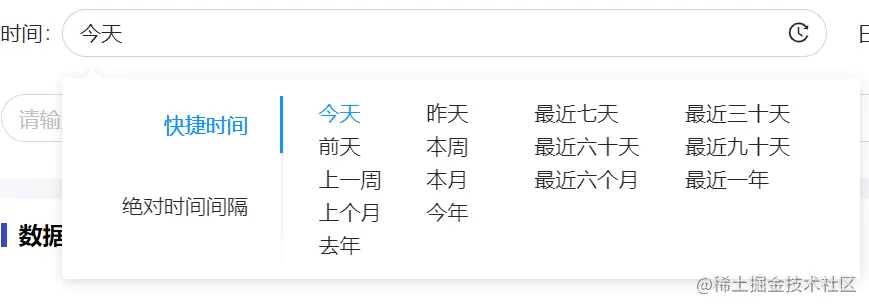
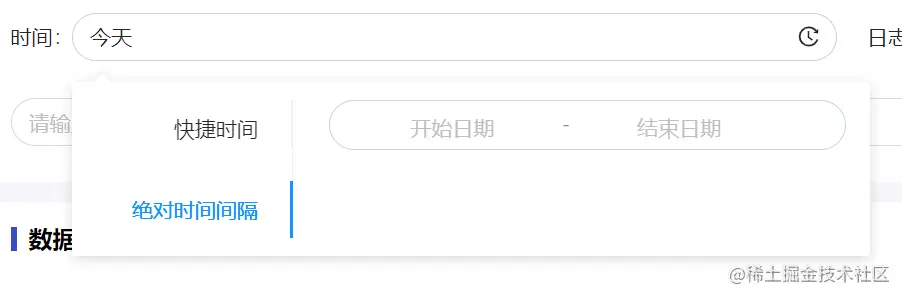
上代码,记录以后备用
<template>
<a-popover trigger="click" :visible="popShow" placement="bottomLeft">
<template
<div class="tab-content" ref="tabContent">
<a-tabs v-model:activeKey="activeKey" tabPosition="left">
<a-tab-pane key="1" tab="快捷时间">
<div class="tab1-box">
<ul>
<li v-for="(item, index) in qList1" :key="index">
<span
@click="clickQitem(item, 't1' + index)"
class="q-item"
:class="{ 'q-item_active': itemActive == 't1' + index }"
>{{ item.label }}</span
>
</li>
</ul>
<div>
<ul>
<li v-for="(item, index) in qList2" :key="index">
<span
class="q-item"
@click="clickQitem(item, 't2' + index)"
:class="{ 'q-item_active': itemActive == 't2' + index }"
>{{ item.label }}</span
>
</li>
</ul>
</div>
</div>
</a-tab-pane>
<a-tab-pane key="2" tab="绝对时间间隔">
<div>
<a-range-picker
dropdownClassName="wlh-time"
@change="rangePickerChange"
:placeholder="['开始日期', '结束日期']"
separator="-"
:disabledDate="disabledDate"
style="width: 100%"
v-model:value="rangTimeArr"
/>
</div>
</a-tab-pane>
</a-tabs>
</div>
</template>
<a-input
placeholder="请选择时间"
class="fillet-input"
allowClear
@click.stop="clickInput"
readonly
v-model:value="showLabel"
>
<template
<HistoryOutlined />
</template>
</a-input>
</a-popover>
</template>
<script>
import { reactive, toRefs, onUnmounted } from 'vue-demi'
import { HistoryOutlined } from '@ant-design/icons-vue'
import moment from 'moment'
import useTools from '@/hooks/useTools'
export default {
components: {
HistoryOutlined
},
props: {
// 设置默认的快捷选择项
defaultQuickTime: {
type: String,
default: ''
}
},
emits: ['update:value', 'change'],
setup(props, { emit }) {
const { getTimeType } = useTools()
const unitMap = {
d: 'day',
w: 'week',
m: 'month',
y: 'year'
}
const state = reactive({
showLabel: '',
showValue: '',
itemActive: '',
activeKey: '1',
popShow: false,
rangTimeArr: [],
tabContent: null,
qList1: [
{
label: '今天',
value: 0,
unit: 'd'
},
{
label: '昨天',
value: 1,
unit: 'd'
},
{
label: '前天',
value: 2,
unit: 'd'
},
{
label: '本周',
value: 0,
unit: 'w'
},
{
label: '上一周',
value: 1,
unit: 'w'
},
{
label: '本月',
value: 0,
unit: 'm'
},
{
label: '上个月',
value: 1,
unit: 'm'
},
{
label: '今年',
value: 0,
unit: 'y'
},
{
label: '去年',
value: 1,
unit: 'y'
}
],
qList2: [
{
label: '最近七天',
value: 7,
unit: 'd'
},
{
label: '最近三十天',
value: 30,
unit: 'd'
},
{
label: '最近六十天',
value: 60,
unit: 'd'
},
{
label: '最近九十天',
value: 90,
unit: 'd'
},
{
label: '最近六个月',
value: 6,
unit: 'm'
},
{
label: '最近一年',
value: 1,
unit: 'y'
}
]
})
// 处理时间
const dealWidthTime = ({ unit, value, label }) => {
const result = {
startTime: '',
endTime: ''
}
const nowTime = moment().valueOf()
const unitKey = unitMap[unit]
if (label.indexOf('最近') === -1) {
result.startTime = moment()
[unitKey](moment()[unitKey]() - value)
.startOf(unitKey)
.valueOf()
result.endTime = moment()
[unitKey](moment()[unitKey]() - value)
.endOf(unitKey)
.valueOf()
} else {
result.startTime = moment().subtract(value, unitKey).valueOf()
result.endTime = nowTime
}
if (result.endTime > nowTime) {
result.endTime = nowTime
}
return getTimeType(result)
}
const emitToValue = (result) => {
emit('update:value', result)
emit('change', result)
state.popShow = false
}
const clickQitem = (item, tkey) => {
state.showLabel = item.label
state.showValue = item
state.itemActive = tkey
const result = dealWidthTime(item)
emitToValue(result)
}
const setDefaultQuick = (arr = [], tkey = 't1') => {
arr.forEach((i, index) => {
if (i.label == props.defaultQuickTime) {
clickQitem(i, tkey + index)
}
})
}
if (props.defaultQuickTime) {
setDefaultQuick(state.qList1, 't1')
setDefaultQuick(state.qList2, 't2')
}
const clickInput = () => {
state.popShow = !state.popShow
}
const rangePickerChange = (dates, strArr = []) => {
state.showLabel = strArr.join('-')
state.showValue = strArr
state.itemActive = ''
const obj = {
startTime: moment(strArr[0] + ' 00:00:00').valueOf(),
endTime: moment(strArr[1] + ' 23:59:59').valueOf()
}
const result = getTimeType(obj)
emitToValue(result)
}
const fn = (e) => {
const timeContent = document.querySelector('.wlh-time')
if (!state.tabContent) return
if (!state.tabContent.contains(e.target) && (!timeContent || !timeContent.contains(e.target))) {
state.popShow = false
}
}
document.addEventListener('click', fn)
onUnmounted(() => {
document.removeEventListener('click', fn)
})
// 禁用时间
const disabledDate = (currentDate) => {
return currentDate.valueOf() > moment().valueOf()
}
return {
...toRefs(state),
clickQitem,
clickInput,
disabledDate,
rangePickerChange
}
}
}
</script>
<style lang="scss" scoped>
.tab-content {
width: 500px
}
.tab1-box {
display: flex
ul {
display: flex
flex-wrap: wrap
margin-bottom: 0
li {
flex: none
width: 50%
.q-item {
cursor: pointer
&:hover {
color:
}
&.q-item_active {
color:
}
}
}
}
}
</style>
useTools里面是一些项目公用的方法, getTimeType就是格式一下时间
const getTimeType = (() => {
    const configTime = 1000 * 60 * 60 * 24 * 28;
    return ({ startTime, endTime }) => {
        if (!startTime || !endTime) {
          throw new Error('startTime&endTime 不能为空');
        }
        ...
        return {
          startTime: moment(startTime).format('yyyy-MM-DD HH:mm:ss'),
          endTime: moment(endTime).format('yyyy-MM-DD HH:mm:ss'),
          timeType
        };
  };
})();
最后看效果