数组基本用法介绍加案例
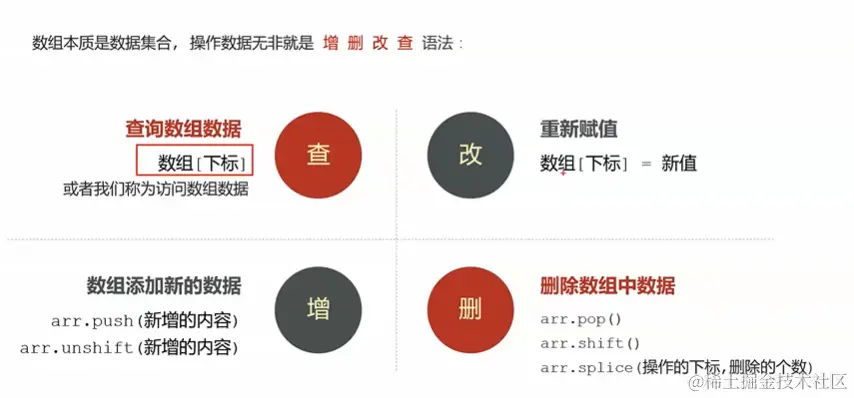
1.数组的初体验
<script>
let arr = ['苹果', '西瓜', '雪梨', '哈密瓜', '榴莲'];
console.log(arr[0]);
console.log( arr.length );
console.log(arr[100]);
</script>
2.数组的循环
数组一般搭配循环来使用
<script>
let arr=[10,20,30,40,50];
arr[0];
arr[1];
arr[2];
arr[3];
arr[4];
for (let index = 0; index < 5 ; index++) {
}
</script>
3.数组的循环输出案例
万少跟我们约定数组从零开始,别乱搞(因为数组第一位是0往后这样顺延的)
<script>
let arr = ['苹果', '西瓜', '香蕉', '葡萄'];
for (let index = 0; index < arr.length; index++) {
console.log(arr[index]);
}
</script>
4.数组求和案例
<script>
let arr = [2, 6, 1, 7, 4];
let sum = 0;
for (let index = 0; index < arr.length; index++) {
sum += arr[index];
}
console.log(sum);
console.log(sum / arr.length);
</script>
5.数组求最大最小案例
求非零的数也是这样,就是不等于零就行,还有更多的办法联想到再补
<script>
let arr = [2, 6, 1, 77, 52, 25, 7];
let max = arr[0];
let min = arr[0];
for (let i = 0; i < arr.length; i++) {
if (arr[i] > max) {
max = arr[i];
}
if (arr[i] < min) {
min = arr[i];
}
}
console.log(max);
console.log(min);
</script>
求非零元素演示
<script>
let arr = [1, 3, 4, 5, 3, 2, 4, 0, 0, 3, 22, 98];
let newArr = [];
for (let index = 0; index < arr.length; index++) {
if (arr[index] !== 0) {
newArr.push(arr[index]);
}
}
console.log(newArr);
</script>
6.push增加数值和应用案例
增加数值演示
<script>
let arr = ['苹果', '香蕉'];
arr.push("西瓜");
console.log(arr);
</script>
应用演示
<script>
let arr = [];
for (let index = 1; index <= 4; index++) {
let userName = prompt('请输入你同学的名字');
arr.push(userName);
}
console.log(arr);
</script>
7. 数组的过滤
<script>
let arr1 = [2, 0, 6, 1, 77, 0, 52, 0, 25, 7];
let arr2 = [];
for (let index = 0; index < arr1.length; index++) {
if (arr1[index] >= 10) {
arr2.push(arr1[index]);
}
}
console.log(arr2);
</script>
8. -数组-unshift-增加元素
<script>
let arr = ['yellow', 'red']
arr.unshift('bule')
console.log(arr);
</script>
9.-push和unshift返回数组的长度
就是添加新元素的时候加入arrLength,还可以返回数组的长度,写法如下
<script>
let arr = ['苹果', '西瓜'];
let arrLength = arr.unshift('哈密瓜');
console.log(arrLength);
console.log(arr.length);
</script>
10. 数组-删除-pop
<script>
let arr = ['西瓜', '香蕉', '麻瓜'];
arr.shift();
console.log(arr);
</script>
11.数组指定元素来删除 -splice
//splice:指定删除和增加,一般不是末尾的值都可以用它,但是常用的是删除功能,括号里面第一个值是数组里面元素的位置,
// 第二个值是删除几个的意思(删除多个是从第一个值数组元素的位置开始往后删),如果是0就是不删除的意思,第三个是需要增加的元素,只可以增加一个(增加的元素会在指定元素位置的前面)
<script>
let arr = ['西瓜', '香蕉', '麻瓜'];
arr.splice(1, 1, '红薯');
console.log(arr);
</script>
数组方法的补充(1)
<script>
let arr = ['西瓜', '香蕉', '麻瓜'];
let last = arr.pop();
console.log(last);
console.log(arr);
</script>
数组方法的补充(2)
<script>
let arr = ['西瓜', 100, null, true, NaN, undefined, 80];
arr.length = 0;
console.log(arr);
</script>
动态生成柱状图 案例
1.第一步先做静态页面
<!DOCTYPE html>
<html lang="en">
<head>
<meta charset="UTF-8" />
<meta
name="viewport"
content="width=device-width, initial-scale=1.0,maximum-scale=1,minimum-scale=1,user-scalable=no"
/>
<title>21-动态生成柱状图.html</title>
<style>
* {
margin: 0;
padding: 0;
box-sizing: border-box;
}
ul {
list-style: none;
width: 1000px;
height: 600px;
margin: 100px auto;
display: flex;
justify-content: space-around;
background-color: aqua;
align-items: flex-end;
}
li {
width: 100px;
background-color: pink;
position: relative;
}
span {
position: absolute;
top: -30px;
left: 50%;
transform: translateX(-50%);
}
div {
position: absolute;
width: 100%;
text-align: center;
top: 100%;
background-color: red;
}
li:nth-child(1) {
height: 100px;
}
li:nth-child(2) {
height: 200px;
}
li:nth-child(3) {
height: 300px;
}
li:nth-child(4) {
height: 400px;
}
</style>
</head>
<body>
<ul>
<li>
<span>1</span>
<div>第1季度</div>
</li>
<li> <span>2</span> <div>第2季度</div> </li>
<li>
<span>3</span>
<div>第3季度</div>
</li>
<li>
<span>4</span>
<div>第4季度</div>
</li>
</ul>
<script>
</script>
</body>
</html>
2.第二步实现 动态生成li标签
<script>
let num = +prompt('请输入你想要生成的li标签的个数');
let liHtml = `<ul>`;
for (let index = 1; index <= num; index++) {
liHtml += `<li>${index}</li>`;
}
liHtml += `</ul>`;
document.write(liHtml);
</script>
3.第三步实现 -获取用户输入的高度
<!DOCTYPE html>
<html lang="en">
<head>
<meta charset="UTF-8" />
<meta
name="viewport"
content="width=device-width, initial-scale=1.0,maximum-scale=1,minimum-scale=1,user-scalable=no"
/>
<title>24-动态生成柱状图-获取用户输入的高度</title>
<style>
* {
margin: 0;
padding: 0;
box-sizing: border-box;
}
ul {
list-style: none;
width: 1000px;
height: 600px;
margin: 100px auto;
display: flex;
justify-content: space-around;
background-color: aqua;
align-items: flex-end;
}
li {
width: 100px;
background-color: pink;
position: relative;
}
span {
position: absolute;
top: -30px;
left: 50%;
transform: translateX(-50%);
}
div {
position: absolute;
width: 100%;
text-align: center;
top: 100%;
background-color: red;
}
</style>
</head>
<body>
<script>
/*
需求分析:(用文字 把看见的需求 描述下来)
1 一打开页面 弹出了4个 输入框
2 用户在每一个输入框 填写数字-控制的是每一个li标签的高度
3 最后一个输入框填写完毕了 页面上出现 4个div
4 4个div的样式部分
1 一行放4个元素
2 每一个元素颜色相同 高度不同
5 操作
1 第4个步骤 我最熟悉了 写布局 css 已经完成了!!
2 先实现 for循环生成4个柱子li(类似之前写过的一个 动态生成table表格)(每一个柱子的高不一样 先不管)
3 动态获取用户输入的高度
4 还需把这些高度按个设置到 对应的li标签中
先实现4功能 写css 3个方式 (内部、外部样式、行内)
*/
// 用来存放4个li标签的 字符串 原来 ul 不需要 循环 只是 li标签要循环
let liHtml = `<ul>`;
// 4个li标签的高度
let liHeight = [100, 150, 200, 250];
// 数组是4个 长度就是4 0-3 4个元素
for (let index = 0; index < 4; index++) {
// liHeight[0] = 100
// liHeight[1] = 150
// liHeight[2] = 200
// liHeight[3] = 250
// let h = liHeight[index];
// liHtml += `<li style="height:50px;"> <span>${index}</span> <div>第${index}季度</div> </li>`;
// liHtml += `<li style="height:${50}px;"> <span>${index}</span> <div>第${index}季度</div> </li>`;
// liHtml += `<li style="height:${h}px;"> <span>${index}</span> <div>第${index}季度</div> </li>`;
liHtml += `<li style="height:${liHeight[index]}px;"> <span>${index}</span> <div>第${index}季度</div> </li>`;
}
liHtml += `</ul>`;
// liHTML = `<ul></ul>`
// 把4个li标签 写到页面上
document.write(liHtml);
</script>
</body>
</html>
4.第四步 最终实现整个案例
<!DOCTYPE html>
<html lang="en">
<head>
<meta charset="UTF-8" />
<meta
name="viewport"
content="width=device-width, initial-scale=1.0,maximum-scale=1,minimum-scale=1,user-scalable=no"
/>
<title>24-动态生成柱状图-获取用户输入的高度</title>
<style>
* {
margin: 0;
padding: 0;
box-sizing: border-box;
}
ul {
list-style: none;
width: 1000px;
height: 600px;
margin: 100px auto;
display: flex;
justify-content: space-around;
background-color: aqua;
align-items: flex-end;
}
li {
width: 100px;
background-color: pink;
position: relative;
}
span {
position: absolute;
top: -30px;
left: 50%;
transform: translateX(-50%);
}
div {
position: absolute;
width: 100%;
text-align: center;
top: 100%;
background-color: red;
}
</style>
</head>
<body>
<script>
let liHtml = `<ul>`;
let liHeight = [];
for (let index = 0; index < 4; index++) {
let height = +prompt(`请输入你想要的第${index + 1}个高度数据`);
liHeight.push(height);
}
for (let index = 0; index < 4; index++) {
liHtml += `
<li style="height:${liHeight[index]}px;">
<span>${liHeight[index]}</span>
<div>第${index + 1}季度</div>
</li>`;
}
liHtml += `</ul>`;
document.write(liHtml);
</script>
</body>
</html>
优化柱状图(添加动画)
<!DOCTYPE html>
<html lang="en">
<head>
<meta charset="UTF-8" />
<meta
name="viewport"
content="width=device-width, initial-scale=1.0,maximum-scale=1,minimum-scale=1,user-scalable=no"
/>
<title>24-动态生成柱状图-获取用户输入的高度</title>
<style>
* {
margin: 0;
padding: 0;
box-sizing: border-box;
}
ul {
list-style: none;
width: 1000px;
height: 600px;
margin: 100px auto;
display: flex;
justify-content: space-around;
background-color: aqua;
align-items: flex-end;
overflow: hidden;
animation: ul-over .1s 2s forwards;
}
li {
width: 100px;
background-color: pink;
position: relative;
transform: translateY(100%);
}
span {
position: absolute;
top: -30px;
left: 50%;
transform: translateX(-50%);
}
div {
position: absolute;
width: 100%;
text-align: center;
top: 100%;
}
.cls-move {
animation: move 1s linear forwards;
}
@keyframes ul-over {
100% {
overflow: visible;
}
}
@keyframes move {
0% {
transform: translateY(100%);
}
100% {
transform: translateY(0%);
}
}
</style>
</head>
<body>
<script>
let liHtml = `<ul>`;
let liHeight = [100, 150, 200, 250];
for (let index = 0; index < 4; index++) {
liHtml += `<li class="cls-move" style="height:${liHeight[index]}px;"> <span>${index}</span> <div>第${index}季度</div> </li>`;
}
liHtml += `</ul>`;
document.write(liHtml);
</script>
</body>
</html>



