
\
\
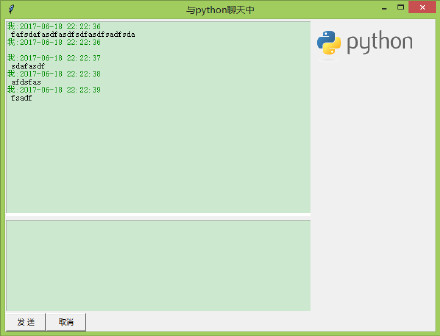
源码:
- from tkinter import *
- import time
- def main():
- def sendMsg():#发送消息
- strMsg = '我:' + time.strftime("%Y-%m-%d %H:%M:%S",
- time.localtime()) + '\n '
- txtMsgList.insert(END, strMsg, 'greencolor')
- txtMsgList.insert(END, txtMsg.get('0.0', END))
- txtMsg.delete('0.0', END)
- def cancelMsg():#取消消息
- txtMsg.delete('0.0', END)
- def sendMsgEvent(event): #发送消息事件
- if event.keysym == "Up":
- sendMsg()
- #创建窗口
- t = Tk()
- t.title('与python聊天中')
- #创建frame容器
- frmLT = Frame(width=500, height=320, bg='white')
- frmLC = Frame(width=500, height=150, bg='white')
- frmLB = Frame(width=500, height=30)
- frmRT = Frame(width=200, height=500)
- #创建控件
- txtMsgList = Text(frmLT)
- txtMsgList.tag_config('greencolor', foreground='#008C00')#创建tag
- txtMsg = Text(frmLC);
- txtMsg.bind("", sendMsgEvent)
- btnSend = Button(frmLB, text='发 送', width = 8, command=sendMsg)
- btnCancel = Button(frmLB, text='取消', width = 8, command=cancelMsg)
- imgInfo = PhotoImage(file = "python.gif")
- lblImage = Label(frmRT, image = imgInfo)
- lblImage.image = imgInfo
- #窗口布局
- frmLT.grid(row=0, column=0, columnspan=2, padx=1, pady=3)
- frmLC.grid(row=1, column=0, columnspan=2, padx=1, pady=3)
- frmLB.grid(row=2, column=0, columnspan=2)
- frmRT.grid(row=0, column=2, rowspan=3, padx=2, pady=3)
- #固定大小
- frmLT.grid_propagate(0)
- frmLC.grid_propagate(0)
- frmLB.grid_propagate(0)
- frmRT.grid_propagate(0)
- btnSend.grid(row=2, column=0)
- btnCancel.grid(row=2, column=1)
- lblImage.grid()
- txtMsgList.grid()
- txtMsg.grid()
- #主事件循环
- t.mainloop()
- if __name__ == '__main__':
- main()
\
\