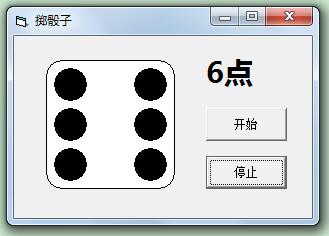
\
\
Private Sub Command1_Click()
Timer1.Enabled = True '开始
End Sub
\
Private Sub Command2_Click()
Timer1.Enabled = False '停止
num = Int(Rnd * 6) + 1
Label1.Caption = num & "点"
Display (num)
End Sub
\
\
Private Sub Form_Load()
For i = 0 To 6 '初始化
Shape2(i).FillColor = &H0&
Shape2(i).FillStyle = 0
Shape2(i).Shape = 3
Shape2(i).Visible = False
Next i
Shape1.FillColor = &HFFFFFF
Shape1.FillStyle = 0
Shape1.Shape = 5
Randomize Timer
Timer1.Enabled = False
Timer1.Interval = 50
Label1.Caption = "1 点"
Display (1)
End Sub
\
Private Sub Timer1_Timer()
Randomize
num = Int(Rnd * 6) + 1
Label1.Caption = num & "点"
Display (num)
End Sub
\
Sub Display(a)
For i = 0 To 6
Shape2(i).Visible = False
Next i
For i = 0 To 6
If i <> 2 Or i <> 4 Then
Shape2(i).FillColor = &H0&
End If
Next i
Select Case a
Case 1
Shape2(3).FillColor = &H0&
Shape2(3).Visible = True
Case 2
Shape2(0).Visible = True
Shape2(6).Visible = True
Case 3
Shape2(0).Visible = True
Shape2(3).Visible = True
Shape2(6).Visible = True
Case 4
For i = 0 To 6
If i = 0 Or i = 2 Or i = 4 Or i = 6 Then
Shape2(i).Visible = True
End If
Next i
Case 5
For i = 0 To 6
If i = 0 Or i = 2 Or i = 3 Or i = 4 Or i = 6 Then
Shape2(i).Visible = True
End If
Next i
Case 6
For i = 0 To 6
If i <> 3 Then
Shape2(i).Visible = True
End If
Next i
End Select
End Sub
\