运行效果:
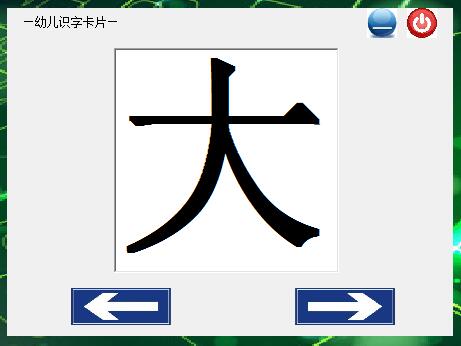
\
程序代码:
Dim myarray(10) As String '定义全局变量,文字数组
Dim i As Integer
\
Private Sub Form_KeyDown(KeyCode As Integer, Shift As Integer)
If KeyCode = 37 Then '键盘按键左边←
Call Image1_Click
ElseIf KeyCode = 39 Then '键盘按键右边→
Call Image2_Click
End If
End Sub
\
Private Sub Form_Load() '定义文字数组,初始化timer控件、索引值i
Timer1.Enabled = fasle
Timer1.Interval = 100
myarray(0) = "大": myarray(1) = "小": myarray(2) = "多": myarray(3) = "少"
myarray(4) = "前": myarray(5) = "后": myarray(6) = "左": myarray(7) = "右"
myarray(8) = "中": myarray(9) = "上": myarray(10) = "下"
Label1.Left = -3800
i = -1
Call Image2_Click
End Sub
\
Private Sub Image1_Click() '移动到上一个字
If i > 0 Then
i = i - 1
Label1 = myarray(i)
End If
Timer1.Enabled = True
Label1.Left = -4000
End Sub
\
Private Sub Image2_Click() '移动到下一个字
If i < 10 Then
i = i + 1
Label1 = myarray(i)
End If
Timer1.Enabled = True
Label1.Left = -4000
End Sub
\
Private Sub Image2_MouseMove(Button As Integer, Shift As Integer, X As Single, Y As Single)
Image1.MousePointer = 99
Image1.MouseIcon = LoadPicture("c:\windows\cursors\harrow.cur")
End Sub
\
Private Sub Image3_Click()
Me.WindowState = vbMinimized '最小化窗口,需要把showintaskbar属性设置为true
End Sub
\
Private Sub Image3_MouseMove(Button As Integer, Shift As Integer, X As Single, Y As Single)
Image3.MousePointer = 99
Image3.MouseIcon = LoadPicture("c:\windows\cursors\harrow.cur")
End Sub
\
Private Sub Image4_Click()
End
End Sub
\
Private Sub Image4_MouseMove(Button As Integer, Shift As Integer, X As Single, Y As Single)
Image4.MousePointer = 99
Image4.MouseIcon = LoadPicture("c:\windows\cursors\harrow.cur")
End Sub
\
'Timer控件实现文字移动效果,如果移动到中间位置就停止。
Private Sub Timer1_Timer()
If Label1.Left < 5000 Then
Label1.Left = Label1.Left + 200
Else
Label1.Left = -4000
End If
If Label1.Left > 1560 And Label1.Left < 1660 Then
Timer1.Enabled = False
End If
End Sub
\
\
学习总结:
1、harrow.cur为windowsXP的系统图标,windows7中没有,要在win7中运行则需要修改成其他图标,否则报错。
2、方向键的键盘码keycode如下:
keycode 37 = Left ←
keycode 38 = Up ↑
keycode 39 = Right →
keycode 40 = Down ↓\
3、如果使用if...else语句,else遵循就近原则。
\