参与拿奖:本文已参与「新人创作礼」活动,一起开启掘金创作之路
PS:代码文末自取
1.运行效果
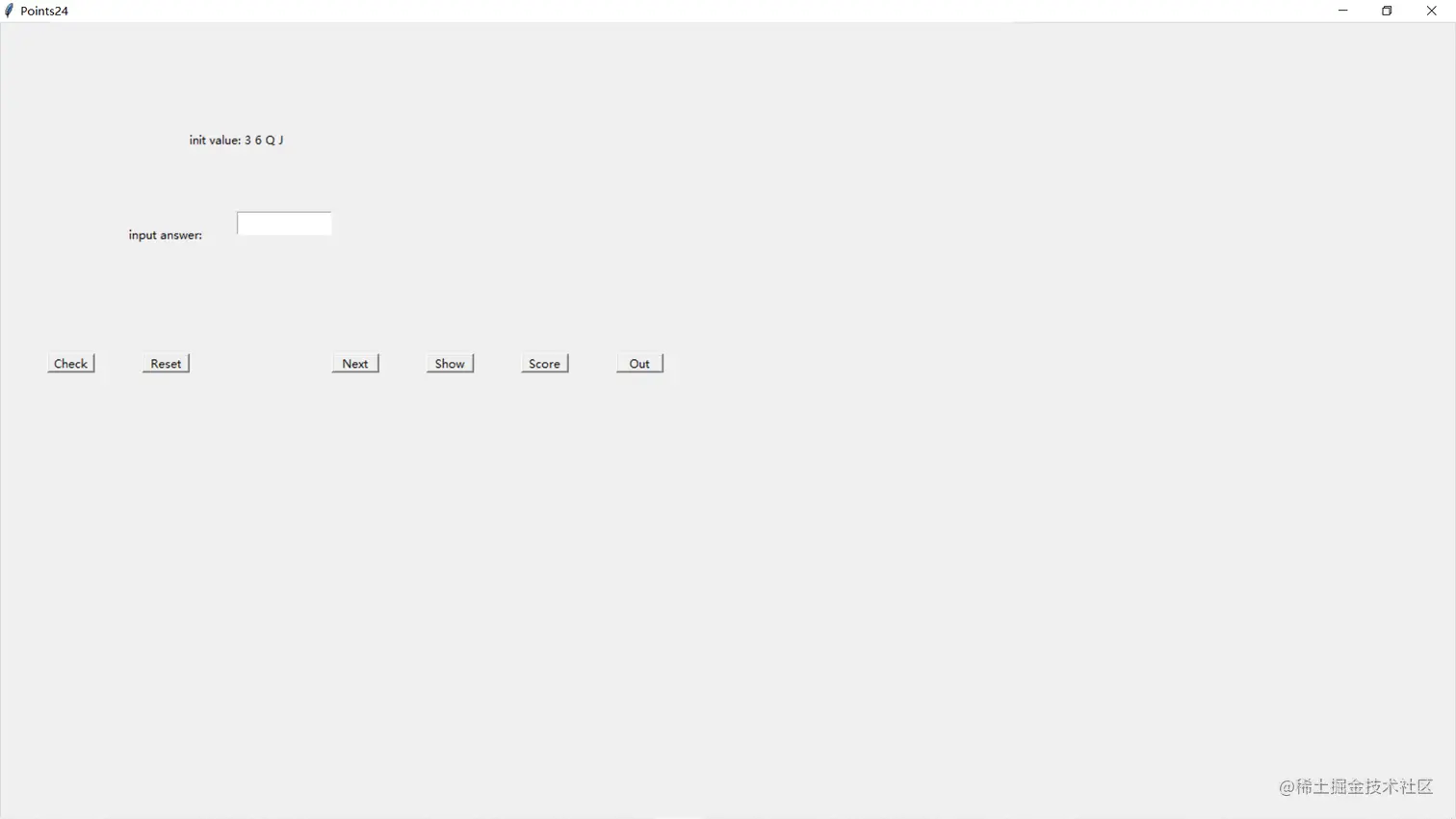
2.导入相关的包
import tkinter
import tkinter.messagebox
import tkinter.ttk
import random
3.创建窗口
root=tkinter.Tk()
root["width"]=1000
root["height"]=1000
root.title("Points24")
count=0
total=1
isnext=True
4.设置随机数
# 返回四个字符和一个字典
def randNumber(n):
    cards=[str(i) for i in range(2,11)]
    cards.insert(0,'A')
    cards.extend(['J','Q','K'])
    value=[i for i in range(1,14)]
    dic=dict(zip(cards,value))
    tempCards=cards*4
    showvalue=random.sample(tempCards,n)
    return showvalue,dic
5.显示题目以及答题框
showvalue,dic=randNumber(4)
labelFirstValue=tkinter.Label(root,text='init value: '+' '.join(showvalue),justify=tkinter.RIGHT,width=100)
labelFirstValue.place(x=150,y=100,width=200,height=50)
varName=tkinter.StringVar(value='')
labelName=tkinter.Label(root,text="input answer:",justify=tkinter.RIGHT,width=100)
labelName.place(x=125,y=200,width=100,height=50)
entryName=tkinter.Entry(root,width=100,textvariable=varName)
entryName.place(x=250,y=200,width=100,height=25)
6.验证答案
def Check():
global count
global entryName
global total
global isnext
answer=entryName.get()
target=False
v=list(answer)
for i in range(len(v)):
if v[i] in ['A','J','K','Q']:
v[i]=str(dic[v[i]])
if answer=='False':
t = list(showvalue)
for i in range(len(t)):
if t[i] in ['A', 'J', 'K', 'Q']:
t[i] = str(dic[t[i]])
trueValue = [int(i) for i in t]
if twentyfour(trueValue)==False:
count+=1
target=True
else:
if eval(''.join(v))==24:
count+=1
target=True
if target==False:
tkinter.messagebox.showerror(title='Error',message='The answer is error!')
else:
tkinter.messagebox.showinfo(title='OK',message='Congratulations!')
if not isnext:
count-=1
isnext=False
buttonOk=tkinter.Button(root,text="Check",command=Check)
buttonOk.place(x=50,y=350,width=50,height=20)
7.重置答案
def Cancel():
    varName.set('')

buttonCancel=tkinter.Button(root,text = "Reset",command = Cancel)
buttonCancel.place(x=150,y=350,width=50,height=20)
8.下一题
def Next():
global showvalue
global varName
global entryName
global isnext
isnext=True
showvalue,dic=randNumber(4)
labelFirstValue = tkinter.Label(root, text='init value: ' + ' '.join(showvalue), justify=tkinter.RIGHT, width=100)
labelFirstValue.place(x=150, y=100, width=200, height=50)
global total
total+=1
varName = tkinter.StringVar(value='')
labelName = tkinter.Label(root, text="input answer:", justify=tkinter.RIGHT, width=100)
labelName.place(x=125, y=200, width=100, height=50)
entryName = tkinter.Entry(root, width=100, textvariable=varName)
entryName.place(x=250, y=200, width=100, height=25)
buttonNext=tkinter.Button(root,text="Next",command=Next)
buttonNext.place(x=350,y=350,width=50,height=20)
9.显示答案
def Show():
answer=showvalue
target=False
v=list(answer)
for i in range(len(v)):
if v[i] in ['A','J','K','Q']:
v[i]=str(dic[v[i]])
trueValue=[int(i) for i in v]
if twentyfour(trueValue) !=False:
answer=twentyfour(trueValue)
tkinter.messagebox.showinfo(title='OK', message=answer)
else:
tkinter.messagebox.showerror(title='Error', message='No answer!')
buttonOut=tkinter.Button(root,text="Show",command=Show)
buttonOut.place(x=450,y=350,width=50,height=20)
10.其他按钮
def Score():
    global total
    global count
    tkinter.messagebox.showinfo(title='Accuracy rate', message="total %d , accuracy %d  accuracy rate %.2f"%(total,count,count/total))
buttonScore=tkinter.Button(root,text="Score",command=Score)
buttonScore.place(x=550,y=350,width=50,height=20)

def Out():
    if tkinter.messagebox.showinfo(title="Tips",message="Are You sure!"):
        root.destroy()
buttonOut=tkinter.Button(root,text="Out",command=Out)
buttonOut.place(x=650,y=350,width=50,height=20)
11.main函数
if __name__=="__main__":
root.mainloop()