一、自定义 hooks 的项目初始化
- npx create-react-app react-usecountdown
- cd react-usecountdown
- yarn start 或 npm start 或 npm run start
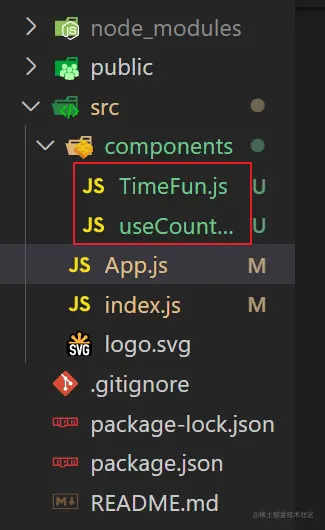
- 在 src/components下,新建
TimeFun.js、useCountDown.js
二、开启自定义 hooks 之路
1.需求分析:
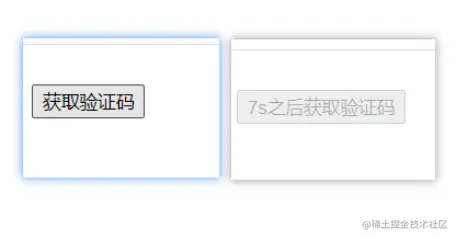
- 点击取验证码,开始倒计时
- 进入页面,不开启倒计时,点击才开启
- 倒计时开始途中,不能再次点击,要节流
2.在useCountDown.js中,书写我们的 倒计时 hook
import { useState, useEffect, useRef } from 'react'
export const = () => {
const [count, setCount] = useState(0)
const [flag, setFlag] = useState(true)
const [timeText, setTimeText] = useState('获取验证码')
let timeIdRef = useRef(null)
useEffect(() => {
return () => {
clearInterval(timeIdRef.current)
}
}, [])
useEffect(() => {
if (count <1) {
setFlag(true)
clearInterval(timeIdRef.current)
setTimeText('获取验证码')
} else {
setTimeText(count + 's之后获取验证码')
}
}, [count])
const start = (num = 10) => {
if (!flag) return
setFlag(false)
setCount(num)
timeIdRef.current = setInterval(() => {
setCount((count) => count - 1)
}, 1000)
}
return { count, start, flag, timeText }
}
三、使用咱们自定义的 useCountDown hook
法1:自定义文本显示效果,不传值,使用默认值 10 秒
import React from 'react'
import { useCountDown } from './useCountDown'
const TimeFun = () => {
const { count, start, flag } = useCountDown()
return <div>
<button disabled={!flag} onClick={() => {
start()
}}>{flag ? '获取验证码' : count + 's之后获取验证码'}</button>
</div>
}
export default TimeFun
法2:自定义文本显示效果,传任意值 ,比如 5 秒
import React from 'react'
import { useCountDown } from './useCountDown'
const TimeFun = () => {
const { count, start, flag } = useCountDown()
return <div>
<button disabled={!flag} onClick={() => {
start(5)
}}>{flag ? '获取验证码' : count + 's之后获取验证码'}</button>
</div>
}
export default TimeFun
法3:使用默认文本显示效果
import React from 'react'
import { useCountDown } from './useCountDown'
const TimeFun = () => {
const { start, flag, timeText } = useCountDown()
return <div>
<button disabled={!flag} onClick={() => {
start(30)
}}>{timeText}</button>
</div>
}
export default TimeFun



