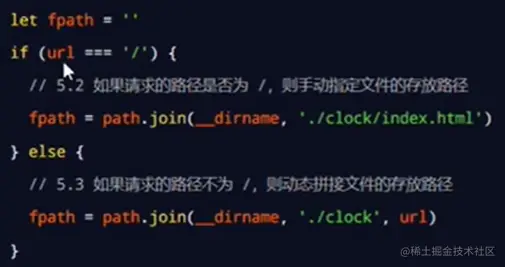
1.是什么?
- node.js是基于Chrome V8引擎的javaScript运行环境
2.安装node.js
3.功能模块
- fs 文件的读写 readFile writeFile
const fs = reauire('fs')
const path = reauire('path')
path.join([...paths]) 路径拼接称字符串
path.basename() 获取路径中的文件名称
path.extname() 获取路径中的文件扩展名  index.html      获取的就是.html
http.createServer()用于创建web服务实例
const http = reauire('http')
常见的web服务器软件有 IIs Apache
4.可以手写一个web服务器
- 在node.js中不需要使用第三方软件 只需要手写几行代码,就可以轻松手写一个web服务器
5.域名
6.域名服务器(DNS)
7.Ip 地址
8.端口
- 每个端口不能同时被多个web服务占用
- 在实际引用中url中的:80默认被省略
9.创建一个基本的web服务的基本步骤
- 导入const path = reauire('path')
- 创建sever实例 const server= http.createServer
- 绑定一个request事件 server.on()
- 启动服务器 server.listen()
const http =require('http');
const server =http.Server();
server.on('request',function(req,res){
console.log('执行请求事件');
});
server.listen(80,function(){
console.log('服务器已启动 http://127.0.0.1:8080');
});
PS C:\Users\Administrator\Desktop\demo> node .\基本web服务器.js
服务器已启动 http:
10.根据不同的url显示不同的html内容
- 实现步骤
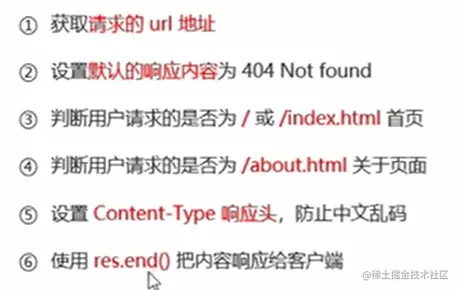
- 实现代码如下
const http = require('http');
const server = http.Server();
server.on('request', (req, res) => {
    const url = req.url
    console.log(url)
    let content = '<h1>404 No Found!</h1>'
    if (url === '/' || url === '/index.html') {
        content = '<h1>首页内容展示</h1>'
    } else if (url === '/about.html') {
        content = '<h1>关于内容展示页面</h1>'
    }
    res.setHeader('Content-Type', 'text/html;charset=utf-8')
    res.end(content)
});
server.listen(80, function () {
    console.log('服务器已启动 http://127.0.0.1:80');
});
11.优化资源的请求路径