随笔:vue框架 总结一些工作中遇到的问题和解决方案汇总
如有侵权,及时删除
ElementFE 查找(github.com/ElemeFE/ele…)
Table 表格
关于fixed属性
问题描述: 添加fixed属性,出现多余的横线,滚动条失效
解决方案:
第一种:
<style scoped>
    ::v-deep  .el-table__fixed,  ::v-deep  .el-table__fixed-right{
      height: 100% !important; //设置高优先,以覆盖内联样式
    }

  ::v-deep .el-table__fixed {
    height: 100% !important; // 让固定列的高自适应,且设置!important覆盖ele-ui的默认样式
    bottom: 18px; // 固定列默认设置了定位, position: absolute;top: 0;left: 0;只需要再设      置一下bottom的值,让固定列和父元素的底部出现距离即可
  }

  ::v-deep .el-table__body-wrapper{
    z-index:2
  }
</style>
第二种:
// el-table设置 max-height="100%"

<el-table
 max-height="100%"
>
</el-table>
Input 输入框
关于type=number属性
问题描述: 限制input框只能输入要求的值
解决方案:
<el-input
 v-model='count'
 oninput="value=value.replace(/[^\d]/g,'')"
/>

oninput ="value=value.replace(/[^\d]/g,'')"   //只能输入数字
oninput ="value=value.replace(/[^0-9.]/g,'')" //只能输入数字和小数
问题描述: type为number类型的时候,maxLength限制的数字失效
解决方案:
第一种:
// 不用maxlength用oninput完美解决
<el-input
    type="number"
    oninput="if(value.length>11)value=value.slice(0,11)"
    placeholder="输入用户手机号查询"
>
</el-input>
第二种:
//el-input 组件封装 思路:根据传入的 maxLength 去控制限制的个数

<el-input
  @input="intValidator"
>
</el-input>

<script>
// props
obj (maxLength可以设计obj到里面) 或者单独传入 maxLength
// methods 方法:
intValidator(e){
    if(this.obj.type !== 'number' ) return
    let value = e.target.value.toString()
    //判断不要超过位数
    if(value.length > this.obj.maxLength ){
      value= value.slice(0, this.obj.maxLength)
      this.obj.phone = value
}
</script>
问题描述: type为number类型的时候,去掉el-input 上面的上下箭头
解决方案:
<style>

.el-form--inline .el-form-item__content {
  width: auto !important;
}
input[type="number"] {
  -moz-appearance: textfield;
}
input[type="number"]::-webkit-inner-spin-button,
input[type="number"]::-webkit-outer-spin-button {
  -webkit-appearance: none;
}

</style>
关于自动转换成大小写
问题描述: input讲输入框内转换成为统一的大小写 (大写 或者 小写 )
解决方案:
第一种
- key事件
-
- keydown
-
- keypress
-
- keyup
<el-input v-model="idCard" type="text" onkeyup="this.value=this.value.toUpperCase()" />
第二种
- 修改样式 通过样式展示大小写 (注意:小写--> 大写 只是页面效果变了,但是保存的值还是之前的小写)
-
- text-transform: uppercase /转为大写/
-
- text-transform: lowercase /转为小写/
-
- text-transform: capitalize /单词首字母转为大写/
<input type="text" style="text-transform: uppercase;" />
第三种
<el-input v-model="idCard" type="text" @blur="blur" />

//methods方法
blur(e){
  return this.idcard = e.target._value.toUpperCase()
},
Pagination 分页
问题描述: 删除尾部的页码变动
解决方案:
第一种:
- 使用侦听器侦听该属性,改变为3时再次请求数据
- 对于侦听器监听对象中的属性方法查阅官方文档后发现要用字符串
    watch: {
     params.pagenum': function () {
      this.getUsers()
    } },
链接图文:解释
第二种: 更新当前页码进行判断
    // 更新当前页码
    let totalPage = Math.ceil((this.totalCount - 1)/this.pageSize);
    let currentPage = this.currentPage > totalPage ? totalPage : this.currentPage;
    this.currentPage = this.currentPage < 1 ? 1 : currentPage;
    this.getList();
Picker 日期时间选择器
问题描述: 日期选择器设置初始值后修改失效
解决方案:
this.$set(this.formInline, 'dataTime', [res.startTime, res.endTime])
elementPlus + vite 自动引入文件
问题描述: 自动引入的相关问题
解决方案: 自动导入推荐 element-plus
首先你需要安装unplugin-vue-components 和 unplugin-auto-import这两款插件
// 自动引入组件安装插件
npm install -D unplugin-vue-components unplugin-auto-import
// 自动引入图标 新增插件
npm install @element-plus/icons-vue
npm install unplugin-icons
npm install iconify-json/ep
import { fileURLToPath, URL } from "node:url";
import { defineConfig } from "vite";
import vue from "@vitejs/plugin-vue";
import vueJsx from "@vitejs/plugin-vue-jsx";
// 自动引入 组件
import AutoImport from "unplugin-auto-import/vite";
import Components from "unplugin-vue-components/vite";
import { ElementPlusResolver } from "unplugin-vue-components/resolvers";
import IconsResolver from "unplugin-icons/resolver";
// 自动引入图标
import Icons from "unplugin-icons/vite";

import path from 'path'
const pathSrc = path.resolve(__dirname, 'src')

export default defineConfig({
  resolve: {
    alias: {
      "@": fileURLToPath(new URL("./src", import.meta.url)),
    },
  },
  plugins: [
    AutoImport({
      resolvers: [
        ElementPlusResolver(),
        // 自动导入图标组件
        IconsResolver({
          prefix: "Icon",
        }),
      ],
      dts: path.resolve(pathSrc, 'auto-imports.d.ts'),
      eslintrc: {
        enabled: false, // 1、改为true用于生成eslint配置。2、生成后改回false,避免重复生成消耗 这个是全局生成 解决 'ElMessage' is not defined. 的eslint校验提示
      },
    }),
    Components({
      resolvers: [
        // Auto register icon components
        // 自动注册图标组件
        IconsResolver({
          enabledCollections: ['ep'],  //@iconify-json/ep 是 Element Plus 的图标库,所以 IconsResolver 配置了 enabledCollections: ['ep'] 实例为 <i-ep-share />
        }),
        // Auto register Element Plus components
        // 自动导入 Element Plus 组件
        ElementPlusResolver(),
      ],
      dts: path.resolve(pathSrc, 'components.d.ts'),
    }),
    Icons({
      autoInstall: true,
    }),
    vue(),
    vueJsx(),
  ],

});
问题描述:
解决报红:tsconfig.json里的include,把 "src/**/*.d.ts" 改为 "**/*.d.ts"
//  tsconfig.josn

{
 //
  "include": ["src/**/*.ts", "**/*.d.ts", "src/**/*.tsx", "src/**/*.vue","src/auto-imports.d.ts"],
  "exclude": [ "node_modules"],
  "references": [
    {
      "path": "./tsconfig.config.json"
    },
    {
      "path": "./tsconfig.app.json"
    },
    {
      "path": "./tsconfig.vitest.json"
    }
}
问题描述:
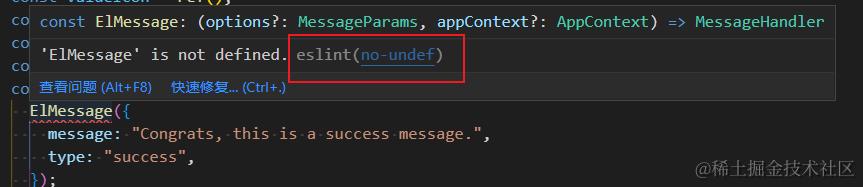
上面ElMessage 解决为还是报错,是eslint的校验
解决方案:
在上面的vite.config.ts里面进行写入 如上图
 eslintrc: {
        enabled: false, // 1、改为true用于生成eslint配置。2、生成后改回false,避免重复生成消耗 这个是全局生成 解决 'ElMessage' is not defined. 的eslint校验提示
      },
会生成一个 .eslintrc-auto-import.jon 文件
在 .eslintrc.cjs文件里面添加
extends: [

    'plugin:vue/vue3-essential',
    'eslint:recommended',
    '@vue/eslint-config-typescript',
    ".eslintrc-auto-import.json", // 对应文件地址进行添加

  ],
随笔记录ing
问题描述: 问题汇总记录ing
解决方案: