效果图展示
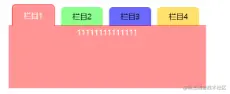
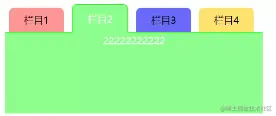
html部分
<div id="wrap">
<ul id="oLi" class="card_List clearfix">
<li class="current">栏目1</li>
<li>栏目2</li>
<li>栏目3</li>
<li>栏目4</li>
</ul>
<div id="oUl" class="card_content">
<div style="display:block;">
11111111111111
</div>
<div>
22222222222
</div>
<div>
3333333333333
</div>
<div>
44444444444444444
</div>
</div>
</div>
css部分
* {
margin: 0;
padding: 0;
}
body {
font: 12px/20px 'microsoft yahei', 'arial';
word-break: break-all;
word-wrap: break-word;
}
.clearfix:after {
content: '.';
display: block;
clear: both;
height: 0;
visibility: hidden;
}
.clearfix {
display: inline-block;
}
* html .clearfix {
height: 1%;
}
.clearfix {
display: block;
}
#wrap {
width: 320px;
margin: 2em auto;
}
.card_List {
height: 30px;
border-bottom: 1px solid #f00;
position: relative;
}
.card_List li {
float: left;
width: 68px;
text-align: center;
height: 30px;
line-height: 30px;
margin: 0 5px;
display: inline;
border-top-left-radius: 6px;
border-top-right-radius: 6px;
}
.card_List li.current {
height: 34px;
line-height: 34px;
margin-top: -4px;
border: 1px solid #F00;
background: #FF9494;
border-bottom: none;
color: #fff;
}
#oLi li:nth-child(1){
background: #FF9494;
}
#oLi li:nth-child(2){
background: #8CFE8C;
}
#oLi li:nth-child(3){
background: #6969FB;
}
#oLi li:nth-child(4){
background: #FFE26F;
}
.card_content div {
display: none;
height: 100px;
text-align: center;
color: white;
}
.card_content div:first-child {
background: #FF9494;
}
js逻辑
window.onload = function () {
var colorArr = {
0:"
1:"
2:"
3:"
}
var bgColorArr = {
0:"
1:"
2:"
3:"
}
// 获取元素
var oL = document.getElementById("oLi")
var oLi = oL.getElementsByTagName("li")
var oUl = document.getElementById("oUl").getElementsByTagName("div")
// 循环下拉框内容
for ( var i=0
// 当前项的索引
oLi[i].index = i
// 点击事件
oLi[i].onclick = function () {
// 排他思想
// 干掉所有人
for ( var j = 0
oLi[j].className = ""
oLi[j].style.border = "none"
}
// 留下我自己 添加当前的类名
this.className = "current"
// 当前边框颜色
this.style.border = "1px solid " + colorArr[this.index]
this.style.borderBottom = "none"
oL.style.borderBottom = "1px solid " + colorArr[this.index]
for ( var j=0
oUl[j].style.display = "none"
oUl[this.index].style.display = "block"
oUl[j].style.backgroundColor = bgColorArr[this.index]
}
}
}
}