HtmlHelper是一个返回Html字符串的方法。返回的字符串可以是任意类型。例如你可以使用HtmlHelper方法返回一个标准的html标签<input> <button> <img>等等。
你也可以自定义HtmlHelper方法,返回一些复杂的html,来展示数据。
1. 视图中的Helper方法
在razor页面中使用@helper创建一个自定义的方法,该方法只能用在当前razor页面中。
@helper ListingItems(string[] items)
    {
    <ol>
    @foreach (string item in items)
    {
    <li>@item</li>
    }
    </ol>
    }

    <h3>Programming Languages:</h3>

    @ListingItems(new string[] { "C", "C++", "C#" })

    <h3>Book List:</h3>

    @ListingItems(new string[] { "How to C", "how to C++", "how to C#" })
2. 常见的HtmlHelper扩展方法
该类型的Helper可以生成多种Hmtl控件如:text boxe checkbox等待。
首先声明一个Model
[DisplayName("学生")]
public class Student
{
    public int StudentId { get; set; }
    [Display(Name="姓名")]
    public string StudentName { get; set; }
    public int Age { get; set; }
    public bool isNewlyEnrolled { get; set; }
    public string Password { get; set; }
    [DisplayFormat(DataFormatString = "{0:yyyy年MM月dd日}")]
    [Display(Name ="生日")]
    public DateTime BirthDay{get;set;}
}
1.1 TextBox
Razor:
@model Student
//传递一个null值
@Html.TextBox("StudentName", null, new { @class = "form-control" })
//使用一个字符串,作为值
@Html.TextBox("StudentName", "this is value", new { @class = "form-control" }
//Controller:ViewBag.StudentName="Janes";
//使用ViewBag获取数据
@Html.TextBox("StudentName", (string)ViewBag.StudentName, new { @class = "form-control" })
//Controller: StudentName="Janes";
//使用Model获取数据
@Html.TextBox("StudentName", Model.StudentName, new { @class = "form-control" })
Html:
<input class="form-control" id="StudentName"  name="StudentName"  type="text"  value="" />
<input class="form-control" id="StudentName"  name="StudentName"  type="text"  value="this is value" />
<input class="form-control" id="StudentName"  name="StudentName"  type="text"  value="Janes" />
<input class="form-control" id="StudentName"  name="StudentName"  type="text"  value="Janes" />
1.2 TextBoxFor
Razor:
@model Student
//Controller: StudentName="Janes";
@Html.TextBoxFor(m => m.StudentName, new { @class = "form-control" })
Html:
<input class="form-control" id="StudentName" name="StudentName" type="text" value="Janes" />
TextBox和TextBoxFor的区别:
- @Html.TextBox是一个弱类型,@Html.TextBoxFor()是个强类型。
- @Html.TextBox参数是一个字符串,@Html.TextBoxFor参数是一个lambda表达式。
- @Html.TextBox如果属性拼写错误在编译的时候不会报错,只能在运行才会报错。
- @Html.TextBoxFor在编译的时候会提示错误。
2.1 TextArea
TextArea()方法是一种若类型的方法,name参数是一个字符串。name参数可以是Model的属性名。它将指定的属性与textarea绑定在一起。因此,它会自动显示文本区域中的Model的属性值,反之亦然。
Razor:
@Html.TextArea("Textarea1", "val", 5, 15, new { @class = "form-control" })
Html:
<textarea class="form-control" cols="15" id="Textarea1" name="Textarea1" rows="5">val</textarea>
2.2 TextAreaFor
TextAreaFor方法是一种强类型的扩展方法。它为使用lambda表达式指定的Model中的属性生成了一个多行的元素。TextAreaFor方法将指定的Model属性绑定到textarea元素。因此,它会自动显示文本区域中的Model属性值,反之亦然。
Razor:
@model Student

@Html.TextAreaFor(m => m.Description, new { @class = "form-control" })
Html:
<textarea class="form-control" cols="20" id="Description" name="Description" rows="2"></textarea>
3.1 Password
Razor:
@Html.Password("OnlinePassword")
Html:
<input id="OnlinePassword" name="OnlinePassword" type="password" value="" />
3.2 PasswordFor
Razor:
@model Student
//Controller: Password="mypassword";
@Html.PasswordFor(m => m.Password)
Html:
<input id="Password" name="Password" type="password" value="mypassword" />
4.1 Hidden
生成一个包含指定名称、值和html属性的输入隐藏字段元素。
Razor:
@model Student
//Controller:StudentId=1;
@Html.Hidden("StudentId")
Html:
<input id="StudentId" name="StudentId" type="hidden" value="1" />
4.2 HiddenFor
是一种强类型扩展方法。它为使用lambda表达式指定的Model属性生成一个隐藏的输入元素。Hiddenfor方法将一个指定的Model属性绑定到一个指定的对象属性。因此,它自动将Model属性的值设置为隐藏字段,反之亦然。
Razor:
@model Student
@Html.HiddenFor(m => m.StudentId)
Html:
<input data-val="true" id="StudentId" name="StudentId" type="hidden" value="1" />
5.1 CheckBox
Razor:
@Html.CheckBox("isNewlyEnrolled", true)
Html:
<input checked="checked" id="isNewlyEnrolled" name="isNewlyEnrolled" type="checkbox" value="true" />
5.2 CheckBoxFor
Razor:
@model Student

@Html.CheckBoxFor(m => m.isNewlyEnrolled)
Html:
<input data-val="true"  data-val-required="The isNewlyEnrolled field is required."  id="isNewlyEnrolled"  name="isNewlyEnrolled"   type="checkbox"    value="true" />
<input name="isNewlyEnrolled" type="hidden" value="false" />
6.1 RadioButton
Razor:
Male:   @Html.RadioButton("Gender","Male")
Female: @Html.RadioButton("Gender","Female")
Html:
Male: <input checked="checked"  id="Gender"    name="Gender"    type="radio"     value="Male" />

Female: <input id="Gender"    name="Gender"     type="radio"     value="Female" />
6.2 RadioButtonFor
Razor:
@model Student

@Html.RadioButtonFor(m => m.Gender,"Male")
@Html.RadioButtonFor(m => m.Gender,"Female")
Html:
<input checked="checked" id="Gender" name="Gender" type="radio" value="Male" />

<input id="Gender" name="Gender" type="radio" value="Female" />
7.1 DropDownList
Razor:
@model Student

@Html.DropDownList("StudentGender",   new SelectList(Enum.GetValues(typeof(Gender))),      "Select Gender",    new { @class = "form-control" })
Html:
<select class="form-control" id="StudentGender" name="StudentGender">
    <option>Select Gender</option>
    <option>Male</option>
    <option>Female</option>
</select>
7.2 DropDownListFor
Razor:
@Html.DropDownListFor(m => m.StudentGender, new SelectList(Enum.GetValues(typeof(Gender))), "Select Gender")
Html:
<select class="form-control" id="StudentGender" name="StudentGender">
    <option>Select Gender</option>
    <option>Male</option>
    <option>Female</option>
</select>
8.1 ListBox
Razor:
@Html.ListBox(“ListBox1”, new MultiSelectList(new [] {"Cricket", "Chess"}))
html:
<select id="ListBox1" multiple="multiple" name="ListBox1"> <option>Cricket</option> <option>Chess</option> </select>
9.1 Display
Razor:
@model Student

@Html.Display("StudentName")
Html:
Steve
9.2 DisplayFor
Raozr:
@model Student

@Html.DisplayFor(m => m.StudentName)
Html:
Steve
10.1 Label
Razor:
@Html.Label("StudentName")
@Html.Label("StudentName","Student-Name")
Html:
<label for="StudentName">姓名</label>
<label for="StudentName">Student-Name</label>
10.2 LabelFor
Razor:
@model Student

@Html.LabelFor(m => m.StudentName)
Html:
<label for="StudentName">姓名</label>
11.1 Editor
该扩展方法是一种基于数据类型生成html输入元素的方法。Editor()或EditorFor()扩展方法基于Model对象的属性的数据类型生成html标签。
| 数据类型 | Html标签 |
|---|---|
| string | <input type="text" > |
| int | <input type="number" > |
| decimal, float | <input type="text" > |
| boolean | <input type="checkbox" > |
| Enum | <input type="text" > |
| DateTime | <input type="datetime" > |
Razor:
StudentId:      @Html.Editor("StudentId")
Student Name:   @Html.Editor("StudentName")
Age:            @Html.Editor("Age")
Password:       @Html.Editor("Password")
isNewlyEnrolled: @Html.Editor("isNewlyEnrolled")
Gender:         @Html.Editor("Gender")
DoB:            @Html.Editor("DoB")
Html:
11.2EditorFof
Razor:
StudentId:      @Html.EditorFor(m => m.StudentId)
Student Name:   @Html.EditorFor(m => m.StudentName)
Age:            @Html.EditorFor(m => m.Age)
Password:       @Html.EditorFor(m => m.Password)
isNewlyEnrolled: @Html.EditorFor(m => m.isNewlyEnrolled)
Gender:         @Html.EditorFor(m => m.Gender)
DoB:            @Html.EditorFor(m => m.DoB)
Html: 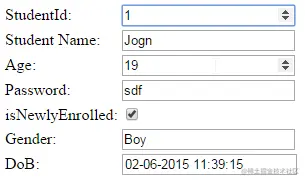
12 Form
Razor:
  @using (Html.BeginForm("ActionName", "ControllerName", FormMethod.Post, new { @class = "form" }))
    {

    }
Html:
<form action="/ControllerName/ActionName" class="form" method="post">

</form>
13.1 Html.Action() 执行一个Action,并返回html字符串。
13.2 Html.ActionLink() 生成一个超链接。
如:
Html.ActionLink("link text", "someaction", "somecontroller", new { id = "123" }, null)
返回:
<a href="/somecontroller/someaction/123">link text</a>
13.3 Url.Action() 返回一个Action的链接地址
如:
Url.Action("someaction", "somecontroller", new { id = "123" })
返回:
/somecontroller/someaction/123