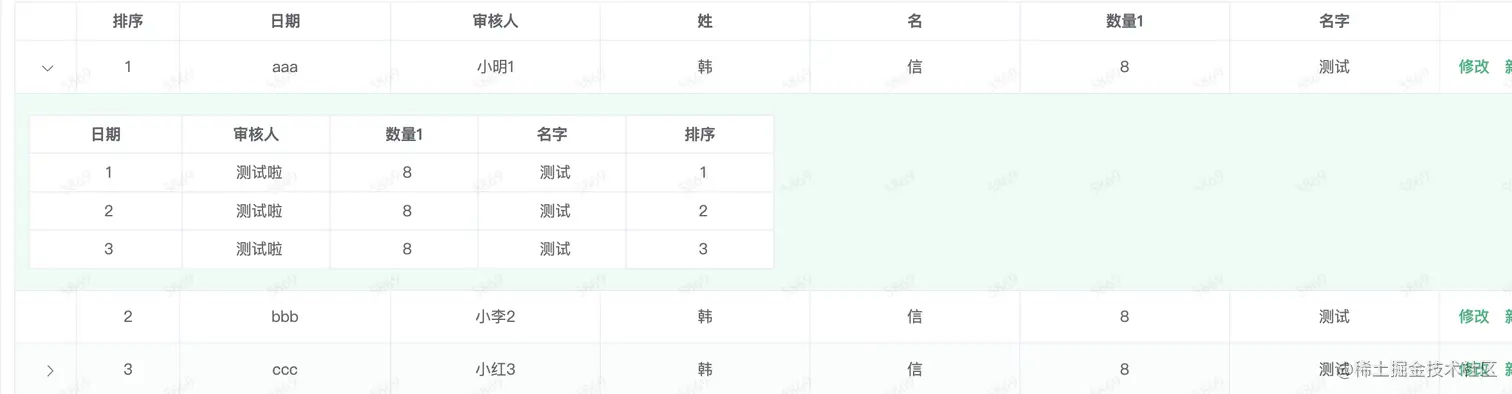
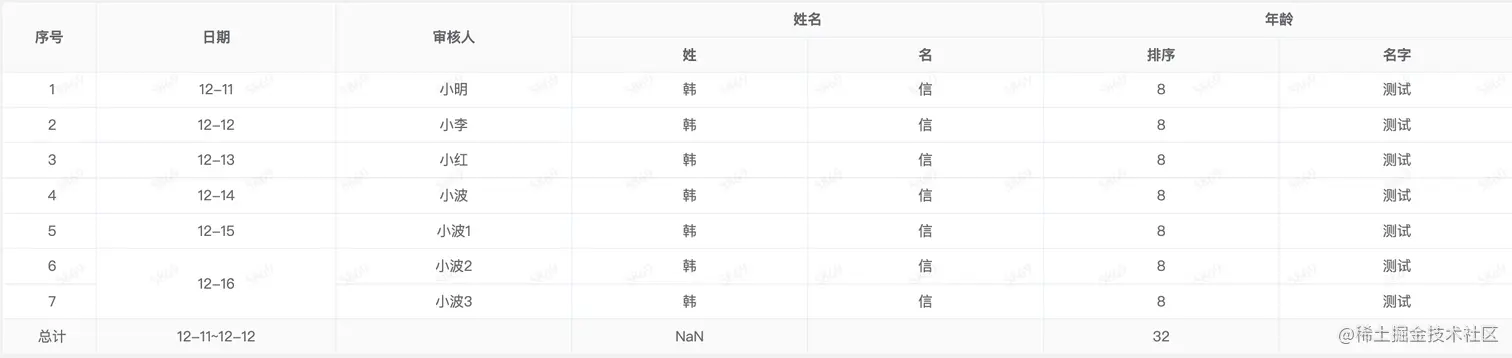
饿了么UI框架合并表头&合并行&拖拽序号&添加总计
- 复杂的表合并
- span-method:合并行或列的计算方法
- 合并行服务端排序(默认正序 倒序要加
reverse)
- summary-method & show-summary:添加合计
- cell-class-name:给指定列添加 text 类
- row-key:唯一的值 (解决拖拽序号顺序混乱的问题)
优化合并表头循环(推荐)
<template>
<div>
<el-table
:data="tableData"
border
ref="ref-table"
:height="tableHeight"
size="mini"
row-key="num"
:cell-class-name="({columnIndex }) => columnIndex == 0 ? 'text' : ''"
:span-method="objectSpanMethod"
:summary-method="getSummaries"
show-summary
>
<el-table-column
align="center"
label="序号"
width="80px"
>
<template slot-scope="scope">
{{scope.$index +1}}
</template>
</el-table-column>
<template v-for="(value, key) in tableHeader">
<el-table-column
v-if="!combineKeys.includes(key)"
align="center"
:key="key"
:prop="key"
:label="value"
>
<template slot="header" v-if="key === 'name'">
<el-tooltip
class="item"
effect="light"
placement="top"
>
<span
slot="content"
>
提示啦
</span>
<span>
{{value}}
<i class="el-icon-question"></i>
</span>
</el-tooltip>
</template>
</el-table-column>
</template>
<template v-for="item in combineHeader">
<el-table-column
align="center"
:key="item.title"
:prop="item.title"
:label="item.title"
>
<el-table-column
v-for="(n) in item.column"
:key="n.field"
:prop="n.field"
:label="n.title"
align="center"
>
</el-table-column>
</el-table-column>
</template>
</el-table>
</div>
</template>
<script>
import Sortable from 'sortablejs';
export default {
name: 'RecordPageDetail',
data() {
return {
tableHeight: 'auto',
tableData: [
{ first_name: '韩', last_name: '信', add: '12-11', num: '小明', name: '测试', sort: '8' },
{ first_name: '韩', last_name: '信', add: '12-12', num: '小李', name: '测试', sort: '8' },
{ first_name: '韩', last_name: '信', add: '12-13', num: '小红', name: '测试', sort: '8' },
{ first_name: '韩', last_name: '信', add: '12-14', num: '小波', name: '测试', sort: '8' },
{ first_name: '韩', last_name: '信', add: '12-15', num: '小波1', name: '测试', sort: '8' },
{ first_name: '韩', last_name: '信', add: '12-16', num: '小波2', name: '测试', sort: '8' },
{ first_name: '韩', last_name: '信', add: '12-16', num: '小波3', name: '测试', sort: '8' }
],
tableHeader: {
add: '日期',
num: '审核人',
first_name: '姓',
last_name: '名',
sort: '数量1',
name: '名字'
},
combineHeader: [{
title: '姓名',
column: [{field: 'first_name', title: '姓' }, { field: 'last_name', title: '名' }]
}, {
title: '年龄',
column: [{ field: 'sort', title: '排序' }, { field: 'name', title: '名字' }]
}],
combineKeys: ['first_name', 'last_name', 'name', 'sort'],
totalData: {add: '12-11~12-12', first_name: 'NaN', sort: '32'}
};
},
mounted() {
this.row_drag();
},
methods: {
row_drag() {
const _tbody = document.querySelector('.el-table__body-wrapper tbody');
const _self = this;
Sortable.create(_tbody, {
animation: 150,
handle: '.text',
onEnd({ newIndex, oldIndex }) {
const _targetRow = _self.tableData.splice(oldIndex, 1)[0];
_self.tableData.splice(newIndex, 0, _targetRow);
}
});
},
objectSpanMethod({ rowIndex, columnIndex }) {
const _keyMap = this.formatRowspanAndColspan(this.tableData, 'add');
if (columnIndex === 1) {
return {
rowspan: _keyMap[rowIndex],
colspan: 1
};
}
},
formatRowspanAndColspan(tableData, key) {
const _basic = [];
const _computedMap = [];
tableData.forEach(t => _basic.push(t[key]));
_basic.forEach((t, index) => {
_computedMap[t] = _computedMap[t] ? _computedMap[t] + 1 : 1;
});
return Object.values(_computedMap).reduce((result, current) => {
return [...result, current, ...[...new Array(current - 1)].map(() => 0)];
}, []);
},
getSummaries(param) {
const { columns } = param;
const _sums = [];
columns.forEach((column, index) => {
if (index === 0) {
_sums[index] = '总计';
}
const _tottalArr = Object.entries(this.totalData || {});
_tottalArr.forEach((item, index2) => {
if (column.property === item[0]){
_sums[index] = item[1];
}
});
});
return _sums;
}
}
};
</script>
饿了么table(带有展开子表) + Sortable
- Sortablejs+element树形表格 拖拽
- :key="tableKey":用于拖拽刷新dom
<template>
<div class="row padding">
<el-form ref="ref-validateForm" :rules="rules" :model="applyForm">
<el-table
:data="applyForm.tableData"
border
ref="ref-table"
v-loading="$store.state.global.tableLoadingStatus"
:height="tableHeight"
row-key="num"
:cell-class-name="({ columnIndex }) => columnIndex == 1 ? 'sortable-id' : ''"
:row-class-name="setClassName"
:key="tableKey"
@expand-change="init_child_data"
>
<el-table-column
type="expand"
>
<template slot-scope="props">
<div class="child-table">
<el-table
:data="props.row.childyList"
ref="ref-table-child"
size="mini"
border
>
<el-table-column
align="center"
:label="value"
:prop="key"
v-for="(value, key) in child"
:key="key"
>
<template slot-scope="scope">
<template v-if="['num'].includes(key)">
测试啦
</template>
<template v-else>
{{scope.row[key]}}
</template>
</template>
</el-table-column>
</el-table>
<el-pagination
small
@current-change="search_data(props.row)"
:current-page.sync="props.row.pageConfig.page"
layout="total, prev, pager, next, jumper"
:page-size="parseInt(props.row.pageConfig.page_size)"
:total="parseInt(props.row.pageConfig.count)"
>
</el-pagination>
</div>
</template>
</el-table-column>
<el-table-column
align="center"
width="80"
label="排序"
>
<template slot-scope="scope">
{{scope.$index +1}}
</template>
</el-table-column>
<el-table-column
align="center"
v-for="(value, key) in tableHeader"
:key="key"
:width="set_table_col_width(key)"
:prop="key"
:label="value"
>
<template slot-scope="scope">
<template v-if="['add', 'first_name', 'last_name', 'sort'].includes(key)">
<template v-if="scope.row.isEdit">
<template v-if="['add'].includes(key)">
<el-form-item :prop="'tableData.' + scope.$index + '.add'" :rules="rules.add">
<el-select
v-model="scope.row.index"
placeholder="请选择"
clearable
>
<el-option
v-for="option in list"
:key="option.value"
:label="option.label"
:value="option.value"
>
</el-option>
</el-select>
</el-form-item>
</template>
<template v-if="['sort'].includes(key)">
<el-form-item :prop="'tableData.' + scope.$index + '.sort'" :rules="rules.sort">
<el-input
v-model="scope.row.sort"
placeholder="测试啦"
type="number"
></el-input>
</el-form-item>
</template>
<template v-if="['first_name'].includes(key)">
<el-form-item
:prop="'tableData.' + scope.$index + '.first_name'"
:rules="rules.first_name">
<el-input
v-model="scope.row.first_name"
placeholder="测试啦"
type="text"
></el-input>
</el-form-item>
</template>
<template v-if="['last_name'].includes(key)">
<el-form-item
:prop="'tableData.' + scope.$index + '.last_name'"
:rules="rules.last_name">
<el-input
v-model="scope.row.last_name"
placeholder="测试啦"
type="text"
></el-input>
</el-form-item>
</template>
</template>
<template v-else>
{{scope.row[key]}}
</template>
</template>
<template v-else>
{{scope.row[key]}}
</template>
</template>
</el-table-column>
<el-table-column
align="center"
width="150"
label="操作"
>
<template slot-scope="scope">
<template v-if="scope.row.isEdit">
<el-button size="mini" type="text" @click="handle_save(scope.row)">保存</el-button>
</template>
<template v-else>
<el-button size="mini" type="text" @click="handle_edit(scope.row)">修改</el-button>
</template>
</template>
</el-table-column>
</el-table>
</el-form>
</div>
</template>
<script>
import Sortable from 'sortablejs';
export default {
name: 'CourseConfiguration',
data() {
return {
tableKey: '',
applyForm: {
tableData: [
{ expand: true, index: '1', first_name: '韩', last_name: '信', add: 'aaa', num: '小明1', name: '测试', sort: '8', childyList: [
{ index: '1', add: '1', num: '小明', name: '测试1', sort: '8' },
{ index: '2', add: '2', num: '小李', name: '测试1', sort: '8' },
{ index: '3', add: '3', num: '小红', name: '测试1', sort: '8' }
]},
{ expand: false, index: '2', first_name: '韩', last_name: '信', add: 'bbb', num: '小李2', name: '测试', sort: '8' },
{ expand: true, index: '3', first_name: '韩', last_name: '信', add: 'ccc', num: '小红3', name: '测试', sort: '8', childyList: [
{ index: '1', add: '1', num: '小明', name: '测试2', sort: '8' },
{ index: '2', add: '2', num: '小李', name: '测试2', sort: '8' },
{ index: '3', add: '3', num: '小红', name: '测试2', sort: '8' }
]},
{ expand: false, index: '1', first_name: '韩', last_name: '信', add: 'aaa', num: '小波4', name: '测试', sort: '8' },
{ expand: true, index: '2', first_name: '韩', last_name: '信', add: 'bbb', num: '小波5', name: '测试', sort: '8', childyList: [
{ index: '1', add: '1', num: '小明', name: '测试3', sort: '8' },
{ index: '2', add: '2', num: '小李', name: '测试3', sort: '8' },
{ index: '3', add: '3', num: '小红', name: '测试3', sort: '8' }
]},
{ expand: false, index: '3', first_name: '韩', last_name: '信', add: 'ccc', num: '小波6', name: '测试', sort: '8' },
{ expand: false, index: '3', first_name: '韩', last_name: '信', add: 'ccc', num: '小波7', name: '测试', sort: '8' }
]
},
tableHeader: {
add: '日期',
num: '审核人',
first_name: '姓',
last_name: '名',
sort: '数量1',
name: '名字'
},
rules: {
add: { required: true, trigger: ['change', 'blur'] },
first_name: { required: true, trigger: ['change', 'blur'] },
last_name: { required: true, trigger: ['change', 'blur'] }
},
tableHeight: 'auto',
isEdit: '',
list: [
{ label: 'aaa', value: '1'},
{ label: 'bbb', value: '2'},
{ label: 'ccc', value: '3'}
],
child: {
add: '日期',
num: '审核人',
sort: '数量1',
name: '名字',
index: '排序'
}
};
},
mounted() {
this.row_drag();
},
methods: {
row_drag() {
this.$nextTick(() => {
const _tbody = document.querySelector('.el-table__body-wrapper tbody');
const _self = this;
Sortable.create(_tbody, {
animation: 150,
handle: '.sortable-id',
onEnd({ newIndex, oldIndex }) {
const _targetRow = _self.applyForm.tableData.splice(oldIndex, 1)[0];
_self.applyForm.tableData.splice(newIndex, 0, _targetRow);
_self.sortMenuData();
}
});
});
},
sortMenuData() {
this.tableKey = Math.random();
this.row_drag();
},
set_table_col_width(key) {
const _obj = {
};
return _obj[key] || '';
},
handle_save(row) {
this.$set(row, 'isEdit', false);
if (this.$refs['ref-validateForm']) {
this.$refs['ref-validateForm'].validate(valid => {
if (valid) {
console.log(row);
this.$message.success('保存成功');
} else {
this.$set(row, 'isEdit', true);
this.$message.error('表单需填写完整!');
}
});
}
},
handle_edit(row) {
this.$set(row, 'isEdit', true);
},
setClassName({row, index}){
return row.expand ? '' : 'expand';
},
init_child_data(row) {}
search_data(row) {
this.init_child_data(row);
}
}
};
</script>
<style lang="scss" scoped>
.el-form .el-form-item--mini.el-form-item {
margin: 0px;
}
::v-deep .el-table .expand .cell .el-table__expand-icon {
display: none;
}
.child-table{
padding: 10px;
width: 600px;
}
</style>