1、Java集合框架概述
1.1、数组存储数据的弊端
一方面, 面向对象语言对事物的体现都是以对象的形式,为了方便对多个对象的操作,就要对对象进行存储。另一方面,使用Array存储对象方面具有一些弊端,而Java 集合就像一种容器,可以动态地把多个对象的引用放入容器中。
- 集合、数组都是对多个数据进行存储操作的结构,简称Java容器。
- 说明:此时的存储,主要指的是内存层面的存储,不涉及到持久化的存储(
.txt,.jpg,.avi,数据库中)
数组在存储多个数据方面的特点
- 数组初始化以后,长度就确定了。
- 数组声明的类型,就决定了进行元素初始化时的类型,因此我们也就只能操作指定类型的数据了
- 比如:
String[] arr; int[] arr1; Object[] arr2;
数组在存储数据方面的弊端:
- 数组初始化以后,长度就不可修改,不便于扩展长度
- 数组中提供的属性和方法非常有限,不便于进行添加、删除、插入等操作,且效率不高
- 数组无法直接获取存储元素的个数
- 数组存储的数据是有序的、可以重复的,存储数据的特点单一,对于无序、不可重复的数据存储需求,不能满足
1.2、集合的使用场景
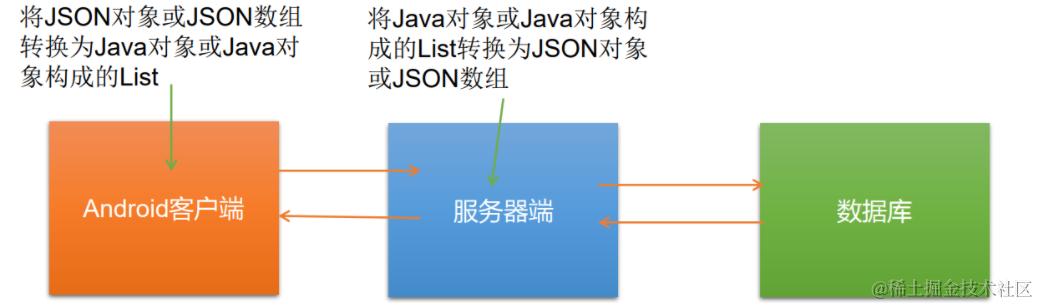
场景一

场景2
1.3、Collection 和 Map 概述
Java 集合可分为 Collection 和 Map 两种体系,Collection 和 Map分别是定义在java.util包下的接口
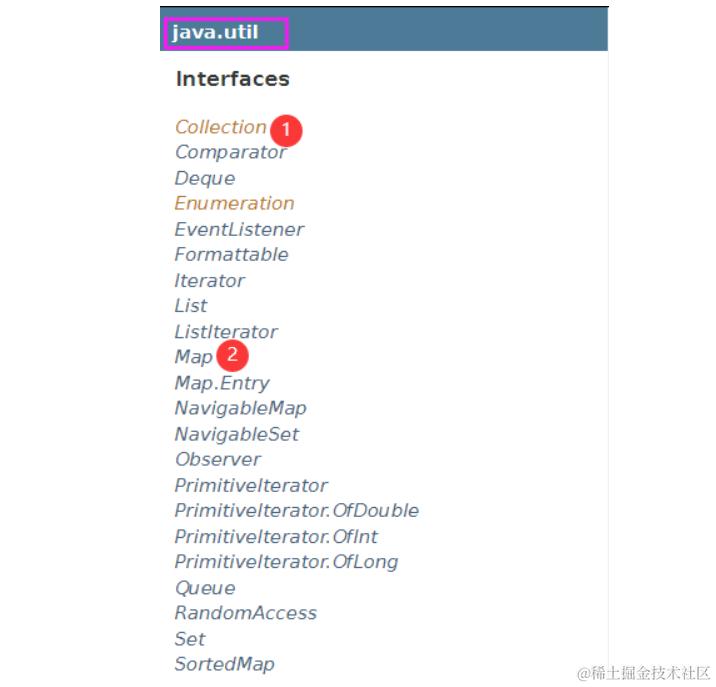
集合框架定义了一些接口,本节提供了每个接口的概述:
| 序号 | 接口描述 |
|---|---|
| 1 | Collection 接口 Collection 是最基本的集合接口,一个 Collection 代表一组 Object,即 Collection 的元素, Java不提供直接继承自Collection的类,只提供继承于的子接口(如List和set)。Collection 接口存储一组不唯一,无序的对象。 |
| 2 | List 接口 List接口是一个有序的 Collection,使用此接口能够精确的控制每个元素插入的位置,能够通过索引(元素在List中位置,类似于数组的下标)来访问List中的元素,第一个元素的索引为 0,而且允许有相同的元素。List 接口存储一组不唯一,有序(插入顺序)的对象。 |
| 3 | Set Set 具有与 Collection 完全一样的接口,只是行为上不同,Set 不保存重复的元素。Set 接口存储一组唯一,无序的对象。 |
| 4 | SortedSet 继承于Set保存有序的集合。 |
| 5 | Map Map 接口存储一组键值对象,提供key(键)到value(值)的映射。 |
| 6 | Map.Entry 描述在一个Map中的一个元素(键/值对)。是一个 Map 的内部接口。 |
| 7 | SortedMap 继承于 Map,使 Key 保持在升序排列。 |
| 8 | Enumeration 这是一个传统的接口和定义的方法,通过它可以枚举(一次获得一个)对象集合中的元素。这个传统接口已被迭代器取代。 |
1.3.1、Collection接口
Collection 是一个单列集合,用来存储一个一个的对象,并定义了存取一组对象的方法,它的继承体系主要为:
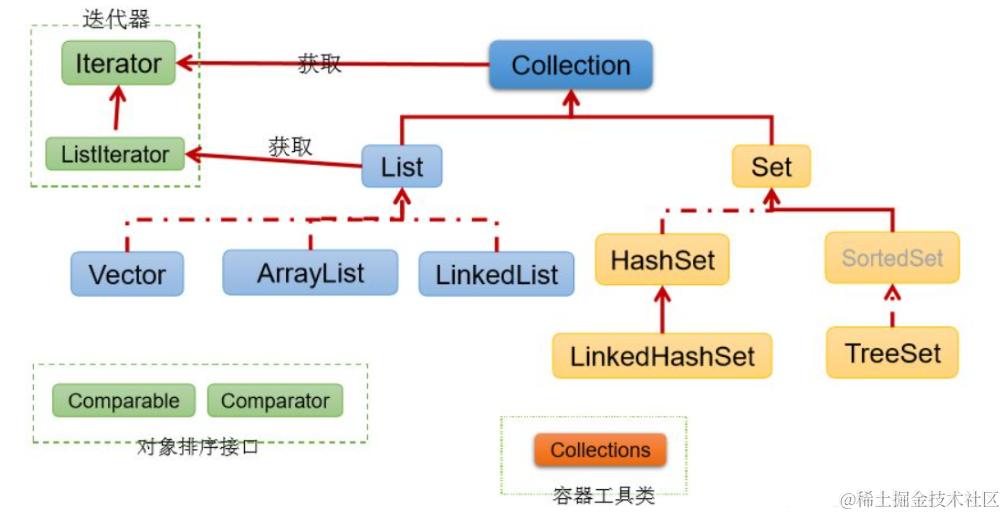
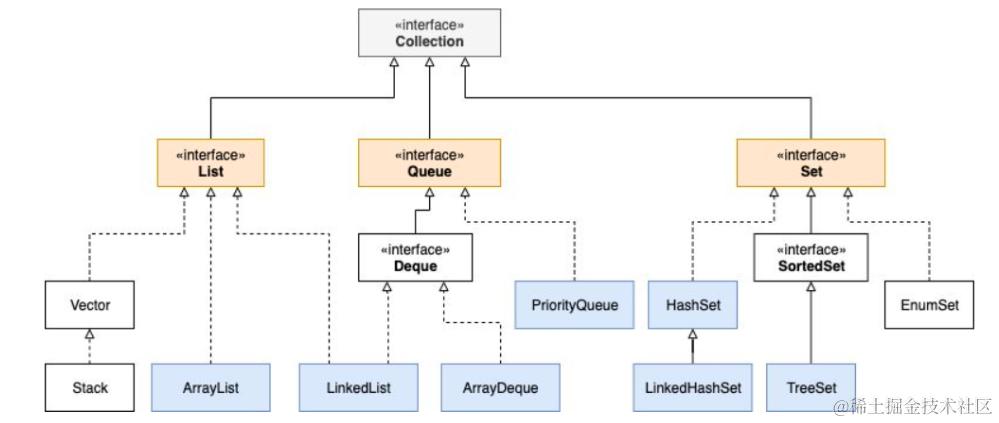
我们可以看到Collection 可以通过迭代器Iterator进行元素的遍历操作,其实上面的图有些不完善,其实我们的队列Queue 接口也继承了Collection ,具体如下:
当然,Collection接口的子接口远不止这么多,查看源码就可以发现,如下
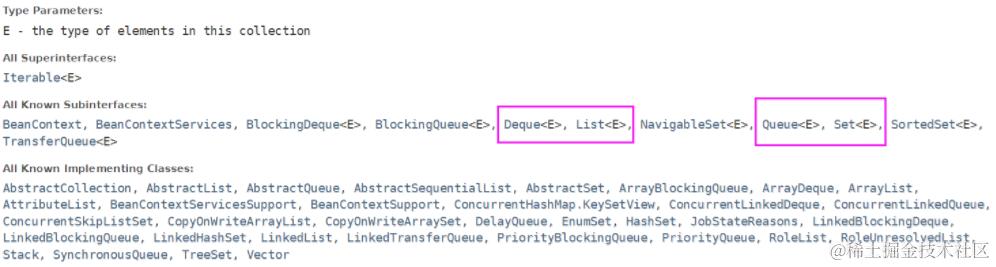
我们这里只关注如下两个子接口:
List:是一个接口,是一个可以存储有序的、可重复的数据元素的集合,类似“动态”数组,可以实现长度的动态改变,它的实现类主要有ArrayList、LinkedList、VectorSet:是一个存储无序的、不可重复的数据的集合,类似高中讲的“集合”,可以实现长度的动态改变,它的实现类主要有HashSet、LinkedHashSet、TreeSet- Set和List的区别
Set接口实例存储的是无序的,不重复的数据。List接口实例存储的是有序的,可以重复的元素。Set检索效率低下,删除和插入效率高,插入和删除不会引起元素位置改变 <实现类有HashSet,TreeSet>。List和数组类似,可以动态增长,根据实际存储的数据的长度自动增长List的长度。查找元素效率高,插入删除效率低,因为会引起其他元素位置改变 <实现类有ArrayList,LinkedList,Vector> 。
1.3.2、Map接口
Map接口:双列数据,保存具有映射关系key-value 对的集合,主要的实现类为HashMap,LinkedHashMap,TreeMap,Hashtable,Properties。它的继承体系主要为:
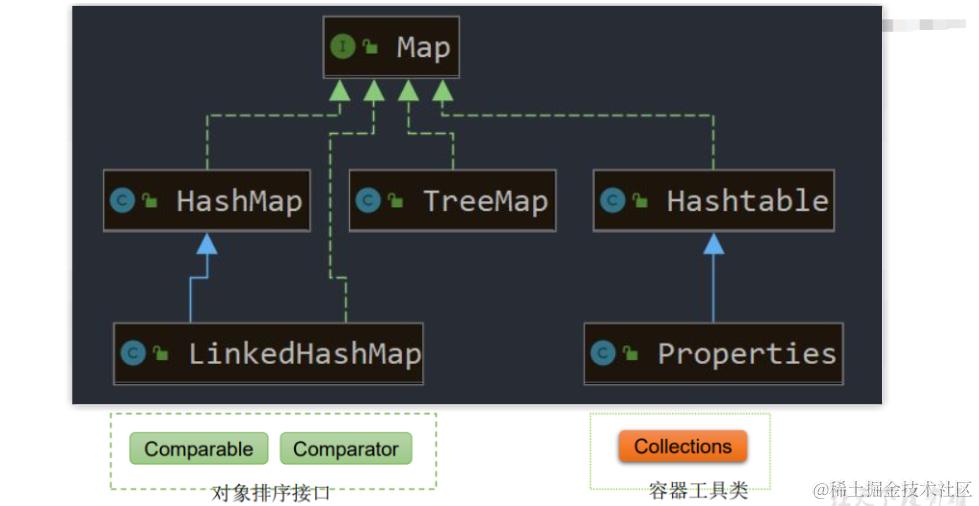
2、Collection接口方法--ArrayList实现
Collection 接口是 List、Set 和 Queue 接口的父接口,该接口里定义的方法既可用于操作 Set 集合,也可用于操作 List 和 Queue 集合。JDK不提供此接口的任何直接实现,而是提供更具体的子接口(如:Set和List) 实现。
在 Java5 之前,Java 集合会丢失容器中所有对象的数据类型,把所有对象都当成 Object 类型处理,即意味着什么类型的数据都可以添加进集合里面;从 JDK 5.0 增加了泛型以后,Java 集合可以记住容器中对象的数据类型,从而我们就只能往集合里面添加指定类型的数据。
查看Collection接口源码,接口中的方法如下:意味着所有实现了此接口的实现类都拥有这些方法,比如ArrayList
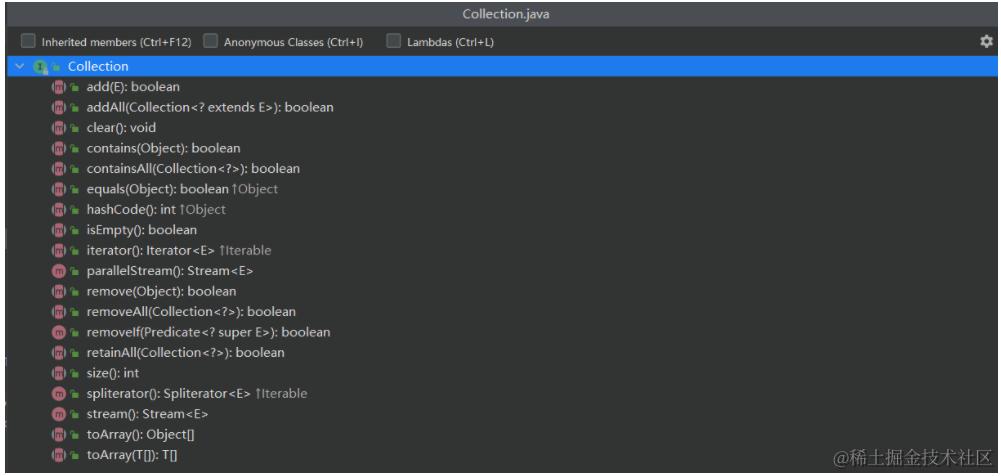
1、添加
- add(Object obj)
- addAll(Collection coll)
/*
添加
add(Object obj):添加一个元素到一个集合里面
addAll(Collection coll): 添加一个集合到集合里面,相当于批量插入数据
*/
Collection coll = new ArrayList(); //用子实现类ArrayList
Collection coll1 = new ArrayList();
coll1.add(123);
coll.add(123); //ArrayList是list接口的实现类,所以可以添加重复的数据
coll.add(123);//自动装箱
coll.add(123);
coll.add(123);
coll.add(new Person("Jerry",20));
coll.add(new String("Tom"));
coll.add(false);
System.out.println(coll.size()); //7

System.out.println(coll); //它的实现子类已经重写过toString方法,所以不会输出地址值

coll.addAll(coll1);
System.out.println(coll.size()); //8
2、获取有效元素的个数
- int size()
System.out.println(coll.size());
3、清空集合
- void clear()
/*清空集合  void clear() */
coll.clear();
System.out.println(coll.size());
4、是否是空集合
- boolean isEmpty()
coll.clear();
System.out.println(coll.isEmpty());
5、是否包含某个元素
- boolean contains(Object obj):内部是通过元素的equals方法来判断是否是同一个对象,我们在判断时会调用obj对象所在类的equals(),这就要求重写
equals()了
/*
是否包含某个元素
boolean contains(Object obj):是通过元素的equals方法来判断是否是同一个对象,一个一个对比,防止重复添加
boolean containsAll(Collection c):也是调用元素的equals方法来比较的。拿两个集合的元素挨个比较。
*/
public void test1(){
    Collection coll = new ArrayList();
    Person p = new Person("Jerry",20);

    coll.add(123);
    coll.add(456);
    coll.add(p);
    coll.add(new Person("Jerry" ,20));
    coll.add(new String("Tom"));
    coll.add(false);

    //1.contains(object obj): 判断当时集合中是否包含obj
    //我们在判断时会调用obj对象所在类的equals(),这就要求重写equals()了
    boolean contains = coll. contains(123);
    System.out.println(contains);//true

    Systen.out.println(coll.contains(new String("Tom")));//true

    System.out.printIn(coll.contains(p));//true
    Systen.out.printLn(coll.contains(new Person("Jerry" ,20))); //false,因为自定义类没有重写equl

    //2. containsAll(Collection colll): 判断形参coll中的所有元素是否都存在于当前集合中。
    Collection coll = Arrays.asList(123, 4567);//返回一个集合
    System.out.println(coll.containsAll(coll1));
}
6、删除
- boolean remove(Object obj) :通过元素的equals方法判断
obj是否是要删除的那个元素。只会删除找到的第一个元素
@Test
public void test2(){
    //3.remove(0bject obj): 从当前集合中移除obj元素。
    Collection coll = new ArrayList();
    coll.add(123);
    coll.add(456);
    coll.add(new Person("Jerry", 20));
    coll.add(new String("Tom"));
    coll.add(false);
    coll.remove (1234);
    System.out.println(coll);
    coll.remove(new Person("Jerry",20));
    System.out.println(coll);
}
7、取当前集合的差集
- boolean removeAll(Collection coll):取当前集合的差集
//4. removeAll(Collection col1): 差集:从当前来合中移除coll1中所有的元素。
Collection coll1 = Arrays.asList(123, 456);
coll.removeAll(coll1);
System.out.printLn(coll);
8、取两个集合的交集
- boolean retainAll(Collection c):把交集的结果存在当前集合中,不影响c
@Test
public void test3(){
    Collection coll = new ArrayList();
    coll.add(123);
    coll.add(456);
    coll.add(new Person("Jerry" ,20));
    coll.add(new String("Tom"));
    coll.add(false);
    //5.retainAIl(Collection coll1):交集: 获取当前集合和coll1集合的交集,并返回给当前集合
    Collection coll1 = Arrays.asList(123, 456,789);
    coll.retainAll(coll1);
    System.out.printIn(coll);
}
9、集合是否相等
- boolean equals(Object obj)
//6. equals(object obj): 要想返回true.需要当前集合和形参集合obj的元素都相同。
Collection coll1 = new ArrayList();
coll1.add(456);
coll1.add(123);
coll1.add(new Person("Jerry" ,20));
coll1.add(new String("Tom"));
coll1.add(false);
System.out.printLn(coll.equals(coll1));
10、集合转成对象数组
- Object[] toArray()
//8.集合---> 数组: toArray()
public class RunoobTest {
    public static void main(String[] args) {
        Collection coll = new ArrayList();
        coll.add(123);
        coll.add(456);
        coll.add(new String("Tom"));
        coll.add(false);
        System.out.println(coll);
        Object[] arr = coll.toArray();
        for(int i = 0;i<arr.length;i++){
            System.out.println(arr[i]);
        }
    }
}
结果
[123, 456, Tom, false] //ArrayList内部重写了toString
123
456
Tom
false
11、获取集合对象的哈希值
- hashCode()
@Test
public void test4(){
    Collection coll = new ArrayList();
    coll.add(123);
    coll.add(456);
    coll.add(new Person("Jerry" , 20));
    coll.add(new String("Tom"));
    coll.add(false);
    //7.hashCode():返回当前集合对象的哈希值
    System. out. println(coll.hashCode());
}
3、拓展:Arrays类的静态方法asList()
介绍
该方法是将数组转化成List集合的方法
List<String> list = Arrays.asList("a","b","c");//自动装箱机制,多态

List<String> list = Arrays.asList(new String[]{"AA", "BB", "CC"});
System. out. println(list);

//也可以用collection来接收
List arr1 = Arrays.asList(new int[]{123, 456});
System.out.println(arr1.size());//1

List arr2 = Arrays.asList(new Integer[]{123, 456});
System.out.println(arr2.size());//2
源码解析:
asList 方法源码:
@SafeVarargs
@SuppressWarnings("varargs")
public static <T> List<T> asList(T... a) {
    return new ArrayList<>(a);
}
进入ArrayList源码
private static class ArrayList<E> extends AbstractList<E>
        implements RandomAccess, java.io.Serializable
进入AbstractList源码
public abstract class AbstractList<E> extends AbstractCollection<E> implements List<E>
进入List源码
public interface List<E> extends Collection<E>
最终我们可以发现 Arrays.asList方法最终返回的是一个List类型的,又继承了Collection接口,所以最终返回一个集合
Arrays.asList()是个坑
查看下面代码
public class ArrayExer2 {
    public static void main(String[] args) {
        List<String> list = Arrays.asList("a","b","c");
        list.add("d");
        System.out.println(list);
    }
}
执行结果:
Exception in thread "main" java.lang.UnsupportedOperationException
	at java.util.AbstractList.add(AbstractList.java:148)
	at java.util.AbstractList.add(AbstractList.java:108)
	at com.lemon.java.ArrayExer2.main(ArrayExer2.java:10)
原因分析:
Arrays.asList(…)方法返回的List集合,既不是ArrayList实例,也不是Vector实例。Arrays.asList(…)返回值是一个固定长度的List集合- 当你向这个
List添加或删除一个元素时(例如list.add("d"))程序就会抛出异常java.lang.UnsupportedOperationException。 我们查看asList()方法的源码,这个返回的ArrayList不是java.util包下的,而是java.util.Arrays.ArrayList,它是Arrays类自己定义的一个静态内部类,这个内部类没有实现add()、remove()方法,而是直接使用它的父类AbstractList的相应方法。 - 而
AbstractList中的add()和remove()是直接抛出java.lang.UnsupportedOperationException异常的!
总结:
- 如果你的List只是用来遍历或者创建一个集合等非添加或删除操作,就用
Arrays.asList()可以简单创建一个集合
Collection coll1 = Arrays.asList(123, 456,789);
- 如果你的
List还要添加或删除元素,还是乖乖地new一个java.util.ArrayList,然后一个一个的添加元素。
Collection coll = new ArrayList(); //用子实现类ArrayList
练习
package cn.wyc;

import java.util.Arrays;
import java.util.List;

public class Test {
    public static void main(String[] args){

        //1、对象类型(String型)的数组数组使用asList(),正常
        String[] strings = {"aa", "bb", "cc"};
        List<String> stringList = Arrays.asList(strings);
        System.out.print("1、String类型数组使用asList(),正常:  ");
        for(String str : stringList){
            System.out.print(str + " ");
        }
        System.out.println();


        //2、对象类型(Integer)的数组使用asList(),正常
        Integer[] integers = new Integer[] {1, 2, 3};
        List<Integer> integerList = Arrays.asList(integers);
        System.out.print("2、对象类型的数组使用asList(),正常:  ");
        for(int i : integerList){
            System.out.print(i + " ");
        }
        //        for(Object o : integerList){
        //            System.out.print(o + " ");
        //        }
        System.out.println();


        //3、基本数据类型的数组使用asList(),出错
        int[] ints = new int[]{1, 2, 3};
        List intList = Arrays.asList(ints);
        System.out.print("3、基本数据类型的数组使用asList(),出错(输出的是一个引用,把ints当成一个元素了):");
        for(Object o : intList){
            System.out.print(o.toString());
        }
        System.out.println();

        System.out.print("   " + "这样遍历才能正确输出:");
        int[] ints1 = (int[]) intList.get(0);
        for(int i : ints1){
            System.out.print(i + " ");
        }
        System.out.println();

        //4、当更新数组或者List,另一个将自动获得更新
        System.out.print("4、当更新数组或者List,另一个将自动获得更新:  ");
        integerList.set(0, 5);
        for(Object o : integerList){
            System.out.print(o + " ");
        }
        for(Object o : integers){
            System.out.print (o + " ");
        }
        System.out.println();

        //5、add()   remove() 报错
        System.out.print("5、add()   remove() 报错:  ");
        //integerList.remove(0);
        //integerList.add(3, 4);
        //integerList.clear();
    }
}
4、Iterator 迭代器
4.1、Iterator 概述
Iterator 接口位于 java.util 包中,Iterator 对象称为迭代器(设计模式的一种),主要用于遍历 Collection 集合中的元素。
- GOF给迭代器模式的定义为:提供一种方法遍历一个容器(container)对象中各个元素,而又不需暴露该对象的内部细节。迭代器模式,就是为容器而生。类似于“公交车上的售票员”、“火车上的乘务员”、“空姐”。
- Collection接口继承了
java.lang.Iterable接口,该接口有一个iterator()方法,那么所有实现Collection接口的集合类都有一个iterator()方法,用以返回一个实现了Iterator接口的迭代器对象。 Iterator仅用于遍历集合,Iterator本身并不提供承装对象的能力。如果需要创建Iterator对象,则必须有一个被迭代的集合。- 集合对象每次调用
iterator()方法都得到一个全新的迭代器对象,默认游标都在集合的第一个元素之前。
4.2、Iterator接口的方法
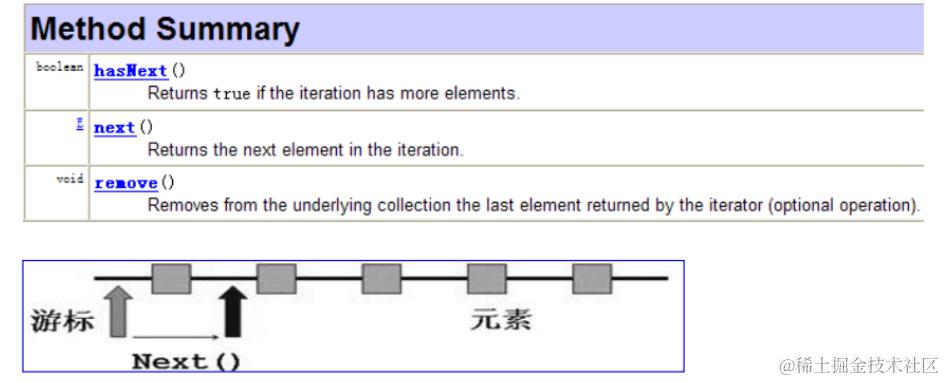
在调用 next() 方法之前必须要调用hasNext()进行检测下一个位置是否还有元素。若不调用,且下一条记录无效,直接调用next()会抛出NoSuchElementException异常。
迭代器 it 的两个基本操作是 next 、hasNext 和 remove。
- 调用 it.next() 会返回迭代器的下一个元素,并且更新迭代器的状态
- 调用 it.hasNext() 用于检测集合中是否还有元素。
- 调用 it.remove() 可以在遍历的时候,删除集合中的元素,此方法不同于集合直接调用remove()
4.3、迭代器的执行原理
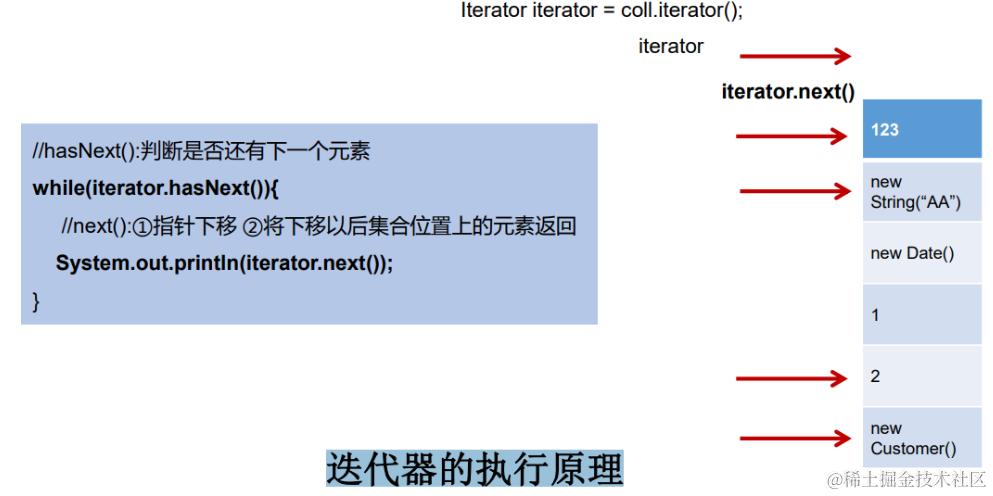
4.4、获取一个迭代器
集合想获取一个迭代器可以使用 iterator() 方法:
// 引入 ArrayList 和 Iterator 类
import java.util.ArrayList;
import java.util.Iterator;

public class RunoobTest {
    public static void main(String[] args) {

        // 创建集合
        ArrayList<String> sites = new ArrayList<String>();
        sites.add("Google");
        sites.add("Runoob");
        sites.add("Taobao");
        sites.add("Zhihu");

        // 获取迭代器
        Iterator<String> it = sites.iterator();

        // 输出集合中的第一个元素
        System.out.println(it.next());
    }
}
4.5、ArrayList 遍历集合元素
1、遍历的第一种方式
@Test
public void test1(){
    //ArrayList<String> sites = new ArrayList<String>();
    Collection coll = new ArrayList(); //多态
    coll.add(123);
    coll.add(456);
    coll.add(new Person("Jerry" ,20));
    coll.add(new String("Tom"));
    coll.add(false);
    Iterator iterator = coll.iterator();//创建一个迭代器
    //方式一
    Systen.out.printIn(iterator.next());
    System.out.println(iterator.next());
    System.out.printIn(iterator.next());
    Systen.out.printIn(iterator.next());
    Systen.out.printin(iterator.next());
    //报异常: NoSuchElenentException
    Systen.out.printIn(iterator.next());//因为值遍历完了
}
2、遍历的第二种方式(不推荐)
//方式二:不推荐
for(int i =0;i < coll.size();i++){
    System.out.printIn(iterator.next());
}
3、遍历的第三种方式
//把集合变为数组相关的内容进行遍历
@Test
public void test2(){
    List<String> list=new ArrayList<String>();
    list.add("Hello");
    list.add("World");
    list.add("HAHAHAHA");

    String[] strArray=new String[list.size()];
    list.toArray(strArray);
    for(int i=0;i<strArray.length;i++){ //这里也可以改写为  for(String str:strArray) 这种形式

        System.out.println(strArray[i]);
    }
}
4、遍历的第四种方式(推荐)
//方式三:推荐
////hasNext():判断是否还有下一个元素
while(iterator.hasNext()){
    //next():①指针下移 ②将下移以后集合位置上的元素返回
    System.out.println(iterator.next());
}
5、遍历的两种错误方式
@Test
public void test2(){
    Collection coll = new ArrayList();
    coll.add(123);
    coll.add(456);
    coll.add(new Person("Jerry" ,20));
    coll.add(new String("Tom"));
    coll.add(false);

    //错误方式一
    Iterator iterator = coll.iterator();
    while((iterator.next()) != null){
        System.out.println(iterator.next());//会跳着输出。有些值不输出
    }

    //错误方式二:
    //集合对象每次调用iterator()方法都得到一个全新的选代器对象,默认游标都在集合的第一个元素之前。
    while (coll.iterator().hasNext()){
        System.out.println(coll.iterator().next());//水远都打印123
    }
}
4.6、Iterator中的remove()方法
调用 it.remove() 可以在遍历的时候,删除集合中的元素,此方法不同于集合直接调用remove()
@Test
public void test3(){
    Collection coll = new ArrayList();
    coll.add(123);
    coll.add(456);
    coll.add(new Person("Jerry" ,20));
    coll.add(new String("Tom"));
    coll.add(false);

    //删除集合中"Tom"
    Iterator iterator = coll.iterator();
    while(iterator.hasNext()){
        Object obj = iterator.next();
        if("Tom".equals(obj)){
            iterator.remove();
        }
    }

    //遍历集合
    iterator = coll.iterator();
    while(iterator.hasNext()){
        System.out.println(iterator.next());
    }
}
注意:
- 如果还未调用next()或在上一次调用 next 方法之后已经调用了 remove 方法
- 再调用remove都会报
IllegalStateException - 如下所示:
//删除集合中"Tom"
Iterator iterator = coll.iterator();
while(iterator.hasNext()){
    iterator.remove();//报IllegalStateException
    Object obj = iterator.next();
    if("Tom".equals(obj)){
        iterator.remove();
        iterator.remove();
    }
}
5、使用 foreach 循环遍历元素 (增强for循环)
Java 5.0 提供了 foreach 循环迭代访问 Collection和数组。
- 遍历操作不需获取
Collection或数组的长度,无需使用索引访问元素。 - 遍历集合的底层调用
Iterator完成操作。 foreach还可以用来遍历数组
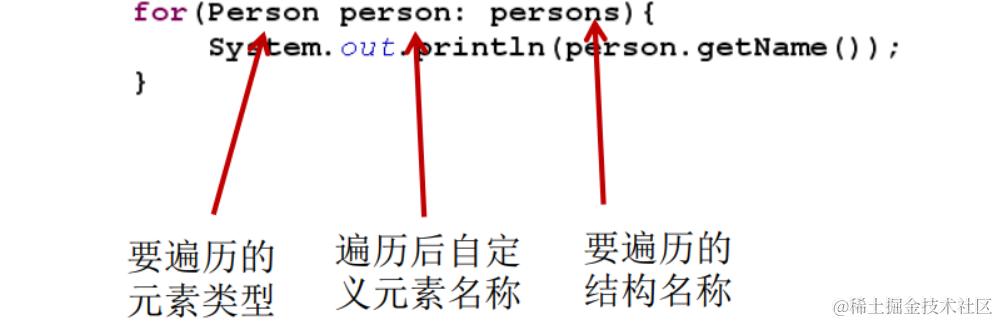
5.1、遍历集合
public class ForTest {
    @Test
    public void test1(){
        Collection coll = new ArrayList();
        coll.add(123);
        coll.add(456);
        coll.add(new Person("Jerry" ,20));
        coll.add(new String("Tom"));
        coll.add(false);
        //for(集合元素的类型 局部变量:集合对象)
        //内部仍然调用了迭代器。
        for(object obj : coll){
            System.out.println(obj);
        }
    }
 }
5.2、遍历数组
@Test
public void test2(){
    int[] arr = new int[]{1,2,3,4,5,6};
    //for(数组元素的类型 局部变量:数组对象)
    for(int i : arr){
        System.out.println(i);
    }
}
5.3、练习
@Test
pubLic void test3(){
    String[] arr = new String[]{"MM", “MM",“HH"};
    //方式1 普通for赋值
    for(int i = 8;i < arr. length;i++){
        arr[i] = "GG";////"GG","GG",“GG”
    }

    //方式2 增强for酯坏
    for(String s : arr){
        s = "GG";//只是把数组中的元素取出来付给了s.原来的还是没变
    }

    for(int i = 8;i < arr.length;i++){
        System.out.printIn(arr[i]);//"MM","MM",“MM”
    }
}