

可扩展矢量图(SVG)是应用程序中最广泛使用的文件图像格式之一。因为它比位图文件有几个优点,特别是在缩放时保留图像质量方面,如果不首先考虑使用SVG,就很难开始构建一个Flutter应用程序。
在这篇文章中,您将学习如何以及何时在Flutter应用程序中使用SVG文件。
在 Flutter 中使用 SVG
Skia,一个2D图形库和Flutter的核心组件,只能将图像序列化为SVG文件。因此,用Skia解码或渲染SVG图像是不可能的。幸运的是,社区用一个梦幻般的Dart原生包来拯救我们,这个包叫做flutter_svg,可以快速渲染和解码SVG。
什么是flutter_svg?
flutter_svg包实现了一个图片缓存,存储了一个ui:Picture 类。这是Skia图形引擎的SkPicture 包装器,它以二进制模式记录特定的SVG渲染命令。
ui.Picture 类并不消耗太多内存,并且被缓存起来以避免重复解析XML文件。让我们来看看SvgPicture.asset 的构造函数。
SvgPicture.asset(
  String assetName, {
  Key? key,
  this.matchTextDirection = false,
  AssetBundle? bundle,
  String? package,
  this.width,
  this.height,
  this.fit = BoxFit.contain,
  this.alignment = Alignment.center,
  this.allowDrawingOutsideViewBox = false,
  this.placeholderBuilder,
  Color? color,
  BlendMode colorBlendMode = BlendMode.srcIn,
  this.semanticsLabel,
  this.excludeFromSemantics = false,
  this.clipBehavior = Clip.hardEdge,
  this.cacheColorFilter = false,
})  : pictureProvider = ExactAssetPicture(
        allowDrawingOutsideViewBox == true
            ? svgStringDecoderOutsideViewBox
            : svgStringDecoder,
        assetName,
        bundle: bundle,
        package: package,
        colorFilter: svg.cacheColorFilterOverride ?? cacheColorFilter
            ? _getColorFilter(color, colorBlendMode)
            : null,
      ),
      colorFilter = _getColorFilter(color, colorBlendMode),
      super(key: key);
通过观察实现,你会注意到来自pictureProvider 的流通知会更新SvgPicture 的图片。
 void _resolveImage() {
final PictureStream newStream = widget.pictureProvider
.resolve(createLocalPictureConfiguration(context));
assert(newStream != null); // ignore: unnecessary_null_comparison
_updateSourceStream(newStream);
}
在这个代码块中,来自pictureProvider 的流被图片缓存的完成者填充到ui.Picture 。
PictureStream resolve(PictureConfiguration picture,
    {PictureErrorListener? onError}) {
  // ignore: unnecessary_null_comparison
  assert(picture != null);
  final PictureStream stream = PictureStream();
  T? obtainedKey;
  obtainKey(picture).then<void>(
    (T key) {
      obtainedKey = key;
      stream.setCompleter(
        cache.putIfAbsent(
          key!,
          () => load(key, onError: onError),
        ),
      );
    },
  ).catchError((Object exception, StackTrace stack) async {
    if (onError != null) {
      onError(exception, stack);
      return;
    }
    FlutterError.reportError(FlutterErrorDetails(
        exception: exception,
        stack: stack,
        library: 'SVG',
        context: ErrorDescription('while resolving a picture'),
        silent: true, // could be a network error or whatnot
        informationCollector: () sync* {
          yield DiagnosticsProperty<PictureProvider>(
              'Picture provider', this);
          yield DiagnosticsProperty<T>('Picture key', obtainedKey,
              defaultValue: null);
        }));
  });
  return stream;
}
添加flutter_svg插件
要将此包添加到您的Flutter依赖项中,您可以运行。
flutter pub add flutter_svg
或者,您可以将flutter_svg添加到您的pubspec.yaml 文件中。
dependencies:
  flutter_svg: ^0.22.0
确保您在您的终端或使用您的编辑器运行flutter pub get 。安装完成后,在您的Dart代码中您想使用这个包的地方导入这个包。
import 'package:flutter_svg/flutter_svg.dart';
在您的Flutter应用程序中使用flutter_svg
有几种方法可以使用这个包,但我们将介绍最常见的使用情况。
一种选择是从内部SVG文件中加载SVG,该文件通常存储在asset 文件夹中。
// example
final String assetName = 'assets/image.svg';
final Widget svg = SvgPicture.asset(
assetName,
);
你也可以从一个URL中加载一个SVG文件,像这样。
// example
final Widget networkSvg = SvgPicture.network(
  'https://site-that-takes-a-while.com/image.svg',
);
最后,你可以从一个SVG代码中加载一个SVG。
// example
SvgPicture.string(
  '''<svg viewBox="...">...</svg>'''
);
在Flutter中扩展SVG功能
一旦您加载了您的SVG文件,第一步就是改变图像的颜色或色调。
// example
final String assetName = 'assets/up_arrow.svg';
final Widget svgIcon = SvgPicture.asset(
  assetName,
  color: Colors.red,
);
使用语义标签有助于描述图像的目的,增强可访问性。为了实现这一点,你可以添加semanticsLabel 参数。语义标签将不会显示在用户界面中。
// example
final String assetName = 'assets/up_arrow.svg';
final Widget svgIcon = SvgPicture.asset(
  assetName,
  color: Colors.red,
  semanticsLabel: 'A red up arrow'
);
SvgPicture如果在height 或width 上没有指定,flutter_svg包会渲染一个空框,LimitedBox ,作为默认的占位符。然而,如果在height 或width 上指定了SvgPicture ,将呈现一个SizedBox ,以确保更好的布局体验。
不过,占位符可以被替换,这对改善用户体验非常好,特别是在通过网络请求加载资产时,可能会有延迟。
// example
final Widget networkSvg = SvgPicture.network(
  'https://site-that-takes-a-while.com/image.svg',
  semanticsLabel: 'A shark?!',
  placeholderBuilder: (BuildContext context) => Container(
      padding: const EdgeInsets.all(30.0),
      child: const CircularProgressIndicator()),
);
在这个例子中,我选择了CircularProgressIndicator ,在图片加载时显示一个进度指示器。你可以添加任何你想要的其他小部件。例如,您可以使用一个自定义的加载部件来替代CircularProgressIndicator 。
检查SVG与flutter_svg的兼容性
您应该知道,flutter_svg库并不支持所有的SVG功能。然而,该包确实提供了一个辅助方法,以确保你不会因为缺乏支持的功能而渲染出一个破损的图像。
// example
final SvgParser parser = SvgParser();
try {
  parser.parse(svgString, warningsAsErrors: true);
  print('SVG is supported');
} catch (e) {
  print('SVG contains unsupported features');
}
请注意,该库目前只检测不支持的元素,如<style> 标签,但不识别不支持的属性。
推荐的Adobe Illustrator SVG配置
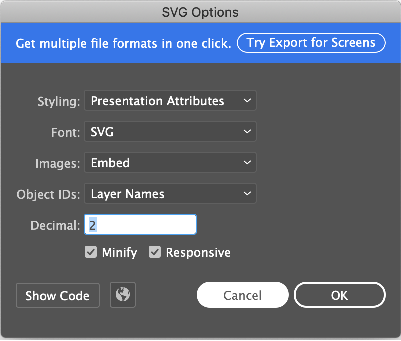
为了在Adobe Illustrator中最大限度地利用flutter_svg,您需要遵循特定建议。
-
-
- 样式:选择展示属性,而不是内联CSS,因为CSS不完全被支持
- 图像:选择嵌入,而不是链接到另一个文件,以获得一个不依赖其他文件的单一SVG
- 对象ID:选择图层名称,以便为SVG标签的每个图层添加一个名称,或者使用最小的图层名称--选择权在你手中
-
在另一个画布中渲染SVG文件
有的时候,你可能想把你的SVG渲染到另一个画布上。SVGPicture ,帮助你轻松实现这一目标。
// example
final String rawSvg = '''<svg viewBox="...">...</svg>''';
final DrawableRoot svgRoot = await svg.fromSvgString(rawSvg, rawSvg);
final Picture picture = svgRoot.toPicture();
svgRoot.scaleCanvasToViewBox(canvas);
svgRoot.clipCanvasToViewBox(canvas);
svgRoot.draw(canvas, size);
结论
使用SVG文件可以成为您的Flutter应用程序的一个重要补充,但SVG并不总是您所有图像问题的正确答案。观察你的用例并持续测量你的应用程序和SVG的性能是至关重要的,因为你可能需要用另一种标准的图像格式(如PNG或JPEG)来替换SVG。
尽管Flutter并不支持SVG,但Dart原生的flutter_svg包对SVG文件有很好的性能和快速支持。该包的使用也相对简单。
请记住,该包的版本仍然低于1.0.0,这可能会破坏API的变化。然而,作者在保持API尽可能的稳定方面做得很好。当使用flutter_svg时,请确保你总是在 pub.dev上检查软件包的最新版本以保持最新。谢谢你的阅读!
The postImplementing SVG in Flutter with flutter_svgappeared first onLogRocket Blog.
