

对使用基于NoSQL的数据库的应用程序的需求正在上升,许多开发人员希望了解如何将MongoDB等数据库集成到用他们喜欢的语言和框架构建的应用程序中。
在本教程中,我将通过展示如何使用MongoDB的官方Go驱动来执行CRUD操作,并沿途提供代码示例,教你如何将MongoDB无缝集成到Go应用程序中。
前提条件
要学习和理解本教程,您需要具备以下条件:
- 在您的机器上安装 MongoDB
- 具有Go的工作知识
- 在您的机器上安装 Go 1.x
- Go开发环境(例如,文本编辑器、IDE)。
开始使用MongoDB
第一步是安装mongo-go-driver,这是MongoDB的官方Go驱动。它提供的功能允许 Go 应用程序连接到 MongoDB 数据库并执行查询。
第一步:建立你的开发环境
在文本编辑器或 IDE 中创建一个新的 Go 项目,并初始化您的go.mod 文件。你可以自由地使用任何名字来命名你的包。
go mod init mongo-with-golang
第2步:安装MongoDB的Go驱动
在你的项目中安装mongo-go-driver包。在终端中,输入以下内容。
go get go.mongodb.org/mongo-driver/mongo
go get go.mongodb.org/mongo-driver/bson
第3步:创建一个MongoDB客户端实例
将 Go 驱动程序包导入您的应用程序,然后在端口27017 (MongoDB 的默认端口)上为数据库创建一个 MongoDB 客户端实例。
创建一个名为main.go 的文件,并在其中保存以下代码。
package main

import (
        "context"
        "go.mongodb.org/mongo-driver/mongo"
        "go.mongodb.org/mongo-driver/mongo/options"
        "go.mongodb.org/mongo-driver/mongo/readpref"
)

func main() {
        client, err := mongo.Connect(context.TODO(), options.Client().ApplyURI("mongodb://localhost:27017"))
        if err != nil {
                panic(err)
        }
}
在这里,你从 Go 驱动程序中导入了mongo 、mongo/options 和mongo/readpref 模块到你的应用程序,以连接到本地数据库。
然后,你使用mongo.Connect() 函数创建了一个客户端实例,并向它传递了一个Gocontext 。当你向服务器(本例中是数据库)发出请求时,你应该使用context.TODO() ,创建一个服务器会接受的上下文。
最后,你使用调用mongo.Connect() 返回的err 变量来检查数据库连接中的错误。如果err 的值不是空的,这意味着有一个错误(错误的凭证或连接到一个不存在的数据库),你应该使用panic() 终止应用程序。
mongo.Connect文档包含了创建 MongoDB 客户端实例的更多高级配置,包括认证。
第四步:平移MongoDB数据库
MongoDB客户端提供了一个Ping() 方法来告诉你是否已经找到并连接了MongoDB数据库。
让我们看看你如何使用它。
if err := client.Ping(context.TODO(), readpref.Primary()); err != nil {
        panic(err)
}
在这里,你调用了Ping() 方法,并向它传递了一个context ,同时使用readpref.Primary() ,告诉MongoDB客户端如何对复制集的成员进行读取操作。
然后,像我们之前做的那样,使用err 变量检查错误,如果需要的话,使用panic() 终止程序。如果代码运行时没有任何错误,说明数据库连接是成功的。
第5步:创建一个MongoDB集合实例
连接到MongoDB数据库后,你需要从client 实例中创建一个Collection 实例,你将使用它来执行查询。
在main.go 文件中添加以下代码,以创建一个从"users" 集合中检索出来的Collection 实例,命名为"testing" 。
usersCollection := client.Database("testing").Collection("users")
这段代码从我们本地MongoDB数据库的"testing" 数据库中检索"users" 集合。如果在检索数据库或集合之前不存在,MongoDB将自动创建它。
用MongoDB执行CRUD
现在你已经成功建立了与MongoDB服务器的连接,并创建了一个Collection 实例,让我们继续从Go中执行数据库的查询。本节介绍了如何使用 Go 驱动程序在 MongoDB 数据库中插入、获取、更新和删除数据。
首先,在处理MongoDB中的数据之前,将我们之前安装的bson 包导入你的项目中。
在你的导入中添加"go.mongodb.org/mongo-driver/bson" 。
在MongoDB中创建新文档
为了在MongoDB集合中创建新文档,数据库客户端提供了一个InsertOne() 方法,允许你插入单个文档,以及一个InsertMany() 方法来插入多个文档。
让我们看看你如何使用它们。
// insert a single document into a collection
// create a bson.D object
user := bson.D{{"fullName", "User 1"}, {"age", 30}}
// insert the bson object using InsertOne()
result, err := usersCollection.InsertOne(context.TODO(), user)
// check for errors in the insertion
if err != nil {
        panic(err)
}
// display the id of the newly inserted object
fmt.Println(result.InsertedID)

// insert multiple documents into a collection
// create a slice of bson.D objects
users := []interface{}{
        bson.D{{"fullName", "User 2"}, {"age", 25}},
        bson.D{{"fullName", "User 3"}, {"age", 20}},
        bson.D{{"fullName", "User 4"}, {"age", 28}},
}
// insert the bson object slice using InsertMany()
results, err := usersCollection.InsertMany(context.TODO(), users)
// check for errors in the insertion
if err != nil {
        panic(err)
}
// display the ids of the newly inserted objects
fmt.Println(results.InsertedIDs)
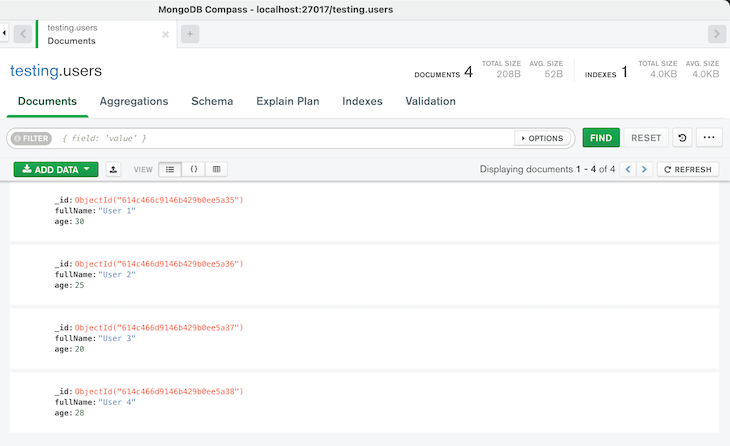
在这里,你创建了一个bson 对象来存储你要插入数据库的数据,因为MongoDB驱动程序要求你把数据准备成bson 。你还可以创建一个数组和切片的bson 对象来存储多个值。
然后,你用InsertOne() 方法插入一个单一的对象,用InsertMany() 方法插入一个对象的列表到数据库集合。
最后,你使用该方法返回的err 变量检查操作是否有错误,并使用插入结果的InsertedID 和InsertedIDs 字段显示新插入的文档的ID。
从MongoDB读取文档
为了从MongoDB集合中检索文档,数据库客户端提供了一个Find() 方法,用于返回符合搜索过滤器的所有文档,以及一个FindOne() 方法,仅返回符合过滤器的第一个文档。
让我们来看看你如何使用它们。
// retrieve single and multiple documents with a specified filter using FindOne() and Find()
// create a search filer
filter := bson.D{
        {"$and",
                bson.A{
                        bson.D{
                                {"age", bson.D{{"$gt", 25}}},
                        },
                },
        },
}

// retrieve all the documents that match the filter
cursor, err := usersCollection.Find(context.TODO(), filter)
// check for errors in the finding
if err != nil {
        panic(err)
}

// convert the cursor result to bson
var results []bson.M
// check for errors in the conversion
if err = cursor.All(context.TODO(), &results); err != nil {
        panic(err)
}

// display the documents retrieved
fmt.Println("displaying all results from the search query")
for _, result := range results {
        fmt.Println(result)
}

// retrieving the first document that match the filter
var result bson.M
// check for errors in the finding
if err = usersCollection.FindOne(context.TODO(), filter).Decode(&result); err != nil {
        panic(err)
}

// display the document retrieved
fmt.Println("displaying the first result from the search filter")
fmt.Println(result)
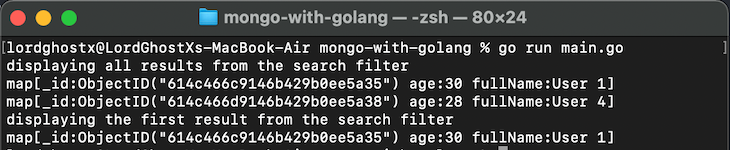
在这里,你创建了一个搜索过滤器来查询数据库中的文档,以寻找在其age 字段中数值大于25 的文档。过滤器定义了MongoDB应该用来匹配数据库中的文档并为用户检索的一组参数。
接下来,你使用Find() 方法,通过提供一个请求上下文和搜索过滤器作为参数,来检索所有符合搜索过滤器的文档。Find() 方法返回一个代表检索到的文档的cursor 对象和一个包含查询数据库时任何错误的error 变量。
在得到结果的cursor 对象后,你使用cusor.All() 函数将游标数据转换为bson 对象的片断。然后,我们使用err 变量检查是否有错误,并在终端显示检索到的文档。
然后,你使用FindOne() 方法来检索符合搜索过滤器的第一个文档。FindOne() 方法返回一个对象,你可以使用Decode() 方法将其转换为bson 对象。
最后,你使用err 变量检查Find() 和Decode() 操作中的错误,并在终端中显示检索到的文档。
你也可以通过用空过滤器匹配Find() 方法来检索一个集合中的每个文档。
// retrieve all the documents in a collection
cursor, err := usersCollection.Find(context.TODO(), bson.D{})
// check for errors in the finding
if err != nil {
        panic(err)
}

// convert the cursor result to bson
var results []bson.M
// check for errors in the conversion
if err = cursor.All(context.TODO(), &results); err != nil {
        panic(err)
}

// display the documents retrieved
fmt.Println("displaying all results in a collection")
for _, result := range results {
        fmt.Println(result)
}
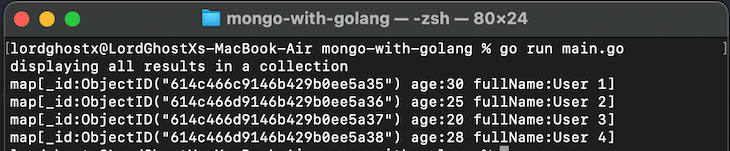
当你关心
bson对象中的字段顺序时,你应该使用bson.D对象(例如,命令和过滤文档),然后在你不关心字段顺序时使用bson.M对象。
在MongoDB中更新文档
MongoDB提供了两种操作来改变集合中的文档:Update 和Replace 。Update 只改变文档中的指定字段,而Replace 用你提供的新字段覆盖现有数据。
MongoDB驱动还提供了以下函数来改变集合中的文档,它们是。
UpdateByID()UpdateOne()UpdateMany()ReplaceOne()FindOneAndUpdate()FindOneAndReplace()
让我们从UpdateByID() 开始探索每个函数,它用指定的ObjectID 来更新单个文档的字段。
// update a single document with a specified ObjectID using UpdateByID()
// insert a new document to the collection
user := bson.D{{"fullName", "User 5"}, {"age", 22}}
insertResult, err := usersCollection.InsertOne(context.TODO(), user)
if err != nil {
        panic(err)
}

// create the update query for the client
update := bson.D{
        {"$set",
                bson.D{
                        {"fullName", "User V"},
                },
        },
        {"$inc",
                bson.D{
                        {"age", 1},
                },
        },
}

// execute the UpdateByID() function with the filter and update query
result, err := usersCollection.UpdateByID(context.TODO(), insertResult.InsertedID, update)
// check for errors in the updating
if err != nil {
        panic(err)
}
// display the number of documents updated
fmt.Println("Number of documents updated:", result.ModifiedCount)
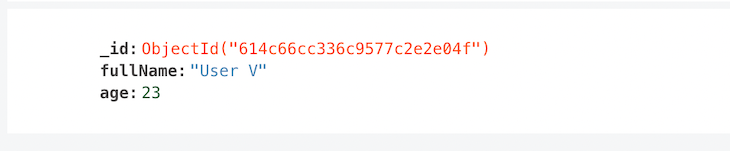
在这里,你在集合中插入了一个新的文档,并创建了一个更新查询,将用"User V" 来设置匹配文档的fullName 字段,然后用1 来增加age 字段。
接下来,你使用UpdateByID() 函数来更新指定的文档,提供一个上下文,你想要修改的文档的ObjectID ,以及要执行的update 查询作为参数。
最后,你使用err 变量检查了update 操作中的错误,并使用调用UpdateByID() 返回的UpdateResult 对象显示了修改的文档的数量。
现在,让我们看看UpdateOne() 和UpdateMany() 函数,更新符合指定搜索过滤器的单个和多个文档。
// update single and multiple documents with a specified filter using UpdateOne() and UpdateMany()
// create a search filer
filter := bson.D{
        {"$and",
                bson.A{
                        bson.D{
                                {"age", bson.D{{"$gt", 25}}},
                        },
                },
        },
}

// create the update query
update := bson.D{
        {"$set",
                bson.D{
                        {"age", 40},
                },
        },
}

// execute the UpdateOne() function to update the first matching document
result, err := usersCollection.UpdateOne(context.TODO(), filter, update)
// check for errors in the updating
if err != nil {
        panic(err)
}
// display the number of documents updated
fmt.Println("Number of documents updated:", result.ModifiedCount)

// execute the UpdateMany() function to update all matching first document
results, err := usersCollection.UpdateMany(context.TODO(), filter, update)
// check for errors in the updating
if err != nil {
        panic(err)
}
// display the number of documents updated
fmt.Println("Number of documents updated:", results.ModifiedCount)
在这里,你首先创建了一个搜索过滤器,匹配在其age 字段中数值大于25 的文档。然后,你创建了一个update 查询,将age 字段的值改为40 。
接下来,你使用UpdateOne() 函数来更新第一个匹配搜索过滤器的文档,提供一个上下文,匹配文档的过滤器,以及要执行的update 查询作为参数。
UpdateOne() 方法返回一个包含操作结果信息的UpdateResult 对象,以及一个包含更新数据库时的任何错误的error 变量。
最后,你使用UpdateMany() 函数来更新所有符合搜索过滤器的文档,提供的参数与上面的UpdateOne() 函数相同。
现在,让我们来看看ReplaceOne() 函数,以覆盖符合指定搜索过滤器的文档中的数据。
// replace the fields of a single document with ReplaceOne()
// create a search filer
filter := bson.D{{"fullName", "User 1"}}

// create the replacement data
replacement := bson.D{
        {"firstName", "John"},
        {"lastName", "Doe"},
        {"age", 30},
        {"emailAddress", "johndoe@email.com"},
}

// execute the ReplaceOne() function to replace the fields
result, err := usersCollection.ReplaceOne(context.TODO(), filter, replacement)
// check for errors in the replacing
if err != nil {
        panic(err)
}
// display the number of documents updated
fmt.Println("Number of documents updated:", result.ModifiedCount)
在这里,你创建了一个搜索过滤器,匹配在其fullName 字段中的值为"User 1" 的文档和一个包含要存储的新数据的bson 对象。
然后,你使用ReplaceOne() 函数来覆盖第一个匹配搜索过滤器的文档的数据,方法是提供一个上下文、匹配文档的过滤器和替换数据作为参数。
最后,你使用err 变量检查替换操作中的错误,并使用调用ReplaceOne() 返回的UpdateResult 对象来显示修改的文档数量。
FindOneAndUpdate() 和FindOneAndReplace() 函数执行与FindOne() 和ReplaceOne() 相同的操作,但会在修改文档之前返回一份文档的副本。
从MongoDB中删除文档
为了从MongoDB集合中删除文档,数据库客户端提供了一个DeleteOne() 方法来删除单个文档,以及一个DeleteMany() 方法来删除一个集合中的多个文档。
让我们看看你如何使用它们。
// delete single and multiple documents with a specified filter using DeleteOne() and DeleteMany()
// create a search filer
filter := bson.D{
        {"$and",
                bson.A{
                        bson.D{
                                {"age", bson.D{{"$gt", 25}}},
                        },
                },
        },
}

// delete the first document that match the filter
result, err := usersCollection.DeleteOne(context.TODO(), filter)
// check for errors in the deleting
if err != nil {
        panic(err)
}
// display the number of documents deleted
fmt.Println("deleting the first result from the search filter")
fmt.Println("Number of documents deleted:", result.DeletedCount)

// delete every document that match the filter
results, err := usersCollection.DeleteMany(context.TODO(), filter)
// check for errors in the deleting
if err != nil {
        panic(err)
}
// display the number of documents deleted
fmt.Println("deleting every result from the search filter")
fmt.Println("Number of documents deleted:", results.DeletedCount)
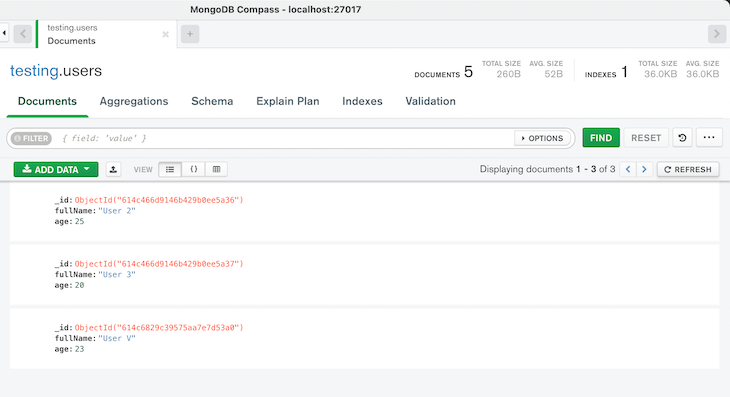
结论
我希望这是一个有帮助的指南,可以帮助我们解决这个通常是具有挑战性的任务。由于缺乏关于使用MongoDB与Go的直接资源,开发人员需要花费大量的时间来探索文档。有了这篇文章作为参考指南,你可以自信地将MongoDB集成到Go应用程序中。
