

React 18 alpha已经发布了,这让人很兴奋!但我们能不能用TypeScript来使用它呢?但是我们可以用TypeScript来使用它吗?
答案是 "可以",但我们需要做几件事来实现这一点。这篇文章将告诉你该怎么做。
用TypeScript创建一个React应用程序
让我们用Create React App为自己创建一个虚无的React TypeScript应用程序。
yarn create react-app my-app --template typescript
现在让我们把React的版本升级到@next 。
yarn add react@next react-dom@next
这将使你在package.json ,使用React 18的条目。它可能会看起来像这样。
    "react": "^18.0.0-alpha-e6be2d531",
    "react-dom": "^18.0.0-alpha-e6be2d531",
如果我们运行yarn start ,我们会发现自己在运行一个React 18应用程序。令人兴奋的是!
使用新的API
因此,让我们尝试使用 [ReactDOM.createRoot](https://github.com/reactwg/react-18/discussions/5)API。正是这个API使我们的应用程序可以使用React 18的新功能。我们将打开index.tsx ,并进行这一改变。
-ReactDOM.render(
-  <React.StrictMode>
-    <App />
-  </React.StrictMode>,
-  document.getElementById('root')
-);
如果我们单独运行JavaScript,这就可以了。然而,由于我们也在使用TypeScript,我们现在遇到了一个错误。
Property 'createRoot' does not exist on type 'typeof import("/code/my-app/node_modules/@types/react-dom/index")'. TS2339
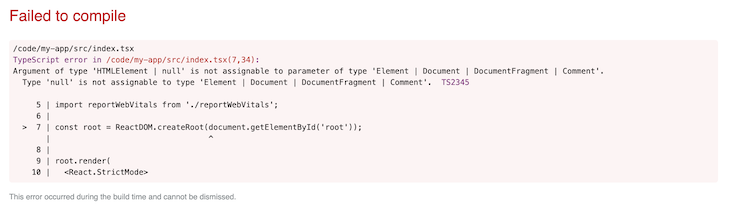
这是TypeScript编译器在抱怨它不了解ReactDOM.createRoot 。这是因为目前我们的应用程序中的类型定义没有定义该API。
让我们升级我们的类型定义。
yarn add @types/react @types/react-dom
我们有理由希望现在一切都能正常工作了--可惜,并没有。同样的错误也出现了。TypeScript很不高兴。
告诉TypeScript关于新的API的信息
如果我们看一下为API添加支持的PR,我们会发现一些提示。如果你看一下一个为 [next.d.ts](https://github.com/DefinitelyTyped/DefinitelyTyped/blob/a07e9cfb005682fb6be0a2e85113eac131c3006f/types/react/next.d.ts),你会发现这个信息,由Sebastian Silbermann提供。
/**
 * These are types for things that are present in the upcoming React 18 release.
 *
 * Once React 18 is released they can just be moved to the main index file.
 *
 * To load the types declared here in an actual project, there are three ways. The easiest one,
 * if your `tsconfig.json` already has a `"types"` array in the `"compilerOptions"` section,
 * is to add `"react/next"` to the `"types"` array.
 *
 * Alternatively, a specific import syntax can to be used from a typescript file.
 * This module does not exist in reality, which is why the {} is important:
 *
 * ```ts
 * import {} from 'react/next'
 * ```
 *
 * It is also possible to include it through a triple-slash reference:
 *
 * ```ts
 * /// <reference types="react/next" />
 * ```
 *
 * Either the import or the reference only needs to appear once, anywhere in the project.
 */
让我们试试清单上的第一项。我们将编辑我们的tsconfig.json ,在"compilerOptions" 部分添加一个新条目。
"types": ["react/next", "react-dom/next"]
如果我们用yarn start 重新启动我们的构建,我们现在会看到一个不同的错误。
Argument of type 'HTMLElement | null' is not assignable to parameter of type 'Element | Document | DocumentFragment | Comment'. Type 'null' is not assignable to type 'Element | Document | DocumentFragment | Comment'. TS2345
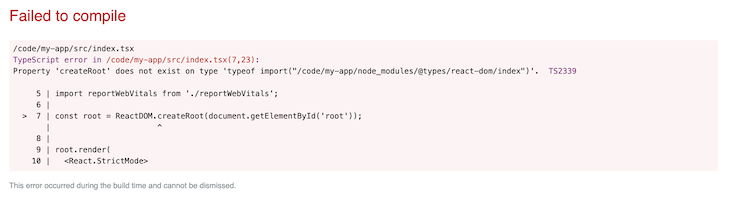
现在这实际上与我们新的React类型定义的问题无关。它们都很好。这是 TypeScript 在说:"我们不能保证document.getElementById('root') 返回的东西不是null 。由于我们是在strictNullChecks 模式下,你需要确定root 不是空的。"
我们将通过在调用ReactDOM.createRoot 之前测试我们是否有一个元素在发挥作用来处理这个问题。
-const root = ReactDOM.createRoot(document.getElementById('root'));
随着这一改变,我们有了一个使用TypeScript的React 18应用程序。请欣赏!
The postHow to use TypeScript with React 18 alphaappeared first onLogRocket Blog.

