核心模块组件
ServerBootstrap和Bootstrap
- 引导类,一个Netty应用由一个
Bootstrap开始,负责配置整个Netty程序,串联各个组件
ServerBootstrap服务端Bootstrap客户端
bootstrap.group(bossGroup, workerGroup)
.channel(NioServerSocketChannel.class)
.option(ChannelOption.SO_BACKLOG, 128)
.childOption(ChannelOption.SO_KEEPALIVE, true)
.handler(null)
.childHandler(new HttpServerInitializer());
.bind(8888).sync();
bootstrap.group(group)
.channel(NioSocketChannel.class)
.handler(new ChannelInitializer<SocketChannel>() {
@Override
protected void initChannel(SocketChannel ch) throws Exception {
ch.pipeline().addLast(new ClientHandler());
}
})
.connect("localhost", 8888).sync();
Future和ChannelFuture
- Netty所有IO操作都是异步的,不能立刻得到消息是否被正确处理,通过
Future和ChannelFuture注册监听,操作成功或失败时会自动触发监听事件
- 获取正在进行IO操作的通道
cf.channel()
cf.sync()
Channel
- 网络通信的组件,用于执行网络IO操作
- 通过Channel获取网络通信的状态、配置参数
channel.remoteAddress();
channel.bytesBeforeWritable();
channel.config();
- 提供异步的网络IO操作
连接、读写、绑定端口,通过ChannelFuture进行监听
- 支持关联IO操作与对应的处理程序
- 不同协议、不同阻塞类型的连接都有不同
Channel与之对应
NioSocketChannel nioSocketChannel = new NioSocketChannel();
NioServerSocketChannel nioServerSocketChannel = new NioServerSocketChannel();
NioDatagramChannel nioDatagramChannel = new NioDatagramChannel();
NioSctpChannel nioSctpChannel = new NioSctpChannel();
NioSctpServerChannel nioSctpServerChannel = new NioSctpServerChannel();
Selector
- Netty基于
Selector实现IO多路复用,通过Selector一个线程可以监听多个Channel事件
- 向一个
Selector注册Channel后,Selector的内部机制自动不断地查询(select方法),查询注册的Channel是否有就绪的IO事件
ChannelHandler
- 一个接口,处理IO事件,拦截IO事件,将其转发到其
ChanneilPipeline中的下一个处理程序
- 本身没有提供实现方法,重写其中的方法,可以监听
channel和handler的各个状态
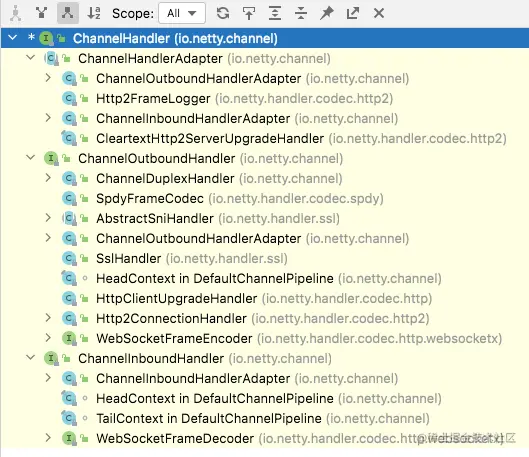
ChannelInBoundHandler处理入站IO事件,服务器往管道里写,客户端从管道读ChannelOutBoundHandler处理出站IO事件,服务器从管道中读取数据,客户端往管道写- 适配器
ChannelInBoundHandlerAdapter处理入站IO事件ChannelOutBoundHandlerAdapter处理出站IO事件ChannelDuplexHandler处理入站/出站IO事件

Pipeline和ChannelPipeline
- 默认认为入栈为
服务端向客户端端
ChannelPipeline是Handler的集合,负责处理和拦截inbound/outbound的时间和操作,相当于一个贯穿Netty的工作链,实现了一种高级形式的拦截过滤器模式,用户完全控制事件的处理方式,以及工作链中的运行过程Channel和ChannelPipeline的组成关系
- 一个
Channel和一个ChannelPipeline互相包含,ChannelPipeline维护余个由ChannelHandlerContext组成的双向链表,每个ChannelHandlerContext关联一个ChannelHandler
- 入站和出站事件在一个双向链表中,入栈从
链表头到尾,出栈从链表尾到头,但是两种事件互不干扰
- head为服务端,tail为客户端
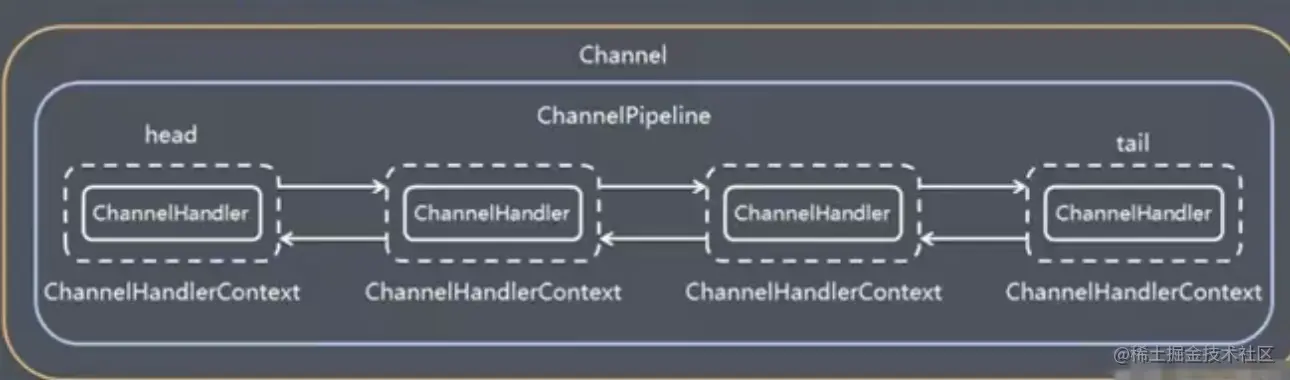
- 在链表中
Handler的真正类型为DefaultChannelHandlerContext
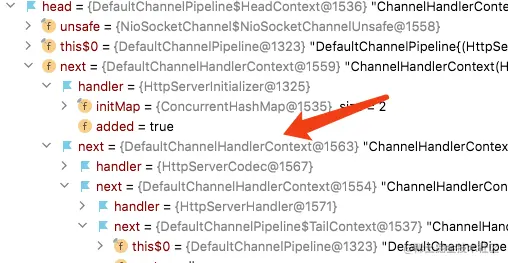
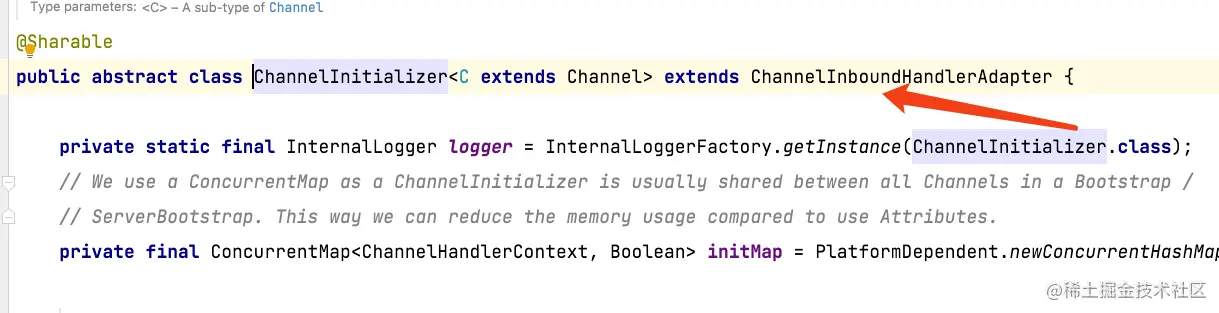
ChannelInitializer,实际上为inboundHandler,作为链表头第一个Handler
ChannelHandlerContext
- 保存
Channel上下文信息,关联一个事件处理器ChannelHandler对象,绑定对应的pipeline/channel
- ctx的真实类型为
class io.netty.channel.DefaultChannelHandlerContext
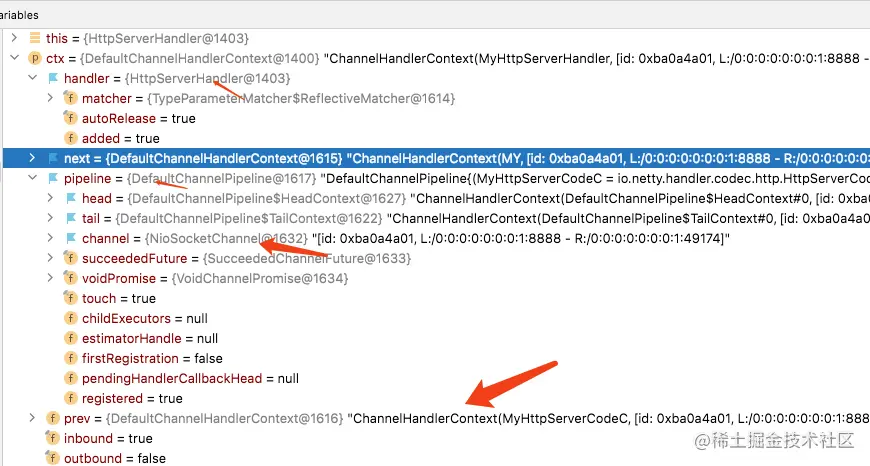
- 获取信息
ctx.channel()
ctx.pipeline()
ctx.handler()
writeAdnFlush(Object msg)将数据写到ChannelPipeline当前ChannelHandler的下一个ChannelHandler,出站
ChannelOption
- 参数设置
-
ChannelOption.SO_BACKLOG,对应TCP/IP协议listen函数中的backlog参数,用来初始化服务器可连接队列大小,服务端处理客户端连接请求是顺序处理的,一时间只能处理一个客户端,多个客户端请求时,服务端将不能处理的客户端连接请求放在队列中等待处理,backlog指定了该队列的大小
ChannelOption.SO_KEEPALIVE 保持连接活动状态
EventLoopGroup
- 是一组
EventLoop的抽象,为了利用多核CPU资源,有多个EventLoop同时工作,每个EventLoop维护一个Selector
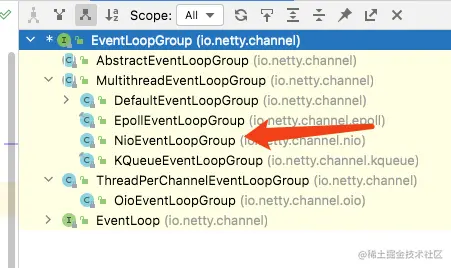
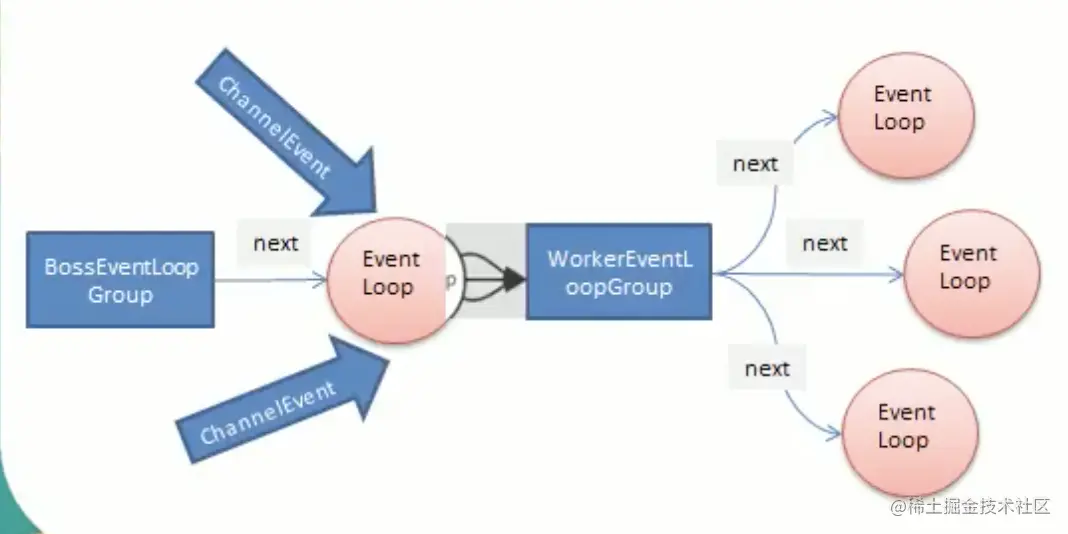
- 通常一个服务器端口
ServerSocketChannel对应一个Selector和一个EventLoop线程
BossEventLoop负责接受客户端连接,并将SocketChannel交给WorkerEventLoopGroup进行IO处理
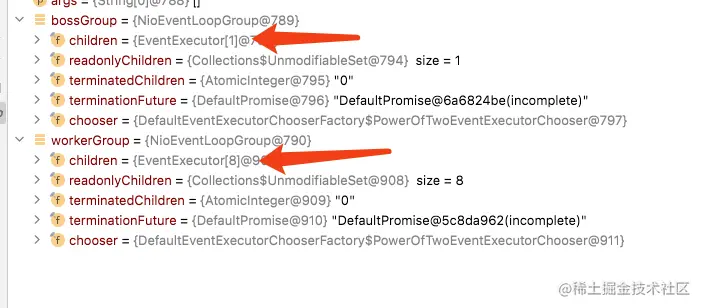
BossGroup和WorkGroup的EventLoop数,超过WorkGroup的EventLoop数会重复使用
- 断开连接,关闭线程
bossGroup.shutdownGracefully()
workerGroup.shutdownGracefully()
Unpooled
- Netty提供的专门用来操作缓冲区的工具类,获取
ByteBuf
//默认大小 256
ByteBuf buffer = Unpooled.buffer()
- Netty中
ByteBuf不需要进行flip,底层维护了readerIndex/writerIndex
readerIndex下一个读取的位置writerIndex下一个写入的位置
ByteBuf byteBuf = Unpooled.buffer(10)
for (int i = 0
byteBuf.writeByte(i)
}
for (int i = 0
System.out.println(byteBuf.readByte())
}
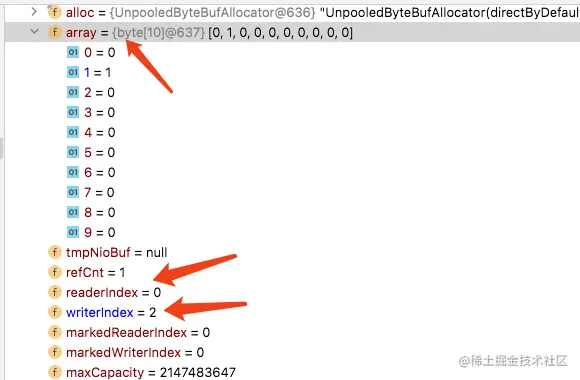
readerIndex/writerIndex/capacity将buf分成了三个区域
[0, readerIndex)读过的区域[readerIndex, writerIndex)可读的区域[writerIndex, capacity)可写的区域
ByteBuf byteBuf = Unpooled.copiedBuffer("hello 掘金", Charset.forName("utf-8"));
if (byteBuf.hasArray()) {
byte[] bytes = byteBuf.array();
System.out.println(bytes.length);
System.out.println(Arrays.toString(bytes));
System.out.println(new String(bytes, 0, byteBuf.readableBytes(), Charset.forName("utf-8")));
System.out.println(byteBuf);
System.out.println(byteBuf.arrayOffset());
System.out.println(byteBuf.writerIndex());
System.out.println(byteBuf.readerIndex());
System.out.println(byteBuf.capacity());
System.out.println(byteBuf.readableBytes());
for (int i = 0; i < byteBuf.readableBytes(); i++) {
System.out.println((char)byteBuf.getByte(i));
}
System.out.println(byteBuf.getCharSequence(0, 4, CharsetUtil.UTF_8));
System.out.println(byteBuf.getCharSequence(3, 7, CharsetUtil.UTF_8));
}