本文对Java中的异常处理机制从异常基本内容到基本开发中异常全局处理流程进行了概述和总结,部分内容参考以下文章:
1、引言
在使用计算机语言进行项目开发的过程中,即使程序员把代码写得尽善尽美, 在系统的运行过程中仍然会遇到一些问题,因为很多问题不是靠代码能够避免的,比如:客户输入数据的格式,读取文件是否存在,网络连接是否始终保持通畅等等。
在Java语言中,将程序执行中发生的不正常情况称为异常 。 (开发过程中的语法错误和逻辑错误不是异常)。Java程序在执行过程中所发生的异常事件可分为两类:
Error:Java虚拟机无法解决的严重问题。如:JVM系统内部错误、资源耗尽等严重情况。比如:StackOverflowError和OOM。一般不编写针对性的代码进行处理,错误不是异常,而是脱离程序员控制的问题。错误在代码中通常被忽略。例如,当栈溢出时,一个错误就发生了,它们在编译也检查不到的。
public class ErrorTest {
    public static void main(String[] args) {
        //1.栈溢出:java.lang.StackOverflowError
        //		main(args);
        //2.堆溢出:java.lang.OutOfMemoryError
        Integer[] arr = new Integer[1024*1024*1024];
    }
}
Exception:其它因编程错误或偶然的外在因素导致的一般性问题,可以使 用针对性的代码进行处理。例如:空指针访问;试图读取不存在的文件;网络连接中断;数组角标越界
对于这些错误,一般有两种解决方法:一是遇到错误就终止程序 的运行。另一种方法是由程序员在编写程序时,就考虑到错误的检测、错误消息的提示,以及错误的处理。
捕获错误最理想的是在编译期间,但有的错误只有在运行时才会发生。 比如:除数为0,数组下标越界等
2、异常分类
这一章主要讲述Exception,针对Exception类的错误,可以分为编译时异常和运行时异常
运行时异常--非敏感异常(Unchecked Exception)
- 是指编译器不要求强制处置的异常。一般是指编程时的逻辑错误,是程序员应该积极避免其出现的异常。
java.lang.RuntimeException类及它的子类都是运行时异常。 - 对于这类异常,可以不作处理,因为这类异常很普遍,若全处理可能会对程序的可读性和运行效率产生影响。
编译时异常--敏感异常(Checked Exception)
- 是指编译器要求必须处置的异常。即程序在运行时由于外界因素造成的一般性异常。编译器要求Java程序必须捕获或声明所有编译时异常。 对于这类异常,编译器会强制要求处理这些异常,否则程序构建时,编译不通过。
- 【代码安全性】在程序打印该类异常信息的时候,应该对异常信息进行脱敏处理,避免将堆栈信息打印出来。
2.1、异常的体系结构
所有的异常类是从 java.lang.Exception 类继承的子类。Exception 类是 Throwable 类的子类。除了Exception类外,Throwable还有一个子类Error 。Java 程序通常不捕获 Error,Error 错误一般发生在严重故障时,它们在Java程序处理的范畴之外。Error 用来指示运行时环境发生的错误。例如,JVM 内存溢出。一般地,程序不会从错误中恢复。
异常类有两个主要的子类:IOException 类和 RuntimeException 类。
更多详见:docs.oracle.com/javase/8/do…
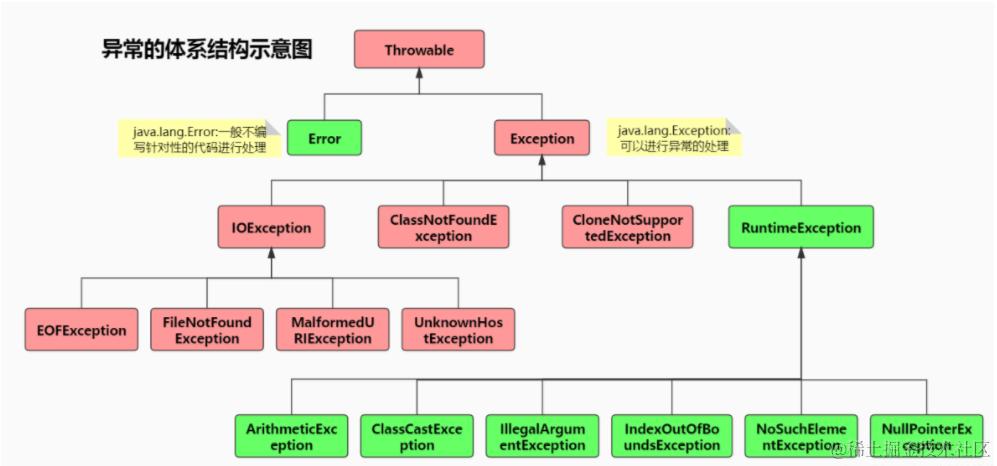
上图中,红色的表示:受检(checked)异常(编译时异常);绿色的表示:非受检(unchecked)异常(运行时异常RuntimeException)
java.lang.Error:一般不编写针对性的代码进行处理java.lang.Exception:可以进行异常的处理
3、常见的异常类型
3.1、运行时异常--非敏感异常
空指针异常:NullPointerException
//NullPointerException
@Test
public void test1(){
    String str = null;
    System.out.println(str.charAt(0));
}
索引越界异常:IndexOutOfBoundsException
//IndexOutOfBoundsException
@Test
public void test2(){
    String str = "abc";
    System.out.println(str.charAt(3));
}
类型转换异常:ClassCastException
//ClassCastException
@Test
public void test3(){
    Object obj = new Date();
    String str = (String)obj;
}
数值转换异常:NumberFormatException
//NumberFormatException
@Test
public void test4(){
    String str = "123";
    str = "abc";
    int num = Integer.parseInt(str);
}
输入不匹配异常:InputMismatchException
//InputMismatchException
@Test
public void test5(){
    Scanner scanner = new Scanner(System.in);
    int score = scanner.nextInt();
    System.out.println(score);
    scanner.close();
}
算术异常:ArithmeticException
//ArithmeticException
@Test
public void test6(){
    int a = 10;
    int b = 0;
    System.out.println(a / b);
}
3.2、编译时异常--敏感异常
- java.io.FileNotFoundException:泄露文件系统结构或文件找不到
- java.util.jar.JarException:泄露文件系统结构
- java.util.MissingResourceException:资源列举
- java.security.acl.NotOwnerException:所有人列举
- java.util.ConcurrentModificationException :可能提供线程不安全的代码信息
- javax.naming.InsufficientResourcesException:服务器资源不足,可能会造成dos攻击
- java.net.BindException:当不信任客户端能够选择服务器端口时造成开放端口列举
- java.lang.OutOfMemoryError:dos攻击
- java.lang.StackOverflowError:dos攻击
- java.sql.SQLException:数据库执行异常
@Test
public void test7(){
    File file = new File("hello.txt");
    //文件可能找不到,发生异常
    FileInputStream fis = new FileInputStream(file);

    int data = fis.read();
    while(data != -1){
        System.out.print((char)data);
        data = fis.read(); //有IO异常
    }
    fis.close(); //关闭文件,有IO异常
}
关于编译时异常:当我们在idea等工具界面写代码的时候,若出现报错标红现象,这就说明有编译时异常,需要处理,而运行时异常不会提示错误信息。编译异常属于敏感异常,所以这些异常应该在代码里面处理,同时,在程序打印异常信息的时候,应该对异常信息进行脱敏处理,避免将堆栈信息打印出来。
4、异常处理机制
在编写程序时,经常要在可能出现错误的地方加上检测的代码, 如进行x/y运算时,要检测分母为0,数据为空,输入的不是数据而是字符等。过多的if-else分支会导致程序的代码加长、臃肿,可读性差。因此采用异常处理机制
4.1、java异常处理的抓抛模型
过程一:"抛":
程序在正常执行的过程中,一旦出现异常,就会在异常代码处生成一个对应异常类的对象。并将此对象抛出。一旦抛出异常对象以后,其后的代码就不再执行。关于异常对象的产生:
- 系统虚拟机自动生成的异常对象;
- 手动的生成一个异常对象,
Exception exception = new ClassCastException();,并抛出(throw)
过程二:"抓":
可以理解为异常的处理方式:
try-catch-finallythrows
4.2、异常方法
下面的列表是 Throwable 类的主要方法:
| 序号 | 方法及说明 |
|---|---|
| 1 | public String getMessage() 返回关于发生的异常的详细信息。这个消息在Throwable 类的构造函数中初始化了。 |
| 2 | public Throwable getCause() 返回一个 Throwable 对象代表异常原因。 |
| 3 | public String toString() 返回此 Throwable 的简短描述。 |
| 4 | public void printStackTrace() 将此 Throwable 及其回溯打印到标准错误流。。 |
| 5 | public StackTraceElement [] getStackTrace() 返回一个包含堆栈层次的数组。下标为0的元素代表栈顶,最后一个元素代表方法调用堆栈的栈底。 |
| 6 | public Throwable fillInStackTrace() 用当前的调用栈层次填充Throwable 对象栈层次,添加到栈层次任何先前信息中。 |
4.3、异常处理机制一:try-catch-finally
语法结构:
try {
    ...... //可能产生异常的代码
} catch (ExceptionName1 e) {
    ...... //当产生ExceptionName1型异常时的处置措施
} catch (ExceptionName2 e) {
    ...... //当产生ExceptionName2型异常时的处置措施
} finally {
    ...... //无论是否发生异常,都无条件执行的语句
}
说明:
- 捕获异常的第一步是用
try{…}语句块选定捕获异常的范围,将可能出现异常的代码放在try语句块中。在执行过程中,一旦出现异常,就会生成一个对应异常类的对象,根据此对象的类型,去catch中进行匹配。 - 在
catch语句块中是对异常对象进行处理的代码。每个try语句块可以伴随一个或多个catch语句,用于处理可能产生的不同类型的异常对象。 ` - 一旦
try中的异常对象匹配到某一个catch时,就进入catch中进行异常的处理。一旦处理完成,就跳出当前的try-catch结构,(在没写finally的情况) 继续执行其后的代码。 - 如果明确知道产生的是何种异常,可以用该异常类作为
catch的参数;也可以用其父类作为catch的参数。- 比如 : 可以用
ArithmeticException类作为参数的地方 , 就可以用RuntimeException类作为参数,或者用所有异常的父类Exception类作为参数。但不能是与ArithmeticException类无关的异常,如NullPointerException(catch中的语句将不会执行)。
- 比如 : 可以用
finally是可选的。catch中的异常类型如果没子父类关系,则谁声明在上,谁声明在下无所谓。catch中的异常类型如果满足子父类关系,则要求子类一定声明在父类的上面。否则,报错。- 常用的异常对象处理的方式:异常对象 调用两个方法
- String getMessage() :
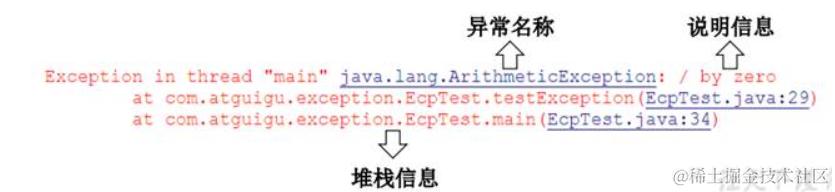
getMessage()获取异常信息,返回new出来的异常信息字符串 - printStackTrace():获取异常类名和异常信息,以及异常出现在程序中的位置。返回值
void
- String getMessage() :
-
在
try结构中声明的变量,再出了try结构以后,就不能再被调用String str = "abc" int num = 0; //声明在外面即可,先初始化一个它,再在try里面赋值,两全其美,可以让外界能够访问 try{ num = Integer.parseInt(str) } -
try-catch-finally结构可以嵌套
举例:
开发中,由于运行时异常比较常见,所以我们通常就不针对运行时异常编写try-catch-finally了。针对于编译时异常,我们说一定要考虑异常的处理
处理运行时异常:ArrayIndexOutOfBoundsException
@Test
public void test(){
    String[] friends = {"AA","BB","CC"};
    try {
        for (int i = 0; i < 5; i++) {
            System.out.println(friends[i]);
        }
    }catch (ArrayIndexOutOfBoundsException e){
        System.out.println("index err");
    }
    System.out.println("this is the end");//异常处理了,所以这句代码可以执行。
}
使用 try-catch-finally 处理编译时异常,使得程序在编译时就不再报错,但是运行时仍可能报错。相当于我们使用 try-catch-finally 将一个编译时可能出现的异常,延迟到运行时出现,因为编译异常不处理程序就不能运行.
//处理编译时异常
@Test
public void test2(){
    FileInputStream fis = null;
    try {
        File file = new File("hello1.txt");
        fis = new FileInputStream(file);

        int data = fis.read();
        while(data != -1){
            System.out.print((char)data);
            data = fis.read();
        }

        //fis.close();这个其实不应该放这里,因为一旦发生错误就直接到catch里面了,不会手动关闭
    } catch (FileNotFoundException e) {
        e.printStackTrace();
    } catch (IOException e) {
        e.printStackTrace(); //打印错误信息
    }finally{
        try {
            if(fis != null)
                fis.close(); //关闭流
        } catch (IOException e) {
            e.printStackTrace();
        }
    }
}
finally的再说明
- 捕获异常的最后一步是通过
finally语句为异常处理提供一个统一的出口,使得在控制流转到程序的其它部分以前,能够对程序的状态作统一的管理。 - 不论在
try代码块中是否发生了异常事件,catch语句是否执行,catch语句是否有异常,或者try中出现了return语句(结束方法),catch语句中是否有return,finally块中的语句都会被执行。 finally语句和catch语句是任选的- 像数据库连接、输入输出流、网络编程
Socket等资源,JVM是不能自动的回收的,我们需要自己手动的进行资源的释放。此时的资源释放,就需要声明在finally中。
@Test
public void testMethod(){
    int num = method();
    System.out.println(num);//3
}

public int method(){

    try{
        int[] arr = new int[10];
        System.out.println(arr[10]);//出现异常,所以不会返回1,直接匹配到catch语句
        return 1;
    }catch(ArrayIndexOutOfBoundsException e){
        e.printStackTrace();
        return 2;
    }finally{
        System.out.println("我一定会被执行");
        return 3;
    }
}
实例
1、判断程序的输出结果
public class ReturnExceptionDemo {
    static void methodA() {
        try {
            System.out.println("进入方法A");
            throw new RuntimeException("制造异常");
        }finally {
            System.out.println("用A方法的finally");
        }
    }
    static void methodB() {
        try {
            System.out.println("进入方法B");
            return;
        } finally {
            System.out.println("调用B方法的finally");
        }
    }
    public static void main(String[] args) {
        try {
            methodA();//处理了methodA抛出的异常
        } catch (Exception e) {
            System.out.println(e.getMessage());
        }
        methodB();
    }
}
结果
进入方法A
用A方法的finally
制造异常
进入方法B
调用B方法的finally
4.4、异常处理机制二:throws
如果一个方法(中的语句执行时)可能生成某种异常,但是并不能确定如何处理这种异常,则此方法应显示地声明抛出异常,表明该方法将不对这些异常进行处理,而由该方法的调用者负责处理。
在方法声明中用throws语句可以声明抛出异常的列表,throws后面的异常类型可以是方法中产生的异常类型,也可以是它的父类。
public static void method1() throws FileNotFoundException,IOException{
    File file = new File("hello1.txt");
    FileInputStream fis = new FileInputStream(file);

    int data = fis.read();
    while(data != -1){
        System.out.print((char)data);
        data = fis.read();
    }
    fis.close();
    System.out.println("hahaha!");
}
throws + 异常类型 写在方法的声明处。指明此方法执行时,可能会抛出的异常类型。一旦当方法体执行时,出现异常,仍会在异常代码处生成一个异常类的对象,此对象满足throws后异常类型时,就会被抛出。异常代码后续的代码,就不再执行!
声明抛出异常示例
将方法中的异常抛出,抛给方法的调用者进行 try-catch 处理。
public class ThrowsTest {
    public static void main(String[] args) {
        ThrowsTest t = new ThrowsTest();
        try {
            t.readFile(); //抛给方法的调用者 t 进行 try-catch 处理
        } catch (IOException e) {
            e.printStackTrace();
        }
    }
    public void readFile() throws IOException {  //抛出异常
        FileInputStream in = new FileInputStream("atguigushk.txt");
        int b;
        b = in.read();
        while (b != -1) {
            System.out.print((char) b);
            b = in.read();
        }
        in.close();
    }
}
重写方法声明抛出异常的原则
方法重写的规则之一: 子类重写的方法抛出的异常类型不大于父类被重写的方法抛出的异常类型
重写方法不能抛出比被重写方法范围更大的异常类型。在多态的情况下,对method()方法的调用-异常的捕获按父类声明的异常处理。
public class OverrideTest {

    public static void main(String[] args) {
        OverrideTest test = new OverrideTest();
        test.display(new SubClass());
    }

    public void display(SuperClass s){  //多态
        try {
            s.method();//子类重写的抛出了异常,所以进行处理,且类型小,所以IOException可以处理
        } catch (IOException e) {
            e.printStackTrace();
        }
    }
}

class SuperClass{
    public void method() throws IOException{
    }
}

class SubClass extends SuperClass{
    public void method() throws FileNotFoundException{ //不能抛出Exception ,否则报错
    }
}
4.4、两种方式的区别
对比两种处理方式
try-catch-finally:真正的将异常给处理掉了。throws的方式只是将异常抛给了方法的调用者,并没真正将异常处理掉。
体会开发中应该如何选择两种处理方式?
- 如果父类中被重写的方法没
throws方式处理异常,则子类重写的方法也不能使用throws,意味着如果子类重写的方法中异常,必须使try-catch-finally方式处理。 - 执行的方法a中,先后又调用了另外的几个方法,这几个方法是递进关系执行的。我们建议这几个方法使用
throws的方式进行处理。而执行的方法a可以考虑使用try-catch-finally方式进行统一处理。 - 如果一个方法内抛出异常,该异常对象会被抛给调用者方法中处理。如果异常没有在调用者方法中处理,它继续被抛给这个调用方法的上层方法。这个过程将一直继续下去,直到异常被处理。这一过程称为捕获(catch)异常。
- 如果一个异常回到
main()方法,并且main()也不处理,则程序运行终止。 - 程序员通常只能处理
Exception,而对Error无能为力。 - 尤其是注意类似IO异常类型,不能说程序出现了IO异常,就直接中断程序业务的继续运行了。
public class ExceptionTest2 {
    public static void main(String[] args){

        try{
            method2();
        }catch(IOException e){
            e.printStackTrace();
        }
        method3();
    }

    public static void method3(){
        try {
            method2();
        } catch (IOException e) {
            e.printStackTrace();
        }
    }

    public static void method2() throws IOException{
        method1();
    }

    public static void method1() throws FileNotFoundException,IOException{
        File file = new File("hello1.txt");
        FileInputStream fis = new FileInputStream(file);

        int data = fis.read();
        while(data != -1){
            System.out.print((char)data);
            data = fis.read();
        }
        fis.close();
        System.out.println("hahaha!");
    }
}
5、手动抛出异常:throw
在程序执行中,除了自动抛出异常对象的情况之外,我们还可以手动的throw一个异常类的对象。Java异常类对象除在程序执行过程中出现异常时由系统自动生成并抛出,也可根据需要使用人工创建并抛出。
- 首先要生成异常类对象,然后通过throw语句实现抛出操作(提交给Java运行环境)。
IOException e = new IOException();
throw e;
- 可以抛出的异常必须是
Throwable或其子类的实例。下面的语句在编译时将会产生语法错误:
throw new String("want to throw");//不是异常类
应用案例
package com.lanmeix.java2;

public class StudentTest {

    public static void main(String[] args) {
        try {
            Student s = new Student();
            s.regist(-1001);
            System.out.println(s);
        } catch (Exception e) {
            //e.printStackTrace();
            System.out.println(e.getMessage());//得到错误打印信息
        }
    }
}

class Student{

    private int id;
    public void regist(int id) throws Exception {
        if(id > 0){
            this.id = id;
        }else{
            //手动抛出异常对象
            //throw new RuntimeException("您输入的数据非法!");
            //throw new Exception("您输入的数据非法!");
            throw new MyException("不能输入负数"); //也可以自己写一个异常类进行继承
        }
    }

    @Override
    public String toString() {
        return "Student [id=" + id + "]";
    }
}
自定义异常类:
package com.lanmeix.java2;
/*
 * 如何自定义异常类?
 * 1. 继承于现有的异常结构:RuntimeException 、Exception
 * 2. 提供全局常量:serialVersionUID
 * 3. 提供重载的构造器
 */
public class MyException extends Exception{
    static final long serialVersionUID = -7034897193246939L;
    public MyException(){
    }

    public MyException(String msg){
        super(msg);
    }
}
6、自定义异常类
- 一般地,用户自定义异常类都是
RuntimeException的子类 - 自定义异常类通常需要编写几个重载的构造器
- 自定义异常需要提供
serialVersionUID - 自定义的异常通过
throw抛出 - 自定义异常最重要的是异常类的名字,当异常出现时,可以根据名字判断异常类型。
如何自定义一个异常类?
- 继承于现有的异常结构:
RuntimeException、Exception - 提供全局常量:
serialVersionUID - 提供重载的构造器
/**
 * 自定义异常类MyException,用于描述数据取值范围错误信息,自定义的异常类
 * 必须继承现有的异常类
 */
public class MyException extends RuntimeException{
    static final long serialVersionUID = -7034897193246939L;
    private int idNumber;

    public MyException(){

    }

    public MyException(String message, int idNumber){
        super(message);//调用父类 Exception的构造器初始化msg
        this.idNumber = idNumber;
    }

    public int getIdNumber() {
        return idNumber;
    }

    public void setIdNumber(int idNumber) {
        this.idNumber = idNumber;
    }
}
使用自定义异常类:
public class MyExpTest {
    public void regist(int num) throws MyException {
        if (num < 0)
            throw new MyException("人数为负值,不合理", 3);
        else
            System.out.println("登记人数" + num);
    }

    public void manager() {
        try {
            regist(-100);
        } catch (MyException e) {
            System.out.println("登记失败,出错种类" + e.getIdNumber()+"\t"+e.getMessage());
        }
        System.out.println("本次登记操作结束");
    }

    public static void main(String args[]) {
        MyExpTest t = new MyExpTest();
        t.manager();
    }
}
7、异常处理新特性:try-with-resource
在传统的资源管理中,例如文件、数据库连接、网络连接等资源,通常需要在 try-catch 语句中显式地关闭资源,以避免资源泄漏。如下所示,这是一个常见的文件读取的传统代码示例:
BufferedReader reader = null;
try {
    reader = new BufferedReader(new FileReader("file.txt"));
    String line = reader.readLine();
    System.out.println(line);
} catch (IOException e) {
    e.printStackTrace();
} finally {
    if (reader != null) {
        try {
            reader.close();
        } catch (IOException e) {
            e.printStackTrace();
        }
    }
}
这种方式的问题在于:
- 需要显式地在
finally块中关闭资源,代码繁琐且容易出错。 - 如果在
finally块中关闭资源时抛出异常,可能会隐藏原始的异常信息,导致调试困难。
为了解决这些问题,Java 7 引入了 try-with-resources 语句。
7.1、try-with-resources 的基本用法
try-with-resources 语句是一种自动资源管理(Automatic Resource Management, ARM)机制,它确保在 try 语句块执行结束时,所有的资源都会被自动关闭,而不需要在 finally 块中显式地关闭资源。
以下是使用 try-with-resources 的基本示例:
try (BufferedReader reader = new BufferedReader(new FileReader("file.txt"))) {
    String line = reader.readLine();
    System.out.println(line);
} catch (IOException e) {
    e.printStackTrace();
}
在这个例子中,BufferedReader 实现了 AutoCloseable 接口(这是 try-with-resources 的要求),因此它会在 try 语句块结束时自动关闭,即使在读取文件时抛出异常,资源也会被正确释放。
7.2、AutoCloseable 和 Closeable 接口
try-with-resources 语句要求所有的资源必须实现 AutoCloseable 接口。AutoCloseable 是 Java 7 引入的一个接口,定义了一个 close() 方法,该方法在资源释放时被调用。
public interface AutoCloseable {
    void close() throws Exception;
Closeable 接口是 AutoCloseable 的子接口,主要用于 I/O 相关的资源管理,如流(Stream)和读写器(Reader/Writer):
public interface Closeable extends AutoCloseable {
    void close() throws IOException;
实现 AutoCloseable 或 Closeable 接口的资源可以在 try-with-resources 中使用。这些资源包括但不限于文件、输入输出流、数据库连接、Socket 等。
7.3、多个资源的管理
try-with-resources 支持在一个 try 语句块中管理多个资源。多个资源可以在 try 语句中声明,并用分号(;)分隔:
try (
    BufferedReader reader = new BufferedReader(new FileReader("file.txt"));
    BufferedWriter writer = new BufferedWriter(new FileWriter("output.txt"))
) {
    String line;
    while ((line = reader.readLine()) != null) {
        writer.write(line);
        writer.newLine();
    }
} catch (IOException e) {
    e.printStackTrace();
}
在这个例子中,reader 和 writer 两个资源都会在 try 语句块结束时自动关闭,并且关闭的顺序与资源声明的顺序相反,先关闭 writer,再关闭 reader。
7.4、异常的抑制处理
在传统的 try-catch-finally 结构中,如果在 try 语句块中抛出了异常,并且在 finally 块中也抛出了异常,那么 finally 块中的异常会覆盖 try 块中的异常,导致 try 块中的异常信息丢失。
try-with-resources 语句提供了一个更好的处理方式,它会在处理 try 块中抛出的异常时,将关闭资源时抛出的异常作为抑制异常(Suppressed Exception)存储在原始异常中,从而保留了所有异常信息。
try (BufferedReader reader = new BufferedReader(new FileReader("file.txt"))) {
    throw new IOException("Primary Exception");
} catch (IOException e) {
    System.out.println("Caught: " + e.getMessage());
    for (Throwable suppressed : e.getSuppressed()) {
        System.out.println("Suppressed: " + suppressed);
    }
}
在这个例子中,如果在 try 块中抛出了 IOException,同时在 close() 方法中也抛出了 IOException,try-with-resources 会捕获这两个异常。主异常是 try 块中抛出的异常,关闭资源时抛出的异常则会被作为抑制异常添加到主异常中。
输出示例:
Caught: Primary Exception
Suppressed: java.io.IOException: Stream Closed
7.5、try-with-resources 的优势
使用 try-with-resources 语句相较于传统的 try-catch-finally 结构有许多优势:
- 自动管理资源:
try-with-resources自动关闭资源,避免了手动管理资源的繁琐过程,同时减少了代码量。 - 防止资源泄漏:由于资源在
try语句块结束时自动关闭,因此即使在异常情况下也不会发生资源泄漏。 - 更清晰的代码结构:使用
try-with-resources使代码更加简洁和易于理解,避免了重复的finally块。 - 更好的异常处理:
try-with-resources语句通过抑制异常的机制,保留了所有相关的异常信息,方便调试和错误分析。
7.6、常见使用场景
try-with-resources 语句适用于所有需要手动管理生命周期的资源,特别是在涉及 I/O 操作时。常见的使用场景包括:
- 文件操作:如文件读取、写入等。
try (BufferedReader reader = new BufferedReader(new FileReader("file.txt"))) {
   String line;
   while ((line = reader.readLine()) != null) {
       System.out.println(line);
   }
} catch (IOException e) {
   e.printStackTrace();
}
- 数据库连接:如
Connection、Statement和ResultSet的管理。
try (
   Connection conn = DriverManager.getConnection(url, user, password);
   Statement stmt = conn.createStatement();
   ResultSet rs = stmt.executeQuery("SELECT * FROM table")
) {
   while (rs.next()) {
       System.out.println(rs.getString(1));
   }
} catch (SQLException e) {
   e.printStackTrace();
}
- 网络通信:如
Socket、ServerSocket的管理。
try (Socket socket = new Socket("example.com", 80)) {
   // Use the socket
} catch (IOException e) {
   e.printStackTrace();
}
8、开发中常用的异常处理流程:统一异常处理
在Java开发中,异常处理是一个非常重要的部分,特别是在构建大型应用程序或 API 时,统一异常处理机制能够显著提升代码的可维护性和用户体验。定义统一的错误代码(code)和错误消息(message)是这种机制的核心部分。
通过定义统一的错误代码和消息模板,并在自定义异常中使用它们,可以显著提升应用程序的错误处理能力和用户体验。这种方法使得错误消息更加一致和可维护,同时也便于前端开发者理解和处理错误。
下面是一个简单的示例,展示如何在Java项目中定义和使用统一的异常处理以及错误代码和消息。
8.1、定义错误代码枚举
在自定义异常处根据实际情况定义自己或业务需要的异常,在实际使用抛自定义异常时,调用此类中的异常即可
首先,定义一个枚举来表示各种错误代码和对应的消息模板。
/**
 * 枚举了一些常用API操作码
 */
public enum ResultCode implements IErrorCode {
    SUCCESS(200, "操作成功"),
    FAILED(400, "操作失败"),
    VALIDATE_FAILED(404, "参数检验失败"),
    UNAUTHORIZED(401, "暂未登录或token已经过期"),
    FORBIDDEN(403, "没有相关权限");

    private int code;
    private String message;

    private ResultCode(int code, String message) {
        this.code = code;
        this.message = message;
    }

    public int getCode() {
        return code;
    }

    public String getMessage() {
        return message;
    }
}
封装API的错误码
/**
 * 封装API的错误码
 */
public interface IErrorCode {
    int getCode();

    String getMessage();
}
8.2、定义通用的方法异常信息返回体
import com.lcp.fitness.common.api.IErrorCode;
import com.lcp.fitness.common.api.ResultCode;
import lombok.Data;

import java.io.Serializable;

@Data
public class CommonResponse<T> implements Serializable {

    private int code;
    private String msg;
    private T data;
    private boolean success;

    public CommonResponse(int code, String msg) {
        this.code = code;
        this.msg = msg;
    }

    public CommonResponse(int code, String msg, T data, boolean success) {
        this.code = code;
        this.msg = msg;
        this.data = data;
        this.success = success;
    }


    //失败返回结果
    public static <T> CommonResponse fail() {
        return new CommonResponse(ResultCode.FAILED.getCode(), ResultCode.FAILED.getMessage(), null, false);
    }

    //失败返回结果
    public static <T> CommonResponse fail(String msg) {
        return new CommonResponse(ResultCode.FAILED.getCode(), msg, null, false);
    }

    //失败返回结果
    public static <T> CommonResponse fail(IErrorCode errorCode) {
        return new CommonResponse(errorCode.getCode(), errorCode.getMessage(), null, false);
    }

    //失败返回结果
    public static <T> CommonResponse fail(IErrorCode errorCode, String msg) {
        return new CommonResponse(errorCode.getCode(), msg, null, false);
    }

    //失败返回结果
    public static <T> CommonResponse fail(int code, String msg) {
        return new CommonResponse(code, msg, null, false);
    }

    //成功返回结果
    public static <T> CommonResponse success() {
        return new CommonResponse(ResultCode.SUCCESS.getCode(), ResultCode.SUCCESS.getMessage(), null, true);
    }

    //成功返回结果
    public static <T> CommonResponse success(T data) {
        return new CommonResponse(ResultCode.SUCCESS.getCode(), ResultCode.SUCCESS.getMessage(), data, true);
    }

    //成功返回结果
    public static <T> CommonResponse success(String msg, T data) {
        return new CommonResponse(ResultCode.SUCCESS.getCode(), msg, data, true);
    }


    /**
     * 参数验证失败返回结果
     */
    public static <T> CommonResponse<T> validateFailed() {
        return fail(ResultCode.VALIDATE_FAILED);
    }

    /**
     * 参数验证失败返回结果
     * @param message 提示信息
     */
    public static <T> CommonResponse<T> validateFailed(String message) {
        return new CommonResponse<T>(ResultCode.VALIDATE_FAILED.getCode(), message, null, false);
    }

    /**
     * 未登录返回结果
     */
    public static <T> CommonResponse<T> unauthorized(T data) {
        return new CommonResponse<T>(ResultCode.UNAUTHORIZED.getCode(), ResultCode.UNAUTHORIZED.getMessage(), data, false);
    }

    /**
     * 未授权返回结果
     */
    public static <T> CommonResponse<T> forbidden(T data) {
        return new CommonResponse<T>(ResultCode.FORBIDDEN.getCode(), ResultCode.FORBIDDEN.getMessage(), data, false);
    }
8.3、定义自定义异常类
接下来,定义一个自定义异常类,用于封装错误代码和消息。
import com.lcp.fitness.common.api.IErrorCode;

/**
 * 自定义API异常
 */
public class ApiException extends RuntimeException {
    private IErrorCode errorCode;

    public ApiException(IErrorCode errorCode) {
        super(errorCode.getMessage());
        this.errorCode = errorCode;
    }

    public ApiException(String message) {
        super(message);
    }

    public ApiException(Throwable cause) {
        super(cause);
    }

    public ApiException(String message, Throwable cause) {
        super(message, cause);
    }

    public IErrorCode getErrorCode() {
        return errorCode;
    }
}
8.4、全局异常处理
为了更优雅地处理异常,这里可以使用 @RestControllerAdvice+@ExceptionHandler 或者@ControllerAdvice+@ExceptionHandler+@ResponseBody 来创建一个全局异常处理器。这样当系统捕捉到有对应的异常类型出现时,比如这里的ApiException,那么系统就能自动捕获和处理所有控制器的异常,GlobalExceptionHandler 处理器就能返回我们自定义的异常信息体。
@RestControllerAdvice= @ControllerAdvice + @ResponseBody
import com.lcp.fitness.utils.CommonResponse;
import lombok.extern.slf4j.Slf4j;
import org.springframework.security.access.AccessDeniedException;
import org.springframework.web.bind.annotation.ExceptionHandler;
import org.springframework.web.bind.annotation.RestControllerAdvice;

/**
 * 全局异常处理
 */
@RestControllerAdvice
@Slf4j
public class GlobalExceptionHandler {

    // @ExceptionHandler 异常处理
    @ExceptionHandler(value = ApiException.class)
    public CommonResponse handle(ApiException e) {
        log.error(e.getMessage());
        // 调用CommonResponse消息体返回类
        return CommonResponse.fail(e.getMessage());
    }

    @ExceptionHandler(value = Exception.class)
    public CommonResponse exception(Exception e) {
        log.error(e.getMessage(), e);
        return CommonResponse.fail(e.getMessage());
    }

    /**
     * springsecurity权限认证失败返回
     * @param e
     * @return
     */
    @ExceptionHandler(value = AccessDeniedException.class)
    public CommonResponse accessDeniedException(AccessDeniedException e) {
        log.error(e.getMessage());
        return CommonResponse.fail("用户无权限访问");
    }
}
8.5、方法使用
在控制器层方法捕获并抛出自定义异常,然后前端请求这个接口时,若出现异常,则会给前端返回我们自定义的异常信息响应体。
@RestController
@RequestMapping("/users")
public class UserController {
    @GetMapping("/{id}")
    public ResponseEntity<String> getUser(@PathVariable int id) {
        User user = findUserById(id);
        if (Objects.isNull(user)) {
            // 手动抛出自定义异常
            throw new ApiException(ResultCode.FORBIDDEN);
        }
        return ResponseEntity.ok("User found: " + user.getName());
    }

    private User findUserById(int id) {
        // 模拟查找用户逻辑
        return null;
    }
}
9、总结
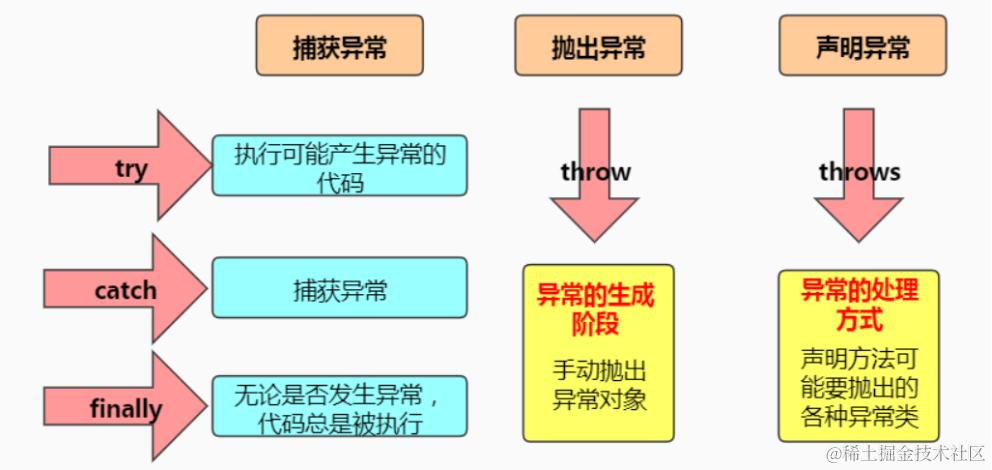
throw 和 throws 区别:
throw表示抛出一个异常类的对象,生成异常对象的过程。声明在方法体内。throws属于异常处理的一种方式,声明在方法的声明处。
try-with-resource
try-with-resource是Java 7引入的一种异常处理方式,它可以在代码块中创建资源对象,并自动关闭这些资源对象。
try-with-resource的基本语法如下:
try (ResourceType resource = new ResourceType()) {
    // 使用resource对象进行操作
} catch (Exception e) {
    // 异常处理
}
try-with-resource的特点如下:
- 在try代码块结束后,无论是否发生异常,系统会自动调用资源对象的close()方法去关闭资源。
- 资源对象必须实现AutoCloseable接口或Closeable接口,这两个接口都定义了close()方法用于关闭资源。
- 可以在try-with-resource中声明多个资源对象,用分号隔开。
使用try-with-resource进行异常处理的优势如下:
- 减少了手动关闭资源对象的代码量,提高了代码的可读性和可维护性。
- 确保资源对象在使用完毕后被及时关闭,避免资源泄露的风险。
- 如果在关闭资源时发生异常,try-with-resource会优先抛出被使用资源抛出的异常,并将关闭资源的异常添加到被抛出的异常中。
需要注意的是,虽然try-with-resource可以自动关闭资源对象,但仍然要注意资源对象的创建和关闭的时机,避免不必要的资源消耗和性能损失。另外,try-with-resource只能用于处理实现AutoCloseable接口或Closeable接口的资源对象,对于无法自动关闭的资源对象,仍然需要手动关闭。