相关blog:QR-Code编码原理 Zxing扫码库优化思路
背景
我们是否这样的遇到过这样的场景,在产品台有n个产品包,服务端对每个产品包都下发了一个url,这个时候我们把这些url一一编成二维码。 但是!!! 因为下发的url长短不一,发现生成的二维码会有不同宽度的白边,导致用户视觉体验差。
原因
好了,先来分析为什么会这样。在生成二维码的时候,我们传入了需要生成的图像的宽高。这个时候整个图像的宽高是确定的,但是你只确定了整个图像的宽高啊,没有确定二维码的宽高呀。
实际上二维码的宽高是不确定的,为毛这么说? 来看一张图
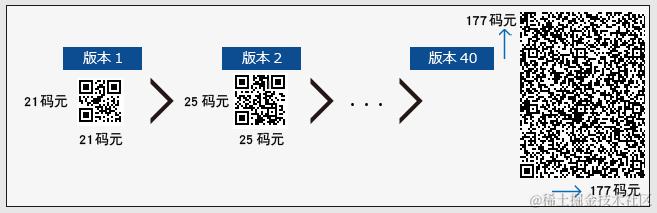 二维码总共有40个版本,每个版本对应的尺寸都不一样
版本1 边长为21位二进制 , 往后每增加一个版本,边长增加4位二进制
二维码总共有40个版本,每个版本对应的尺寸都不一样
版本1 边长为21位二进制 , 往后每增加一个版本,边长增加4位二进制
所以你传入的url的长短不一样,扫码库会根据你传入字符串的长度选择合适的版本,然后生成不同宽高的二维码,所以我们就知道了为什么 得到的二维码图像 总会有不同的白边。
那么这个能解决吗?当然是可以的。
往下看
源码
先来看一下zxing的代码库
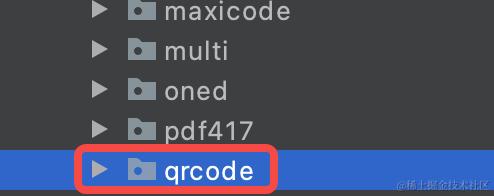
看到这个仓里有好多包,每个包对应一种码型,我们要找的就是这个qrcode二维矩阵码包
找到这个包下的QRCodeWriter编码类
先看他的编码方法encode()
public BitMatrix encode(String contents,
                        BarcodeFormat format,
                        int width,
                        int height,
                        Map<EncodeHintType,?> hints) throws WriterException {

  if (contents.isEmpty()) {
    throw new IllegalArgumentException("Found empty contents");
  }

  if (format != BarcodeFormat.QR_CODE) {
    throw new IllegalArgumentException("Can only encode QR_CODE, but got " + format);
  }

  if (width < 0 || height < 0) {
    throw new IllegalArgumentException("Requested dimensions are too small: " + width + 'x' +
        height);
  }

  ErrorCorrectionLevel errorCorrectionLevel = ErrorCorrectionLevel.L;
  int quietZone = QUIET_ZONE_SIZE;
  if (hints != null) {
    if (hints.containsKey(EncodeHintType.ERROR_CORRECTION)) {
      errorCorrectionLevel = ErrorCorrectionLevel.valueOf(hints.get(EncodeHintType.ERROR_CORRECTION).toString());
    }
    if (hints.containsKey(EncodeHintType.MARGIN)) {
      quietZone = Integer.parseInt(hints.get(EncodeHintType.MARGIN).toString());
    }
  }
  // 真正开始执行编码
  QRCode code = Encoder.encode(contents, errorCorrectionLevel, hints);
  // 重点方法:将得到的QRCode转化为二进制矩阵BitMatrix,并加入白边
  return renderResult(code, width, height, quietZone);
}
下面来看这个重要的添加白边的方法 renderResult()
// Note that the input matrix uses 0 == white, 1 == black, while the output matrix uses
// 0 == black, 255 == white (i.e. an 8 bit greyscale bitmap).
private static BitMatrix renderResult(QRCode code, int width, int height, int quietZone) {
  ByteMatrix input = code.getMatrix();
  if (input == null) {
    throw new IllegalStateException();
  }
  // 输入的宽高
  int inputWidth = input.getWidth();
  int inputHeight = input.getHeight();

      // quiteZone为初始白边的宽度
  int qrWidth = inputWidth + (quietZone * 2);
  int qrHeight = inputHeight + (quietZone * 2);

  // 和用户输入的宽高比一比,取大者作为最终输出的宽高
  int outputWidth = Math.max(width, qrWidth);
  int outputHeight = Math.max(height, qrHeight);

  // 计算缩放比
  int multiple = Math.min(outputWidth / qrWidth, outputHeight / qrHeight);
  // Padding includes both the quiet zone and the extra white pixels to accommodate the requested
  // dimensions. For example, if input is 25x25 the QR will be 33x33 including the quiet zone.
  // If the requested size is 200x160, the multiple will be 4, for a QR of 132x132. These will
  // handle all the padding from 100x100 (the actual QR) up to 200x160.
  // 计算额外需要加的白边的宽度
  int leftPadding = (outputWidth - (inputWidth * multiple)) / 2;
  int topPadding = (outputHeight - (inputHeight * multiple)) / 2;

  BitMatrix output = new BitMatrix(outputWidth, outputHeight);

  // 编码ByteMatrix矩阵,将ByteMatrix的内容计算padding后转换成二进制矩阵BitMatrix输出
  for (int inputY = 0, outputY = topPadding; inputY < inputHeight; inputY++, outputY += multiple) {
    // Write the contents of this row of the barcode
    for (int inputX = 0, outputX = leftPadding; inputX < inputWidth; inputX++, outputX += multiple) {
      if (input.get(inputX, inputY) == 1) {
        output.setRegion(outputX, outputY, multiple, multiple);
      }
    }
  }

  return output;
}
看到这里就应该已经知道如何去白边了吧
我们把这个QRCodeWriter类copy一份然后改造下里面的renderResult()方法,把里面的两个padding的地方改一下,就。。ok了
动手
方法1
// Note that the input matrix uses 0 == white, 1 == black, while the output matrix uses
// 0 == black, 255 == white (i.e. an 8 bit greyscale bitmap).
 private static BitMatrix renderResult(QRCode code, int width, int height, int quietZone) {
  ByteMatrix input = code.getMatrix();
  if (input == null) {
    throw new IllegalStateException();
  }
  int inputWidth = input.getWidth();
  int inputHeight = input.getHeight();
  int outputWidth = Math.max(width, inputWidth);
  int outputHeight = Math.max(height, inputWidth);

  int multiple = Math.min(outputWidth / inputWidth, outputHeight / inputHeight);
  // Padding includes both the quiet zone and the extra white pixels to accommodate the requested
  // dimensions. For example, if input is 25x25 the QR will be 33x33 including the quiet zone.
  // If the requested size is 200x160, the multiple will be 4, for a QR of 132x132. These will
  // handle all the padding from 100x100 (the actual QR) up to 200x160.


  BitMatrix output = new BitMatrix(outputWidth, outputHeight);

  for (int inputY = 0, outputY = 0; inputY < inputHeight; inputY++, outputY += multiple) {
    // Write the contents of this row of the barcode
    for (int inputX = 0, outputX = 0; inputX < inputWidth; inputX++, outputX += multiple) {
      if (input.get(inputX, inputY) == 1) {
        output.setRegion(outputX, outputY, multiple, multiple);
      }
    }
  }

  return output;
}
看下改造前后的效果
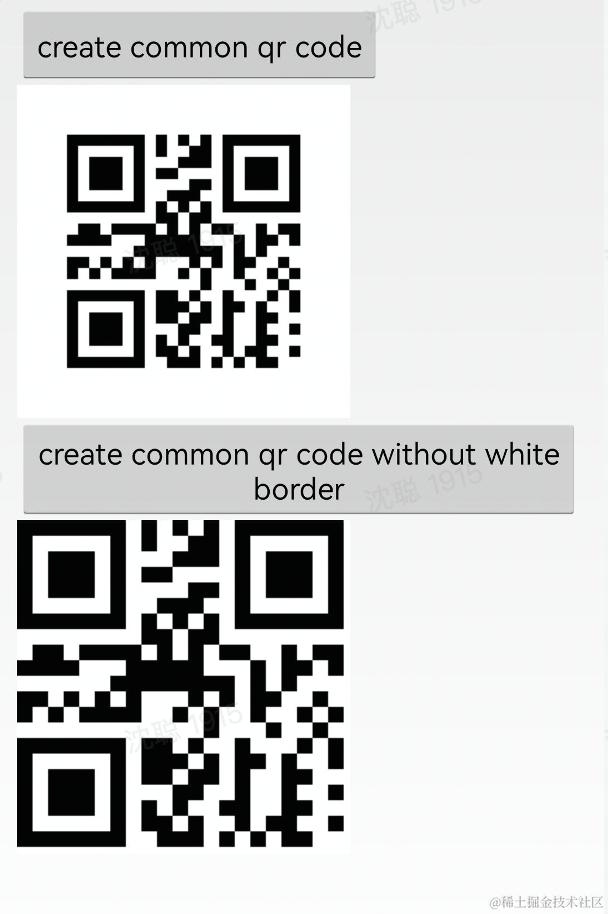
测试代码:
    ```
public void generateQrCodeWithoutWhiteBorder(View view) {
    QRCodeWithoutWhiteBorderWriter qrCodeWriter = new QRCodeWithoutWhiteBorderWriter();
    Map<EncodeHintType, String> hints = new HashMap<>();
    hints.put(EncodeHintType.CHARACTER_SET, "utf-8"); //记得要自定义长宽
    BitMatrix encode = null;
    try {
        encode = qrCodeWriter.encode("hello world", BarcodeFormat.QR_CODE, width, height, hints);
    } catch (WriterException e) {
        e.printStackTrace();
    }
    int[] colors = new int[width * height];
    //利用for循环将要表示的信息写出来
    for (int i = 0; i < width; i++) {
        for (int j = 0; j < height; j++) {
            if (encode.get(i, j)) {
                colors[i * width + j] = Color.BLACK;
            } else {
                colors[i * width + j] = Color.WHITE;
            }
        }
    }

    Bitmap bit = Bitmap.createBitmap(colors, width, height, Bitmap.Config.RGB_565);
    mIvQrCodeWihoutWhiteBorder.setImageBitmap(bit);
}
这个时候有些人就要说了,能不能不侵入Zxing库的代码? 也是可以的, 下面介绍第二种方法
方法2
这个时候我们需要 从上面的QRCodeWriter的encode()方法返回的BitMatrix入手了
因为我们知道01矩阵在这个带白框矩阵中的位置,所以我们把里面的二维码矩阵,单独抽出来就行了
看代码
稍微拓展了一下,这个方法是重新定义二维码白边的宽度,如果你不想要白边,margin传0就行
private static BitMatrix updateBit(BitMatrix matrix, int margin) {
    int tempM = margin * 2;
    int[] rec = matrix.getEnclosingRectangle(); // 获取二维码图案的属性
    // 感兴趣可以进入这个getEnclosingRecting()方法看一下
    // rec[0]表示 left:二维码距离矩阵左边缘的距离
    // rec[1]表示 top:二维码距离矩阵上边缘的距离
    // rect[2]表示二维码的宽
    // rect[2]表示二维码的高
    int resWidth = rec[2] + tempM;
    int resHeight = rec[3] + tempM;
    BitMatrix resMatrix = new BitMatrix(resWidth, resHeight); // 按照自定义边框生成新的BitMatrix
    resMatrix.clear();
    for (int i = margin; i < resWidth - margin; i++) { // 循环,将二维码图案绘制到新的bitMatrix中
        for (int j = margin; j < resHeight - margin; j++) {
            if (matrix.get(i - margin + rec[0], j - margin + rec[1])) {
                resMatrix.set(i, j);
            }
        }
    }
    return resMatrix;
}
测试代码:
public void generateCommonQrCode(View view) {
    QRCodeWriter qrCodeWriter = new QRCodeWriter();
    Map<EncodeHintType, String> hints = new HashMap<>();
    hints.put(EncodeHintType.CHARACTER_SET, "utf-8"); //记得要自定义长宽
    BitMatrix encode = null;
    try {
        encode = qrCodeWriter.encode("hello world", BarcodeFormat.QR_CODE, width, height, hints);
    } catch (WriterException e) {
        e.printStackTrace();
    }
    encode = updateBit(encode, 0);
    int newWidth = encode.getWidth();
    int newHeight = encode.getHeight();
    int[] colors = new int[newWidth * newHeight];
    //利用for循环将要表示的信息写出来
    for (int i = 0; i < newWidth; i++) {
        for (int j = 0; j < newHeight; j++) {
            if (encode.get(i, j)) {
                colors[i * newWidth + j] = Color.BLACK;
            } else {
                colors[i * newWidth + j] = Color.WHITE;
            }
        }
    }
    Bitmap bit = Bitmap.createBitmap(colors, newWidth, newWidth, Bitmap.Config.RGB_565);
    mCommonQrCode.setImageBitmap(bit);
}
相关blog:QR-Code编码原理 Zxing扫码库优化思路
欢迎指正,欢迎补充
参考blog:blog.csdn.net/pxr1989104/…