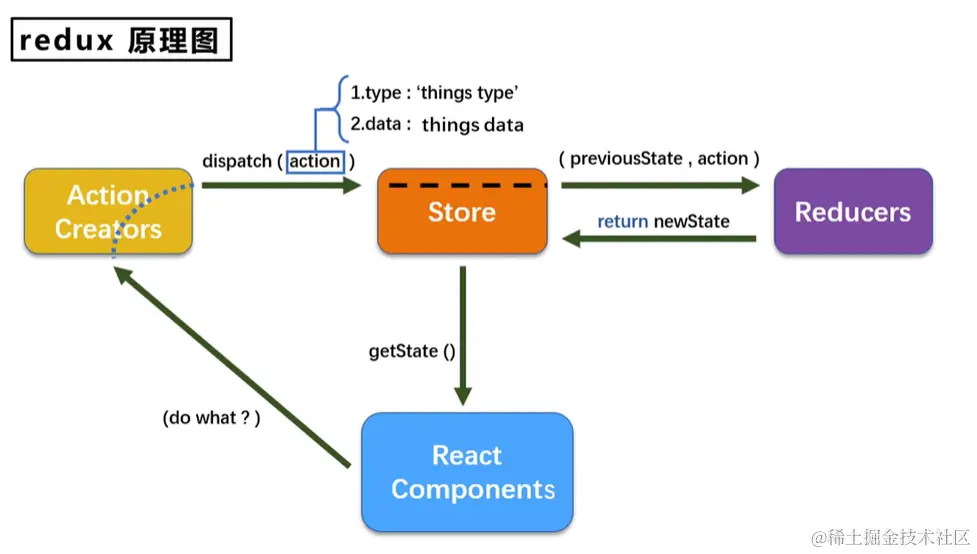
redux 完整版
store/index.js
import { createStore, applyMiddleware, combineReducers } from "redux";
import thunk from "redux-thunk";
import home from "./reducers/home";
import about from "./reducers/about";
import { composeWithDevTools } from "redux-devtools-extension";
export default createStore(
combineReducers({
home,
about,
}),
composeWithDevTools(applyMiddleware(thunk))
);
store/reducers/home.js
export default (preState = [1, 2, 3], action) => {
let { type, data } = action;
switch (type) {
case "add":
return [...preState, data];
default:
return preState;
}
};
store/actions/home.js
export const increment = (data) => ({type: "increment", data})
export const incrementAsync = (data, time) => {
return (dispatch) => {
setTimeout(() => {
dispatch(increment(data));
}, time)
}
}
在组件里使用redux
import store from "../../store";
store.getState()
store.getState().reducer名
store.dispatch(action)
redux只负责状态管理,不负责随着状态的改变驱动页面的改变
单个组件里可以使用:
componentDidMount() {
store.subscribe(() => {
this.setState({});
})
}
全局的改变
src/index.js
import store from "./store";
store.subscribe(() => {
ReactDOM.render(<App />, document.getElementById("root"));
})
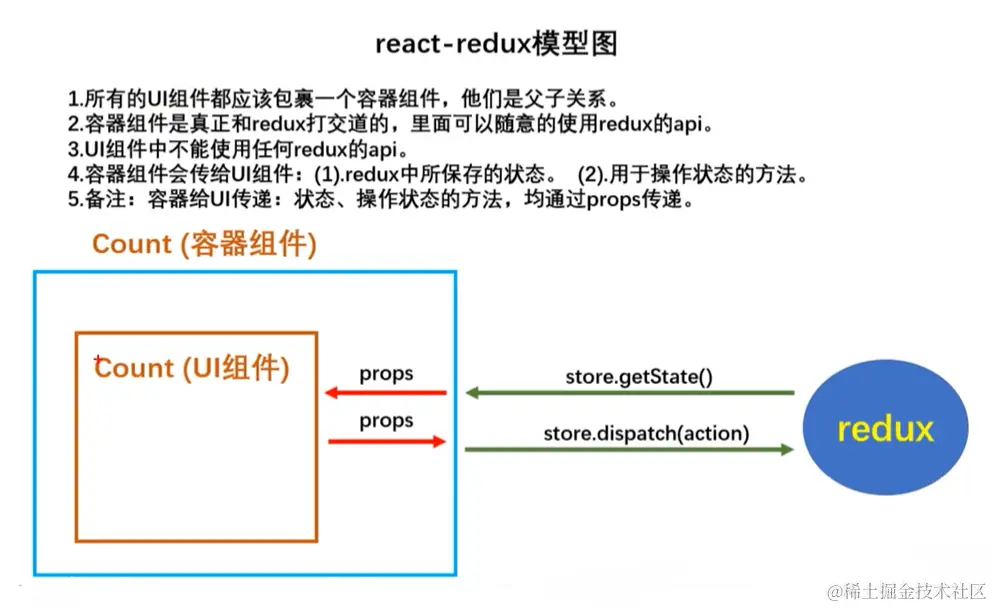
react-redux 完整版
容器组件和UI组件写在一起,方便查看
react-redux会随着状态的改变页面随之改变,只需要通过Provider传store
src/index.js
import { Provider } from "react-redux";
import store from "./store";
ReactDOM.render(
<Provider store={store}>
<App />
</Provider>,
document.getElementById("root")
);
src/containers/home.js
import React, { Component } from "react";
import { connect } from "react-redux"
class Home extends Component {
render() {
return <div>Home</div>;
}
}
export default connect(
state => ({ lxh: state }),
{
action名1,
action名2,
}
)(Home);