JS
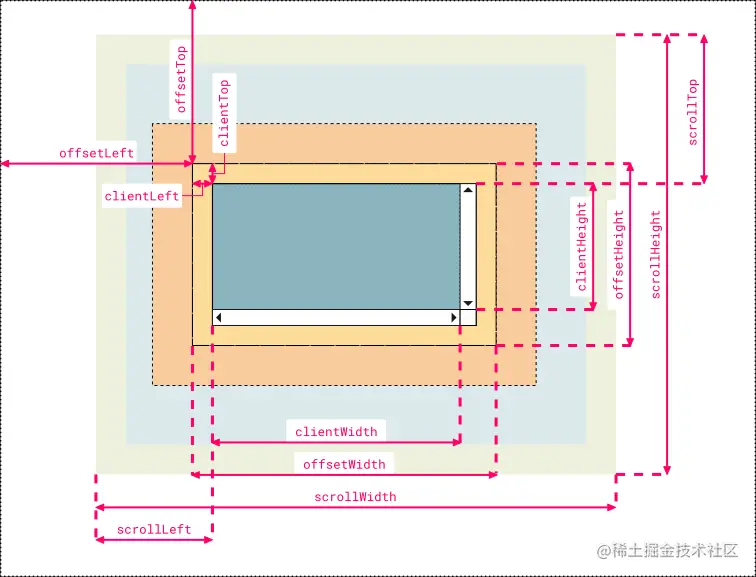
网页可见区域宽: document.documentElement.clientWidth || document.body.clientWidth
网页可见区域高: document.documentElement.clientHeight || document.body.clientHeight
网页可见区域宽: document.documentElement.offsetWidth || document.body.offsetWidth (包括边线的宽)
网页可见区域高: document.documentElement.offsetHeight || document.body.offsetHeight (包括边线的高)
网页正文全文宽: document.documentElement.scrollWidth || document.body.scrollWidth
网页正文全文高: document.documentElement.scrollHeight || document.body.scrollHeight
网页被卷去的高: document.documentElement.scrollTop || document.body.scrollTop
网页被卷去的左: document.documentElement.scrollLeft || document.body.scrollLeft
网页正文部分上: window.screenTop
网页正文部分左: window.screenLeft
屏幕分辨率的高: window.screen.height
屏幕分辨率的宽: window.screen.width
屏幕可用工作区高度: window.screen.availHeight
屏幕可用工作区宽度: window.screen.availWidth
vue监听元素进入视口
<template>
<div>
<ul class="ulBox" id="ulBox">
<li class="li" :id="'id'+item" v-for="(item,index) in list" :key="index">
{{item}}
</li>
</ul>
</div>
</template>
<script>
export default {
data() {
return {
list: [1,2,3,4,5,6,7,8,9],
};
},
created() {
},
mounted() {
window.addEventListener('scroll', this.scrollToTop);
},
methods: {
scrollEvent(e) {
console.log('clientHeight', e.target.clientHeight);
console.log('scrollHeight', e.target.scrollHeight);
console.log('offsetTop', e.target.offsetTop);
console.log('scrollTop', e.target.scrollTop);
},
scrollToTop() {
var domHight = window.screen.height || window.innerHeight ||
document.documentElement.clientHeight;
console.log('domHight', domHight);
var scrollTop = window.pageYOffset || document.documentElement.scrollTop || document.body.scrollTop;
var id;
var scrollHeight;
var offsetTop;
var top;
var bottom;
this.list.map( (i) => {
id = document.getElementById(`id${i}`);
scrollHeight = id.scrollHeight;
offsetTop = id.offsetTop;
top = offsetTop - domHight > 0 ? offsetTop - domHight : 0;
bottom = scrollHeight + offsetTop;
if (scrollTop >= top && scrollTop <= bottom) {
console.log('元素出现在可视区: ' + i);
} else {
console.log('元素不在了: ' + i);
}
});
},
},
}
</script>
<style lang='less' scoped>
.ulBox {
width: 100%;
// height: 100vh;
// overflow-y: scroll;
margin: 0;
padding: 0;
list-style: none;
.li {
width: 100%;
height: 5rem;
border: 1px solid #999999;
display: flex;
justify-content: center;
align-items: center;
}
.li:not(:first-child) {
border-top: none;
}
}
.box {
width: 400px;
height: 600px;
border: 1px solid pink;
overflow: auto;
li {
width: 300px;
height: 200px;
background-color: #ccc;
}
&::after {
content: '^';
display: block;
width: 10px;
height: 10px;
background-color: pink;
}
}
p::first-letter {
color: green;
}
p::first-line {
color: green;
}
p::selection {
color: red;
background-color: #ccc;
}
</style>



