前言
随着Vue的默认版本已经更新至Vue3,学习Vue的脚步仍在继续,今天我们来实现优雅地在在Composition Api中使用Vuex的mapState。
回顾
在Options Api中我们使用mapState结合computed的时候一般是这么实现的
     {
         computed:{
                 ...mapState(['name','age','height'])
         }
     }
但是当我们使用Composition Api时,我们一般会使用
<script>
import { defineComponent, computed } from "vue";
import { useStore, mapState } from "vuex";
export default defineComponent({
  setup() {
    const store = useStore();
    const name = computed(() => store.state.name);
    const age = computed(() => store.state.age);
    const height = computed(() => store.state.height);
    return {
      name,age,height
    };
  },
});
</script>
没错这种方法能够实现我们对少数量的state进行使用,但是如果如果数据量大,将会有很多行属实不太优雅。于是便使用了mapState。
   <h2>{{ height }}</h2>
   <h2>{{ name }}</h2>
   <h2>{{ age }}</h2>
export default{
setup(){
    const storeState = mapState(["name", "age", "height"]);
        return {
            ...storeState
        }
    }
}
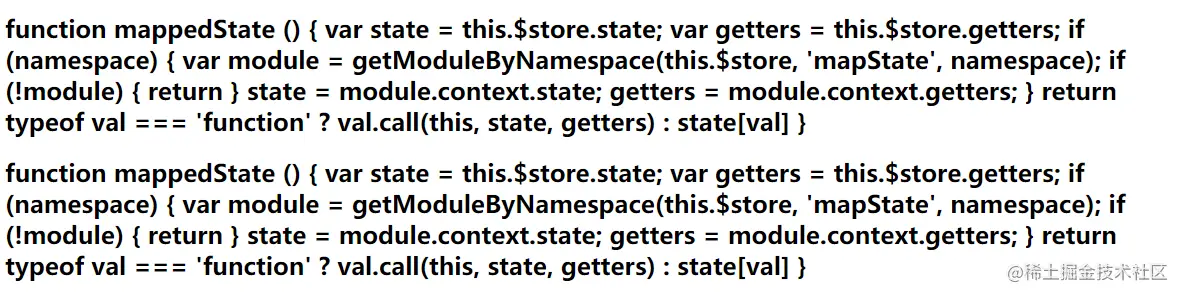
 结果如上如图 ,返回是一个一个函数Why?
 答:首先我们回顾第一个代码块(Options Api),computed中编写 计算属性其实可以是这样的
{
    computed:{
        getName() {
           return '隔壁老王'
        },
        ...mapState(['name','age','height'])
    }
}
没错在computed中每一个键值对的值是函数类型。由此可得我们每一个...mapState()出来的都是一个个函数。在CompositionApi中Computed的使用也是传入一个函数,那么便有下面操作。
export default{
setup() {
const storeState = mapState(["count", "name", "age"]);
const resultStoreState = {};
Object.keys(storeState).map((item) => {
const resFuc = storeState[item];
resultStoreState[item] = computed(resFuc);
});
const { height, name, age } = { ...resultStoreState };
return {
height,
name,
age,
};
},
}
如果走到一步已经算完成一半了。运行代码你就会喜提一个报错
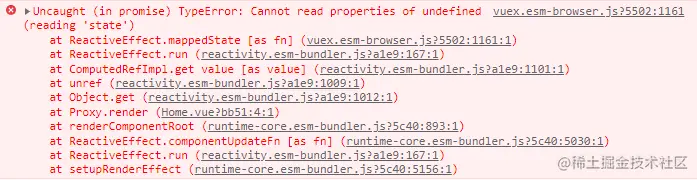
从报错来看找不到一个state这个属性
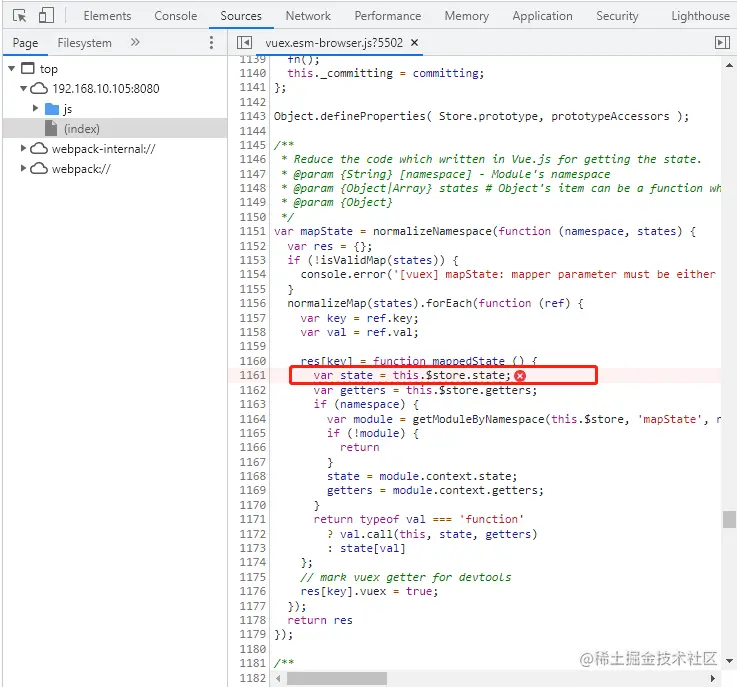
state没有是因为this.$store中没有这个属性,在CompositionApi中this.$store本身就是undefined那么undefined.state 必然是报错的,有什么好的方法解决呢?答案是有的,使用bind方法手动去改变函数内部的this指向。
export default{
setup() {
const store = useStore();
const storeState = mapState(["height", "name", "age"]);
const resultStoreState = {};
Object.keys(storeState).map((item) => {
const resFuc = storeState[item];
resultStoreState[item] = computed(resFuc.bind({ $store: store }));
});
const { height, name, age } = { ...resultStoreState };
return {
height,
name,
age,
};
},}
我们的页面也成功展示出我们的王小明同学

感谢各位看官捧场,有错误的地方或者用语不对的可以指出我多加修改!!!