nodejs基本概念
nodejs是什么
1.nodejs是基于Chrome V8引擎的javascript运行时
2.nodejs出现之前,js只能在浏览器运行
3.nodejs出现之后,js可以在任何安装nodejs的环境中运行
commonjs和ES6Module有何区别
1.语法不同
2.commonjs是动态引入,执行时引入
  ES6Module是静态引入,编译时引入
3.commonjs require的三个级别
    nodejs自带模块    如require('http')
    npm安装的模块     如require('loadsh')
    自定义模块        如require('../utils.js')
nodejs和前端js的区别
1.都使用ES语法
2.前端js使用JS Web API  nodejs使用Node API
3.前端js用于网页,在浏览器运行
  nodejs可用于服务端,如开发web server
  nodejs也可用于本机,如webpack等本机的工具
处理http请求
如何启动http服务
const http = require('http')
const server = http.createServer((req,res)=>{
    ...
    res.end('hello word')
}).listen(3000)
如何定义路
1.定义路由的两大要素: pathname method
2.从req中获取method 和url
3.再通过url获取pathname
如何获取querystring
const http = require('http')
const server = http.createServer((req,res)=>{
const method = req.method
const url = req.url
const pathname = url.split('?')[0]
const querystring = url.split('?)[1] //解析querystring
//根据method 和 pathname定义路由
if(method === 'GET' && pathname === 'xxx'){
res.end('xxx路由')
}
}).listen(3000)
如何获取request body
const http = require('http')
const server = http.createServer((req,res)=>{
const method = req.method
if(method === 'POST'){
console.log('content-type',req.headers['content-type'])
let postData = ''
req.on('data',chunk => {
postData += chunk.toString()
})
req.on('end',() => {
res.end(postData)
})
}
}).listen(3000)
如何返回json格式
res.writeHead(200,{
'Content-type': 'application/json'
})
res.end(JSON.stringify(data))
结构化和非结构化
结构化数据,易于通过程序访问和分析,如对象和数组
非结构化的数据,不易通过程序分析,如字符串
编程中的数据,都尽量结构化
session如何实现登录
1.cookie可实现登录校验
2.cookie不能泄露用户信息,所以有了session
3.session存储用户信息,cookie和session关联
nodejs框架
框架的作用和价值
1.封装原生的API,让开发更简单
2.规范流程和格式,如koa2的中间件
3.让开发人员专注于业务和功能开发
async/await执行顺序
async function f1() {
console.log('async f1 start')
await f2()
console.log('async f1 end')
}
async function f2() {
console.log('async f2')
}
console.log('script start')
f1()
console.log('script end')
script start
async f1 start
async f2
script end
async f1 end
koa2如何处理路由
router.post('/create', async (ctx,next) => {
    const query = ctx.query
    const reqBody = ctx.request.body
    ctx.body = {
        errno:0,
        ...
    }
})
描述koa2洋葱圈模型
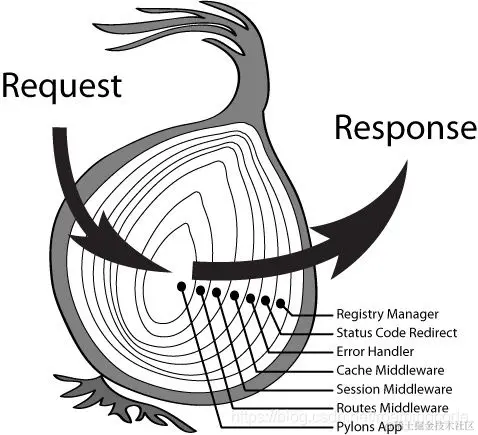
const koa = require('koa')
const app = new koa()
app.use(async(ctx, next) => {
await next()
const rt = ctx.response.get('X-Response-Time')
console.log(`${ctx.method} ${ctx.url} - ${rt}`)
})
app.use(async(ctx, next) => {
const start = Date.now()
await next()
const ms = Date.now() - start
ctx.set('X-Response-Time', `${ms}ms`)
})
app.use(async(ctx, next) => {
ctx.body = 'hello world'
})
app.listen(3000)
服务端经典分层模型
路由 ->  controller -> db -> 数据库(mysql/mongodb/redis)
中间件(如登录验证中间件)    Model
Mongodb
DB Collection Document分别是什么意思
DB - 数据库  一个系统的数据集合
Collection - 集合  一类数据的集合  如所有的用户数据
Document -文档  单个数据,如一个用户数据
Mongoose的Schema和Model是什么意思
Schema - 数据规范,定义哪些属性,数据类型、是否必须等
Model - 数据模型,提供API操作Document
Model依赖一个Schema规范,对应一个Collection
const Schema = mongoose.Schema({
    content: {
        type: String,
        require: true
    },
    username: String
},{timestamps: true})

const Comment = mongoose.model('comment',Schema)
Mysql数据
关系型数据表,表的设计 SQL语句 复杂SQL语句